🛒 Best Price Today on Amazon
Prime members get fast, free shipping on everything above, plus member-only deals. New members get a 30-day free trial — cancel anytime.
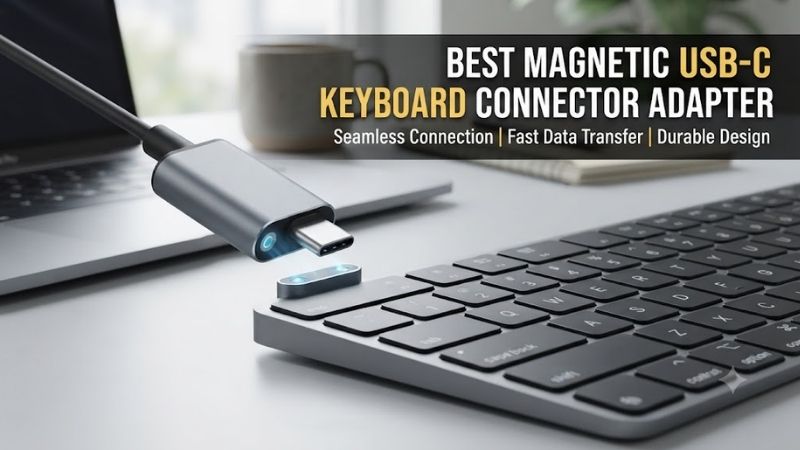
A magnetic USB-C connector can make a wired keyboard easier to disconnect, especially when switching between desks or moving a compact gaming setup. However, the best magnetic USB C keyboard connector adapter must do more than attract two metal contacts. Reliable USB data transmission, port clearance, and electrical safety are essential.
Quick Verdict: Which Magnetic USB-C Adapter Is Worth Considering?
Magnetic USB-C adapters offer convenience but introduce an additional electrical connection that a conventional USB-C cable does not have. For a gaming keyboard, a secure wired connection should generally take priority over the convenience of magnetic detachment, especially during competitive play or firmware updates.
Best documented full-featured option: BTL ADP0001 Magnetic USB-C Adapter
Best right-angle option: MoKo 24-Pin 90-Degree Magnetic Adapter
Best for premium data specifications: VCOM Magnetic USB-C Adapter
Best multi-adapter package: 3C’S 24-Pin Magnetic USB-C Adapter
Best basic compact option: HU Magnetic USB-C Adapter
Best alternative: FONKEN 24-Pin Magnetic USB-C Adapter
These are candidates for evaluation rather than verified performance winners. A standard, well-made USB-C cable remains the safer default for critical keyboard connections.
Quick Comparison Table
| Adapter | Advertised characteristics | Main consideration |
|---|---|---|
| BTL ADP0001 | 24-pin, up to 40Gbps, 100W | Full-featured connector |
| MoKo 90-Degree | 24-pin, up to 10Gbps, 100W | Cable routing |
| VCOM Magnetic USB-C | Full-function data support | Specification verification |
| 3C’S Magnetic 24-Pin | Multi-adapter package, high-power claims | Cable and device matching |
| HU Magnetic USB-C | Charging and data support | Basic peripheral connectivity |
| FONKEN 24-Pin | High-speed data claims | Seller and revision consistency |
Advertised transfer speeds and power ratings are manufacturer or seller claims, not independently verified performance results. They are maximum capabilities under compatible conditions and do not indicate keyboard responsiveness.
How We Selected These Magnetic Connectors
Selection prioritizes explicit USB data functionality, suitable connector geometry, clear documentation, and predictable operation with wired peripherals. Products marketed exclusively for charging are unsuitable recommendations for a wired keyboard unless their data support is independently established.
Electrical concerns also receive substantial weight. Magnetic connectors can collect conductive particles, separate unexpectedly, and introduce contact resistance. Buyers should evaluate those trade-offs before focusing on claimed maximum transfer speeds.
The 6 Magnetic USB-C Keyboard Connector Adapters to Consider
Each adapter offers a different combination of connector design, portability, or advertised electrical capability. None should be regarded as universally compatible with all keyboard controllers, cables, and USB-C ports without checking the exact configuration and testing the assembled connection.
BTL ADP0001 Magnetic USB-C Adapter – Best Documented Full-Featured Option
The BTL ADP0001 is a compelling candidate for users who want a magnetic connector with relatively clear published specifications. Its 24-pin interface is marketed for high-speed USB data, making it more relevant to wired keyboards than charging-only magnetic accessories.
Best for: Users who require documented data functionality.
Advertised technical specifications
-
24-pin magnetic design.
-
Up to 40Gbps data transfer.
-
Up to 100W USB Power Delivery.
-
Magnetic detachable connection.
-
One-year stated warranty.
Keyboard-specific performance considerations
A keyboard transmits relatively small amounts of data compared with an external SSD or monitor. Therefore, the adapter’s advertised 40Gbps capability is not a meaningful competitive-gaming advantage.
What matters is maintaining electrical continuity, recognizing the keyboard consistently, and avoiding unexplained device resets.
Pros: Published technical details, data-oriented design, detachable connector.
Cons: High transfer speed does not establish low latency or reliability; magnetic contact risks remain.
Buy if: You want to evaluate a well-documented magnetic adapter for a noncritical keyboard setup.
Skip if: Your primary objective is maximum competitive-gaming reliability.
MoKo 24-Pin 90-Degree Magnetic Adapter – Best for Tight Desk Layouts
The MoKo 90-degree magnetic USB-C adapter addresses a common physical issue: USB-C cables can protrude awkwardly from a keyboard positioned near a monitor riser, desk shelf, or another peripheral. Its angled configuration can redirect the cable while retaining the magnetic detachable interface.
Best for: Compact desks with restricted cable clearance.
Advertised specifications
The referenced 24-pin version is marketed with up to 10Gbps data capability and up to 100W charging support. These ratings are much higher than the data bandwidth and power typically required by an ordinary mechanical keyboard.
The practical feature is the 90-degree connection, not the maximum transfer specification.
Real-world considerations
An angled connector may reduce cable bending, but it can also increase leverage on the keyboard port if accidentally struck. Port orientation matters because the same adapter may direct the cable upward, downward, or sideways depending on the keyboard.
Check the physical direction before purchasing.
Pros: Right-angle routing, compact design, data-oriented specification.
Cons: Direction-dependent fit, additional mechanical leverage, possible availability limitations.
Buy if: Your keyboard’s USB-C port is positioned where a straight cable creates an obstruction.
Skip if: The adapter would protrude into another accessory or receive frequent sideways pressure.
VCOM Magnetic USB-C Adapter – Best for Feature-Rich Setups
The VCOM magnetic USB-C adapter is aimed at users looking for a compact detachable connector with broad advertised USB-C functionality. Its appeal comes from combining data-transfer capabilities with a magnetic coupling mechanism rather than limiting the connection to basic charging.
Best for: Users comparing full-featured magnetic USB-C connectors.
Technical considerations
A full-featured USB-C adapter may route additional contacts beyond those required for ordinary USB 2.0 keyboard communication. However, the presence of many contacts does not guarantee correct electrical behavior during every connection or disconnection.
For a keyboard, the relevant features are correct USB data routing, stable power delivery at the required voltage, and a sufficiently secure connection.
Pros: Broad functionality claims, compact connection concept.
Cons: Exact model and revision must be verified; specifications alone do not establish compliance.
Buy if: The specific VCOM version documents USB data support and fits your keyboard port.
Skip if: The seller cannot clearly identify the model or supply reliable specifications.
3C’S 24-Pin Magnetic USB-C Adapter – Best Multi-Adapter Package
The 3C’S magnetic adapter package is an option for buyers who want multiple detachable connector assemblies. The potential convenience is keeping compatible magnetic connections in different locations, such as a desktop workstation and a secondary gaming setup.
Best for: Users managing more than one noncritical USB-C accessory.
Practical functionality
Multi-adapter packages may simplify cable organization when the connector halves are designed to work together. However, magnetic connector components from different manufacturers should not be assumed interchangeable.
Even when two connectors appear physically similar, differences in contact arrangement, orientation, and electrical design may make cross-brand mixing unsafe.
Pros: Multiple units, detachable connection, potential desk convenience.
Cons: Interoperability uncertainty, electrical risks, specifications dependent on exact package.
Buy if: You plan to use the complete matched adapter assemblies as provided.
Skip if: You intend to mix magnetic connector halves across different brands.
HU Magnetic USB-C Adapter – Best Basic Peripheral Option
The HU magnetic USB-C adapter is marketed as a compact solution supporting charging and data synchronization. It may appeal to users who do not need advanced video functionality and simply want a removable USB-C connection for a keyboard or another ordinary peripheral.
Best for: Basic USB peripherals where data support is documented.
Why simplicity matters
A conventional USB keyboard normally does not require USB4 speeds or high-wattage Power Delivery. Its communication requirements are modest, although certain keyboards also draw power for lighting and internal electronics.
The critical difference is between an adapter that genuinely supports USB data and one that only supplies power. A keyboard connected through a charge-only adapter may illuminate but fail to register keystrokes.
Pros: Compact concept, basic functionality, potentially economical.
Cons: Limited product documentation may complicate verification.
Buy if: You can confirm the exact model supports wired USB keyboard data.
Skip if: The listing is ambiguous about whether data contacts are present.
FONKEN 24-Pin Magnetic USB-C Adapter – Best Alternative for Flexible Connectivity
The FONKEN 24-pin magnetic USB-C adapter is marketed with high-speed data and charging capabilities, making it a possible alternative for users comparing detachable connector designs. Its practical appeal is broad USB-C support rather than a feature specific to mechanical keyboards.
Best for: Buyers evaluating several magnetic connector designs.
Advertised features and limitations
Some FONKEN variants are promoted with high transfer speeds and substantial charging capabilities. Such specifications should be treated as seller claims unless supported by detailed technical documentation and appropriate compliance evidence.
For keyboard use, high bandwidth is mostly unnecessary. Connection reliability, physical alignment, and protection from accidental separation matter considerably more.
Pros: Multiple listed configurations, data-oriented options.
Cons: Specification differences between variants, uncertain long-term contact reliability.
Buy if: The exact model’s documentation clearly matches your intended use.
Skip if: You need a verified low-risk connection for competitive gaming or firmware flashing.
Buying Guide: What Matters for Magnetic Keyboard Connectors
Magnetic USB-C accessories are fundamentally different from ordinary passive USB-C cables because they introduce a detachable electrical interface between the keyboard and host. That extra interface may improve convenience, but it also creates additional opportunities for disconnection, contact contamination, and unpredictable electrical behavior.
Data Support Matters More Than Charging Wattage
A wired keyboard requires reliable USB data communication. An adapter advertised for 100W or 240W charging is not necessarily suitable because charging capability does not establish that the data pins are present or correctly connected.
Check that the manufacturer explicitly documents USB data functionality. For a typical USB 2.0 keyboard, stable USB 2.0 data support is sufficient; extremely high bandwidth provides no inherent typing benefit.
Understand Safety and USB-C Compliance
Magnetic USB-C adapters may not follow the same connector arrangement as standardized USB-C plugs and receptacles. Product claims such as USB4, 40Gbps, or 240W should not be treated as proof of USB-IF certification.
Exposed contacts can accumulate metallic particles. Unintended separation or reconnection may also cause electrical transients or operating interruptions.
Use caution with expensive keyboards and avoid magnetic adapters during firmware flashing, when an unexpected USB disconnection could interrupt an important update.
Consider Keyboard Polling Rates and Connection Stability
A keyboard’s polling rate describes how frequently it can report input to its host. A magnetic adapter does not increase that rate or improve the switch’s actuation mechanism.
If the connection is unstable, intermittent resets and missed inputs may occur. For competitive gaming, a reliable direct USB-C cable is preferable to an unverified magnetic connection.
Frequently Asked Questions
Will a magnetic USB-C adapter increase keyboard input lag?
A correctly functioning passive connection does not inherently add a meaningful processing delay, but unstable contacts can cause connection problems.
Can I use a charging-only magnetic connector with a keyboard?
Not for wired data communication. It needs the appropriate USB data connections.
Are magnetic USB-C connectors safe for every keyboard?
No universal safety guarantee exists. Design quality, compatibility, contact condition, and electrical behavior all matter.
Can I flash keyboard firmware through a magnetic adapter?
A direct, reliable USB-C cable is strongly preferable during firmware updates.
Final Verdict
The BTL ADP0001 and MoKo 90-degree adapter are worthwhile candidates for buyers who specifically need magnetic USB-C convenience and documented data functionality. However, no magnetic connector should be assumed as reliable as a direct cable. For gaming reliability, firmware updates, and valuable keyboards, a conventional USB-C connection remains the preferred choice.