🛒 Best Price Today on Amazon
Prime members get fast, free shipping on everything above, plus member-only deals. New members get a 30-day free trial — cancel anytime.
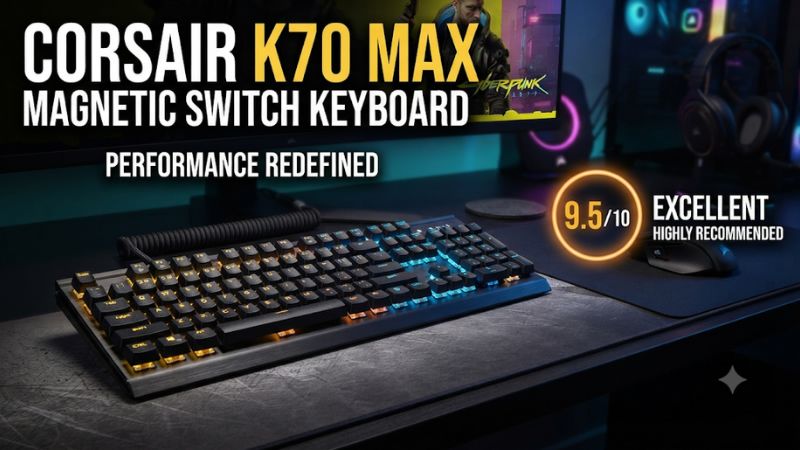
This Corsair K70 Max magnetic switch keyboard review finds the Max best for players who want full-size controls and adjustable actuation on the same board. Its MGX switches and Rapid Trigger can help with repeated inputs. The price and footprint make more sense if you will use the numpad, media keys, and per-key tuning.
K70 Max verdict and specifications
The K70 Max is strongest when you need a full-size layout and a genuinely adjustable gaming keyboard. Its MGX Hall-effect switches let you set the depth of individual keys, and updated firmware and iCUE add configurable Rapid Trigger. You also get dedicated media controls, a numpad, a removable cable, and a cushioned palm rest in the documented package.
Those benefits do different jobs. Shorter reset travel can be useful during repeated taps. A deeper threshold can reduce unintended presses in other parts of the layout. The media and number keys save work throughout the week. If you only want a normal mechanical keyboard with a numpad, most of the Max premium goes toward capabilities you may rarely use.
| Feature | Corsair K70 Max |
|---|---|
| Layout | Full-size with physical arrows, navigation keys, and numpad |
| Main switch technology | Corsair MGX linear magnetic switches with Hall-effect sensing |
| Primary actuation range | 0.4–3.6 mm in 0.1 mm steps |
| Rapid Trigger | Supported with compatible firmware and iCUE |
| Report rate | Up to 8,000 Hz, adjustable |
| Connection | Wired with a detachable USB cable |
| Keycaps | Double-shot PBT in the documented package |
| Extra hardware | Dedicated media keys, volume roller, and tournament switch |
| Switch replacement | Installed switches are not a normal hot-swap system |
Which K70 Max is this?
This review covers the full-size Corsair K70 Max RGB Magnetic-Mechanical Gaming Keyboard, such as the steel gray CH-910961G-NA configuration. The K70 Core and K70 RGB Pro use conventional fixed-actuation switches. The K70 Pro TKL is a different product with a smaller layout and its own switch arrangement.
The Max also differs from the hybrid models that reserve magnetic sensing for a subset of positions. The K70 Max uses MGX switches across the regular key matrix. That is worth checking in the configurator if you play with arrow keys, numpad positions, or an unusual key layout. You can build a profile around the real controls you use.
Early reviews may describe Rapid Trigger before its full software controls appeared. Corsair later documented how to enable and adjust it in iCUE with current compatible firmware. If you open a long-stored or used board, verify the actual device settings and firmware before treating an old review as an accurate description of the current feature set.
Who will use enough of the board to justify it?
A player who uses the numpad for work and plays timing-sensitive games at night is the clearest match. You can use the same board for spreadsheets or a simulator and maintain a separate profile for keys that benefit from faster reset. Dedicated media controls are still available without putting them on a layer.
Someone who plays with a wide mouse sweep may get more value from a compact analog keyboard. The Max gives up desk width in exchange for physical access to everything. A player who never changes actuation also gets less from the switch system. If the intent is simply to replace a worn full-size keyboard, test whether stock linear feel and the media layout would cover your needs on a less expensive model.
The Max is worth buying when you can name both layout and input features you will use. Consider how often you return to a saved profile, reach for the numpad, and change room or desk setups. Those recurring tasks are where the extra hardware can earn its cost.
What the magnetic switches change
Primary actuation sets the first press
A Hall-effect sensor measures the position of the magnetic switch as it moves. The Max lets you decide where a press first registers, from 0.4 mm to 3.6 mm in 0.1 mm increments. You can make frequently used movement keys register sooner and give nearby keys more travel to protect against accidental presses.
Start with a value close to the feel you already know. Play a familiar sequence and adjust only the key that causes a problem. If you occasionally brush a reload key, give it a deeper threshold. If your gentle initial press sometimes feels slow on a movement key, try bringing that threshold up slightly and retest. Your hands need enough margin for ordinary resting pressure.
Training time matters. A shallow profile can feel impressive in the first few minutes while producing errors during a long game. Keep a saved baseline so you can compare after several rounds and restore the original settings if the fast profile proves inconsistent.
Rapid Trigger controls what happens after the press begins
Rapid Trigger can reset an actuated key based on upward movement and re-actuate it after sufficient downward movement. This reduces the distance you need to travel for some repeated inputs. It can help when you make quick taps and do not naturally return the key near its normal fixed reset point.
Corsair’s iCUE workflow exposes Rapid Trigger in the actuation settings. Its documented controls let you adjust movement sensitivity and, in the supported configuration, separate press and release values. The initial actuation setting still matters. A low Rapid Trigger sensitivity describes how far the switch moves during a reset cycle. The primary threshold governs when the first press is established.
Start with enough margin to avoid unintended releases. A player who bottoms out and lifts quickly may like a short reset. A player who holds a key near mid-travel may need more upward movement before it releases. Use the outcome you can observe in a game to decide whether to shorten or lengthen either value.
Use a different setup for holds and repeated taps
Try three actions before saving a profile: a brief deliberate tap, a series of repeated taps, and a held input. An improvement in repeated taps can coexist with a new problem in the hold test. If a movement key lifts while you are still trying to hold a direction, increase the release distance or leave Rapid Trigger off for that key.
For a rhythm game, compare repeated notes and long notes on the same chart segment. Look at missed inputs and unwanted releases as different outcomes. For a shooter, try taps, sustained movement, and a return to neutral using only the controls you normally bind. Keep the test simple enough that you know which change created the result.
If you write on the same board, give typing its own profile. Use thresholds that tolerate resting fingers and ordinary typing force. You can still use shallow movement settings in a game without asking every key in every application to react the same way.
Dual Actuation needs a specific reason to be enabled
The Max can assign an additional action at a deeper point in the same press. That can be useful in supported contexts where one key should have two roles depending on depth. It also increases the chance of triggering a second action when you press harder under pressure. Begin with ordinary one-action bindings and add the feature only when it saves a real input step.
For example, a noncompetitive application could use a shallow press for one command and a confirmed deeper press for another. Try a series of deliberate shallow presses before trusting it. If you accidentally cross both thresholds, different keys may be more reliable. The feature matters because the board reads distance, so your ability to reproduce that distance is part of the setup.
For ranked play or an event, check its input rules and keep the keyboard on a suitable profile. A physical press should produce the permitted action, and extra threshold behavior, macros, or automated sequences may be restricted. A clean default profile is useful on a borrowed computer as well.
Gaming performance, layout, and stock construction
An 8,000 Hz mode is an option to test
Corsair advertises up to 8,000 Hz through AXON and lets you adjust the setting in iCUE. The nominal intervals are 0.125 ms at 8,000 Hz and 1 ms at 1,000 Hz. Switch behavior and the complete path from key press to game response include more than that interval. Use the high rate as a testable setting rather than a guaranteed improvement in a particular game.
Test a known input-heavy scene at your usual polling rate. Then turn up the rate and repeat the same scene. On a system where a very high rate causes an unwanted change, return to the stable setting and keep your actuation profile. It is possible to retain the benefits of per-key tuning while running a lower report rate.
The independently reviewed Max is a capable gaming keyboard. Its most distinctive advantage relative to a conventional K70 is that you can change what physical movement produces a press or release. That change is easier for many players to evaluate directly than a small difference in report intervals.
A full-size layout helps some setups and crowds others
The Max gives you a separate navigation area, arrow keys, and numpad. This is useful when your games use many binds, when you control a simulator, or when the same machine is used for numeric work. You can reach the keys by feel, and buying a separate pad becomes unnecessary for many of those tasks.
On a small desk, the numpad can sit in the area you want for mouse movement. Before buying, measure your normal large sweep with a full-size board in place. Try shifting the board left and check whether the typing center remains comfortable. A user who plays with the board angled should check the corner of the chassis and the cable path as well.
If you want adjustable arrows or a good editing layout, an analog TKL can preserve both without the number block. The Max makes sense when the number block and dedicated media controls are recurring benefits. Otherwise, use the desk space as a primary purchase criterion.
PBT caps and a padded palm rest suit a permanent desk
The documented Max package includes double-shot PBT keycaps and a magnetic cushioned palm rest. The dedicated volume roller and physical media buttons make it easy to adjust playback while staying in a game or edit. These features can be more visible in daily use than the difference between two close actuation values.
Published reviews describe sound-dampening materials while reporting different impressions of the stock noise and feel. Test the spacebar and other stabilized keys at home if sound matters. A large key can produce a sharper bottom-out than a letter, and a hard desk can amplify the result. Use the same surface where you work, particularly if another person sits nearby.
Try the board both with and without the rest. Check the depth available, where your palm naturally lands, and whether the rest interferes with moving between keyboard and mouse. Adjustable switches can accommodate some hand habits. They cannot change the physical height or width of the keyboard.
The switches are part of the purchase decision
Treat the installed MGX switches as the switch system you are buying. The Max does not offer ordinary hot-swap customization. If you expect to try other springs and compatible Hall-effect switch families, compare boards designed for easy switch changes rather than treating the Max as a platform for that hobby.
A caps change can alter texture, shape, and sound. It leaves the stock magnetic switch hardware and its spring characteristics in place. If you dislike the resistance or how the switch returns, actuation changes can improve some aspects of control without changing the underlying feedback under your fingers.
For a useful buying test, compare a light tap, a bottom-out, and a hold. Use arrow keys and modifiers as well as the letters you normally test. A player who trusts the stock return feel gets more out of tuning because the thresholds improve a familiar motion instead of trying to compensate for a switch they dislike.
iCUE setup and the buying decision
Update firmware and set up a clean baseline
Connect the keyboard directly to a compatible USB data port. Open iCUE and select the K70 Max. Check for compatible firmware updates, then find Key Actuations in the keyboard’s controls. Use the documented UI for your installed version. The relevant settings can look different in screenshots from earlier software.
Make a baseline profile first. Give your game keys an ordinary fixed threshold and leave additional actions off. Test each direction, a hold, and a combined press. Then switch on Rapid Trigger for the keys that need it. Record the primary actuation, reset, and re-press behavior so you can restore the working values.
After saving, check what persists when you close iCUE or connect to a second machine. Hardware and application profiles have different roles. Verify the behavior you depend on instead of assuming that every setting you see on screen is active in every profile or mode.
Use the tournament switch when its behavior fits
The K70 Max has a physical tournament switch. Corsair documents a simplified operating mode that restricts certain custom behavior and uses a fixed lighting presentation. That gives you a known starting state when you take the board to another computer. Check the manual and test the precise behavior of your working firmware before relying on it.
For everyday use, keep one simple saved profile even if you rarely use the switch. If you experience unwanted secondary behavior or a strange remap, you can return to that known profile and isolate what changed. This is especially useful after setting up several game profiles with different actuation depths.
If a competitive event specifies permitted functions, follow those rules and use a profile that you have tested. Verify key-down and key-up in practice. A physical mode control is useful because it makes changing states easy, while the event rules determine which behavior is allowed.
Compare the Max with the right alternative
Compare the K70 RGB Pro if you want a full-size K70 with detachable USB and dedicated media controls but prefer a fixed Cherry MX switch. Compare the K70 Core if you only need the full layout, a dial, and ordinary linear input. The Max is worth the difference when adjustable actuation or release behavior will improve actual tasks.
If you want magnetic inputs and mainly need WASD, arrows, and room for the mouse, compare a TKL or compact board. Read the switch map if the arrows are your movement keys. Some magnetic gaming boards use conventional mechanical switches outside the main cluster, and the product label alone does not tell you whether your intended keys are adjustable.
If planning to use the board near another sleeper or a microphone, compare the sound before buying. Magnetic sensing tells you how the keyboard reads travel. The springs, caps, case, and the way you bottom out determine much of the sound.
Check a used Max beyond whether the lights turn on
Verify model, cable, and palm rest. Plug it in and test ordinary input before opening iCUE. Check for a consistent key-down and key-up across the positions you use. Then verify that the board appears in iCUE and exposes the expected actuation controls. A working lighting animation says little about whether the magnetic settings are usable.
Ask the seller to clear or explain any unusual profiles. If a single press seems to trigger two unrelated commands, restore a clean profile before assuming there is a hardware issue. Test the roller and media keys separately. Check the case, front edge, and wrist rest if you plan to use it for long sessions.
Finally, compare the price with a complete new or discounted option after accounting for missing accessories. A used Max can be good value if its sensing behaves consistently and you want the specific switch platform. The value shrinks quickly if you only need an ordinary full-size keyboard.
Conclusion
Buy the Corsair K70 Max if you need a full-size board and will use its per-key actuation and Rapid Trigger. It combines those features with a numpad, dedicated media buttons, a detachable cable, and a padded palm rest. Update the firmware, tune only the keys that benefit, and test holds as well as repeated taps. A fixed-switch K70 or a compact analog keyboard offers better value when tuning or full-size controls matter less to you.