🛒 Best Price Today on Amazon
Prime members get fast, free shipping on everything above, plus member-only deals. New members get a 30-day free trial — cancel anytime.
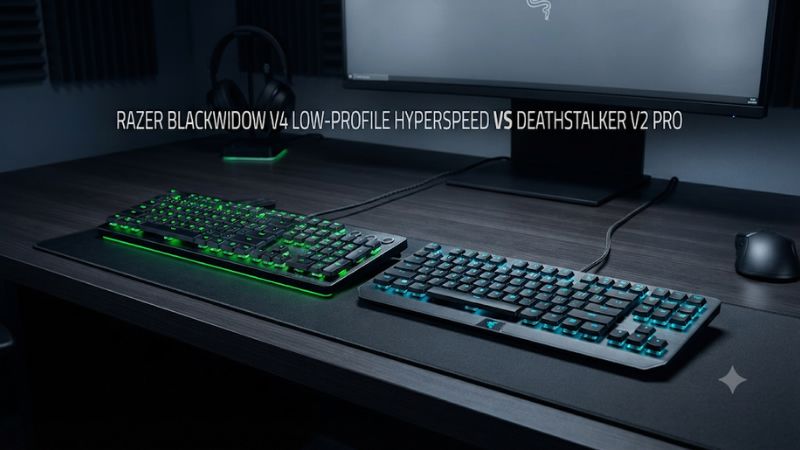
In Razer BlackWidow V4 Low-Profile HyperSpeed vs DeathStalker V2 Pro, choose the BlackWidow for dedicated macro keys and more low-profile switch options. Choose the DeathStalker if you prefer its optical feel or find a good discount. Compare both with your usual lighting, because their longest battery claims use different conditions.
Which full-size low-profile Razer should you choose?
The full-size BlackWidow V4 Low-Profile HyperSpeed is the stronger fit for someone who wants a slim desk keyboard with four dedicated macro buttons, several switch feel options, and a battery-saving mode. The DeathStalker V2 Pro remains a good choice if you specifically like its low-profile optical switches, prefer its simpler controls, or find the complete package at a meaningful discount.
Both have a numpad, physical arrows, Bluetooth, a 2.4 GHz receiver option, and wired USB operation. Decide how you like the switches and controls first. Then check which connection and lighting combination you will actually use. The battery and polling headlines describe specific modes.
| Feature | BlackWidow V4 Low-Profile HyperSpeed | DeathStalker V2 Pro |
|---|---|---|
| Models compared | Full-size RZ03-0527 family | Full-size RZ03-0436 family |
| Switches | Low-profile mechanical Green Clicky, Orange Tactile, or Yellow Linear, depending on availability | Low-profile optical Red Linear or Purple Clicky, depending on availability |
| Arrow keys and numpad | Dedicated | Dedicated |
| Connections | 2.4 GHz, Bluetooth, or USB | 2.4 GHz, Bluetooth, or USB |
| Extra controls | Clickable roller, media and connection controls, four dedicated macro keys | Multifunction roller, media button, and wireless controls |
| Standard wireless reporting | Up to 1,000 Hz over HyperSpeed | 1,000 Hz class in the supported gaming mode |
| Optional higher wireless rate | Up to 4,000 Hz with a separately sold compatible HyperPolling dongle | Compare the standard supported connection |
| Battery claims | Up to 980 hours in Power Saving Mode | Up to 200 hours on the product page, with a separate 40-hour launch claim |
| Switch replacement | No documented hot-swap support | Choose the stock optical switch at purchase |
Use the full-size names and identifiers
This comparison concerns full-size keyboards. Razer also sells the BlackWidow V4 Low-Profile Tenkeyless HyperSpeed and DeathStalker V2 Pro Tenkeyless. They omit the numpad and can differ in control placement or published battery figures. The word HyperSpeed alone also appears on other Razer keyboards, so check the full product listing.
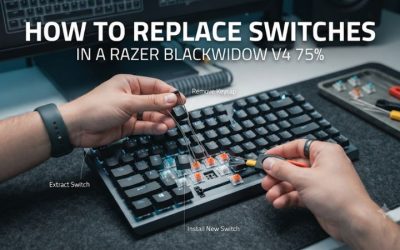
The standard-height BlackWidow V4 75% is a separate, hot-swappable, wired model. The BlackWidow in this comparison uses a slim chassis and installed low-profile switches. A name beginning with BlackWidow V4 does not tell you whether a particular package has a numpad, supports switch swapping, or uses wireless.
For a used listing, ask for the label and a photo of the receiver and cable. A color or switch label can identify the desired feel while leaving the model ambiguous. Check the layout and connector package before you compare the price with a new unit.
Decide what you need beyond a slim chassis
If your goal is a thinner board that occupies less vertical space, both models address it. Try each with your fingers in their normal resting position and see whether the front edge works with your chair and desk. Neither layout by itself solves a problem caused by insufficient lateral mouse room.
The BlackWidow is easier to justify when the extra buttons replace repeated actions. A player who spends most sessions changing volume, muting a call, switching devices, or using personal shortcuts can make use of the larger control set. The DeathStalker retains useful media and connection controls in a simpler arrangement.
If you leave the keyboard in one spot and rarely use special commands, switch preference and price can make the decision. A premium that pays for features you seldom touch has less value than a keyboard you find comfortable all day.
Switch feel, layout, and sound
The BlackWidow gives you a tactile option
Razer lists three low-profile mechanical switch options for the BlackWidow line: Green Clicky, Orange Tactile, and Yellow Linear. Availability depends on region and layout. Orange is the distinctive choice if you want a tangible bump without selecting a dedicated click mechanism. Yellow suits a buyer who prefers uninterrupted travel, and Green provides audible feedback.
Choose the switch you would be willing to keep. Razer explicitly states this BlackWidow lacks hot-swap support. A stock switch that is too loud for your room or too light for the way you type is a poor fit even if it comes on the best sale.
For a useful comparison, test a paragraph, a held movement key, and a rapid sequence of short presses. Then try it beside a normal conversation or with your usual microphone. At home, the everyday choice is frequently between a comfortable tactile cue and sound you can live with.
The DeathStalker uses low-profile optical sensing
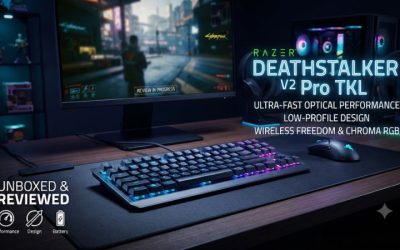
The DeathStalker V2 Pro uses optical switches in its low-profile form. Razer lists a Red Linear option and a Purple Clicky option where available. For the linear switch, Razer gives a 1.2 mm actuation point and 2.8 mm total travel. That defines the documented physical configuration for that switch, and your fingers will also notice return force and cap shape.
These DeathStalker switches are conventional fixed optical inputs for this comparison. The optical label does not provide the position-tracking features of an analog Huntsman. If you want adjustable actuation or Rapid Trigger, choose a model that documents those capabilities.
A buyer who likes a short, smooth stroke can still prefer the DeathStalker’s optical linears. Compare the feel with the BlackWidow’s low-profile Yellow configuration rather than comparing an optical linear to a clicky or tactile mechanical model and attributing every difference to sensing.
Evaluate sound using the actual switch variant
Both boards can sound different according to switch choice, case, keycaps, and the way you type. The BlackWidow uses dampening materials and lubricated stabilizers in its construction. The DeathStalker’s optical switch options include a linear and a clicky design, which can produce very different listening experiences.
Begin with ordinary letters and add Space, Enter, and Shift. Larger keys can be the dominant sound in a room. If you use voice chat, ask a friend to listen briefly while you type at your normal force. A board that sounds restrained in a quiet typing clip may still be audible through your microphone in your own setup.
If low noise is important, focus on the exact linear choice and the way it bottoms out. Tactile and clicky labels tell you about feedback. They cannot tell you the complete sound of the keyboard at your seat or what a nearby microphone will capture.
Check the numpad and controls against your mouse space
Both full-size layouts keep the numpad. This is valuable if you use it for numeric entry or in-game bindings. It leaves roughly the same kind of desk constraint as any full-size board: your mouse may have to sit farther right. Extra buttons can also change where your hand finds a familiar edge.
Take a measurement from where your left hand rests on the movement keys to the rightmost point of your normal mouse sweep. Place a full-size board in that position and try a few wide turns. If you constantly hit it, evaluate the specific TKL variants instead of assuming a thinner full-size board will solve the width problem.
For office work, check how often you reach for the numpad while using the mouse. The full-size models earn their width if the numeric layout saves real work. If you mainly need a slim board and a large mouse area, size should decide before you debate switch technology.
Wireless, polling, and battery life
Use HyperSpeed for gaming and Bluetooth where it fits
Both keyboards offer a dedicated receiver route for a gaming system. They also support Bluetooth for compatible secondary devices. A simple setup is to keep the receiver with your PC and pair Bluetooth to a laptop or tablet when that serves your workflow. Confirm the physical switching controls and what happens when a device wakes from sleep.
Start with a direct receiver connection when comparing them. Test the keyboard at the desk or seat where you normally play. If the receiver is hidden behind a metal computer case or shared alongside other wireless gear, use a short controlled comparison at a different port before blaming the keyboard or its switches.
For a wireless keyboard shared across screens, the time it takes to reconnect can matter more than small latency differences while the device is already active. Try the actual transition between work and gaming, including waking each computer and typing the first few characters.
The BlackWidow’s 4,000 Hz mode needs the right optional receiver
Razer lists up to 1,000 Hz over HyperSpeed for the BlackWidow’s ordinary gaming connection and advertises up to 4,000 Hz with a compatible HyperPolling Wireless Dongle sold separately. Verify current compatibility and whether the accessory is actually included in a bundle. The wireless option shown on the product page does not make the supplied standard receiver a 4 kHz device.
At 1,000 Hz the nominal report interval is 1 ms. At 4,000 Hz it is 0.25 ms. The complete path includes the switch, firmware, computer, game, and display. The smaller interval is useful as a specific capability to test, while the expected difference in a real game depends on the rest of your setup.
The DeathStalker is still relevant if you want a slim board with a standard 1,000 Hz-class gaming connection. If you would never buy or enable the optional dongle, give more weight to switch feel, controls, and the battery routine you can actually compare.
The longest battery ratings use different operating conditions
Razer advertises up to 980 hours for the BlackWidow in Power Saving Mode. The company says this mode reduces polling, turns off lighting, and pauses Synapse connectivity. That is useful for long spans of ordinary typing. It is a different configuration from high polling with Chroma and software features active.
Razer’s DeathStalker product page advertises up to 200 hours, while its launch materials cite 40 hours of continuous use for the full-size version. Reviews and documentation also describe different results under different lighting conditions. If a listing shows 40, 50, or 200 hours, check the model size and conditions before deciding it is a contradiction or a comparable figure.
Use a normal week as the comparison. If you leave lighting on, test with your usual brightness. Use the wireless mode you need for gaming, and account for time spent sleeping or connected to another device. Headline hours help identify available modes. Your charging interval tells you whether the keyboard fits your routine.
Check power saving alongside the controls you depend on
If the BlackWidow stays in its maximum-runtime mode for most of the workday, check how quickly you can return to the gaming setup. Verify the mode indicator, lighting, software availability, and the key assignments you expect when you switch. A shortcut that is convenient for saving battery is more useful when you understand what changes with it.
For the DeathStalker, compare normal standby behavior and your charging schedule. A less ambitious advertised maximum can be acceptable when you keep the board close to a USB charging cable or use lighting only when needed. Check that the keyboard works in your intended wired mode while charging.
If you regularly use your board on a couch, across a room, or in a place without convenient USB access, battery life deserves more weight. At a fixed desk, a sensible cable route can make charging a small inconvenience. Compare the cost of an optional receiver and any additional cable as part of that decision.
Macro keys, software, and purchase value
BlackWidow offers more dedicated shortcut positions
The full-size BlackWidow has four dedicated macro buttons. They make sense for shortcuts you want available without changing your main key layout. A work setup might use them for muting a call or switching applications. A gaming setup can assign supported single actions, subject to the game’s rules. Keep those bindings in easy-to-remember groups.
The DeathStalker offers a multifunction roller and media control with a simpler layout. It can suit a player who mainly changes volume or playback. Try operating those controls by touch. A dedicated shortcut is worthwhile if you can reach it without moving your hand so far that it interrupts the task.
For streaming or productivity, test the commands in their real apps. Some mappings depend on Synapse running or a program being active. Verify what works after you close the software if the board also moves to a machine where you cannot install it.
Check Chroma, keycaps, and onboard behavior separately
Razer lists double-shot PBT keycaps for the full-size BlackWidow Low-Profile HyperSpeed. It describes laser-etched, coated keycaps on the DeathStalker V2 Pro. Both offer Chroma lighting on supported configurations. The day-to-day differences are texture, legend visibility, and whether the stock caps suit your preferred feel.
Try each at a low brightness to see if you can read the legends you actually need. This matters if you use the numpad in a dark room or use a secondary function only occasionally. If you plan to replace the caps, check the low-profile stem and stabilized key compatibility before ordering. Standard-height keycap compatibility is a separate question.
For a second computer, test a supported onboard profile with Synapse closed. Check one ordinary remap and one media or special control. Treat Chroma Studio effects and automatic app profiles as separate from the basic keyboard functions you can verify on the hardware.
Compare discounts with the switch and battery you receive
The DeathStalker is the better value if it comes with the optical switch you want, a working receiver, and an acceptable battery at a noticeably lower price. The BlackWidow is worth a premium when you can name the macro controls, switch option, or power behavior that saves you work. Compare the actual package and accessory cost before counting an optional 4,000 Hz mode in the value calculation.
For used units, test the 2.4 GHz receiver, Bluetooth pairing, cable, and charging. Leave the keyboard running for a normal session and observe its reconnect behavior after sleep. Check the numpad, large keys, and the roller. If you buy for macro controls, test the dedicated positions as well as ordinary letters.
Choose the switch before buying the discounted configuration. Since these models are best treated as fixed stock switch designs, swapping to a different feel later is a much less practical plan than picking the correct model now.
Conclusion
Choose the Razer BlackWidow V4 Low-Profile HyperSpeed for its dedicated macro keys, wider low-profile switch selection, and optional 4,000 Hz wireless mode with the compatible add-on receiver. Choose the DeathStalker V2 Pro if its optical switches feel better to you or the complete package costs meaningfully less. Compare battery life under the lighting and connection you will actually use, and confirm that the full-size layout leaves enough room for your mouse.