🛒 Best Price Today on Amazon
Prime members get fast, free shipping on everything above, plus member-only deals. New members get a 30-day free trial — cancel anytime.
- Quick Verdict: Which Stabilizer Tuning Kit Is Best?
- Quick Comparison Table
- How We Selected the Best Stabilizer Tuning Supplies
- Best Keyboard Stabilizer Tuning Products Reviewed
- Buying Guide: Tuning Stabilizers for Beginners
- Frequently Asked Questions
- Final Verdict
- Quick Verdict: Which Stabilizer Tuning Kit Is Best?
- Quick Comparison Table
- How We Selected the Best Stabilizer Tuning Supplies
- Best Keyboard Stabilizer Tuning Products Reviewed
- Buying Guide: Tuning Stabilizers for Beginners
- Frequently Asked Questions
- Final Verdict
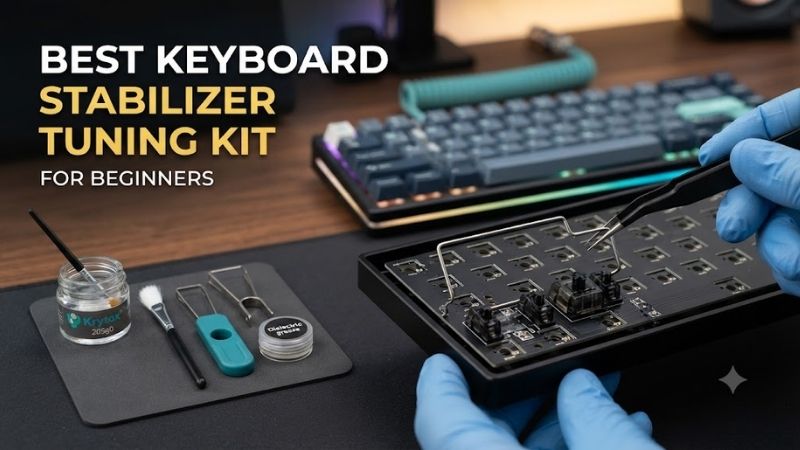
A good keyboard stabilizer tuning setup helps reduce unwanted rattling and improve the feel of the spacebar, Shift, Enter, and Backspace keys. The best keyboard stabilizer tuning kit for beginners should provide suitable lubricant, controlled application tools, compatible replacement parts, and a repeatable testing method.
Quick Verdict: Which Stabilizer Tuning Kit Is Best?
Most beginners do not need to purchase an expensive collection of specialized products. A small brush, suitable stabilizer lubricant, precision tools, and a way to verify wire balance can address many ordinary stabilizer problems without extensive keyboard modifications.
The Glorious Lube Kit is a convenient starting point for organizing basic lubrication work, although it is primarily marketed for mechanical switches rather than as a complete stabilizer-specific kit.
KBDfans Stabilizer Foam Stickers are useful for selected PCB-contact modifications, while Durock V2 and Gateron stabilizer sets provide replacement hardware when the original stabilizers are difficult to tune.
The best purchase depends on whether the problem originates from insufficient lubrication, a bent wire, excessive housing movement, or incompatible hardware.
Quick Comparison Table
These seven recommendations are complementary tuning supplies rather than seven identical all-in-one kits. Some provide lubrication equipment, while others address stabilizer mounting or replacement. A beginner should avoid purchasing every item without first identifying the source of the unwanted sound.
| Product | Category | Best Use |
|---|---|---|
| Glorious Lube Kit | Lubrication toolkit | Best general starter kit |
| Glorious G-Lube | Lubricant | Light stabilizer tuning |
| Kinetic Labs Krytox 205g0 | Lubricant | Controlled plastic-contact lubrication |
| KBDfans Stabilizer Foam Stickers | Damping accessory | PCB-contact modification |
| Durock V2 Screw-In Stabilizer Set | Replacement stabilizers | PCB-mounted builds |
| Gateron Plate-Mount Stabilizer Set | Replacement stabilizers | Compatible plate-mounted boards |
| iFixit Essential Electronics Toolkit | Precision tools | Disassembly and adjustment |
How We Selected the Best Stabilizer Tuning Supplies
Stabilizer tuning involves multiple interacting sources of noise. A spacebar may rattle because a wire is unbalanced, stems move excessively inside the housings, mounting components are loose, or contact surfaces are insufficiently lubricated. We selected products that address these distinct problems.
Wire Balance and Mechanical Alignment
A stabilizer wire should make consistent contact with the moving components on both sides of the key. If the wire is bent unevenly, one side may produce a tapping sound even after generous lubrication, making additional grease an ineffective solution.
For screw-in stabilizers, inspect whether the housings are securely mounted.
For plate-mounted designs, verify that the tabs engage the plate properly.
A loose stabilizer can move as a complete assembly, which requires a different solution from ordinary wire rattle.
Wire balance should be checked before applying excessive lubricant.
Lubrication Type and Application Control
Lubrication can reduce friction and mechanical noise between selected stabilizer components, but applying too much can create a sluggish or sticky return. Beginners should prioritize small quantities and consistent application rather than attempting to eliminate every sound through grease alone.
Different contact areas may benefit from different lubricant characteristics.
Plastic sliding surfaces and metal-wire contact points do not always require identical treatment.
The selected product must also be compatible with the materials used in the stabilizer.
Avoid household petroleum jelly or unsuitable oils.
Stabilizer Mounting Compatibility
PCB-mounted screw-in stabilizers, PCB clip-in stabilizers, and plate-mounted stabilizers are not interchangeable. A replacement set must match the PCB’s mounting holes, plate design, and the length of each stabilized key.
A 75% keyboard may use a different spacebar arrangement from another 75% board.
Likewise, certain compact layouts use unusual Shift or Backspace dimensions.
Before ordering replacement hardware, identify the stabilizer type and required wire lengths.
A premium stabilizer cannot compensate for the wrong mounting standard.
Best Keyboard Stabilizer Tuning Products Reviewed
These seven products cover lubrication, cushioning, replacement hardware, and precision handling. The purpose is to help a beginner build a sensible tuning workflow instead of assuming that one lubricant or foam sticker can correct every stabilizer defect.
Glorious Lube Kit — Best General Starting Toolkit
The Glorious Lube Kit is a convenient starting point for beginners because it groups the basic equipment needed for mechanical switch lubrication. Although not a complete stabilizer-specific system, its application tools can be useful when preparing a broader keyboard tuning workspace.
Best For: Beginners who need basic lubrication tools.
Included Tuning Functions
Glorious documents the kit as including equipment for switch lubrication, with accessories such as a switch opener, brush, and lubricant in relevant configurations.
The tools are intended primarily for switches.
However, a suitable brush can also help apply small amounts of compatible lubricant to selected stabilizer surfaces.
Practical Advantages
A beginner working with loose lubricant jars and improvised brushes may apply inconsistent quantities.
Dedicated application tools make controlled work easier.
The kit can also serve future switch-modification projects, extending its usefulness beyond one spacebar.
Limitations
The kit is not a dedicated wire-balancing system.
It also does not automatically include replacement stabilizers or every accessory needed for a specific PCB.
Pros: Convenient starting equipment, useful lubrication brush, broader keyboard-modding applications.
Cons: Primarily switch-oriented, not complete stabilizer hardware, no guarantee of corrected wire balance.
Buy If: You are starting mechanical keyboard lubrication work.
Skip If: You only need to replace one defective stabilizer wire.
Glorious G-Lube — Best Accessible Lubricant Alternative
Glorious G-Lube is a keyboard-oriented lubricant intended for mechanical switch components. It can also be considered for compatible stabilizer plastic contact areas when applied carefully, but users should not assume that every stabilizer part requires the same amount or type of lubrication.
Best For: Builders who want one keyboard-oriented lubricant for selected components.
Material Compatibility
G-Lube is designed for keyboard lubrication.
Its suitability depends on the contact materials and intended application.
For stabilizers, the goal is reducing friction without preventing the stem from returning freely.
The amount applied is more important than creating a visibly thick layer.
Application Technique
Use a small brush to apply a controlled quantity.
Move the stabilizer through its full travel before reassembling the keyboard.
If the stabilizer feels sluggish, inspect for excess lubricant rather than automatically adding more.
Limitations
Lubrication cannot straighten an unbalanced wire.
It also cannot secure a loose stabilizer housing that requires mechanical correction.
Pros: Keyboard-oriented lubricant, convenient for small applications, useful for multiple tuning tasks.
Cons: Not a complete kit, does not correct mounting faults, can be overapplied.
Buy If: You need lubricant for selected keyboard components.
Skip If: Your stabilizer problem is primarily mechanical misalignment.
Kinetic Labs Krytox 205g0 — Best for Controlled Plastic-Contact Lubrication
Kinetic Labs sells Krytox 205g0 in small quantities suitable for keyboard enthusiasts. Its established use in mechanical keyboard tuning makes it relevant for selected stabilizer contact points, although the amount and location of application must be chosen carefully.
Best For: Users wanting a common enthusiast keyboard lubricant.
Product Characteristics
Krytox 205g0 is a grease-based lubricant.
It is widely used on selected mechanical keyboard sliding surfaces.
Small containers are convenient for occasional modifications because stabilizer tuning usually requires very little material.
However, the name alone does not establish the ideal quantity for every stabilizer design.
Practical Application
Apply a thin amount to appropriate plastic-contact areas.
Avoid coating every component without a clear purpose.
Excess lubricant can change key return characteristics and make the stabilizer feel heavy.
Sound Expectations
Lubrication may reduce certain friction and rattle sounds.
However, the final result depends on wire alignment, housing fit, mounting stability, and keycap construction.
Pros: Established keyboard-modding lubricant, available in small quantities, suitable for controlled applications.
Cons: Easy to overapply, requires separate tools, cannot correct defective hardware.
Buy If: You want a commonly used enthusiast lubricant.
Skip If: You need a complete set of stabilizers and tools.
KBDfans Stabilizer Foam Stickers — Best Contact-Damping Accessory
KBDfans Stabilizer Foam Stickers are small damping accessories intended for selected points where stabilizer components contact the PCB. They may be useful for particular stabilizer configurations, but compatibility and placement are critical to avoid introducing unwanted movement or interference.
Best For: Compatible keyboards needing localized contact damping.
Product Configuration
KBDfans lists a package containing 20 stabilizer foam stickers.
These accessories are intended for specific stabilizer-related modifications.
They do not replace stabilizer housings, stems, or metal wires.
Their function is to alter localized contact behavior.
Installation Considerations
The PCB should be clean before applying adhesive material.
Stickers must be placed according to the intended mounting configuration.
Incorrect positioning can interfere with screw holes, housing fit, or stabilizer movement.
Do not use thick material where a stabilizer requires direct, rigid contact.
Expected Results
Foam stickers may reduce selected contact noises.
They cannot correct a bent wire or poorly fitted stabilizer.
The benefit depends on the original source of the unwanted sound.
Pros: Inexpensive accessory, small package, targeted damping application.
Cons: Not universal, installation mistakes possible, limited effect on wire rattle.
Buy If: Your stabilizer type supports the intended contact modification.
Skip If: The primary problem is wire imbalance or incompatible stabilizers.
Durock V2 Screw-In Stabilizer Set — Best Replacement Hardware
Durock V2 screw-in stabilizers are a common enthusiast option for compatible PCB-mounted mechanical keyboards. Replacing poorly fitted original stabilizers can be more effective than repeatedly adding grease when the underlying components have excessive movement or unreliable mounting.
Best For: Compatible DIY boards with PCB screw-in stabilizer mounting.
Construction and Mounting
The Durock V2 family uses screw-in mounting.
This requires appropriate PCB holes and clearance.
A keyboard built exclusively for plate-mounted stabilizers cannot accept screw-in models without supported modifications.
The correct wire lengths must also match the stabilized keys.
Tuning Potential
Replacement stabilizers provide a new mechanical starting point.
The user can inspect wire balance, apply lubricant, and secure the housings properly before installing the keyboard.
However, premium hardware does not guarantee a perfectly quiet spacebar without tuning.
When Replacement Makes Sense
Replacement is appropriate when the original stabilizer is damaged, poorly fitted, or mechanically unsuitable.
If the original hardware is sound and merely under-lubricated, replacement may be unnecessary.
Pros: Enthusiast-oriented replacement hardware, screw-in mounting, tunable construction.
Cons: PCB compatibility required, separate lubrication may be necessary, wrong wire lengths can prevent installation.
Buy If: Your PCB supports screw-in stabilizers and the original hardware is inadequate.
Skip If: Your keyboard only supports plate-mounted stabilizers.
Gateron Plate-Mount Stabilizer Set — Best for Plate-Mounted Boards
Gateron plate-mounted stabilizers serve keyboards that secure the stabilizer housings directly to a compatible switch plate. They are useful when a beginner needs replacement parts for a board that does not support conventional PCB screw-in hardware.
Best For: Compatible plate-mounted mechanical keyboards.
Mounting Method
The stabilizer housing engages designated cutouts in the plate.
This differs mechanically from PCB-mounted screw-in or clip-in systems.
Secure plate engagement is important because housing movement can contribute to unwanted noise.
Tuning Applications
A properly fitted plate-mounted stabilizer can be inspected for wire alignment and lubricated where appropriate.
However, the plate cutout must provide adequate retention.
A loose plate fit may require a different corrective approach.
Compatibility
Buyers should verify the plate standard and wire lengths.
Not every plate-mounted design is interchangeable.
Pros: Correct mounting category for supported boards, replaceable components, useful for basic tuning.
Cons: Requires compatible plate, no guarantee of noise reduction, may still need lubrication.
Buy If: Your keyboard uses compatible plate-mounted stabilizers.
Skip If: Your PCB requires screw-in mounting.
iFixit Essential Electronics Toolkit — Best Supporting Precision Tools
The iFixit Essential Electronics Toolkit supplies precision handling and disassembly equipment useful when accessing keyboard stabilizers. It does not provide a complete stabilizer-tuning system, but it can reduce the risk of damage caused by poorly fitting screwdrivers or improvised opening tools.
Best For: Beginners who need safe access to keyboard internals.
Practical Uses
Precision screwdrivers help remove case hardware.
Opening tools can assist with compatible keyboard housings.
Controlled handling is useful when separating parts that may otherwise be damaged by excessive force.
What It Does Not Include
The toolkit is not a substitute for stabilizer lubricant.
It also does not necessarily include specialized wire-balancing equipment.
Buyers should identify the exact tuning operation before purchasing.
Pros: General-purpose repair tools, useful for disassembly, applicable to future keyboard work.
Cons: Not a dedicated stabilizer kit, no lubricant included by default, may duplicate tools already owned.
Buy If: You need precision repair tools for keyboard maintenance.
Skip If: You already have suitable screwdrivers and only need lubricant.
Buying Guide: Tuning Stabilizers for Beginners
A successful stabilizer tune begins with diagnosing the source of the noise. Rattle can originate from the wire, stems, housings, keycap, or mounting system. The correct approach is to make one controlled change at a time and confirm that the key still moves freely after each adjustment.
Identify the Stabilizer Type
Determine whether the keyboard uses plate-mounted, PCB clip-in, or PCB screw-in stabilizers.
Inspect the mounting structure before buying replacement parts.
Do not assume all mechanical keyboards use the same system.
Check Wire Balance Before Lubrication
A wire that contacts unevenly can produce noise even when heavily lubricated.
Inspect it carefully.
Use appropriate tools and avoid excessive bending.
Forcing the wire can create a new alignment problem.
Apply Small Amounts of Lubricant
Use a fine brush.
Focus on appropriate contact areas.
Test the stabilizer after each change.
If the key returns slowly, check for excessive lubricant or interference.
Tune the Spacebar Separately
Spacebars often produce more noticeable sound because of their size and mass.
A hollow keycap can contribute to resonance.
Stabilizer rattle and keycap resonance are different problems.
Use appropriate modifications for each source.
Test Before Final Assembly
Install the stabilizers and a representative keycap.
Check the key’s movement and sound.
Only proceed to full assembly when the result is satisfactory.
Frequently Asked Questions
Stabilizer tuning can improve the feel of large keyboard keys, but it is easy to confuse wire rattle, housing movement, and keycap resonance. These questions explain the equipment beginners actually need and why adding more lubricant is not always the correct solution.
What tools do beginners need for stabilizer tuning?
A suitable screwdriver, fine brush, compatible lubricant, and basic inspection tools are useful starting points.
Does lubricant eliminate all stabilizer rattle?
No. Bent wires and loose housings may require mechanical correction.
Are screw-in stabilizers always better than plate-mounted models?
Not universally. Compatibility and tuning quality matter more than mounting type alone.
Can too much lubricant damage the feel?
Yes. Excessive grease can make large keys feel sluggish or sticky.
Do stabilizer foam stickers always help?
No. Their effect depends on placement and the source of the noise.
Should I replace my stabilizers before tuning?
Not necessarily. Well-fitting original stabilizers may only need minor adjustment.
Does stabilizer tuning improve gaming latency?
No. It primarily changes the mechanical feel and sound of stabilized keys.
Final Verdict
The best keyboard stabilizer tuning kit for beginners is a practical combination of appropriate lubrication tools, compatible hardware, and a careful testing process. Glorious provides a convenient starting toolkit, Krytox 205g0 is useful for selected contact points, and replacement stabilizers should be chosen by mounting compatibility.
Compare beginner keyboard stabilizer tuning supplies, including lube kits, foam pads, replacement stabilizers, and precision tools for quieter large keys.
Best Keyboard Stabilizer Tuning Kit for Beginners: 7 Picks
A good keyboard stabilizer tuning setup helps reduce unwanted rattling and improve the feel of the spacebar, Shift, Enter, and Backspace keys. The best keyboard stabilizer tuning kit for beginners should provide suitable lubricant, controlled application tools, compatible replacement parts, and a repeatable testing method.
Quick Verdict: Which Stabilizer Tuning Kit Is Best?
Most beginners do not need to purchase an expensive collection of specialized products. A small brush, suitable stabilizer lubricant, precision tools, and a way to verify wire balance can address many ordinary stabilizer problems without extensive keyboard modifications.
The Glorious Lube Kit is a convenient starting point for organizing basic lubrication work, although it is primarily marketed for mechanical switches rather than as a complete stabilizer-specific kit.
KBDfans Stabilizer Foam Stickers are useful for selected PCB-contact modifications, while Durock V2 and Gateron stabilizer sets provide replacement hardware when the original stabilizers are difficult to tune.
The best purchase depends on whether the problem originates from insufficient lubrication, a bent wire, excessive housing movement, or incompatible hardware.
Quick Comparison Table
These seven recommendations are complementary tuning supplies rather than seven identical all-in-one kits. Some provide lubrication equipment, while others address stabilizer mounting or replacement. A beginner should avoid purchasing every item without first identifying the source of the unwanted sound.
| Product | Category | Best Use |
|---|---|---|
| Glorious Lube Kit | Lubrication toolkit | Best general starter kit |
| Glorious G-Lube | Lubricant | Light stabilizer tuning |
| Kinetic Labs Krytox 205g0 | Lubricant | Controlled plastic-contact lubrication |
| KBDfans Stabilizer Foam Stickers | Damping accessory | PCB-contact modification |
| Durock V2 Screw-In Stabilizer Set | Replacement stabilizers | PCB-mounted builds |
| Gateron Plate-Mount Stabilizer Set | Replacement stabilizers | Compatible plate-mounted boards |
| iFixit Essential Electronics Toolkit | Precision tools | Disassembly and adjustment |
How We Selected the Best Stabilizer Tuning Supplies
Stabilizer tuning involves multiple interacting sources of noise. A spacebar may rattle because a wire is unbalanced, stems move excessively inside the housings, mounting components are loose, or contact surfaces are insufficiently lubricated. We selected products that address these distinct problems.
Wire Balance and Mechanical Alignment
A stabilizer wire should make consistent contact with the moving components on both sides of the key. If the wire is bent unevenly, one side may produce a tapping sound even after generous lubrication, making additional grease an ineffective solution.
For screw-in stabilizers, inspect whether the housings are securely mounted.
For plate-mounted designs, verify that the tabs engage the plate properly.
A loose stabilizer can move as a complete assembly, which requires a different solution from ordinary wire rattle.
Wire balance should be checked before applying excessive lubricant.
Lubrication Type and Application Control
Lubrication can reduce friction and mechanical noise between selected stabilizer components, but applying too much can create a sluggish or sticky return. Beginners should prioritize small quantities and consistent application rather than attempting to eliminate every sound through grease alone.
Different contact areas may benefit from different lubricant characteristics.
Plastic sliding surfaces and metal-wire contact points do not always require identical treatment.
The selected product must also be compatible with the materials used in the stabilizer.
Avoid household petroleum jelly or unsuitable oils.
Stabilizer Mounting Compatibility
PCB-mounted screw-in stabilizers, PCB clip-in stabilizers, and plate-mounted stabilizers are not interchangeable. A replacement set must match the PCB’s mounting holes, plate design, and the length of each stabilized key.
A 75% keyboard may use a different spacebar arrangement from another 75% board.
Likewise, certain compact layouts use unusual Shift or Backspace dimensions.
Before ordering replacement hardware, identify the stabilizer type and required wire lengths.
A premium stabilizer cannot compensate for the wrong mounting standard.
Best Keyboard Stabilizer Tuning Products Reviewed
These seven products cover lubrication, cushioning, replacement hardware, and precision handling. The purpose is to help a beginner build a sensible tuning workflow instead of assuming that one lubricant or foam sticker can correct every stabilizer defect.
Glorious Lube Kit — Best General Starting Toolkit
The Glorious Lube Kit is a convenient starting point for beginners because it groups the basic equipment needed for mechanical switch lubrication. Although not a complete stabilizer-specific system, its application tools can be useful when preparing a broader keyboard tuning workspace.
Best For: Beginners who need basic lubrication tools.
Included Tuning Functions
Glorious documents the kit as including equipment for switch lubrication, with accessories such as a switch opener, brush, and lubricant in relevant configurations.
The tools are intended primarily for switches.
However, a suitable brush can also help apply small amounts of compatible lubricant to selected stabilizer surfaces.
Practical Advantages
A beginner working with loose lubricant jars and improvised brushes may apply inconsistent quantities.
Dedicated application tools make controlled work easier.
The kit can also serve future switch-modification projects, extending its usefulness beyond one spacebar.
Limitations
The kit is not a dedicated wire-balancing system.
It also does not automatically include replacement stabilizers or every accessory needed for a specific PCB.
Pros: Convenient starting equipment, useful lubrication brush, broader keyboard-modding applications.
Cons: Primarily switch-oriented, not complete stabilizer hardware, no guarantee of corrected wire balance.
Buy If: You are starting mechanical keyboard lubrication work.
Skip If: You only need to replace one defective stabilizer wire.
Glorious G-Lube — Best Accessible Lubricant Alternative
Glorious G-Lube is a keyboard-oriented lubricant intended for mechanical switch components. It can also be considered for compatible stabilizer plastic contact areas when applied carefully, but users should not assume that every stabilizer part requires the same amount or type of lubrication.
Best For: Builders who want one keyboard-oriented lubricant for selected components.
Material Compatibility
G-Lube is designed for keyboard lubrication.
Its suitability depends on the contact materials and intended application.
For stabilizers, the goal is reducing friction without preventing the stem from returning freely.
The amount applied is more important than creating a visibly thick layer.
Application Technique
Use a small brush to apply a controlled quantity.
Move the stabilizer through its full travel before reassembling the keyboard.
If the stabilizer feels sluggish, inspect for excess lubricant rather than automatically adding more.
Limitations
Lubrication cannot straighten an unbalanced wire.
It also cannot secure a loose stabilizer housing that requires mechanical correction.
Pros: Keyboard-oriented lubricant, convenient for small applications, useful for multiple tuning tasks.
Cons: Not a complete kit, does not correct mounting faults, can be overapplied.
Buy If: You need lubricant for selected keyboard components.
Skip If: Your stabilizer problem is primarily mechanical misalignment.
Kinetic Labs Krytox 205g0 — Best for Controlled Plastic-Contact Lubrication
Kinetic Labs sells Krytox 205g0 in small quantities suitable for keyboard enthusiasts. Its established use in mechanical keyboard tuning makes it relevant for selected stabilizer contact points, although the amount and location of application must be chosen carefully.
Best For: Users wanting a common enthusiast keyboard lubricant.
Product Characteristics
Krytox 205g0 is a grease-based lubricant.
It is widely used on selected mechanical keyboard sliding surfaces.
Small containers are convenient for occasional modifications because stabilizer tuning usually requires very little material.
However, the name alone does not establish the ideal quantity for every stabilizer design.
Practical Application
Apply a thin amount to appropriate plastic-contact areas.
Avoid coating every component without a clear purpose.
Excess lubricant can change key return characteristics and make the stabilizer feel heavy.
Sound Expectations
Lubrication may reduce certain friction and rattle sounds.
However, the final result depends on wire alignment, housing fit, mounting stability, and keycap construction.
Pros: Established keyboard-modding lubricant, available in small quantities, suitable for controlled applications.
Cons: Easy to overapply, requires separate tools, cannot correct defective hardware.
Buy If: You want a commonly used enthusiast lubricant.
Skip If: You need a complete set of stabilizers and tools.
KBDfans Stabilizer Foam Stickers — Best Contact-Damping Accessory
KBDfans Stabilizer Foam Stickers are small damping accessories intended for selected points where stabilizer components contact the PCB. They may be useful for particular stabilizer configurations, but compatibility and placement are critical to avoid introducing unwanted movement or interference.
Best For: Compatible keyboards needing localized contact damping.
Product Configuration
KBDfans lists a package containing 20 stabilizer foam stickers.
These accessories are intended for specific stabilizer-related modifications.
They do not replace stabilizer housings, stems, or metal wires.
Their function is to alter localized contact behavior.
Installation Considerations
The PCB should be clean before applying adhesive material.
Stickers must be placed according to the intended mounting configuration.
Incorrect positioning can interfere with screw holes, housing fit, or stabilizer movement.
Do not use thick material where a stabilizer requires direct, rigid contact.
Expected Results
Foam stickers may reduce selected contact noises.
They cannot correct a bent wire or poorly fitted stabilizer.
The benefit depends on the original source of the unwanted sound.
Pros: Inexpensive accessory, small package, targeted damping application.
Cons: Not universal, installation mistakes possible, limited effect on wire rattle.
Buy If: Your stabilizer type supports the intended contact modification.
Skip If: The primary problem is wire imbalance or incompatible stabilizers.
Durock V2 Screw-In Stabilizer Set — Best Replacement Hardware
Durock V2 screw-in stabilizers are a common enthusiast option for compatible PCB-mounted mechanical keyboards. Replacing poorly fitted original stabilizers can be more effective than repeatedly adding grease when the underlying components have excessive movement or unreliable mounting.
Best For: Compatible DIY boards with PCB screw-in stabilizer mounting.
Construction and Mounting
The Durock V2 family uses screw-in mounting.
This requires appropriate PCB holes and clearance.
A keyboard built exclusively for plate-mounted stabilizers cannot accept screw-in models without supported modifications.
The correct wire lengths must also match the stabilized keys.
Tuning Potential
Replacement stabilizers provide a new mechanical starting point.
The user can inspect wire balance, apply lubricant, and secure the housings properly before installing the keyboard.
However, premium hardware does not guarantee a perfectly quiet spacebar without tuning.
When Replacement Makes Sense
Replacement is appropriate when the original stabilizer is damaged, poorly fitted, or mechanically unsuitable.
If the original hardware is sound and merely under-lubricated, replacement may be unnecessary.
Pros: Enthusiast-oriented replacement hardware, screw-in mounting, tunable construction.
Cons: PCB compatibility required, separate lubrication may be necessary, wrong wire lengths can prevent installation.
Buy If: Your PCB supports screw-in stabilizers and the original hardware is inadequate.
Skip If: Your keyboard only supports plate-mounted stabilizers.
Gateron Plate-Mount Stabilizer Set — Best for Plate-Mounted Boards
Gateron plate-mounted stabilizers serve keyboards that secure the stabilizer housings directly to a compatible switch plate. They are useful when a beginner needs replacement parts for a board that does not support conventional PCB screw-in hardware.
Best For: Compatible plate-mounted mechanical keyboards.
Mounting Method
The stabilizer housing engages designated cutouts in the plate.
This differs mechanically from PCB-mounted screw-in or clip-in systems.
Secure plate engagement is important because housing movement can contribute to unwanted noise.
Tuning Applications
A properly fitted plate-mounted stabilizer can be inspected for wire alignment and lubricated where appropriate.
However, the plate cutout must provide adequate retention.
A loose plate fit may require a different corrective approach.
Compatibility
Buyers should verify the plate standard and wire lengths.
Not every plate-mounted design is interchangeable.
Pros: Correct mounting category for supported boards, replaceable components, useful for basic tuning.
Cons: Requires compatible plate, no guarantee of noise reduction, may still need lubrication.
Buy If: Your keyboard uses compatible plate-mounted stabilizers.
Skip If: Your PCB requires screw-in mounting.
iFixit Essential Electronics Toolkit — Best Supporting Precision Tools
The iFixit Essential Electronics Toolkit supplies precision handling and disassembly equipment useful when accessing keyboard stabilizers. It does not provide a complete stabilizer-tuning system, but it can reduce the risk of damage caused by poorly fitting screwdrivers or improvised opening tools.
Best For: Beginners who need safe access to keyboard internals.
Practical Uses
Precision screwdrivers help remove case hardware.
Opening tools can assist with compatible keyboard housings.
Controlled handling is useful when separating parts that may otherwise be damaged by excessive force.
What It Does Not Include
The toolkit is not a substitute for stabilizer lubricant.
It also does not necessarily include specialized wire-balancing equipment.
Buyers should identify the exact tuning operation before purchasing.
Pros: General-purpose repair tools, useful for disassembly, applicable to future keyboard work.
Cons: Not a dedicated stabilizer kit, no lubricant included by default, may duplicate tools already owned.
Buy If: You need precision repair tools for keyboard maintenance.
Skip If: You already have suitable screwdrivers and only need lubricant.
Buying Guide: Tuning Stabilizers for Beginners
A successful stabilizer tune begins with diagnosing the source of the noise. Rattle can originate from the wire, stems, housings, keycap, or mounting system. The correct approach is to make one controlled change at a time and confirm that the key still moves freely after each adjustment.
Identify the Stabilizer Type
Determine whether the keyboard uses plate-mounted, PCB clip-in, or PCB screw-in stabilizers.
Inspect the mounting structure before buying replacement parts.
Do not assume all mechanical keyboards use the same system.
Check Wire Balance Before Lubrication
A wire that contacts unevenly can produce noise even when heavily lubricated.
Inspect it carefully.
Use appropriate tools and avoid excessive bending.
Forcing the wire can create a new alignment problem.
Apply Small Amounts of Lubricant
Use a fine brush.
Focus on appropriate contact areas.
Test the stabilizer after each change.
If the key returns slowly, check for excessive lubricant or interference.
Tune the Spacebar Separately
Spacebars often produce more noticeable sound because of their size and mass.
A hollow keycap can contribute to resonance.
Stabilizer rattle and keycap resonance are different problems.
Use appropriate modifications for each source.
Test Before Final Assembly
Install the stabilizers and a representative keycap.
Check the key’s movement and sound.
Only proceed to full assembly when the result is satisfactory.
Frequently Asked Questions
Stabilizer tuning can improve the feel of large keyboard keys, but it is easy to confuse wire rattle, housing movement, and keycap resonance. These questions explain the equipment beginners actually need and why adding more lubricant is not always the correct solution.
What tools do beginners need for stabilizer tuning?
A suitable screwdriver, fine brush, compatible lubricant, and basic inspection tools are useful starting points.
Does lubricant eliminate all stabilizer rattle?
No. Bent wires and loose housings may require mechanical correction.
Are screw-in stabilizers always better than plate-mounted models?
Not universally. Compatibility and tuning quality matter more than mounting type alone.
Can too much lubricant damage the feel?
Yes. Excessive grease can make large keys feel sluggish or sticky.
Do stabilizer foam stickers always help?
No. Their effect depends on placement and the source of the noise.
Should I replace my stabilizers before tuning?
Not necessarily. Well-fitting original stabilizers may only need minor adjustment.
Does stabilizer tuning improve gaming latency?
No. It primarily changes the mechanical feel and sound of stabilized keys.
Final Verdict
The best keyboard stabilizer tuning kit for beginners is a practical combination of appropriate lubrication tools, compatible hardware, and a careful testing process. Glorious provides a convenient starting toolkit, Krytox 205g0 is useful for selected contact points, and replacement stabilizers should be chosen by mounting compatibility.