🛒 Best Price Today on Amazon
Prime members get fast, free shipping on everything above, plus member-only deals. New members get a 30-day free trial — cancel anytime.
Split mechanical keyboards allow each hand to occupy a more natural position, but their unusual geometry can make conventional wrist rests uncomfortable or poorly aligned. Finding the best wrist rest for split mechanical keyboards requires careful attention to height, separation distance, tenting angle, and whether support should contact the palms rather than the wrists.
Quick Verdict: Which Wrist Rest Works Best for Split Keyboards?
For most split-keyboard users, two independent supports provide greater positioning flexibility than one long wrist rest. They allow each keyboard half to move naturally without forcing both hands into a fixed position. However, a support should never create continuous pressure directly beneath the sensitive inner wrist.
The ErgoDox EZ Wing Wrist Rest is an excellent model-specific option, while Grifiti Split Keyboard Wrist Pads offer greater flexibility. MoErgo and Kinesis accessories are particularly useful for their supported keyboard systems, where the palm support can work with the intended typing geometry.
Quick Comparison Table
| Product | Design | Best for | Main limitation |
|---|---|---|---|
| ErgoDox EZ Wing Wrist Rest | Separate contoured supports | ErgoDox EZ | Shape designed for one keyboard family |
| Grifiti Split Keyboard Wrist Pads | Two cushioned pads | Flexible split setups | Height may not suit low-profile boards |
| Kinesis Freestyle2 Palm Supports | Attach-on supports | Freestyle2 | Model-specific |
| Kinesis Freestyle2 VIP3 Kit | Palm supports and tenting | Freestyle2 ergonomic setups | Not universal |
| MoErgo Glove80 Palm Rests | Detachable sculpted supports | Glove80 | Integrated keyboard-specific design |
| MoErgo Go60 Walnut Palm Rests | Optional detachable wooden supports | Go60 | Specialized compatibility |
How We Selected These Wrist Rests
Selection focused on split-keyboard compatibility, independent positioning, palm-contact geometry, support height, surface firmness, and integration with keyboard tenting. We also considered whether a product is a general-purpose accessory or a component designed for one particular keyboard.
The distinction is important because a wrist rest that works well with a conventional flat keyboard may position the hands incorrectly when placed in front of a tented or deeply sculpted split keyboard. Comfort depends on the complete workstation arrangement, not simply the softness of the support.
The 6 Best Wrist Rests for Split Mechanical Keyboards
Split keyboards are designed to allow independent placement of the left and right typing modules. A suitable support should preserve this freedom while keeping the hands from being forced upward or outward. The products below approach that requirement through different materials, shapes, and mounting systems.
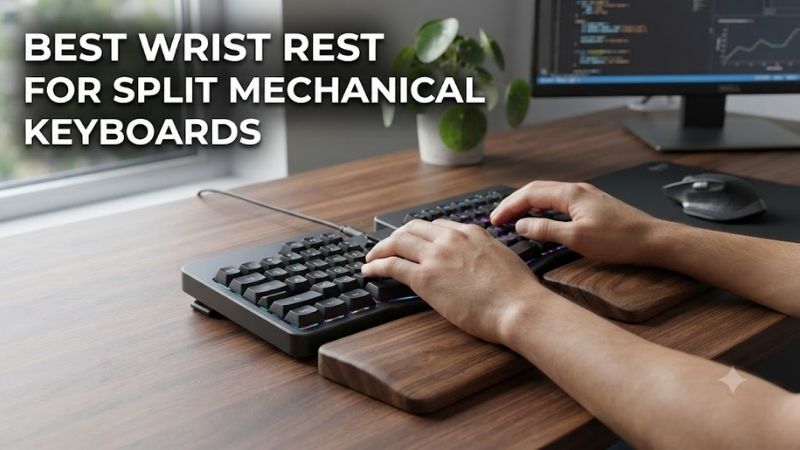
ErgoDox EZ Wing Wrist Rest – Best Overall for ErgoDox Owners
The ErgoDox EZ Wing Wrist Rest is designed specifically for the ErgoDox EZ mechanical keyboard. Its two separate, contoured supports can be positioned independently, allowing users to adjust their distance from each keyboard half instead of accepting a fixed attachment point.
Best for: ErgoDox EZ owners seeking matching palm support.
Key features
-
Two independent support pieces
-
Custom-molded contoured shape
-
Heavy construction intended to remain stable
-
Adjustable placement relative to the keyboard
-
Washable material
-
Black and white options
Ergonomic design
The ErgoDox EZ uses two separate keyboard modules that can be positioned according to shoulder width and natural forearm alignment.
A single straight wrist rest would undermine some of that flexibility.
The Wing design avoids this problem by providing separate support pieces.
Users can move the keyboard halves farther apart, rotate them, or adjust their positions without requiring the support surfaces to remain connected.
This is particularly useful when the keyboard’s tenting accessories are used.
Surface geometry
The Wing is shaped to complement the ErgoDox EZ’s distinctive keyboard outline.
Its contour provides a defined support area rather than a simple rectangular foam pad.
However, a custom shape does not guarantee comfort for every hand.
Users with different hand sizes may prefer different distances between the keyboard and the support.
The support should make contact primarily with the heel of the palm when resting, without forcing pressure into the inner wrist.
Practical adjustment
One advantage of a separate support is the ability to move it slightly forward or backward.
If it is too close to the keyboard, the user may experience excessive wrist extension.
If it is too far away, the support may become ineffective or encourage reaching.
Small adjustments can make a noticeable difference.
A good starting point is to place each rest where the hand can remain relatively neutral without lifting the shoulders or bending the wrist sharply.
Pros
-
Designed specifically for ErgoDox EZ
-
Independent positioning
-
Contoured construction
-
Washable
-
Suitable for different keyboard spacing arrangements
Cons
-
Specialized shape
-
May not match other split keyboards
-
Firm support is not preferred by everyone
-
Requires careful placement
Buy If: You own an ErgoDox EZ and want a dedicated matching support.
Skip If: You use a different split keyboard and need a universally adjustable accessory.
Grifiti Split Keyboard Wrist Pads – Best Flexible Cushioned Option
Grifiti Split Keyboard Wrist Pads are a practical choice for users who want two independent cushioned surfaces instead of a model-specific integrated accessory. The company offers split keyboard pads sized for ErgoDox-style mechanical keyboards, making them relevant to custom ergonomic workstations.
Best for: Users seeking soft independent support with flexible placement.
Construction and feel
Grifiti’s wrist-pad products emphasize cushioned contact surfaces and nonslip materials.
A soft pad can feel more comfortable than a hard desk surface when the palms rest between typing sessions.
However, softness alone is not sufficient for correct ergonomics.
A pad that compresses too deeply may allow the hands to settle into a position that increases wrist extension.
Likewise, an excessively thick pad may elevate the palms above the keyboard’s preferred typing height.
Advantages for split keyboards
The principal advantage is independent positioning.
Each pad can move with its corresponding keyboard half.
This supports different separation widths and rotation angles.
For users who frequently change between typing and gaming layouts, that flexibility can be valuable.
A split keyboard may be positioned farther apart for relaxed typing and closer together for a particular desk arrangement.
Independent pads can accommodate those changes.
Practical compatibility
Although Grifiti offers split-oriented products, buyers should compare the pad dimensions with their keyboard halves.
A very compact split keyboard may require less support area.
A larger keyboard with prominent thumb clusters may need a different shape.
Check the usable support height as carefully as the width and depth.
Cleaning and maintenance
Cushioned pads can accumulate dust and skin oils over time.
Cleaning should follow the manufacturer’s instructions.
Avoid soaking materials that contain adhesives or foam structures not intended for machine washing.
A removable or easily maintained surface is useful for long-term desk setups.
Pros
-
Cushioned contact
-
Independent positioning
-
Relevant to split keyboard layouts
-
Nonslip design emphasis
-
Flexible placement
Cons
-
Height may not suit every keyboard
-
Foam compression changes feel
-
Not molded specifically for all split models
-
Requires maintenance
Buy If: You prefer soft support and want freedom to adjust each keyboard half.
Skip If: You use a very low-profile split keyboard and do not need elevated palm support.
Kinesis Freestyle2 Palm Supports – Best Integrated Support for Freestyle2
Kinesis Freestyle2 Palm Supports are detachable accessories designed to attach directly to compatible Freestyle2 keyboard modules. Rather than being separate desk pads, they create a connected support area that moves with the keyboard halves.
Best for: Kinesis Freestyle2 owners who prefer attached palm supports.
Key specifications
-
Detachable plastic support structures
-
Cushioned adhesive pads
-
Approximately 1/4-inch foam pad thickness
-
Soft, fabric-covered contact surface
-
Designed for Freestyle2 keyboards
-
Not compatible with Freestyle Pro
Attachment design
An integrated support has one important advantage: its distance from the keyboard remains consistent.
When the user moves a keyboard half, the support moves with it.
This can be useful on a desk where the keyboard modules are repositioned frequently.
The trade-off is reduced independence between the keyboard and palm support.
Users cannot simply slide the rest farther away without moving the keyboard module itself.
Material and cushioning
The Freestyle2 pads use closed-cell foam with a soft, gel-like feel and fabric covering.
This provides a cushioned surface rather than direct contact with hard plastic.
The pads are replaceable, which is beneficial because cushioned materials can compress or wear over time.
Kinesis indicates that the pads are designed for periodic replacement rather than permanent use.
Compatibility limitations
The accessory is intended for Freestyle2 keyboards.
It is not compatible with the Freestyle Pro mechanical keyboard.
This matters because the word “Freestyle” appears across several Kinesis products that do not necessarily share the same accessory interface.
Buyers should check the exact keyboard model before purchasing.
Pros
-
Integrated support
-
Cushioned contact surface
-
Replaceable pads
-
Designed for Freestyle2
-
Moves with the keyboard modules
Cons
-
Model-specific
-
Fixed relative positioning
-
Pad replacement may be necessary
-
Not compatible with Freestyle Pro
Buy If: You own a Freestyle2 and want attached palm support.
Skip If: You use a different split keyboard or prefer freely movable desk pads.
Kinesis Freestyle2 VIP3 Kit – Best for Combined Tenting and Palm Support
The Kinesis Freestyle2 VIP3 Kit combines integrated palm supports with adjustable tenting accessories. It is designed for users who want to change the angle of their split keyboard halves while preserving support at the front of each module.
Best for: Freestyle2 users building a tented ergonomic workstation.
Key features
-
Two palm supports
-
Replaceable cushioned pads
-
Two V-lifter mechanisms
-
Tenting positions of 5, 10, and 15 degrees
-
Independent support for keyboard halves
-
Designed specifically for compatible Freestyle2 models
Why tenting matters
Tenting raises the inner edges of the keyboard halves.
This changes the rotational position of the hands and forearms during typing.
For some users, this can make it easier to maintain a comfortable forearm orientation.
However, adding tenting also changes the height and angle of the keyboard’s front edge.
A conventional flat desk pad may no longer align with the user’s palm position.
The VIP3 integrates support with the intended tenting system.
Practical advantages
The ability to select different tenting angles allows gradual adjustment.
A user can begin at a modest angle and evaluate comfort before moving to a more pronounced position.
This is preferable to assuming that maximum tenting is automatically the best setting.
The two halves can also be positioned independently.
That flexibility is one of the main advantages of split keyboard design.
Important compatibility issue
The VIP3 kit is not a universal split keyboard accessory.
It is designed around the Freestyle2.
The palm supports are required for the VIP3 lifting mechanism to operate as intended.
Users who prefer tenting without palm supports should consider the manufacturer’s separate compatible accessory arrangement.
Pros
-
Palm support and tenting integration
-
Multiple tenting angles
-
Independent keyboard-half positioning
-
Replaceable pads
-
Model-specific engineering
Cons
-
Only for compatible Freestyle2 keyboards
-
More components than simple pads
-
Requires careful initial adjustment
-
Not appropriate for every ergonomic preference
Buy If: You use a Freestyle2 and want adjustable tenting with integrated palm support.
Skip If: You need a standalone support for a custom mechanical split keyboard.
MoErgo Glove80 Palm Rests – Best Sculpted Integrated Support
MoErgo Glove80 Palm Rests are designed to work with the keyboard’s distinctive concave key wells and adjustable tenting system. Their three-dimensional shape supports a different ergonomic approach from conventional flat keyboards, where the palms may need to be lifted between typing sequences.
Best for: Glove80 owners who want manufacturer-designed palm support.
Key features
-
Three-dimensionally sculpted shape
-
Detachable construction
-
Designed for Glove80 geometry
-
Compatible with the keyboard’s tenting system
-
Attached using dedicated hardware
Relationship to keyboard geometry
The Glove80 uses concave key wells rather than a conventional flat key arrangement.
This changes the position of the fingers relative to the keyboard base.
The palm rests are designed around that geometry.
As a result, they are more than ordinary rectangular pads.
Their purpose is to provide support in a position compatible with the keyboard’s intended typing posture.
Tenting and adjustment
The Glove80 supports adjustable tenting.
Its palm rests are integrated into that overall design.
This can help preserve support as the keyboard angle changes.
However, users should still adjust their hand position carefully.
Some may prefer to remove the palm rests when using unusually high tenting angles or specialized mounting arrangements.
Practical limitation
These supports are designed for Glove80 hardware and are ordinarily part of the keyboard system.
They should not be considered universal accessories for other split keyboards.
A buyer who does not own the Glove80 should generally choose a different product.
Pros
-
Sculpted design
-
Integrated with keyboard geometry
-
Detachable
-
Supports different typing configurations
-
Purpose-built for the Glove80
Cons
-
Not universal
-
Availability as a separate replacement may vary
-
Requires compatible mounting hardware
-
Not suitable for ordinary flat keyboards
Buy If: You own a Glove80 and need its compatible palm support configuration.
Skip If: You want a standalone accessory for another split keyboard.
MoErgo Go60 Walnut Palm Rests – Best Premium Wooden Option
MoErgo Go60 Walnut Palm Rests are optional detachable accessories designed for the Go60 split keyboard. Their wooden construction provides an alternative to cushioned foam or molded plastic, appealing to users who prefer a firmer contact surface and coordinated desktop appearance.
Best for: Go60 owners seeking detachable wooden palm support.
Material and design
Walnut creates a relatively firm support surface.
Unlike foam, it does not rely on substantial compression to provide contact.
Some users prefer this stable feeling, particularly when moving their palms between typing intervals.
Others may find a firm surface less comfortable than cushioning.
Neither preference is universally correct.
Compatibility with the Go60
The Go60 is a compact split keyboard designed with portability in mind.
Its palm rests are detachable, allowing users to configure the keyboard for travel or extended desk use.
This distinction is useful because some users may not want to carry additional supports when working away from their primary workstation.
At home, the palm rests can form part of a more permanent ergonomic arrangement.
Practical considerations
Wooden accessories should be kept away from excessive moisture and cleaned according to the manufacturer’s guidance.
The support height should also be evaluated in relation to the keyboard’s tenting position.
A rigid surface may be less forgiving of incorrect placement than a compressible foam pad.
Pros
-
Detachable design
-
Walnut construction
-
Firm support surface
-
Compatible with Go60 system
-
Useful for a coordinated workstation
Cons
-
Specialized compatibility
-
Firmer than foam alternatives
-
Requires appropriate care
-
Not a universal split keyboard rest
Buy If: You own a Go60 and prefer a premium firm support surface.
Skip If: You want cushioned pads for a different keyboard.
Buying Guide: How to Choose a Wrist Rest for a Split Mechanical Keyboard
A split keyboard changes how the hands interact with the desk. Instead of positioning both hands in front of one straight keyboard, the user can separate and rotate the halves. The ideal palm support should accommodate this freedom without forcing the wrists into an uncomfortable angle.
Choose Independent Supports for Adjustable Keyboard Halves
Two-piece rests are usually more flexible than a single continuous rest.
They allow each support to move with the corresponding keyboard half.
This is important for users who experiment with shoulder-width spacing or different rotation angles.
A fixed full-width rest may force the keyboard halves to remain closer together than desired.
However, integrated supports can be useful when the keyboard manufacturer has carefully designed the support position.
Match the Height of the Rest to the Keyboard
The height of the support should be considered relative to the keyboard’s front edge.
If the rest is too tall, it may elevate the palms and encourage an uncomfortable wrist position.
If it is too low, it may provide little useful support.
Low-profile keyboards often require less elevation than conventional mechanical keyboards.
Some users of very low-profile split keyboards may prefer no rest at all.
A small folded towel can be a useful temporary experiment before purchasing a permanent accessory.
Consider Tenting and Wrist Rotation
Tenting changes the orientation of each keyboard half.
A wrist rest intended for a flat keyboard may not match the resulting hand position.
When using tenting, evaluate whether the support maintains comfortable palm contact without introducing sideways pressure.
The best angle depends on individual anatomy and workstation layout.
Start with modest adjustments and evaluate comfort over time.
Avoid Continuous Pressure on the Inner Wrist
A wrist rest should not be used to press continuously against the underside of the wrist.
That area contains sensitive nerves and tendons.
When support is helpful, gentle palm contact is generally preferable.
During active typing, many users benefit from allowing the hands to move naturally rather than fixing them against a support surface.
Take regular breaks and adjust the workstation if numbness, tingling, or pain occurs.
Compare Foam, Gel, Plastic, and Wood
Foam provides cushioning but can compress with use.
Gel-like pads may offer a soft contact sensation, although they can also create pressure if excessively thick.
Molded plastic provides stable support and can incorporate complex shapes.
Wood offers a firm surface and may suit users who prefer minimal compression.
The most comfortable material depends on the user’s contact pressure, desk height, and personal preference.
Frequently Asked Questions
Do split mechanical keyboards need wrist rests?
Not always. Some users prefer them, while others find a neutral typing posture more comfortable without additional support.
Are two wrist rests better than one?
Two independent rests usually provide more flexibility for separated keyboard halves.
Can wrist rests help with keyboard tenting?
They can, when designed or positioned to match the keyboard’s angle.
Should my wrists touch the rests while typing?
Avoid sustained pressure on the inner wrists. Gentle palm support during pauses may be more appropriate.
Are wooden wrist rests comfortable?
Some users prefer their stable surface, while others prefer soft cushioning.
Can I use ordinary mouse wrist rests with a split keyboard?
Possibly, if the dimensions and height are suitable. Check that they do not force an awkward posture.
Do wrist rests prevent repetitive strain injuries?
No accessory guarantees injury prevention. Overall posture, workload, breaks, and individual needs matter.
Final Verdict
The ErgoDox EZ Wing Wrist Rest is a strong choice for supported ErgoDox keyboards, while Grifiti Split Keyboard Wrist Pads provide flexible cushioning for other arrangements. Kinesis and MoErgo accessories are worthwhile for their matching systems. Prioritize independent positioning, correct height, and gentle palm contact rather than maximum padding.