🛒 Best Price Today on Amazon
Prime members get fast, free shipping on everything above, plus member-only deals. New members get a 30-day free trial — cancel anytime.
- Is the Razer Ornata V3 TKL worth buying?
- How do the Mecha-Membrane keys feel?
- How does it work as a gaming keyboard?
- What should you expect from RGB and Synapse?
- Who is most likely to like the Ornata V3 TKL?
- What should you verify about the case, lighting, and support?
- What should you test before deciding it is good value?
- Conclusion
Buy the Ornata V3 TKL if you want a slim wired keyboard with dedicated arrows, a wrist rest, and an audible click. This Razer Ornata V3 TKL gaming keyboard review explains where the hybrid feel and layout make sense. Compare another board if you need quiet typing, mechanical switch swaps, or per-key RGB control.
Is the Razer Ornata V3 TKL worth buying?
Buy it for the layout, low height, and included wrist rest
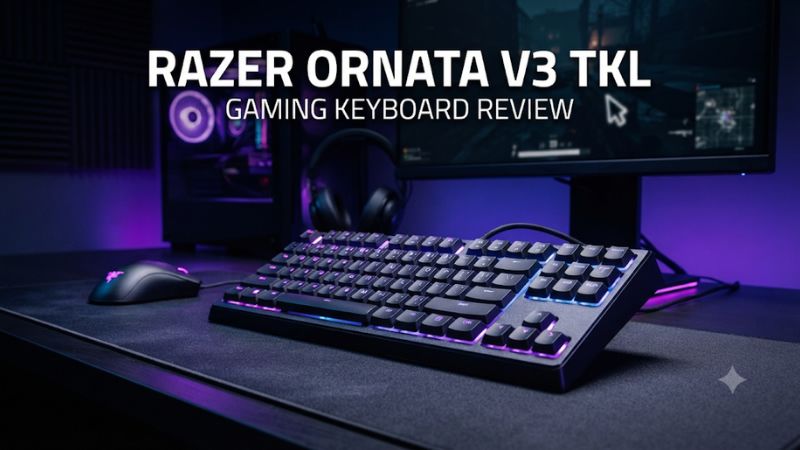
The Ornata V3 TKL suits a buyer who wants a compact wired board for both typing and games. It keeps the arrow keys, navigation cluster, and function row, and removes the number pad so the mouse can sit closer. The front edge and keys are relatively low, and the included magnetic wrist rest gives you a second way to set up the desk.
Razer’s Mecha-Membrane design uses membrane-based input with a noticeable click. The sound and feedback are purchase criteria on their own.
Try a few ordinary presses if possible, especially if you normally use silent laptop keys or deeper mechanical switches. The appeal comes from liking the click and low profile together.
Buy it when those features are available at a price you consider competitive with other wired TKL boards. You get media controls and a basic set of RGB options as part of a straightforward setup. Neither a bright effect nor the word gaming on the box is a reason to buy if you dislike the way its keys sound.
Skip it if you want quiet operation or a modding platform
This is a better fit for someone who plans to use the keyboard largely as supplied. The hybrid action is a different design from individual standard mechanical switches with hot-swap sockets. A shopper who wants to try different switch weights or replace switches from an ordinary parts bin should choose a keyboard built for that purpose.
An audible click can also be unwelcome in a shared room. If you have calls or recordings every day, check the sound from the microphone’s position.
A low-profile case can look like an office keyboard and still produce distracting key noise. In that setting, compare with a genuinely quiet typing option.
The TKL is also a distinct product from the full-size Ornata V3 and the Ornata V3 X. Confirm the exact layout, part number, and included rest from the listing. Their keyboards can look similar, and switch behavior, lighting, and the presence of a number pad can differ.
| Feature | Razer Ornata V3 Tenkeyless |
|---|---|
| Model family | RZ03-0488x |
| Layout | TKL with an arrow cluster and function row |
| Switch feel | Clicky Razer Mecha-Membrane |
| Connection | Wired USB |
| Wrist rest | Included magnetic soft-touch rest |
| Media control | Dedicated backlit buttons |
| Lighting | Chroma RGB in zones; Razer’s TKL feature page lists eight |
| Intended switch service | Stock hybrid design rather than user hot-swap |
How do the Mecha-Membrane keys feel?
Expect a click and a membrane-style response
The hybrid design gives you a click without using ordinary contact switches that you can pull from individual sockets. Use the sound and physical feedback to judge whether it feels right. Some people value a clear audible indication during fast taps, while others prefer feedback they can feel without hearing it in the room.
Try pressing at normal speed with a relaxed hand. Compare individual letters and ordinary punctuation, then test Space, Shift, and Backspace.
A long cap with stabilizers may sound different from a letter. A sticking return or a large sound change on one side of a key is a reason to inspect the specific unit.
If you are moving from a traditional mechanical board, you may notice a different force curve near the bottom. If you come from a laptop, the desktop spacing and click may be the bigger changes. Make a judgment after editing a normal page and playing long enough for your hands to settle at their usual positions.
Compare it in the room where it will be used
Start with a short text sample at your normal typing speed. Record from where your microphone usually sits if keyboard noise matters.
Try the same sample with voice processing off and again with the software you use in calls. Compare the recording to the sound in the room because they answer different practical questions.
If you mostly play alone and like the feedback, the click can be a positive part of the board. If you work beside someone, consider what it sounds like during a longer session. A keyboard that sounds fine during two isolated taps can be distracting when used continuously in a quiet room.
A desk mat can alter the way the case sounds against a hard surface. It has limited influence on the click each switch makes. If the click itself is what bothers you, choosing a quieter switch design is more direct than expecting a desk accessory to change it.
Separate the low front edge from the wrist rest
Set the board flat and try typing without the rest first. Then attach it and compare the angle as you reach the number row and arrows. The useful question is whether the support lets you keep your hands in a comfortable position while moving easily to the keys you use.
The magnetic rest adds depth in front of the board. Check that it does not push you farther back from the mouse or block the edge of your mat. It is convenient to remove when you want more desk room and attach when it works for a longer typing session.
If the rest changes how your hands move in a game, test a full round each way. Once you find an approach you like, keep that position as your baseline. It is easier to judge the stock board when your seat, hands, and accessories are the same in each comparison.
How does it work as a gaming keyboard?
Use the dedicated keys to your advantage
The TKL keeps dedicated arrows and function keys, which matters if you use them for game menus, editing, or key assignments. It offers more mouse space than a typical full-size board without putting those inputs on a 60% layer. Set the left side where your movement hand falls and check the right edge during your largest mouse sweep.
Wired USB makes setup direct and avoids charging. Verify a stable port and keep the cable clear of your mouse area.
If you use a dock or an accessory to switch hosts, compare directly first. If a fault appears only through the dock, you have a better starting point than blaming the key action.
The media keys can save a trip into the operating system during a match. Try the volume and playback controls with the applications you use. Check whether you can find them by touch and whether they affect the intended or currently active media source.
Test the exact combinations your games require
Hold two movement keys, add a modifier, and use another action such as jump. Do this in a simple key-event display if available and then in the actual game.
Repeat in several directions and with the opposite-side modifier if you use it. Passing one chord is useful evidence for that combination only.
Testing the exact TKL matters here. An independent review of the full-size Ornata V3 belongs to a different model.
It should not be turned into a numerical rollover or latency claim for the TKL. If a store gives a broad anti-ghosting description, verify the key combinations that actually matter for your play.
If an action fails, check the game’s binding and test every key separately. Then repeat the same combination with a standard keyboard profile. A problem that only happens when several specific keys are held is different from a key that never sends an input or one that is bound to the wrong command.
Keep performance expectations aligned with the design
Choose it for everyday digital input and the feel you prefer. It is a conventional fixed-response setup rather than an analog keyboard with custom actuation distances or Rapid Trigger. For a player who wants those functions, a separate magnetic or analog optical model offers a different feature set.
If you mainly play games that use standard taps and holds, a dependable key layout may be more useful than extra tuning. Check that the standard board behaves correctly in your usual rhythm or movement patterns. Do not infer a precise speed or threshold from the loudness of the click.
Test both presses and releases. If a game feels slow, verify the game settings and hardware connection before changing keyboard profiles. A short practice drill with the same character or action on both keyboards helps identify whether the difference is consistent.
What should you expect from RGB and Synapse?
Set a simple zone effect first
Razer’s product feature section advertises eight Chroma RGB zones for the Ornata V3 Tenkeyless. Zone lighting controls groups of keys rather than giving every key an independent lighting unit you can assign. If one retailer lists a different number, verify it against the exact model or its device page before paying for a particular lighting layout.
Razer’s TKL FAQ lists Breathing, Spectrum Cycling, Static, and Wave. Use a static color as the first test and adjust brightness to match your room.
Check how clearly you can read the cluster you use most at night. If the main reason for the purchase is individually highlighted movement keys, a per-key board will usually fit that goal better.
Choose whatever effect makes sense when the board is in use. A visible wave or broad band of color can be enough if you want ambient lighting. A utility that displays color changes in a panel can still offer fewer device features than other Chroma keyboards that use independent LEDs.
Check which settings need a supported app
Consult Razer’s current support list for the exact TKL before using Synapse for assignments or lighting. Start with a basic effect change or other supported setting. If the device has no tile, verify support and the direct USB connection before expecting a particular software feature.
Quit the application and inspect what the keyboard does then. The software preview and the board’s behavior on another computer can differ. If a setting matters at work or on a secondary PC, verify it on that host rather than assuming a lighting profile travels with the board.
If Windows or another RGB utility changes a color after login, identify the controller by trying one at a time. This is a separate issue from pressing a key and receiving the wrong input. A stable normal keyboard connection should still be the first baseline when looking at either symptom.
Who is most likely to like the Ornata V3 TKL?
A mixed work and gaming desk can use its familiar keys
If your work depends on arrows or function keys and your games need mouse room, the TKL layout gives you a straightforward compromise. Put a plain document and a typical game side by side as tests. Run your usual shortcuts and see which keys remain easy to reach after removing the number pad from the desk.
The same layout can help if you are moving from an office keyboard but dislike stepping down to 60%. You can use the navigation cluster directly while gaming and typing.
A separate number pad makes sense only if you have somewhere to keep it and regularly want to move it out of the way. Verify the actual space you gain before choosing that arrangement.
If you use several work machines, check their USB access and software availability. The basic wired role is easy to understand.
Custom effects or assignments can depend on the host and supported software. Keep a simple initial setup so you can judge what the hardware does when you are away from your own computer.
A quiet shared room deserves a real noise test
Listen for the click with your hands at normal speed, then ask someone else who uses the room where it is most noticeable. Make a short recording at your usual voice position if calls matter. The sound transmitted to a remote teammate can be different from the action you hear at the desk.
If most of the sound comes from striking the bottom hard, try a lighter press as an experiment. If the distinctive click remains the issue, compare another switch system.
A wrist rest or desk mat can change how your hands and case contact the desk. Neither changes the switch mechanism itself.
A user who likes audible confirmation may see the same feature as a benefit. This is a place where personal preference genuinely decides the purchase. An attractively priced keyboard becomes less attractive if you plan to suppress its normal sound every time you open a microphone.
A limited budget changes the right comparison
Compare the Ornata with the complete wired keyboards you could buy at a similar local price. Determine whether an included rest and dedicated media keys would otherwise require a separate accessory or a compromise.
If you mainly want a simple wired board, a cheaper membrane TKL may cover the layout. If you want to modify switches, a hot-swap mechanical board can be more useful over time.
Ask which features you can verify before paying. The feel of the board and the keys you use every day are easiest to judge.
The stock RGB and included rest matter once you have confirmed those basics. If there is only a small price difference between two options, prioritize the click and layout you will still want after a week.
What should you verify about the case, lighting, and support?
Check the keycap finish and included parts
Look at the cap surface under your desk light. Razer advertises coated keycaps on the Ornata V3 TKL.
The useful question is whether the texture and legends are easy to read and comfortable for you. On a used unit, look at heavily used keys first because they can show finish changes sooner than surrounding caps.
Check that the rest attaches cleanly and lies flat on your desk. If the keyboard moves when you shift a hand onto the rest, compare placement on a stable surface. If you only use the rest for typing, verify that it is easy to remove without pulling the USB cable or shifting the board against the mousepad.
Inspect the supplied cable exit and leave enough space behind it for the path you need. A wired board can still be inconvenient if the cable has to cross your mouse area or reach a distant tower. A model that fits beside the mouse should also leave a practical way to connect it.
Verify the selected SKU before comparing lighting counts
Use the model identifier and listing together when you shop. The family comparison includes both full-size and TKL models, and the published lighting discussion can look different when a retailer merges them.
Confirm the TKL’s advertised zones and expect the lights to change in groups. A key’s legend and surrounding area can still look different at different angles.
Check one standard color at the brightness you will use. If your priorities include distinguishing individual ability keys in the dark, try to configure the exact selection before treating a broad Chroma claim as enough. If all you want is a gentle glow or a color to match the rest of the desk, the available effects can do that job.
What should you test before deciding it is good value?
Run a simple first-session checklist
- Check the full name. Confirm Ornata V3 Tenkeyless, your preferred regional layout, and the included rest.
- Listen to normal typing. Compare an ordinary paragraph and fast game taps from your seat and microphone position.
- Check game chords. Hold the directions and modifiers relevant to your titles and verify that the expected inputs work together.
- Check the controls. Try the media buttons and a known lighting effect after reconnecting the keyboard.
- Check desk fit. Test mouse movement with and without the attached rest. Use the normal seat and mat.
If you are comparing it with a more expensive TKL, start with the one feature you need most. It might be less noise, removable switches, per-key RGB, or wireless use. If you only want a wired keyboard with a low feel and the Ornata fits that need, compare the actual prices for the variants you can buy.
Give your typical games and writing tasks an equal chance to reveal issues. A short demonstration in a bright store can make useful controls obvious and hide how loud the click is in a quiet home. Test the ordinary use that accounts for most of the week.
Conclusion
The Razer Ornata V3 TKL is a sensible choice for a slim wired layout, an included magnetic rest, and a clicky hybrid feel you already enjoy. Its zone lighting and fixed switch design are limits to consider. Try the actual noise and key combinations before buying, and choose another board if quieter typing, per-key lighting, or removable switches matters more.