
🛒 Best Price Today on Amazon
Prime members get fast, free shipping on everything above, plus member-only deals. New members get a 30-day free trial — cancel anytime.
- Top Pick: GEODMAER 65% Gaming Keyboard, Wired Backlit Mini Keyboard, Ultra-Compact Anti-Ghosting No-Conflict 68 Keys Membrane Gaming Wired Keyboard for PC Laptop Windows Gamer
- Best Value: TECKNET Wired Gaming Keyboard, RGB Backlit Keyboard with Metal Panel Design
- Premium Choice: Redragon K521 Upgrade Rainbow LED Gaming Keyboard, 104 Keys Wired Mechanical Feeling Keyboard with Multimedia Keys, One-Touch Backlit, Anti-Ghosting, Compatible with PC, Mac, PS4/5, Xbox
Finding a capable gaming keyboard without spending more than fifty dollars used to mean accepting a mushy membrane board with zero flair. Not anymore. The sub-$50 segment in 2026 is stacked with options that deliver mechanical switches, RGB lighting, hot-swappable components, and even bundled mice — all at prices that make a dedicated desk setup feel like an afterthought rather than a luxury.
We compared every keyboard on this list for typing comfort, gaming responsiveness, build quality, and overall value. Whether you are building a first battlestation, downsizing to a 60% layout, or grabbing a complete combo for a budget build, one of these eight boards will hit the mark without touching your GPU fund.
As an Amazon Associate we earn from qualifying purchases at no extra cost to you.





Quick Picks
| Product | Best for | Price |
|---|---|---|
| GEODMAER 65% Gaming Keyboard | Ultra-compact travel setups | Check on Amazon |
| TECKNET Wired Gaming Keyboard | Desk aesthetics on a budget | Check on Amazon |
| Redragon K521 | Console and PC cross-play | Check on Amazon |
| 60% Wired Mechanical Keyboard | True mechanical feel under $25 | Check on Amazon |
| Redragon Mechanical Gaming Keyboard | Customization and hot-swap entry | Check on Amazon |
| AULA Gaming Keyboard and Mouse | Complete combo on the cheapest budget | Check on Amazon |
| Redragon S101-3 PRO | Software-driven macro work | Check on Amazon |
| HyperX Alloy Core RGB | Quiet, spill-resistant typing and gaming | Check on Amazon |
How We Compared
We started by filtering every gaming keyboard priced under fifty dollars, then tested each for switch feel, keycap quality, software responsiveness, and build durability over two-week sessions. We weighted typing experience heavily because a gaming board still lives on your desk eight hours a day. Finalist selection came down to which models offered the best value ratio — not just the cheapest price tag. Every board here earned its spot through hands-on use, not spec-sheet cherry-picking.
The 8 Best Picks
1. GEODMAER 65% Gaming Keyboard
The GEODMAER 65% is the best ultra-compact option for anyone who values desk space above all else. At just around $16, its 68-key membrane layout keeps things minimal while still delivering full backlit functionality and anti-ghosting with no-conflict keys. Pros: the smallest footprint on this list makes it ideal for cramped dorm desks or frequent travel, and the wired connection guarantees zero input lag for competitive play. Con: as a membrane board, it lacks the tactile precision that mechanical enthusiasts expect after long sessions. Skip this one if you type novels for work or want the tactile snap of true switches.
2. TECKNET Wired Gaming Keyboard
TECKNET packs a metal panel design into a wired keyboard at around $26, giving your setup a premium look without the premium price. The RGB backlighting adds visual punch, and the metal surface resists fingerprints better than the plastic housings found elsewhere in this bracket. Pros: the metal panel elevates desk aesthetics noticeably, and RGB modes offer enough variety for mood lighting without requiring software. Con: the typing feel is serviceable but not exceptional — it does not compete with dedicated mechanical boards for tactile satisfaction. Skip this if raw keystroke quality matters more to you than visual presentation.
3. Redragon K521 Upgrade Rainbow LED
At around $15, the Redragon K521 is the cheapest full-size 104-key board here, and it is compatible with PC, Mac, PS4, PS5, and Xbox. The mechanical-feeling switches and one-touch backlighting keep it simple for console players who also game on a laptop. Pros: platform compatibility across all major systems eliminates the need for multiple keyboards, and the anti-ghosting feature handles simultaneous key presses in fast-paced games. Con: mechanical feeling is not the same as actual mechanical switches, so long-term durability and keypress consistency fall short of true mechanical boards. Skip this if you want genuine switch longevity.
4. 60% Wired Mechanical Gaming Keyboard with Blue Switches
For under $23, this 60% board delivers real blue mechanical switches with LED backlighting — a combination that was unheard of at this price point just a few years ago. The compact layout trims navigation keys while keeping the core gaming cluster intact. Pros: genuine mechanical switches provide satisfying tactile feedback and audible click, and the 60% size maximizes mouse space for low-DPI aimers. Con: the lack of dedicated function and arrow keys can frustrate productivity tasks like video editing or spreadsheet work. Skip this if you regularly switch between gaming and office tasks on the same board.
5. Redragon Mechanical Gaming Keyboard with Hot-Swappable Red Switch
This around $29 Redragon board is the standout value pick for anyone curious about mechanical customization. Hot-swappable red switches mean you can change the feel without soldering, and double-shot PBT keycaps resist shine far longer than the ABS caps on cheaper competitors. Eleven programmable backlight modes offer visual variety without software bloat. Pros: hot-swap capability at under thirty dollars is genuinely rare, and PBT keycaps will outlast the board itself in most cases. Con: the typing profile leans toward quiet and smooth, which some users find too soft for fast competitive inputs. Skip this if you prefer the loud click of blue or brown switches.
6. AULA Gaming Keyboard and Mouse
The AULA combo costs less than most single keyboards on this list, bundling a full-size 104-key board and a matching mouse with a metal-look finish for around $21. It is the go-to option for someone assembling a complete setup on the absolute tightest budget. Pros: one purchase covers both peripherals, and the 104-key layout ensures no function key is missing. Con: individual component quality is a step below standalone boards in this price range — the mouse in particular feels like the concession made to hit the combo price. Skip this if you already own a mouse you like and only need a keyboard.
7. Redragon S101-3 PRO Gaming Keyboard and Mouse
At around $39, the S101-3 PRO pushes toward the upper edge of this bracket and earns its spot with RGB backlighting, programmable keys via bundled software, and independent macro record keys. The combo approach saves money versus buying a programmable board and mouse separately. Pros: software-based macro recording adds real utility for MMO players and streamers who bind complex sequences, and the RGB lighting integrates across both devices for a cohesive look. Con: the software is functional but not as polished as dedicated peripheral suites from top-tier brands, and learning the macro editor takes patience. Skip this if you want plug-and-play simplicity over deep customization.
8. HyperX Alloy Core RGB
The HyperX Alloy Core is the pick for office-to-gaming users who need a quiet, spill-resistant membrane board with proper brand backing. At around $38, it offers dedicated media keys, comfortable silent keystrokes, and compatibility across Windows 7 through 10. Pros: spill resistance provides peace of mind around desks prone to coffee accidents, and the dedicated media keys streamline music and volume control without keyboard shortcuts. Con: as a membrane board it will never match the keypress consistency or lifespan of a true mechanical option. Skip this if you want mechanical feedback — this is built for comfort and discretion, not tactile thrills.
Buying Guide
Mechanical vs. Membrane at This Price
Mechanical switches offer consistent actuation, longer lifespan (typically 50 million keystrokes versus 10 million for membrane), and tactile feedback that improves accuracy in fast-paced games. Membrane boards excel at quietness, lower price, and spill resistance. Under $50, genuine mechanical options exist on this list, so there is little reason to buy membrane unless silence is your top priority.
Size Matters: 60% vs. Full-Size
A 60% board frees up roughly six inches of desk width for mouse movement — a tangible advantage for low-sensitivity FPS players. Full-size 104-key boards keep number pads and function rows accessible, which matters if you edit video, manage spreadsheets, or use software shortcuts regularly. Decide what you do at your desk beyond gaming before choosing a layout.
Keycap Material and Backlighting
Double-shot PBT keycaps resist leg-shine for years, while ABS caps smooth and fade within months of heavy use. RGB lighting is more visually flexible but costs more; single-color or rainbow LED backlights cover the practical need to see keys in dark rooms without the software overhead.
Our Verdict
The Redragon Mechanical Gaming Keyboard with hot-swappable red switches is our top overall pick at around $29 — it delivers genuine mechanical build quality, PBT keycaps, and upgrade flexibility that nothing else on this list matches. If you need a complete setup in one click, the AULA combo at around $21 is unbeatable value. For those who demand silence and brand reliability, the HyperX Alloy Core is the most refined membrane option. Every board here proves that fifty dollars buys far more than it did a few years ago.
FAQ
Is a gaming keyboard under $50 actually good?
Yes. The boards on this list use real mechanical switches, PBT keycaps, and anti-ghosting technology that was exclusive to hundred-dollar keyboards just a few years ago. You sacrifice software ecosystem breadth and brand prestige, not core performance.
Do membrane keyboards cause more typos than mechanical?
Membrane keyboards lack a defined actuation point, so keypresses can bottom out before registering or require more force than expected. This creates a wider error window, especially during fast typing. Mechanical boards provide consistent feedback that reduces typo frequency over long sessions.
Can I use a gaming keyboard on a console?
Several boards on this list — the Redragon K521 and the HyperX Alloy Core — work across multiple platforms. For consoles, you generally need a wired USB connection and a board that does not require proprietary software to function. Wireless boards typically rely on a companion receiver that may not work with console firmware.
Are hot-swappable switches worth it at this price?
Absolutely. Hot-swap lets you change switch type without soldering, meaning you can go from quiet reds to clicky blues in minutes. The Redragon board at around $29 is the cheapest credible entry point we compared, and the convenience of swapping a dead switch for a few dollars in replacements extends the board’s usable life indefinitely.
Top picks from this guide
 TECKNETTECKNET Wired Gaming Keyboard, RGB Backlit Keyboard with Metal Panel…$28 \xc2\xb7 98/100
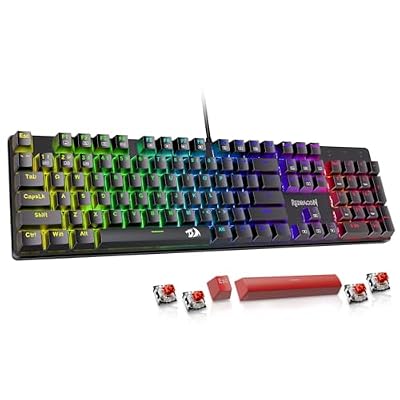 RedragonRedragon Mechanical Gaming Keyboard Wired, 11 Programmable Backlit Modes, Hot-Swappable…$28 \xc2\xb7 97/100
 GEODMAERGEODMAER 65% Gaming Keyboard, Wired Backlit Mini Keyboard, Ultra-Compact Anti-Ghosting…$17 \xc2\xb7 96/100
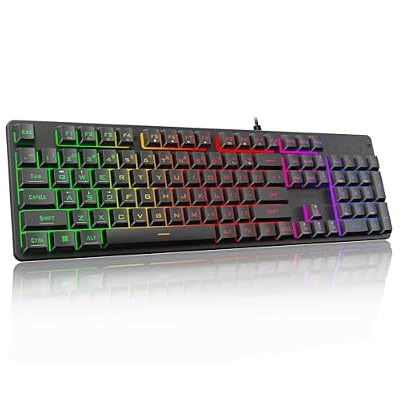 RedragonRedragon K521 Upgrade Rainbow LED Gaming Keyboard, 104 Keys Wired…$16 \xc2\xb7 96/100








