
- Top Pick: Sceptre New 22-Inch Gaming Monitor, FHD 1080p, Up to 144Hz, HDMI, DisplayPort, Built-in Speakers, Machine Black (E225W-FW144 Series, 2026)
- Best Value: Samsung 27" Odyssey G5 (G51F) Series QHD (1440P) Gaming Monitor
- Premium Choice: Sceptre Curved 24-inch Gaming Monitor 1080p R1500 98% sRGB HDMI x2 VGA Build-in Speakers, VESA Wall Mount Machine Black (C248W-1920RN Series)
Shopping for a gaming monitor on a budget usually means wading through vague spec sheets, inflated “gaming” branding, and panels that look great in marketing photos but fall apart under fast-paced action. Refresh rate, response time, and panel type all interact in ways that aren’t obvious until you’re mid-match and noticing ghosting or tearing you didn’t expect.
This guide breaks down six of the best value gaming monitors available right now, covering everything from 144Hz 1080p budget picks to a QHD upgrade for players who want sharper detail without paying flagship prices. We’ll help you match the right panel to your GPU, your games, and your desk space.



As an Amazon Associate we earn from qualifying purchases at no extra cost to you.







🎮 Get More From Your Setup — Free
Prime Gaming gives you free PC games every month, in-game loot, and a free Twitch channel sub — plus fast free shipping on all the gear above. New members get a 30-day free trial.
Watch: Best Bargain Gaming Monitors — Video Review
How to Choose a Bargain Gaming Monitors (2026)
- Refresh Rate: 144Hz is the sweet spot for budget gaming; 165Hz and higher help competitive shooters feel noticeably smoother if your GPU can push the frames.
- Resolution: 1080p keeps frame rates high on modest hardware, while 1440p (QHD) delivers sharper visuals if you have a mid-range or better graphics card.
- Panel Type & Sync Tech: IPS panels offer better color and viewing angles than VA; look for FreeSync or G-Sync Compatible support to eliminate screen tearing.
- Response Time: A 1ms (MPRT) rating minimizes motion blur and ghosting in fast-paced games, which matters more than raw refresh rate for some players.
- Connectivity: Confirm your monitor has enough HDMI and DisplayPort inputs for your console, PC, and any future upgrades, plus VESA mount compatibility if you want an arm.
The Best Bargain Gaming Monitors (2026)s Reviewed
Sceptre 22-Inch 144Hz (E225W-FW144)
The cheapest true entry point into 144Hz gaming here, this 22-inch Sceptre trades size for speed and still includes built-in speakers, a rarity at this price. It’s an easy recommendation for a secondary rig or a first competitive-gaming upgrade.
Samsung 27″ Odyssey G5 (G51F)
Stepping up to QHD on a 27-inch screen makes a real visual difference, and the Odyssey G5 delivers sharper detail without sacrificing smoothness. If your GPU can handle 1440p, this is the pick that ages best.
Sceptre Curved 24-inch (C248W-1920RN)
The curved panel and 98% sRGB coverage make this monitor stand out for immersion and color accuracy well beyond its price point. Dual HDMI plus VGA and built-in speakers round it out as a genuinely flexible budget option.
Acer 27″ KB272 IPS
With a 120Hz IPS panel, FreeSync compatibility, and 99% sRGB coverage, the Acer KB272 is built for buyers who want color accuracy for creative work alongside smooth gaming. The 1ms VRB response time keeps fast motion crisp.
LG 24G411A-B UltraGear
LG’s UltraGear brings 144Hz overclockable refresh, 1ms motion blur reduction, and both G-Sync Compatible and FreeSync support to a compact 24-inch IPS panel. HDR10 support is a nice bonus that’s uncommon in this price tier.
Related Guides
Frequently Asked Questions
Is 1080p still good enough for gaming in 2026?
Yes, especially at 24 inches or smaller, where pixel density remains sharp. 1080p also makes high refresh rates like 144Hz or 165Hz much easier to hit consistently on budget and mid-range GPUs.
Do I need FreeSync or G-Sync on a budget monitor?
It’s highly recommended. Adaptive sync eliminates screen tearing and stuttering, and most modern budget monitors support at least one standard at no extra cost.
Is a curved monitor better for gaming?
Curved panels can add immersion, particularly in single-player and open-world games, but they’re a personal preference rather than a performance upgrade. Flat panels remain more common for competitive, precision-based titles.
Should I prioritize resolution or refresh rate on a budget?
For competitive and fast-paced games, prioritize refresh rate and response time. For visually rich single-player games, a step up in resolution like QHD often provides a more noticeable improvement.
Final Thoughts
For most budget-conscious gamers, the LG 24G411A-B UltraGear offers the best all-around mix of speed, sync support, and image quality, while the Samsung Odyssey G5 is the top pick if you want to move up to QHD. Buyers who just need reliable 144Hz gaming at the lowest possible cost should look to the Sceptre 22-Inch, which remains one of the strongest value options on this list.
Top picks from this guide
SceptreSceptre New 22-Inch Gaming Monitor, FHD 1080p, Up to 144Hz,…$65 \xc2\xb7 99/100 SamsungSamsung 27" Odyssey G5 (G51F) Series QHD (1440P) Gaming Monitor…$150 \xc2\xb7 98/100
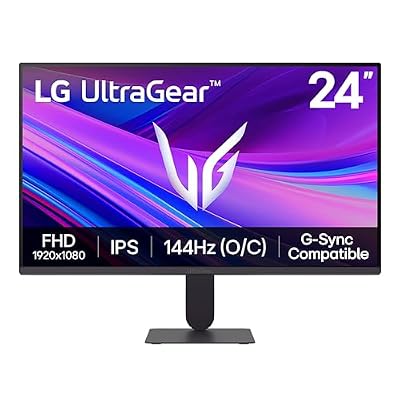 LGLG 24G411A-B 24-inch Ultragear Full HD (1920 x 1080) IPS…$100 \xc2\xb7 98/100
 ASUSASUS ROG XG27AQDMGR 27 Inch 1440p 240Hz Glossy OLED HDR…$384 \xc2\xb7 98/100








