🛒 Best Price Today on Amazon
Prime members get fast, free shipping on everything above, plus member-only deals. New members get a 30-day free trial — cancel anytime.
- Best 1440p Gaming Monitor Black Friday Deals: What to Target
- 1440p Gaming Monitor Comparison Table
- Budget 1440p Gaming Monitors
- Mid-Range 1440p Gaming Monitors
- Premium 1440p Gaming Monitors
- Match Your GPU to the Monitor
- IPS vs Fast-VA vs OLED at 1440p
- Burn-In Warranty: What to Read Before You Buy
- When to Buy: Early vs Black Friday vs Cyber Monday
- Deal Red Flags
- Pick X If… Decision Table
- Alternatives to Consider
- Console and Mixed Use
- Setup Tips for a New 1440p Monitor
- Frequently Asked Questions
Updated November 2026 – The best 1440p gaming monitor Black Friday deals 2026 are most likely to be a 27-inch ASUS ROG Strix XG27ACS or AOC Q27G3XMN at the budget end, a Samsung Odyssey OLED G6, Alienware AW2726DM or ASUS ROG Strix XG27AQNGV in the middle, and an MSI MPG 271QRX or ASUS ROG Swift OLED PG27AQDP at the top.
The best 1440p gaming monitor Black Friday deals are worth hunting because 27-inch 1440p is where graphics cards, panel technology and sale pricing line up best. It is sharp enough for text and open-world games, light enough on the GPU to hold high refresh rates, and the segment now includes OLED panels that were once limited to flagship budgets. Black Friday 2026 is on Friday 27 November, Thanksgiving is 26 November, and Cyber Monday is 30 November. Live offers change daily, so this guide gives you the spec lines to compare against instead of quoting listings.
Best 1440p Gaming Monitor Black Friday Deals: What to Target
Aim for a 27-inch screen at 2560×1440. At that size the pixel density is comfortable for desktop distance, and it matches the way reviewers such as RTINGS and Display Ninja organise their 1440p and 27-inch roundups. Then choose along three lines: panel type (IPS, fast-VA or OLED), refresh rate (144Hz to 540Hz exist in 2026), and how much of that refresh rate your graphics card can actually use.
A sensible target by tier is a 144Hz to 180Hz fast IPS at the budget tier, a 240Hz to 360Hz OLED or 360Hz IPS at the mid-range tier, and a 360Hz to 540Hz OLED at the premium tier. Anything beyond your frame rate is wasted, so read the GPU pairing table later in this guide before spending extra on refresh rate.
1440p Gaming Monitor Comparison Table
| Model | Tier | Panel | Stated refresh | Best for | Limits |
|---|---|---|---|---|---|
| AOC Q27G3XMN | Budget | 27-inch 1440p, reviewer-praised picture | High refresh | Cheapest credible upgrade | Basic features |
| ASUS ROG Strix XG27ACS | Budget | Fast IPS | 180Hz | Mid-range GPUs | No OLED contrast |
| Alienware AW2726DM | Mid-range | QD-OLED | 240Hz | Entry OLED | Care habits |
| Samsung Odyssey OLED G6 | Mid-range | QD-OLED | 360Hz | Fast-paced shooters | OLED brightness limits |
| ASUS ROG Strix XG27AQNGV | Mid-range | IPS | 360Hz | Bright rooms, long sessions | Grey blacks |
| MSI MPG 271QRX | Premium | QD-OLED | 360Hz | PC Gamer’s top 1440p OLED | Reviewer calls the price steep |
| LG UltraGear 27GS95QE | Mid-range | WOLED | 240Hz | Bright-room OLED | Two-year burn-in cover reported |
| ASUS ROG Swift OLED PG27AQDP | Premium | QD-OLED | 480Hz | Best overall per Tom’s Hardware | Cost |
| ASUS ROG Swift OLED PG27AQWP-W | Premium | OLED | Up to 540Hz per Display Ninja | RTINGS best 1440p tested | Niche refresh rate |
Budget 1440p Gaming Monitors
AOC Q27G3XMN – Best for Budget Picture Quality
27-inch · 2560×1440 · budget tier · RTINGS best budget gaming monitor 2026
RTINGS names it the best budget gaming monitor of 2026 and says its picture beats most budget displays. For a first 1440p upgrade, it is the model to watch during the sale. Compare the stand adjustments and ports against your desk before buying, since budget monitors often trim those.
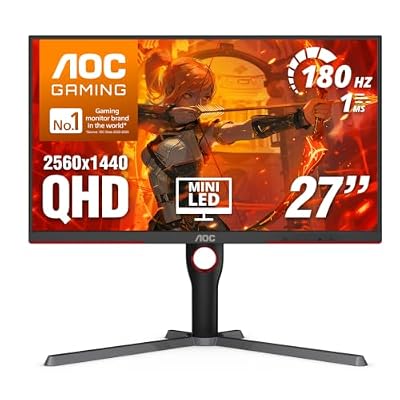
AOC 27 Inch Gaming Monitor QHD 180Hz Mini-LED HDR1000, Q27G3XMN | 3440×1440 Computer Monitor, 0.3ms, HDR400, USB 3.2, DP 1.4, HDMI 2.1, Height Adjustable Stand, Audio Out, VESA Mount
Included for 'Best 1440p Gaming Monitor Black Friday Deals 2026' because the listing lists an explicit depth/thickness, which is the attribute this article compares.
View on AmazonASUS ROG Strix XG27ACS – Best for a Fast IPS Sweet Spot
27-inch · 2560×1440 · 180Hz · Fast IPS
Bottleneck PC calls this fast IPS the sweet spot for most gamers. It pairs naturally with RTX 5060 Ti and RTX 5070 class cards. If your graphics card tops out at moderate frame rates in modern titles, 180Hz covers it without paying for a refresh rate you will not reach.

ASUS ROG XG27ACS 27 Inch 1440p 180Hz USB-C G-SYNC HDR Gaming Monitor | DisplayHDR 400, sRGB 133%, 1ms (GTG), Fast IPS, ELMB Sync, AI Gaming, Free Sync, for PS5 and Xbox
Included for 'Best 1440p Gaming Monitor Black Friday Deals 2026' because the listing lists an explicit depth/thickness, which is the attribute this article compares.
View on AmazonMid-Range 1440p Gaming Monitors
Alienware AW2726DM – Best for Entry-Level OLED
27-inch · 2560×1440 · 240Hz · QD-OLED
Tom’s Hardware names this its best-value gaming monitor, describing it as QHD at 240Hz on a QD-OLED panel. Dell and Alienware are reported to cover burn-in under a three-year warranty on OLED models, but warranty text differs by region, so read the maker page for your own market.
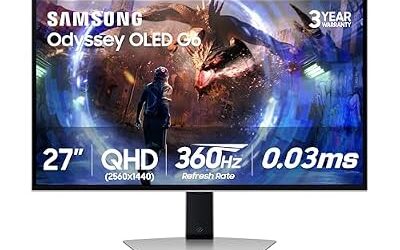
Samsung Odyssey OLED G6 – Best for Fast OLED Motion
27-inch · 2560×1440 · 360Hz · QD-OLED
Monitor Maven lists it as its best-value OLED. At 360Hz it is well matched to competitive shooters on a strong CPU and a graphics card in the RTX 5070 Ti or RX 9070 XT class. Because it appears on many deal trackers, compare its sale listing with the AW2726DM and PG27AQDP spec lines to see where the extra refresh rate stops being worth it.

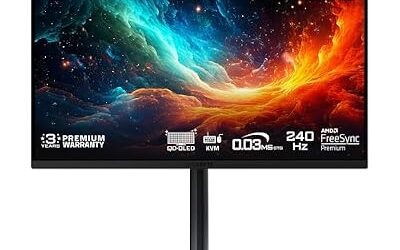
Samsung 27” Odyssey OLED G6 (G60SD) Series Gaming Monitor with QHD & QD-OLED, 360Hz 0.03ms, AMD FreeSync Premium Pro, Anti-Glare, Sleek Design, Cooling System, 3 Year Warranty, LS27DG602SNXZA
Included for 'Best 1440p Gaming Monitor Black Friday Deals 2026' because the listing adds cooling or gel-infused layers, which is the attribute this article compares.
View on AmazonASUS ROG Strix XG27AQNGV – Best for 360Hz IPS Without OLED Worries
27-inch · 2560×1440 · 360Hz · IPS · G-SYNC Pulsar
Display Ninja lists it as its premium 360Hz pick. Choose it if your room is bright, if the screen doubles as a work monitor, or if you prefer not to think about burn-in. The trade-off is lower contrast than OLED in a dark room.
LG UltraGear 27GS95QE – Best for Bright-Room OLED
27-inch · 2560×1440 · 240Hz · WOLED
Monitor Maven picks this 27-inch 1440p WOLED, and notes a two-year burn-in warranty. One reviewer says WOLED copes better with ambient light than QD-OLED, which can look purple-tinted in black areas under room lighting. If you game with the lights on, it deserves a look.

LG 27GS95QE 27-inch Ultragear OLED Gaming Monitor QHD 1440p 240Hz 0.03ms DisplayHDR True Black 400 AMD FreeSync Premium Pro NVIDIA G-Sync HDMI 2.1 DisplayPort Tilt/Height/Swivel Stand Black
Included for 'Best 1440p Gaming Monitor Black Friday Deals 2026' as a representative home product in this roundup; selection reflects the product set returned for this topic.
View on AmazonPremium 1440p Gaming Monitors
MSI MPG 271QRX – Best for 360Hz QD-OLED Colour
27-inch · 2560×1440 · 360Hz · QD-OLED · 0.03ms response (maker-stated per PC Gamer)
PC Gamer names it the best 1440p OLED gaming monitor while calling its launch pricing steep. That is why it is a Black Friday candidate: reviewers like it, and a markdown is the most likely way it becomes good value. MSI is reported to include a three-year warranty that explicitly covers burn-in on its OLED monitors.

msi MPG 271QRX QD-OLED, 27 OLED Gaming Monitor, 2560 x 1440 (QHD), 0.03ms Response time, 360Hz, True Black HDR 400, HDMI, DP Port, USB Type C, Tilt, Height, Black
Included for 'Best 1440p Gaming Monitor Black Friday Deals 2026' as a representative home product in this roundup; selection reflects the product set returned for this topic.
View on AmazonASUS ROG Swift OLED PG27AQDP – Best for the Fastest All-Round 1440p OLED
27-inch · 2560×1440 · 480Hz · QD-OLED
Tom’s Hardware ranks it best overall in its 2026 gaming monitor guide and best OLED. Monitor Maven also picks it as its 480Hz leader. ASUS ROG OLED monitors are reported to carry three years of cover that includes burn-in. At 480Hz your CPU, not the graphics card, usually decides how much of the refresh rate you see.

ASUS ROG PG27AQDP 27 Inch 1440p 480Hz OLED Gaming Monitor | Custom Heatsink, 0.03ms, G-SYNC Compatible, WOLED, DisplayHDR 400, AI Assistant, True 10-bit, 99% DCI-P3, for PS5 and Xbox
Included for 'Best 1440p Gaming Monitor Black Friday Deals 2026' because the listing lists an explicit depth/thickness, which is the attribute this article compares.
View on AmazonASUS ROG Swift OLED PG27AQWP-W – Best for Ultra-High Refresh and White Styling
27-inch · 2560×1440 · up to 540Hz per Display Ninja · OLED
RTINGS names the PG27AQWP-W the best 1440p gaming monitor it has tested. It is the model for players who want the top of the range and a white finish, but 480Hz and 540Hz are esports-level numbers that most single-player gamers will not exploit.

ASUS ROG PG27AQWP-W 27 Inch 1440p 540Hz Tandem OLED Gaming Monitor | Dual Mode FHD 720Hz, TrueBlack Glossy, Neo Proximity Sensor, 0.02ms, G-SYNC Compatible, DisplayPort 2.1, for PS5 and Xbox
Included for 'Best 1440p Gaming Monitor Black Friday Deals 2026' because the listing lists an explicit depth/thickness, which is the attribute this article compares.
View on AmazonMatch Your GPU to the Monitor
| GPU class | Realistic target | Monitor tier to shop |
|---|---|---|
| RTX 5060 / RX 9060 XT class | 100 to 144 frames per second in modern games at high settings | Budget 144Hz to 180Hz IPS |
| RTX 5070 / RX 9070 class | 144 to 200 frames per second, depending on game | Budget to mid-range, 180Hz to 240Hz |
| RTX 5070 Ti / RX 9070 XT class | 200 or more in many titles, higher in esports games | Mid-range 240Hz to 360Hz OLED or IPS |
| RTX 5080 class and up | Very high in esports titles, strong at 1440p everywhere | Premium 360Hz to 480Hz OLED |
Frame rates vary a lot by game and settings, so treat this table as a starting point. A competitive shooter at low settings can run far above these numbers, while a demanding single-player title with ray tracing may fall below them.
IPS vs Fast-VA vs OLED at 1440p
IPS: reliable colour, good viewing angles, no burn-in. Blacks look grey in dark rooms. Fast IPS models respond well enough for most players.
Fast-VA: better contrast than IPS, often at a lower cost. Check independent response-time measurements because dark-colour smearing is the common weakness.
OLED: near-instant pixel response, true blacks and excellent HDR contrast. Downsides include lower full-screen brightness, text rendering that can look slightly softer on some pixel layouts, and burn-in risk that makers offset with warranties and pixel-refresh routines.
For text clarity, 27 inches at 1440p is a good compromise. Reviewers sometimes note slight colour fringing around text on OLED monitors with non-standard subpixel layouts, and Windows ClearType tuning can help. If you spend most of your day in documents, an IPS may serve you better than an OLED.
Burn-In Warranty: What to Read Before You Buy
TFTCentral notes that most leading OLED monitor makers now include burn-in in the warranty, usually for three years, though not universally. Dell/Alienware and MSI are reported to cover it explicitly, LG UltraGear is reported at two years, and ASUS ROG OLED monitors are reported at three. One June 2026 roundup describes a different ASUS model as relying on OLED Care+ with no stated burn-in term, while another source lists three-year cover, so sources can conflict. Read the warranty page for your exact model and region, and confirm whether open-box or imported units are covered.
When to Buy: Early vs Black Friday vs Cyber Monday
- Early offers (early to mid November): Worth taking only if the price is already at the lowest point you have seen for that model.
- Black Friday (27 November): Strongest range of doorbuster monitors and bundles, though the best offers can sell out quickly.
- Cyber Monday (30 November): A second pass, and sometimes the better chance for computer accessories and monitors that did not clear on Friday.
- Late November and December: Previous-generation models often continue to drop as new releases approach.
Deal Red Flags
- A claimed original price that does not match the model’s long-run selling history. Look at several months of price history rather than the percentage shown.
- Last-generation clearance presented as new. A previous-generation monitor is fine if it is labelled and priced as such.
- A bundle that includes accessories you do not need and hides a thin monitor discount.
- A listing that quotes the maximum refresh rate without saying it is for a lower resolution mode.
- Missing panel details: IPS, VA, QD-OLED and WOLED are very different products.
- A restrictive return window or third-party seller with unclear warranty terms.
- HDR badges with no local dimming or OLED behind them.
Pick X If… Decision Table
| Pick this | If you |
|---|---|
| AOC Q27G3XMN | Want the lowest spend on a good 1440p picture |
| ASUS ROG Strix XG27ACS | Want a safe, fast IPS for a mid-range GPU |
| Alienware AW2726DM | Want OLED at a mid-range tier |
| Samsung Odyssey OLED G6 | Want 360Hz OLED for shooters |
| ASUS ROG Strix XG27AQNGV | Want 360Hz without OLED |
| LG UltraGear 27GS95QE | Play in a bright room and want OLED |
| MSI MPG 271QRX or ASUS ROG Swift OLED PG27AQDP | Want the best 1440p OLED and have a high-end GPU |
Alternatives to Consider
- Philips 27M2N8500: Display Ninja lists it as a 27-inch QD-OLED at 1440p and 360Hz.
- Acer Nitro XV273U F5: Tom’s Hardware names it its best 500Hz monitor, for competitive players on fast hardware.
- Dual-mode 4K monitors: If you are building an RTX 5080 class system, a 4K 240Hz screen with a 1080p high-refresh mode may suit you better than staying at 1440p.
Console and Mixed Use
Consoles output at most 4K at 120Hz, so a 1440p monitor receives a scaled image from them. If a console is your main device, a 4K monitor or TV is often the better fit. If a PC is your main device and the console is occasional, a 27-inch 1440p monitor with an HDMI 2.1 port is fine. Check the port specification in the maker’s manual, because some monitors list HDMI 2.1 on only one port.
Setup Tips for a New 1440p Monitor
Use the DisplayPort cable in the box for the highest refresh rates and enable the refresh rate in Windows display settings, since the default can be 60Hz. Turn on adaptive sync (G-SYNC Compatible or FreeSync) in the graphics driver. For OLED, follow the maker’s guidance on pixel refresh and screen-off timers, and keep static windows from sitting on screen for hours. Consult the monitor manual for the exact menu names, which vary by maker.
Frequently Asked Questions
What is the best 1440p gaming monitor to buy on Black Friday 2026?
It depends on tier. A 27-inch ASUS ROG Strix XG27ACS or AOC Q27G3XMN suits budgets, the Samsung Odyssey OLED G6 or Alienware AW2726DM suits mid-range OLED buyers, and the ASUS ROG Swift OLED PG27AQDP is Tom’s Hardware’s best overall.
Is 1440p still worth it with an RTX 5070 or RX 9070?
Yes. 1440p is the natural resolution for that class of card, balancing image sharpness with high frame rates. A 144Hz to 240Hz monitor typically suits it better than a 4K panel.
Should I buy an IPS or OLED 1440p monitor?
Buy OLED for contrast and motion clarity in dim rooms, and IPS for bright rooms, mixed work use and no burn-in concerns. Fast IPS monitors have also become strong value in recent years.
Is 360Hz or higher worth it at 1440p?
Only for competitive players whose system can hold frame rates close to the refresh rate. For most gamers 144Hz to 240Hz is plenty, and spending less on refresh rate leaves room for a better panel.
Do 1440p OLED monitors have burn-in cover?
Many do. TFTCentral reports that most leading makers now cover burn-in, typically for three years, with LG reported at two on at least one model. Read the exact warranty text for your model and region.
When will 1440p gaming monitors be cheapest?
Many shoppers see the lowest prices from Black Friday to Cyber Monday, though earlier offers and previous-generation clearance can compete. Check a model’s price history across several months before deciding.