🛒 Best Price Today on Amazon
Prime members get fast, free shipping on everything above, plus member-only deals. New members get a 30-day free trial — cancel anytime.
- Quick Answer: Which Budget Gaming Monitor Should You Target?
- Budget Gaming Monitor Comparison Table
- Best Budget Gaming Monitor Under 200 for Black Friday: What to Target
- What to Compromise On at This Price
- 1080p vs 1440p: Which Resolution at This Price?
- IPS vs VA at Budget Prices
- Budget 1440p Picks
- Budget 1080p Picks
- Pick X If… Decision Table
- Compatibility Notes
- When to Buy: Early vs Black Friday vs Cyber Monday
- Deal Red Flags
- Setup Tips After You Buy
- Alternatives Worth Knowing
- Frequently Asked Questions
Updated November 2026 – For the best budget gaming monitor under 200 for Black Friday, a 27-inch 1440p 180Hz IPS such as the ASUS TUF VG27AQ3A or the KTC H27T22C-3 suits most buyers, while the Dell SE2426HGS is the pick for competitive 1080p play at 240Hz and the AOC Q27G40XMN is the stretch target if you want mini-LED contrast.
The budget tier has changed. Guru Gamer notes that a 27-inch 1440p high-refresh monitor now costs about what a basic 1080p 144Hz screen used to, so most buyers should aim for 1440p unless their graphics card is weak or they only play competitive shooters. This guide explains what a budget gaming monitor can and cannot do, which models reviewers name, what to compromise on, and how to spot a real markdown. The under-200 tier is a budget band, not a promise, and deals change daily, so compare any live listing against the spec lines below.
Quick Answer: Which Budget Gaming Monitor Should You Target?
- Best all-rounder: the ASUS TUF VG27AQ3A, a 27-inch Fast IPS 1440p 180Hz panel that Guru Gamer calls the safest 1440p choice.
- Cheapest 1440p: the KTC H27T22C-3 (and H27T22S), which PC Gamer names the best budget 1440p gaming monitor.
- Best for competitive play: the Dell SE2426HGS, a 24-inch 1080p 240Hz Fast IPS.
- Best for faster 1440p: the AOC Q27G4ZR, a 240Hz IPS.
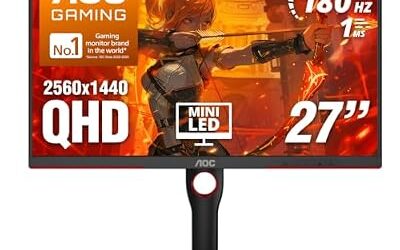
- Stretch pick for HDR contrast: the AOC Q27G40XMN mini-LED VA, which TechSpot picks in its segment.
Budget Gaming Monitor Comparison Table
| Model | Size / resolution | Panel / refresh | Best for | Compromise |
|---|---|---|---|---|
| KTC H27T22C-3 | 27-inch / 1440p | IPS, high refresh | Cheapest 1440p | Basic stand and features |
| ASUS TUF VG27AQ3A | 27-inch / 1440p | Fast IPS, 180Hz | Safe all-rounder | Modest HDR |
| AOC Q27G4ZR | 27-inch / 1440p | IPS, 240Hz | Faster 1440p | Stretches the budget |
| AOC Q27G40XMN | 27-inch / 1440p | Mini-LED VA, 180Hz | HDR contrast | VA smearing, price at the top of the tier |
| Dell SE2426HGS | 24-inch / 1080p | Fast IPS, 240Hz | Competitive shooters | Lower resolution |
| KTC H25X7 | 25-inch / 1080p | IPS, 400Hz | Esports refresh | Needs a strong CPU |
| Lenovo Legion R25f-30 | 25-inch / 1080p | High refresh | Budget 1080p | Basic stand |
Best Budget Gaming Monitor Under 200 for Black Friday: What to Target
Start with resolution and refresh rate. A 27-inch 1440p monitor at 144Hz to 180Hz is the sweet spot for the budget tier because it offers sharper text and detail than 1080p while staying easy to drive on a mid-range graphics card. A 24 or 25-inch 1080p monitor at 240Hz or more suits players who prioritize frame rate in fast shooters and have a modest GPU. Then pick the panel: IPS for color and viewing angles, VA for contrast.
Budget buyers should expect compromises, and knowing them in advance keeps you from paying for features you will not miss. The sections below explain what to give up and what to protect.
What to Compromise On at This Price
- HDR: most budget panels carry HDR labels that do little. Without local dimming or high peak brightness, HDR on a budget IPS rarely looks better than SDR. The exception is a mini-LED model like the AOC Q27G40XMN, which TechSpot reports has 1,152 dimming zones.
- Stand ergonomics: many budget stands tilt only. If you need height adjustment, factor in a VESA monitor arm and check the mount pattern in the manual.
- Built-in speakers: if present they are weak. Use headphones or desktop speakers.
- Color accuracy: expect decent sRGB coverage but not professional accuracy.
- Connectivity: HDMI 2.0 and DisplayPort 1.4 are typical. Budget monitors rarely include HDMI 2.1, which matters only for 4K console gaming.
What not to compromise on: a real refresh rate (144Hz or higher), adaptive sync support (FreeSync or G-Sync compatible), and low response time without heavy overdrive artifacts. These three decide how the monitor feels in games.
1080p vs 1440p: Which Resolution at This Price?
At 24 to 25 inches, 1080p gives about 92 pixels per inch and looks acceptable. At 27 inches, 1080p falls to about 82 pixels per inch and looks soft, whereas 1440p gives about 109. Because 27-inch 1440p monitors now share the budget tier with 1080p models, reviewers such as Guru Gamer point most buyers to 1440p. Choose 1080p only if your graphics card struggles at 1440p, you want the highest frame rate in competitive games, or you prefer a smaller screen.
A 1440p frame has about 1.78 times as many pixels as a 1080p frame, so you need a GPU that can keep frame rates above the monitor’s refresh rate range to benefit. A mid-range card from a recent generation is a reasonable match for 1440p at 144Hz or higher in most games.
IPS vs VA at Budget Prices
IPS panels give wider viewing angles, more consistent color and fast response in the modern Fast IPS variants. VA panels give higher native contrast, which makes dark scenes look deeper, but they can smear in dark transitions and show narrower viewing angles. Mini-LED backlights on VA models, such as the AOC Q27G40XMN, add local dimming for stronger HDR contrast, with a blooming trade-off around bright objects on dark backgrounds.
Budget 1440p Picks
KTC H27T22C-3 – Best for the cheapest 1440p
27-inch · 1440p · IPS · high refresh · budget tier
PC Gamer says the best budget 1440p gaming monitor is the KTC H27T22C-3 because it nails the fundamentals while keeping its price very low. Guru Gamer lists the related H27T22S as a sale item. The brand is less established than the big names, so read the warranty terms and the return policy.

KTC 27 Inch Gaming Monitor 220Hz, 2K QHD Monitor 1ms w/ Speakers H27T22C-3 | 2560x1440 Fast IPS Monitors Gamer 200Hz, Adaptive Sync, HDR400, 131% sRGB, HDMI DP Port, Tiltable, Low Blue Light, VESA Mount
Included for 'Best Budget Gaming Monitor Under $200 for Black Friday 2026' because the listing lists an explicit depth/thickness, which is the attribute this article compares.
View on AmazonASUS TUF VG27AQ3A – Best for a safe 1440p all-rounder
27-inch · 1440p · Fast IPS · 180Hz · budget to mid-range tier
Guru Gamer calls the VG27AQ3A the safest 1440p all-rounder. A recognized brand, a Fast IPS panel and 180Hz make it a dependable pick for mixed gaming and everyday use. It is a good default if you do not want to research lesser-known brands.

ASUS TUF Gaming VG27AQ3A 27 Inch 1440p 180Hz G-SYNC Gaming Monitor | Fast IPS, ELMB Sync, 1ms, 130% sRGB, Built-In Speakers, FreeSync Premium, HDR10, for PS5 and Xbox, 3yr warranty
Included for 'Best Budget Gaming Monitor Under $200 for Black Friday 2026' because the listing lists an explicit depth/thickness, which is the attribute this article compares.
View on AmazonAOC Q27G4ZR – Best for faster 1440p
27-inch · 1440p · IPS · 240Hz (260Hz overclocked) · budget tier
Guru Gamer lists the Q27G4ZR as a 240Hz IPS that reaches 260Hz when overclocked. It suits players with a strong GPU who want 1440p and a high refresh rate. Overclocked refresh modes are not covered in the same way as the rated specs, so treat them as optional.
Asus ROG Strix XG27ACS – Best for fast response, if the price drops
27-inch · 1440p · IPS · 180Hz · mid-range tier
TechSpot calls the XG27ACS the best-performing 1440p 180Hz LCD it has tested for response times, but adds that its regular price is usually too high for what it is. That makes it a sale-only target: consider it only when it drops into your budget band.

ASUS ROG XG27ACS 27 Inch 1440p 180Hz USB-C G-SYNC HDR Gaming Monitor | DisplayHDR 400, sRGB 133%, 1ms (GTG), Fast IPS, ELMB Sync, AI Gaming, Free Sync, for PS5 and Xbox
Included for 'Best Budget Gaming Monitor Under $200 for Black Friday 2026' because the listing lists an explicit depth/thickness, which is the attribute this article compares.
View on AmazonAOC Q27G40XMN – Best for mini-LED contrast on a budget
27-inch · 1440p · VA · 180Hz · mini-LED with 1,152 zones · upper budget tier
TechSpot picks the Q27G40XMN as its top choice in its segment, describing a 1,152-zone mini-LED local dimming system, and notes that it often drops to about the top of the budget tier. Display Ninja names it the best HDR monitor in its budget list. The related Q27G3XMN is listed by Guru Gamer with 336 dimming zones and DisplayHDR 1000.
Budget 1080p Picks
Dell SE2426HGS – Best for competitive 1080p
24-inch · 1080p · Fast IPS · 240Hz · budget tier
Guru Gamer picks the SE2426HGS as the best cheap competitive monitor. A 24-inch screen is easy to take in at a glance, and 240Hz rewards players who can keep frame rates high in shooters.

Dell 24 240Hz Gaming Monitor - SE2426HG - 23.8-inch FHD (1920x1080) 240Hz Display, in-Plane Switching (IPS) Technology, AMD FreeSync™ Premium, TÜV 3-Star, 2X HDMI, DisplayPort 1.4, Tilt
Included for 'Best Budget Gaming Monitor Under $200 for Black Friday 2026' as a representative home product in this roundup; selection reflects the product set returned for this topic.
View on AmazonKTC H25X7 – Best for extreme refresh rates
25-inch · 1080p · IPS · 400Hz · budget tier
Display Ninja names the H25X7 the best 1080p monitor in its budget list. A 400Hz refresh only pays off in lighter esports titles with a fast CPU and GPU, so it is a niche pick for specific games.

KTC 24.5 Inch 400Hz Gaming Monitor, 240Hz Monitor 1080P, Fast IPS, H25X7 | Adaptive Sync w/ 1ms, HDR 400, 128%sRGB, HDMI DisplayPort, 360Hz Monitors for Gamer, Tilt Adjustable, Eye Care, VESA Mount
Included for 'Best Budget Gaming Monitor Under $200 for Black Friday 2026' because the listing lists an explicit depth/thickness, which is the attribute this article compares.
View on AmazonLenovo Legion R25f-30 – Best for a basic budget 1080p
25-inch · 1080p · high refresh · budget tier
TechRadar lists the Legion R25f-30 as its best budget 1080p gaming monitor. It is a straightforward choice if you want a recognized brand without extras.
Pick X If… Decision Table
| Pick this | If you… |
|---|---|
| ASUS TUF VG27AQ3A | want a safe, branded 1440p monitor |
| KTC H27T22C-3 | want the lowest price for 1440p and accept a lesser-known brand |
| AOC Q27G4ZR | have a strong GPU and want 240Hz at 1440p |
| AOC Q27G40XMN | want HDR contrast and can stretch the budget |
| Dell SE2426HGS | play competitive shooters on a modest GPU |
| KTC H25X7 | play esports titles at very high frame rates |
| Lenovo Legion R25f-30 | want a simple branded 1080p monitor |
Compatibility Notes
Match the monitor to your hardware. For consoles, current PlayStation and Xbox models output up to 4K at 120Hz, and a budget 1440p monitor will downscale. HDMI 2.0 limits some modes, so read the manual. For PCs, DisplayPort gives the most reliable high refresh rates. Adaptive sync works with both AMD and NVIDIA cards, but you may need to enable it in the monitor menu and in the graphics driver. If you use a monitor arm, check the VESA pattern, as some budget models have a recessed back panel.
When to Buy: Early vs Black Friday vs Cyber Monday
Black Friday 2026 falls on Friday 27 November, with Thanksgiving on 26 November and Cyber Monday on 30 November. Budget monitors often see early promotions during the first half of November, and prices for popular models can be as low on those days as on the main event. Black Friday brings the widest range of discounts and last-generation clearance. Cyber Monday sometimes restocks sold-out models. Because budget prices move often, note the normal range of your target model for a few weeks, and buy early when the listing meets your spec and the return window extends past the holidays.
Deal Red Flags
- Inflated “was” prices: a discount from an unrealistic list price is not a real markdown. Use price-history habits.
- Refresh rate claims: some listings quote an overclocked refresh rate as the headline. Look for the rated spec.
- HDR badges: a “HDR” label without local dimming or high brightness adds little.
- Unknown brands with no warranty details: read the warranty and return terms before buying.
- Bundle traps: a monitor bundled with accessories can hide a weaker monitor deal.
- Return windows: confirm the dates and inspect for dead pixels and backlight bleed promptly. Budget panels vary between units.
Setup Tips After You Buy
A budget monitor often ships with factory settings that waste its potential. Open the on-screen menu and set the refresh rate to the highest rated value in your operating system’s display settings, because many monitors default to 60Hz until you change it. Switch on adaptive sync (FreeSync or G-Sync compatible) in both the monitor menu and the graphics driver. Try the overdrive setting at its middle level first, since the fastest setting on many budget panels adds visible overshoot, sometimes called inverse ghosting. Use a DisplayPort cable for the highest refresh rate when the monitor offers the port.
Inspect the screen on a plain white, black and gray background during the return window. Slight backlight bleed at the corners is common on budget IPS panels, but severe bleed, clusters of stuck pixels or a stand that wobbles are reasons to exchange the unit. Keep the packaging until you are sure about the purchase.
Alternatives Worth Knowing
- Refurbished or open-box monitors from the maker: can save money, but read the warranty.
- Stretching to the mid-range: TechSpot suggests that with a larger budget, a mid-range 4K LCD is where it would spend the money.
- Used monitors: risky, because backlight wear and stuck pixels are hard to judge from photos.
Frequently Asked Questions
Is 1440p worth it on a budget gaming monitor?
For most buyers, yes. Guru Gamer notes that a 27-inch 1440p high-refresh monitor now costs about what a basic 1080p 144Hz screen used to. Choose 1080p only if your GPU struggles at 1440p.
Is 180Hz noticeably better than 144Hz?
The difference is small for most players. Going from 60Hz to 144Hz is the big jump. Spend on 180Hz or more only if your graphics card can reach those frame rates.
Is IPS or VA better for a budget gaming monitor?
IPS gives better color and viewing angles and fast response. VA gives deeper blacks but can smear in dark scenes. Pick IPS for competitive play and VA for dim-room single-player games.
Does a budget monitor need HDR?
Not unless it has local dimming. Most budget HDR labels do little. A mini-LED model such as the AOC Q27G40XMN is the exception, according to TechSpot and Display Ninja.
Can a budget monitor work with a PS5 or Xbox?
Yes, at 1080p or 1440p, though the console will not use 4K. Check that the monitor accepts 120Hz over HDMI, and read the manual for which port supports it.
Should I buy a lesser-known brand like KTC?
Reviewers such as PC Gamer rate the KTC H27T22C-3 well for the price. Read the warranty and return terms first, since support quality varies by brand and region.