🛒 Best Price Today on Amazon
Prime members get fast, free shipping on everything above, plus member-only deals. New members get a 30-day free trial — cancel anytime.
- Best 4K Gaming Monitor Black Friday Deals: What to Target
- 4K Gaming Monitor Comparison Table
- Budget and Lower-Spend 4K Gaming Monitors
- Mid-Range 4K Gaming Monitors
- Premium 4K Gaming Monitors
- DisplayPort 1.4 vs DisplayPort 2.1 vs HDMI 2.1
- What GPU Do You Need for 4K Gaming?
- Dual-Mode Monitors Explained
- Console Use: PlayStation 5 and Xbox Series X
- QD-OLED vs WOLED vs Mini-LED at 4K
- Burn-In and Warranty
- When to Buy: Early vs Black Friday vs Cyber Monday
- Deal Red Flags
- Pick X If… Decision Table
- Alternatives
- Frequently Asked Questions
Updated November 2026 – The best 4K gaming monitor Black Friday deals 2026 are likely to be the Gigabyte MO27U2 or MSI MAG 275UPD E14 for lower spend, the Alienware AW2725QF or ASUS ROG Strix XG32UQWMS for mid-range dual-mode buyers, and the ASUS ROG Strix XG32UCWMG, ASUS ROG Swift OLED PG32UCWM or PG32UCDM for premium 4K OLED.
If you want the best 4K gaming monitor Black Friday deals can offer, first decide whether your graphics card can drive 4K. A 4K monitor needs roughly four times the pixels of 1080p, and only RTX 5080 or RX 9070 XT class cards and above deliver high frame rates in demanding titles. The good news is that dual-mode monitors now add a 1080p high-refresh mode for competitive play. Black Friday 2026 is Friday 27 November, Thanksgiving is 26 November and Cyber Monday is 30 November. Offers change daily, so compare any listing against the spec lines below.
Best 4K Gaming Monitor Black Friday Deals: What to Target
Target three things: panel (QD-OLED, WOLED, mini-LED or IPS), refresh rate (144Hz to 240Hz at 4K), and connectivity (DisplayPort 1.4 with compression, DisplayPort 2.1, and HDMI 2.1). RTINGS names the ASUS ROG Swift OLED PG32UCDM Gen3 as its best 4K gaming monitor and best 240Hz pick for 2026. Tom’s Hardware names the ASUS ROG Swift OLED PG32UCWM its best 4K OLED. TechSpot calls the ASUS ROG Strix XG32UCWMG the standout among 4K OLEDs. Several outlets lean towards OLED at the top end.
4K Gaming Monitor Comparison Table
| Model | Tier | Stated modes | Panel and size | Best for |
|---|---|---|---|---|
| MSI MAG 275UPD E14 | Budget | 4K 144Hz or 1080p 288Hz | 27-inch | Cheap dual-mode |
| Gigabyte MO27U2 | Mid-range | 4K 240Hz | 27-inch QD-OLED | Lowest-cost 4K 240Hz OLED |
| Alienware AW2725QF | Mid-range | 4K 160Hz or 1080p 320Hz per PC Gamer | 27-inch | Natural-looking 1080p mode |
| ASUS ROG Strix XG32UQWMS | Mid-range | Dual-mode | 32-inch | Dual-mode at lower tier |
| ASRock Phantom Gaming 32 | Mid-range | Dual-mode | 32-inch, two HDMI 2.1 ports | PC plus console |
| LG UltraGear 32GX870B | Premium | 4K 240Hz or 1080p 480Hz | 32-inch | LG buyers |
| ASUS ROG Strix XG32UCWMG | Premium | 4K 240Hz or 1080p 480Hz | 32-inch WOLED | TechSpot standout |
| ASUS ROG Swift OLED PG32UCWM | Premium | 4K 240Hz or 1080p 480Hz | 32-inch | Tom’s Hardware best 4K OLED |
| ASUS ROG Swift OLED PG27UCWM | Premium | 480Hz mode | 26.5-inch tandem RGB OLED | Competitive and sharp 1080p mode |
| ASUS ROG Swift OLED PG32UCDM | Premium | 4K 240Hz | 32-inch QD-OLED | RTINGS best 4K |
Budget and Lower-Spend 4K Gaming Monitors
MSI MAG 275UPD E14 – Best for Cheap Dual-Mode
27-inch · 3840×2160 at 144Hz · 1080p at 288Hz · dual-mode · budget tier
A retailer roundup describes this monitor as one of the cheaper dual-mode models, running 4K at 144Hz or 1080p at 288Hz. Its refresh rates are lower than those of premium models, but 144Hz at 4K is enough for most single-player games on an RTX 5070 Ti or similar card with upscaling.
Mid-Range 4K Gaming Monitors
Gigabyte MO27U2 – Best for Low-Cost 4K 240Hz QD-OLED
27-inch · 3840×2160 · 240Hz · QD-OLED
A retailer roundup lists the MO27U2 as the cheapest 4K 240Hz QD-OLED it carries. A 27-inch 4K screen is very sharp, which also helps text. As with any OLED, read the maker’s burn-in cover and care guidance.

GIGABYTE MO27U2 27" QD-OLED UHD AMD Freesync Premium Pro Gaming Monitor | Black, UHD 3840x2160-4K, 240Hz, 0.03ms GTG, G-SYNC Compatible, HDMI2.1, DP1.4, Type-C, KVM, Height and Tilt Adjustable
Included for 'Best 4K Gaming Monitor Black Friday Deals 2026' as a representative home product in this roundup; selection reflects the product set returned for this topic.
View on AmazonAlienware AW2725QF – Best for a Natural-Looking 1080p Mode
27-inch · 3840×2160 at 160Hz · 1080p at 320Hz per PC Gamer · dual-mode
PC Gamer picks the AW2725QF as its best dual-mode 4K/1080p monitor, saying pixel blending makes the 1080p mode look nearly native. If you want 4K for single-player games and a high-refresh 1080p mode for competitive shooters, this is a model to watch.

Alienware 27 4K Dual-Resolution Gaming Monitor - AW2725QF - 4K at 180Hz and FHD at 360Hz, 0.5ms GTG 1ms GTG (Extreme Mode), VESA AdaptiveSync, NVIDIA G-SYNC Compatible, HDMI/DP/USB 3.2 Gen1 - Black
Included for 'Best 4K Gaming Monitor Black Friday Deals 2026' as a representative home product in this roundup; selection reflects the product set returned for this topic.
View on AmazonASUS ROG Strix XG32UQWMS – Best for Lower-Cost 32-Inch Dual-Mode
32-inch · 4K · dual-mode
The roundups list it among 32-inch dual-mode options, and one retailer shows a sizeable markdown from its earlier price. It suits buyers who want the larger screen and dual-mode flexibility but not premium OLED pricing. Compare its stated modes against the premium models above before choosing.
ASRock Phantom Gaming 32 – Best for PC and Console Together
32-inch · 4K · dual-mode · two HDMI 2.1 ports
The roundup notes two HDMI 2.1 ports, which suits a gaming PC and a PlayStation 5 or Xbox Series X sharing one screen. That is the main reason to choose it over a similar monitor with a single HDMI 2.1 port.
Premium 4K Gaming Monitors
ASUS ROG Strix XG32UCWMG – Best for 4K OLED Overall Standout
32-inch · WOLED · 4K 240Hz · 1080p up to 480Hz
TechSpot calls it the standout among 4K OLEDs, Tom’s Hardware names it its best 4K gaming monitor, and TFTCentral also recommends it. WOLED is reported to handle bright rooms well, which makes it a strong choice if you game with the lights on.

ASUS ROG Strix OLED XG32UCWMG Gaming Monitor – 32 Inches (31.5 Inch Display) OLED Glossy 4K TrueBlack
Included for 'Best 4K Gaming Monitor Black Friday Deals 2026' because the listing lists an explicit depth/thickness, which is the attribute this article compares.
View on AmazonASUS ROG Swift OLED PG32UCWM – Best for Tom’s Hardware’s Best 4K OLED
32-inch · 3840×2160 at 240Hz · 1080p at 480Hz
Tom’s Hardware names it its best 4K OLED, and describes it as a well-rounded dual-mode OLED. It is an excellent candidate for markdowns on the previous release as newer models arrive.

ASUS ROG PG32UCWM 32 Inch 4K 240Hz Tandem RGB OLED Gaming Monitor | Dual Mode HD 480Hz, TrueBlack Glossy, Neo Proximity Sensor, 0.03ms, GaNFET technology, G-SYNC Compatible, DP2.1 PS5 and Xbox
Included for 'Best 4K Gaming Monitor Black Friday Deals 2026' because the listing lists an explicit depth/thickness, which is the attribute this article compares.
View on AmazonASUS ROG Swift OLED PG32UCDM – Best for RTINGS’ Top 4K Pick
32-inch · 3840×2160 · 240Hz · QD-OLED
RTINGS names the Gen3 as its best 4K gaming monitor and best 240Hz monitor. Warranty descriptions differ: one mid-2026 roundup says it relies on OLED Care+ without a stated burn-in term, another lists three-year burn-in cover. Read the ASUS warranty page for your region before buying.

ASUS ROG PG32UCDM 32 Inch 4K 240Hz OLED Gaming Monitor QD-OLED | UHD, Custom Heatsink, 0.03ms, G-SYNC Compatible, USB-C 90W, True 10-bit, Graphene Film, 99% DCI-P3, for PS5 and Xbox
Included for 'Best 4K Gaming Monitor Black Friday Deals 2026' because the listing lists an explicit depth/thickness, which is the attribute this article compares.
View on AmazonASUS ROG Swift OLED PG27UCWM – Best for Sharper Competitive Play
26.5-inch · tandem RGB OLED · 480Hz mode
The roundup calls it the most flexible for competitive play because of the 480Hz mode, and notes that the smaller size keeps the 1080p mode sharper than on 32-inch models.
LG UltraGear 32GX870B – Best for LG Dual-Mode Buyers
32-inch · 4K 240Hz · 1080p 480Hz
Roundups list it among the 32-inch dual-mode models that run 4K at 240Hz or 1080p at 480Hz. LG UltraGear OLED monitors are reported to carry a two-year burn-in warranty, so compare that against the three-year terms reported for some rivals.
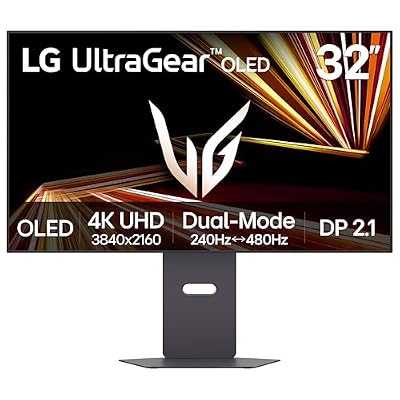
LG 32GX870A-B 32-inch Ultragear 4K UHD (3840 x 2160) OLED Gaming Monitor, Dual-Mode, 240Hz, 0.03ms, NVIDIA, AMD FreeSync Premium Pro, VESA DisplayHDR True Black 400, USB Type-C, DP2.1
Included for 'Best 4K Gaming Monitor Black Friday Deals 2026' as a representative home product in this roundup; selection reflects the product set returned for this topic.
View on AmazonDisplayPort 1.4 vs DisplayPort 2.1 vs HDMI 2.1
| Port | What it means for 4K gaming | Limit |
|---|---|---|
| DisplayPort 1.4 | Reaches 4K at high refresh rates by using display stream compression | Compression is usually not visible, but some features such as alt-tabbing can be slower |
| DisplayPort 2.1 | More bandwidth, so higher refresh rates at 4K with less compression | Needs a graphics card and cable that support it |
| HDMI 2.1 | Needed for 4K at 120Hz on consoles and for PC use at high refresh rates | Count the ports: the number of HDMI 2.1 ports varies |
Check the maker’s spec page for the exact port versions on your model, because some monitors list HDMI 2.1 on one port and older versions on others. For PC use, DisplayPort is the safe path to the highest refresh rates. For consoles, use HDMI 2.1 and a certified high-speed cable.
What GPU Do You Need for 4K Gaming?
| GPU class | 4K experience | Suggested approach |
|---|---|---|
| RTX 5060 Ti / RX 9060 XT | Light games and older titles only | Prefer 1440p, or a dual-mode monitor used in 1080p mode |
| RTX 5070 / RX 9070 | Playable with upscaling in many modern titles | 4K 144Hz dual-mode monitor |
| RTX 5070 Ti / RX 9070 XT | Good 4K at tuned settings with upscaling | 4K 144Hz to 240Hz |
| RTX 5080 and above | Strong 4K performance in most games | 4K 240Hz OLED |
Upscaling and frame generation help close the gap, but they change how the image looks and feels, so read reviewer comparisons for your games before relying on them.
Dual-Mode Monitors Explained
A dual-mode monitor offers one high-resolution, moderate-refresh mode and a lower-resolution, very high-refresh mode, typically 4K at 240Hz and 1080p at 480Hz. In 1080p mode the monitor scales the image to fill the panel. A smaller screen and good scaling make the lower-resolution mode look cleaner, which is why reviewers praise the 26.5-inch ASUS PG27UCWM and the AW2725QF pixel blending. Dual-mode is most useful for players who mix cinematic single-player games with competitive shooters.
Console Use: PlayStation 5 and Xbox Series X
Consoles output up to 4K at 120Hz over HDMI 2.1, so any 4K monitor with an HDMI 2.1 port can use that mode. The monitor’s refresh rate above 120Hz does not help a console. Model with two HDMI 2.1 ports, such as the ASRock Phantom Gaming 32, are useful if you also want a second device connected without cable swaps. A console on a 32-inch monitor suits desk play, but a TV may suit sofa play better.
QD-OLED vs WOLED vs Mini-LED at 4K
One reviewer says QD-OLED gives wider colour and brighter HDR, while another says WOLED handles bright rooms better with no purple-black tint. Mini-LED monitors offer high brightness and are safe from burn-in, but may show blooming around bright objects. At 4K and 32 inches, text sharpness is good on all panel types, although OLED pixel layouts can produce slight fringing on small text. Reviewers compare text clarity in their measurements, so look at that section.
Burn-In and Warranty
TFTCentral reports that most leading OLED monitor makers now include burn-in in the warranty, usually for three years, but not all. Dell/Alienware, MSI and ASUS ROG are reported to cover it, LG UltraGear at two years. One roundup says one monitor lists only one year of parts and labour and does not state burn-in cover. Always read the exact model’s warranty page. Follow the maker’s care guidance on pixel refresh cycles and avoid static content for long periods.
When to Buy: Early vs Black Friday vs Cyber Monday
- Early November: Some makers start early. Buy if the price already looks like a historic low for the model.
- Black Friday (27 November): Wide range of 4K monitors on offer, with the strongest doorbusters often limited in stock.
- Cyber Monday (30 November): A second chance, especially for models that did not clear on Friday.
- After the sale: New releases push previous-generation 4K OLEDs down in the weeks that follow.
Deal Red Flags
- A claimed original price that the monitor rarely sold at. Compare against price history.
- Dual-mode refresh numbers quoted without the resolution they apply to.
- Unclear connection details: confirm the HDMI 2.1 and DisplayPort versions on the maker page.
- Previous-generation stock presented as new releases.
- OLED with no burn-in cover, or open-box units with a short warranty.
- A narrow return window, which matters for panel defects that appear after a few days.
- Bundles that make a small discount look large.
Pick X If… Decision Table
| Pick this | If you |
|---|---|
| MSI MAG 275UPD E14 | Want the least-cost route to dual-mode |
| Gigabyte MO27U2 | Want 4K 240Hz OLED at the lowest tier reported |
| Alienware AW2725QF | Value a clean 1080p mode |
| ASRock Phantom Gaming 32 | Share the screen with a console |
| ASUS ROG Strix XG32UCWMG | Want a bright-room-friendly 4K OLED |
| ASUS ROG Swift OLED PG32UCDM | Want RTINGS’ top-rated 4K pick |
| ASUS ROG Swift OLED PG27UCWM | Play competitive games and prefer a smaller screen |
Alternatives
- MSI MPG 322UR X24: PC Gamer’s top OLED pick, a QD-OLED 32-inch monitor. The roundup notes its burn-in terms are not stated, so confirm them.
- LG UltraGear 45GX950A: Tom’s Hardware’s best ultrawide, for players who want width more than resolution.
- A 1440p OLED: If your graphics card is mid-range, a 27-inch 1440p OLED is usually a better fit than 4K.
Frequently Asked Questions
Which GPU do I need for a 4K gaming monitor?
An RTX 5080 or RX 9070 XT class card or better gives a strong 4K experience. An RTX 5070 or RX 9070 can manage 4K with upscaling in many games. Lower-end cards are better suited to 1440p.
Is a dual-mode 4K monitor worth buying?
Yes, if you play both cinematic and competitive games. The 1080p mode runs at very high refresh rates, such as 480Hz on several ASUS and LG models. If you only play single-player games at 4K, a non-dual-mode screen can be cheaper.
Do I need DisplayPort 2.1 for 4K 240Hz?
Not necessarily. DisplayPort 1.4 can reach 4K at high refresh rates using compression. DisplayPort 2.1 gives more bandwidth and requires a compatible graphics card and cable.
Can I use a 4K gaming monitor with a console?
Yes, with HDMI 2.1 you can run PlayStation 5 and Xbox Series X at up to 4K 120Hz. Refresh rate above 120Hz does not help a console. Check the port versions on the maker’s page.
Are 4K OLED monitors safe from burn-in?
No OLED panel is immune, but makers include pixel-shifting and refresh cycles. TFTCentral reports that most leading makers cover burn-in, commonly for three years. Read the exact terms for your model.
Should I wait for Cyber Monday to buy a 4K monitor?
Waiting can pay off for models that did not sell out on Friday, but top offers can disappear. If a monitor you want hits a price at or below its long-run low, buying early in the sale window is reasonable.