🛒 Best Price Today on Amazon
Prime members get fast, free shipping on everything above, plus member-only deals. New members get a 30-day free trial — cancel anytime.
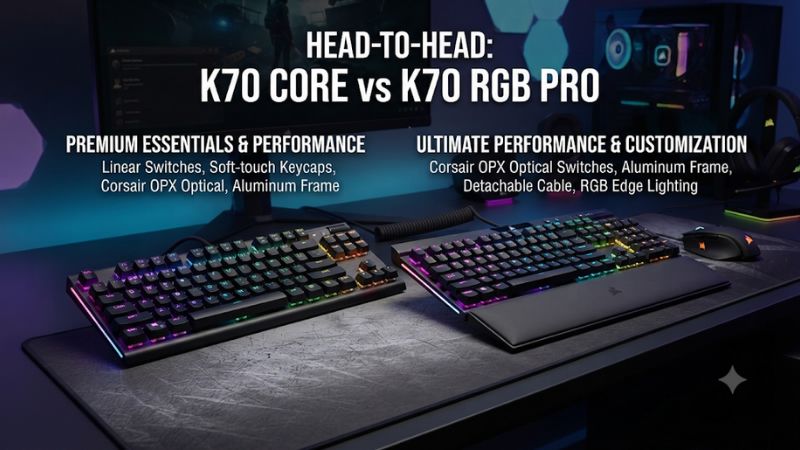
In Corsair K70 Core vs Corsair K70 RGB Pro, the Core suits buyers who want a full-size board with light linear switches and a dial. The Pro earns its premium if you want a particular Cherry MX switch, a detachable cable, or dedicated media controls. Both are wired, and both have fixed-actuation switches.
Which K70 should you buy?
Choose the K70 Core if you want a straightforward full-size keyboard, prefer Corsair’s MLX Red linear feel, and mainly need volume and playback control. Choose the K70 RGB Pro if you want a particular Cherry MX switch, use a full set of media buttons, or move the keyboard often enough to benefit from a detachable cable. The Pro also offers a higher advertised report rate and a physical tournament switch.
Both preserve the numpad, arrow keys, and standard navigation cluster. This comparison uses the full-size wired Core and the full-size wired K70 RGB Pro. The K70 Pro TKL and K70 Max belong to different configurations, including versions with magnetic switches. Check the complete product name before using any switch or feature claim to compare prices.
| Feature | Corsair K70 Core RGB | Corsair K70 RGB Pro |
|---|---|---|
| Layout | Full-size | Full-size |
| Main switches | Corsair MLX Red linear family | Cherry MX, depending on SKU |
| Actuation adjustment | Fixed | Fixed |
| USB report rate | 1,000 Hz | Up to 8,000 Hz with AXON |
| Cable | Attached USB cable | Detachable USB-C cable at the keyboard |
| Media controls | Multifunction rotary dial and media control | Dedicated media buttons and volume roller |
| Keycaps | ABS on the reviewed standard version | PBT or polycarbonate depending on SKU |
| Hardware tournament switch | No dedicated rear tournament switch | Yes |
| Palm rest | Bundle-dependent | Included with documented PBT MX Red bundle |
The features you touch should lead the decision
A higher report rate is easy to compare on a spec sheet. In daily use, the switch feel, control placement, and cable can have a larger effect. If you spend more time writing and managing audio than playing timing-sensitive games, test those tasks before giving polling the deciding vote.
Start with the three things you do most often. For a player who types all day, keeps a browser stream open, and plays several rounds of a shooter at night, a comfortable switch and a useful media control matter in every activity. For someone who moves a board between events, a removable cable and documented onboard behavior can be more valuable than the stock sound.
Write down what your current keyboard gets wrong. If it is too loud, compare the actual switches and sound. If the cable makes setup awkward, the Pro solves that directly. If the keyboard crowds the mouse, both boards retain the full-size width, so compare a smaller layout.
Check the exact Pro switch and keycap bundle
K70 RGB Pro listings can describe different Cherry MX switches and different keycap materials. Corsair documents a North American MX Red version with double-shot PBT and regional configurations with polycarbonate. The name K70 RGB Pro alone leaves those details open. Check the switch and keycaps in the SKU you will actually receive.
The Core is simpler because the common full-size configuration uses the MLX Red family. Its listings can still vary in how the switch revision and palm-rest bundle are described. If you are comparing a Shop A Core with a Shop B Pro, record each exact SKU to avoid making a decision from an unrelated variant.
A meaningful comparison needs both real prices and real packages. The Pro might be cheaper in a less desirable switch or layout. A better-priced Core could omit a rest you use. Compare what you want to keep on your desk instead of treating all copies of either board as identical.
Switches, sound, and typing
MLX Red gives the Core a consistent starting point
The Core’s regular option is a light linear with uninterrupted travel. It is easy to hold for movement, and it suits players who prefer an even press. The low force can make accidental input more likely if you rest a finger heavily on the keys. Try a normal writing or gaming session before judging the switch from a few taps.
The Core’s sound-dampening layers also influence its character. Some reviewers found it reasonably quiet for a mechanical board, while reactions to switch smoothness varied. Type with your usual force and listen particularly to the spacebar, Shift, and Enter. Those stabilizer sounds can affect a shared space more than the tone of a single letter key.
If you want a light stock linear with usable media controls and have little interest in selecting between switches, the Core keeps the decision simple. It can also make sense when you would otherwise pay for a Pro switch configuration that does not match your typing preference.
Cherry MX choice is a real reason to choose the Pro
The Pro gives buyers a reason to shop by switch type. If your local listing offers MX Red, you get a linear option. A documented tactile or speed-oriented SKU can suit a different preference. Buy a specific switch because you know how you want it to feel. A short travel switch is useful only when your normal pressing technique benefits from it.
Try the two at the same desk if possible. Press one key slowly, then type a paragraph or play through a familiar exercise. Notice the force needed to hold a modifier, where the movement first registers, and how often adjacent keys are hit. Switch differences that feel obvious in a slow press can matter less in an actual game, while fatigue or typos can become more apparent later.
Both are fixed-actuation boards. Choosing a different Pro switch changes its physical behavior. It does not make the actuation adjustable in iCUE. If you need per-key actuation or a movement-based reset, that is a reason to compare a K70 Max or another analog board.
Keycaps and stabilizers affect more than appearance
Some Pro packages use double-shot PBT caps, while the standard reviewed Core uses ABS. Surface texture, thickness, and keycap fit can change how the board feels during long sessions. A keycap that feels grippy in a short demo may be more comfortable or more abrasive depending on how your fingers move across it.
Try larger keys in particular. The spacebar and Enter can have different return sounds from the letter keys, and the difference matters if you share an office or gaming space. Set both keyboards on the same desk surface before comparing. A desk mat can change the amount of hollow sound you hear.
If you plan to replace caps, check the exact regional layout, right Shift, and bottom-row sizes. Both boards can accept compatible keycaps, while their switch implementations are intended as installed hardware. If you regularly swap switch types as part of the hobby, compare a hot-swappable board before budgeting for either one.
Numpad use and wrist position are shared considerations
Both boards retain a full navigation block and numpad. That is valuable for spreadsheets, editing shortcuts, and games that distinguish numpad keys from the top number row. It also places the mouse farther to the right unless you move the keyboard left. Try that shift before you buy if your current setup has a short mouse sweep.
The palm rest can change the space the keyboard needs front to back. Check your desk depth with it installed, particularly if you use a microphone arm or place the board near the edge. A rest is useful when it matches your posture and does not interfere with moving to the mouse.
If your comparison comes down to comfort, leave room to try the exact layout for a long session. The Pro’s extra controls can be convenient without changing its overall footprint. A buyer who dislikes the width of the Core will face the same broad layout decision with the Pro.
Controls, polling, and software
The Pro makes more media commands available at a glance
The Core’s multifunction dial covers quick volume changes and supports other functions in its documented modes. If volume is the only setting you reach for in a match, it can be just as useful as a larger media section. The dial’s value is that you remember where it is and can turn it without changing your attention.
The Pro provides a separate volume roller plus dedicated media buttons. That makes sense if you frequently pause a video, skip a track, and manage volume while your main application stays active. Try each using the same software you normally run. System media controls can act on the player selected by the operating system, which may differ from the app you intended to control.
Pick the arrangement you can use by touch. The smaller Core control set is sufficient for many players. The Pro earns its place when you want more functions available at the same time without assigning them to a layer or another device.
The Pro’s high polling rate is a narrower upgrade
The Core runs at 1,000 Hz. The RGB Pro advertises up to 8,000 Hz through Corsair AXON. At those nominal rates, the intervals between reports are 1 ms and 0.125 ms. The difference is 0.875 ms between report intervals. That number does not measure the difference in total key-to-screen response, because switch travel, scan and processing time, frame timing, and the display still matter.
RTINGS also notes that its tests of the two boards use different test benches. Avoid combining their individual numbers into a precise head-to-head latency claim. Both boards are designed for gaming, and the right comparison should include the switch and key behavior you prefer.
If you buy the Pro, test a familiar input-heavy game at your normal setting, then try the higher rate. If frame pacing or another device behaves differently, return to a known setting and compare again. Keep what is stable on your setup. A faster supported mode is most valuable when you can use it without adding problems.
The detachable cable has everyday value
The Pro’s removable USB-C connection is useful when you travel, share a desk, or use an existing cable route. You can unplug at the board without moving the other end of the cable. Carry a compatible data cable if you expect to use that feature regularly. A cable chosen only for charging can be an unreliable replacement for a keyboard connection.
The Core’s attached cable is fine when the board stays in one spot. Measure the path to your PC and leave slack behind the board. A desk pulled away from a wall or a cable tray with a tight opening can make the cable a bigger factor than it seems in a photo.
Neither board adds a USB pass-through port under the standard configurations considered here. If you use the port on an older K70 for a mouse receiver or another accessory, plan a separate connection before replacing it. Changing to the Pro for the removable cable addresses how the board connects to the PC, not the number of peripheral ports available.
The Pro has a dedicated tournament switch
Corsair documents a rear tournament switch on the RGB Pro. It provides a simplified mode with static lighting and disables accidental macro activations. This can be useful when you travel with the board or want a predictable starting configuration. Confirm which behavior the mode alters before you depend on a profile during play.
The Core has onboard profile and keyboard-lock controls. Use them to keep a simple profile available if you want to avoid unwanted shortcuts. A clean profile can be sufficient for ordinary games. A physical tournament switch matters more when you value one visible hardware state or an event calls for specific settings.
Check the game or event rules independently of the switch label. A hardware mode can help restrict the changes your keyboard makes, while the organizer determines what is allowed. Verify any remaps you plan to use before the event so you can focus on playing once the board is connected.
Both use iCUE, with different profiles worth saving
Both boards support iCUE for options such as lighting and remapping. The Core is best approached with a few simple presets. The Pro offers more onboard storage in its documented configuration, which can matter for someone who travels, works on different computers, or switches among many layouts.
The useful test is retention. Save a preferred profile to the keyboard, quit iCUE, and verify the key assignments and lighting that should work in hardware mode. Disconnect and reconnect once to check what loads on startup. Use an application-specific profile only when you know it can run on the computer where you need it.
If you use the board on a managed work PC, ordinary USB keyboard operation and saved settings are more valuable than assuming you can run a companion app. If the board stays next to your personal PC, app-linked profiles may be the easiest way to keep your shortcuts organized.
Which board is better value for your desk?
Choose the Core when the stock package covers your needs
The Core is the better value when you want the layout, enjoy a light linear feel, and prefer one dial over many dedicated controls. Its wired 1,000 Hz implementation is a practical baseline. A buyer who rarely disconnects the board or changes media tracks can keep the cost lower while getting the functions used in a normal week.
If the stock feel appeals, the Core’s limited switch selection is convenient. It reduces the chance of buying a switch chosen only because it ships with a sale listing. When checking a used example, test isolated taps for unwanted repeats and confirm firmware or support options if any appear. Cable wear matters more on a fixed-cable model.
Compare the cost after considering the palm rest. A discounted board may be more attractive if you already own a comfortable rest. If you need one, count its price and desk space before comparing with a Pro package that includes it.
Choose the Pro when several of its extras matter
The Pro is a better purchase when you will use the detachable cable, recognize the value of its exact Cherry MX option, or frequently operate the dedicated media controls. Those benefits can justify a premium on their own. Higher polling provides another reason for a player who wants to test that mode and can keep it stable.
If you found a substantial sale, confirm the switch, layout, keycap material, palm rest, and included cable. A discount on a switch you dislike rarely improves everyday use. A complete Pro in your preferred configuration can be an excellent buy when it costs close to the Core.
Give extra weight to the features you cannot add cheaply later. An external dial or a different cable route can sometimes solve a control issue, while a soldered switch preference is part of the board you choose. Buy the configuration you are likely to keep.
Use a short comparison test before spending more
Try a paragraph, a media change, a wide mouse movement, and a few game input combinations on each board. Keep the keyboard in the position where you would put it at home. Check whether you reach the roller and the numpad, whether the switch encourages errors, and whether the cable creates any issue when you move the keyboard.
If you are buying online, look for a review of the exact model and switch. Use published measurements for the method and hardware they cover. Then check retailer terms if you need a chance to try the fit and sound yourself.
Give your decision one concrete reason. If the sentence is “I need a removable cable because I swap boards twice a week,” the Pro fits. If it is “I want a light linear full-size board that stays plugged in,” the Core fits. That comparison is more useful than picking by the position of a product name in the lineup.
Conclusion
Choose the Corsair K70 Core for a simple full-size wired board, MLX Red linears, and easy volume control. Choose the K70 RGB Pro if you want a specific Cherry MX configuration, dedicated media buttons, a removable cable, or the higher supported report rate. Check the exact keycaps and palm-rest package before ordering. Both use fixed-actuation switches, so adjustable press and reset distances call for a different model.