
🛒 Best Price Today on Amazon
Prime members get fast, free shipping on everything above, plus member-only deals. New members get a 30-day free trial — cancel anytime.
- Best Keyboards for CS2 at a Glance
- 1. Wooting 80HE+ — Best Overall for CS2
- 2. Razer Huntsman V3 Pro TKL 8KHz — Best Optical Pick
- 3. Logitech G PRO X TKL RAPID — Best Simple TKL Option
- 4. SteelSeries Apex Pro TKL Gen 3 — Best for Per-Key Control
- 5. Corsair K70 PRO TKL — Best for Gaming and Daily Use
- 6. ASUS ROG Falchion Ace HFX — Best Compact CS2 Keyboard
- What Matters Most in a CS2 Keyboard?
- How to Choose the Best Keyboard for CS2
- Recommended CS2 Keyboard Settings
- FAQ
- Conclusion

Irock Gaming Keyboard, TKL Wired Mechanical, Magnetic Switch, Rapid Trigger
Included for 'Best Keyboard for CS2: 6 Picks for Faster Competitive Play' because the listing specifies TKL Wired Mechanical and Magnetic Switch, details this guide uses to compare options.
View on Amazon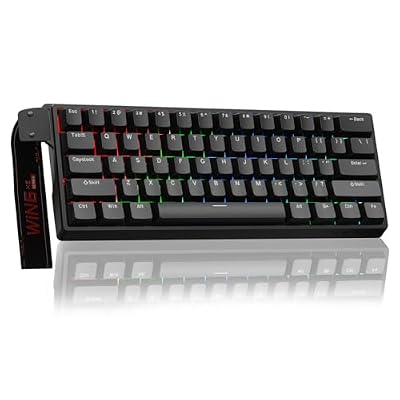
Aula WIN60 HE - 60% Mechanical Gaming Keyboard Wired, Magnetic Switch Hot Swappable, Adjustable Actuation Rapid Trigger Mode, 8000 Hz Polling Rate, RGB Small Keyboard 60 Percent Compact Design for PC
Included for 'Best Keyboard for CS2: 6 Picks for Faster Competitive Play' because the listing specifies 60% Mechanical Gaming Keyboard Wired and Magnetic Switch Hot Swappable, details this guide uses to compare options.
View on Amazon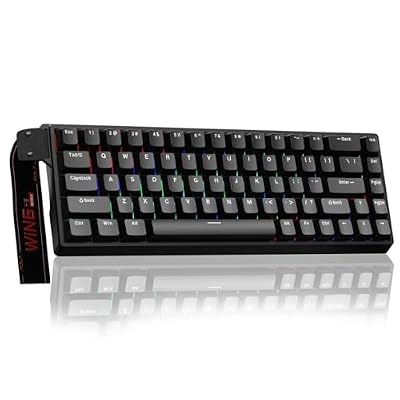
AULA WIN68 HE Mechanical Gaming Keyboard 60%, Hall Effect Magnetic Switch, Fast Trigger Mode Adjustable Actuation, 8000Hz Polling Rate, RGB Backlit, Wired Black Keyboard for Laptop/PC Gamer
Included for 'Best Keyboard for CS2: 6 Picks for Faster Competitive Play' because the listing specifies Hall Effect Magnetic Switch and Fast Trigger Mode Adjustable Actuation, details this guide uses to compare options.
View on AmazonThe best keyboard for CS2 should help you stop, counter-strafe, peek, and repeat movement inputs with minimal delay. Rapid Trigger and adjustable actuation matter more than flashy extras, while a compact layout leaves more mouse room. These six keyboards fit competitive Counter-Strike 2 especially well.
Best Keyboards for CS2 at a Glance
| Keyboard | Layout | Switch Technology | Rapid Trigger | Adjustable Actuation | Polling / Report Rate |
|---|---|---|---|---|---|
| Wooting 80HE+ | 80% | Analog Hall Effect | Yes | 0.1–4.0 mm | True 8 kHz |
| Razer Huntsman V3 Pro TKL 8KHz | TKL | Analog Optical Gen-2 | Yes | 0.1–4.0 mm | Up to 8000 Hz |
| Logitech G PRO X TKL RAPID | TKL | Magnetic analog | Yes | Adjustable | 1 ms report rate |
| SteelSeries Apex Pro TKL Gen 3 | TKL | Analog magnetic | Yes | 0.1–4.0 mm | — |
| Corsair K70 PRO TKL | TKL | Hall Effect MGX Hyperdrive | Yes | 0.1–4.0 mm | Up to 8000 Hz |
| ASUS ROG Falchion Ace HFX | 65% | Magnetic HFX | Yes | 0.1–4.0 mm | 8000 Hz |
In CS2, keyboard choice mainly affects movement timing rather than raw aim. Rapid Trigger can reset a movement key as soon as it starts rising, while adjustable actuation lets you tune how early A, D, W, or S registers. A TKL or smaller layout also creates more room for low-sensitivity mouse movement.
1. Wooting 80HE+ — Best Overall for CS2
Wooting 80HE+ is built around Hall Effect switches, Rapid Trigger, per-key actuation tuning, and true 8 kHz polling. That combination suits CS2 players who want extremely fine control over strafes and counter-strafes without giving up arrow keys or the familiar spacing of a near-TKL layout for daily use too.
- Best For: Competitive CS2 players who prioritize movement tuning
- Key Features: Analog Hall Effect switches, true 8 kHz polling, Rapid Trigger, 0.1–4.0 mm adjustable actuation
- What Makes It Different: Wootility provides detailed per-key Rapid Trigger, actuation, and calibration controls
- Use Case: Counter-strafing, jiggle peeking, repeated A/D movement, competitive matchmaking
- Who It’s For: Players who want deep configuration without moving to a 60% layout
- Pros: Highly adjustable movement keys; true 8 kHz polling; compact 80% design; extensive per-key tuning
- Cons: More configuration than casual players may need; compact layout still requires some adaptation
2. Razer Huntsman V3 Pro TKL 8KHz — Best Optical Pick
Razer Huntsman V3 Pro TKL 8KHz uses Analog Optical Switches Gen-2 with Rapid Trigger, 0.1–4.0 mm adjustable actuation, and up to 8000 Hz polling. Its dedicated controls make fast setting changes easier, while the TKL footprint leaves more desk space for wide mouse sweeps during low-sensitivity play.
- Best For: Players wanting optical sensing and onboard adjustment
- Key Features: Analog Optical Gen-2 switches, Rapid Trigger, 0.1–4.0 mm actuation, up to 8000 Hz polling
- What Makes It Different: Dedicated controls allow Rapid Trigger and actuation changes directly from the keyboard
- Use Case: Competitive CS2, LAN setups, frequent sensitivity experimentation
- Who It’s For: Players who want high-end analog features without relying entirely on software
- Pros: TKL layout; doubleshot PBT keycaps; onboard profiles; wrist rest; high polling capability
- Cons: Extensive features can be unnecessary for players who use one fixed configuration
3. Logitech G PRO X TKL RAPID — Best Simple TKL Option
Logitech G PRO X TKL RAPID combines magnetic analog switches, Rapid Trigger, adjustable actuation, and a 1 ms report rate in a tournament-focused TKL chassis. It is less about extreme polling figures and more about direct movement tuning, familiar Logitech G software, and a clean layout for competitive setups.
- Best For: Logitech G users wanting magnetic switches for CS2
- Key Features: Magnetic analog switches, Rapid Trigger, adjustable actuation, LIGHTSYNC RGB, 1 ms report rate
- What Makes It Different: Competitive features are packaged inside a straightforward conventional TKL layout
- Use Case: CS2 matchmaking, esports setups, mixed gaming and everyday desktop use
- Who It’s For: Players who prefer Logitech G HUB and do not need 8000 Hz polling
- Pros: Familiar TKL design; adjustable actuation; Rapid Trigger; detachable cable
- Cons: Lower published report rate than several 8 kHz alternatives
4. SteelSeries Apex Pro TKL Gen 3 — Best for Per-Key Control
SteelSeries Apex Pro TKL Gen 3 uses adjustable magnetic switches with 0.1–4.0 mm actuation, Rapid Trigger, Rapid Tap, and Protection Mode. For CS2, the useful distinction is flexibility: movement keys can be made extremely sensitive while nearby keys can be configured to reduce accidental inputs during tense rounds.
- Best For: Players who frequently hit unintended nearby keys
- Key Features: Adjustable magnetic switches, 0.1–4.0 mm actuation, Rapid Trigger, Protection Mode, OLED display
- What Makes It Different: Protection Mode is designed to reduce accidental neighboring key activation
- Use Case: Competitive movement combined with differentiated sensitivity across multiple key groups
- Who It’s For: Players who want granular customization and onboard feedback
- Pros: Wide actuation range; TKL layout; sound dampening; aluminum top plate; onboard configuration
- Cons: Several advanced features are unnecessary if you only adjust WASD
5. Corsair K70 PRO TKL — Best for Gaming and Daily Use
Corsair K70 PRO TKL pairs Hall Effect MGX Hyperdrive switches with Rapid Trigger, 0.1–4.0 mm adjustable actuation, and an up-to-8000 Hz report rate. Its TKL layout preserves navigation keys, while the dedicated Game Mode button and iCUE controls make it practical for players who also use the board outside CS2.
- Best For: Players who want a competitive keyboard that remains practical for everyday use
- Key Features: MGX Hyperdrive Hall Effect switches, Rapid Trigger, dual actuation, up to 8000 Hz reporting
- What Makes It Different: Combines analog gaming controls with a conventional TKL layout and dedicated Game Mode
- Use Case: CS2, other competitive games, typing, productivity
- Who It’s For: Existing Corsair users or players who want iCUE integration
- Pros: Adjustable actuation; high report rate; wrist rest; detachable cable; onboard profiles
- Cons: TKL occupies more horizontal space than 65% and 60% boards
6. ASUS ROG Falchion Ace HFX — Best Compact CS2 Keyboard
ROG Falchion Ace HFX is a 65% analog keyboard with magnetic HFX switches, Rapid Trigger, 0.1–4.0 mm actuation, and 8000 Hz polling. Its compact body gives the mouse maximum room, while dual USB-C ports and a touch panel add desk flexibility. The trade-off is a less conventional layout than TKL boards.
- Best For: Low-sensitivity CS2 players who need maximum mouse space
- Key Features: 65% layout, magnetic HFX switches, Rapid Trigger, 0.1–4.0 mm actuation, 8000 Hz polling
- What Makes It Different: Dual USB-C ports allow flexible cable placement and switching between two computers
- Use Case: Small desks, low-sensitivity aiming, portable competitive setups
- Who It’s For: Players comfortable using layers instead of dedicated navigation clusters
- Pros: Very compact; 8000 Hz polling; adjustable magnetic switches; dedicated Rapid Trigger toggle
- Cons: 65% layout requires more shortcuts than TKL
What Matters Most in a CS2 Keyboard?
Rapid Trigger
Rapid Trigger matters in CS2 because movement accuracy depends on how quickly a key stops registering when you release it. A dynamic reset can shorten the gap between releasing one strafe key and starting the opposite direction. The benefit is control, but settings that are too sensitive can also cause unintended movement.
Adjustable Actuation
Adjustable actuation lets you choose how far a key travels before it registers. Very shallow settings can make strafing feel immediate, while deeper values can reduce accidental presses on utility, reload, or communication keys. Per-key control is more useful than one global setting because CS2 actions need different sensitivity.
Keyboard Size
A 60%, 65%, or TKL keyboard is usually more practical for CS2 than a full-size board because it frees horizontal space for the mouse. TKL keeps function and navigation keys, 65% saves more room while retaining arrows, and 60% is the smallest. The trade-off is more layer use for non-gaming shortcuts.
Avoid SOCD and Last-Input Automation in CS2
Do not confuse Rapid Trigger with SOCD-style features such as Snap Tap, Rapid Tap, Speed Tap, or similar last-input-priority modes. Valve says hardware-assisted counter-strafing automation can trigger a kick on official CS2 servers, so disable those features before matchmaking even if your keyboard offers them.
How to Choose the Best Keyboard for CS2
| Factor | What to Look For | Why It Matters in CS2 |
|---|---|---|
| Switch sensing | Hall Effect or analog optical | Enables adjustable activation and dynamic reset features |
| Rapid Trigger | Per-key adjustment preferred | Helps movement keys reset without returning to a fixed reset point |
| Actuation | Adjustable per key | Lets WASD stay sensitive while other keys remain harder to trigger accidentally |
| Layout | TKL, 65%, or 60% | Creates additional mouse room |
| Polling | 1000 Hz or higher | Shortens keyboard reporting intervals, although it is not the only source of input latency |
| Onboard memory | Useful for LAN or shared PCs | Keeps settings available without rebuilding profiles |
| Software | Easy profile and per-key control | Makes actuation and Rapid Trigger tuning less frustrating |
Recommended CS2 Keyboard Settings
Start with Rapid Trigger on movement keys and use a moderately shallow actuation point rather than the minimum possible setting. If you notice accidental strafes or unwanted inputs, increase the actuation distance or Rapid Trigger sensitivity. Keep utility and non-movement keys deeper if the software allows per-key tuning.
A useful starting approach is to make A and D more sensitive than less time-critical keys such as B, M, or communication shortcuts. Avoid copying another player’s minimum actuation settings blindly. Finger pressure, switch feel, hand position, and typing habits determine whether an extremely shallow setting improves control or produces errors.
FAQ
Is Rapid Trigger Worth It for CS2?
Rapid Trigger is useful for CS2 because it changes how quickly a key resets as you lift your finger. That can make repeated strafing and direction changes feel more immediate than a conventional fixed reset point. It does not improve aim by itself, but it can make movement inputs easier to stop and repeat consistently.
Is TKL or 60% Better for CS2?
A TKL keyboard is often the easiest CS2 layout to live with because it removes the number pad without changing the main key cluster. A 65% or 60% board gives even more mouse room, which helps low-sensitivity players, but those layouts move or layer extra keys. Choose the smallest size that does not slow daily use.
Does 8000 Hz Polling Matter for CS2?
Higher polling can reduce the interval between keyboard reports, but it is only one part of responsiveness. Switch sensing, firmware, actuation settings, and the rest of the PC input chain also matter. For most players, Rapid Trigger and sensible actuation tuning will be more noticeable than chasing polling rate alone.
What Actuation Point Should I Use for CS2?
Start with Rapid Trigger on movement keys and use a moderately shallow actuation point rather than the minimum possible setting. If you notice accidental strafes or unwanted inputs, increase the actuation distance or Rapid Trigger sensitivity. Keep utility and non-movement keys deeper if the software allows per-key tuning.
Is Snap Tap Allowed in CS2?
Valve specifically advises players with input-automation features such as Snap Tap to disable them before joining a match. Hardware-assisted counter-strafing and related automation can be detected on Valve official servers and may result in a kick. Rapid Trigger itself works differently because it changes key activation and reset behavior.
Conclusion
The best keyboard for CS2 should make movement easier to start, stop, and repeat without creating accidental inputs. Wooting, Razer, Logitech, SteelSeries, Corsair, and ASUS all offer strong competitive options. Choose by layout, Rapid Trigger control, actuation tuning, software, and the desk space you actually need.









