🛒 Best Price Today on Amazon
Prime members get fast, free shipping on everything above, plus member-only deals. New members get a 30-day free trial — cancel anytime.
Gaming Mouse DPI Guide insights resolve erratic cursor flutter and inaccurate tracking while boosting targeting stability. Many buyers struggle with twitchy sensors, oversold sensitivity specs, and missed shots during intense matches. This breakdown clarifies essential metrics so you can pick ideal settings for steady victory.
How to Choose the Right Sensitivity Settings
Configuring personal sensitivity demands evaluating sensor mechanics, desk dimensions, and hand kinematics during matches. Uninformed players frequently suffer wrist exhaustion and jumpy crosshairs during chaotic shootouts. This gaming mouse DPI guide highlights essential factors so you configure hardware for consistent aim.
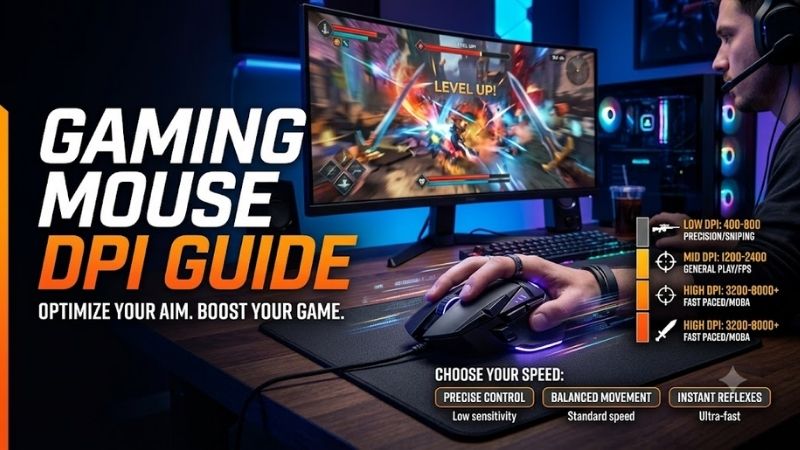
Native Sensor DPI and Hardware Smoothing
Modern optical sensors boast excessive sensitivity ratings exceeding thirty thousand counts per linear inch. However, extremely elevated sensitivity thresholds force internal algorithms to smooth raw inputs, adding imperceptible tracking drag. Choosing a native range avoids processing latency and eliminates artificial aim jitter.
Most competitive champions configure their sensors between four hundred and sixteen hundred hardware sensitivity intervals. This moderate bracket yields authentic one-to-one cursor translation across your display without synthetic sensor intervention. Sticking to native hardware thresholds guarantees reliable muscular muscle memory.
Polling Rates and Communication Frequency
Polling rates dictate how many times every second your pointer transmits spatial coordinate data back to your motherboard. Standard tournament mice operate at one thousand hertz, but advanced models push upward to eight thousand hertz. Higher frequencies minimize frame latency and deliver visibly smoother cursor paths.
Nevertheless, hyper-polling speeds demand considerable processor reserves and can trigger frame pacing stutter on budget desktop configurations. Mid-tier setups achieve exceptional tracking clarity without computational overload by setting polling to two thousand hertz. Balanced configurations guarantee snappy performance.
Grip Style and Chassis Ergonomics
How you clasp your pointer profoundly governs how easily you command delicate cursor maneuvers during tactical play. Palm grips demand larger contoured chassis for broad forearm motions, whereas claw and fingertip grips thrive on compact frames. Aligning shape with hand posture prevents muscle fatigue across matches.
Ultra-light chassis weighing under sixty grams permit rapid flicking actions without overworking delicate tendons. However, players who prefer deliberate sweeping tracking often benefit from balanced shells that offer stabilizing tactile mass. Following this gaming mouse DPI guide ensures your hand geometry stays relaxed.
Lift-Off Distance and Pad Surfaces
Lift-off distance determines the exact vertical elevation at which an optical sensor ceases registering desk coordinates. Low settings stop cursor drift whenever you reposition your hand across cloth or textured glass pads. This prevents accidental crosshair twitching during aggressive competitive reset swipes.
Cloth mousepads generate gentle dynamic friction that aids low-sensitivity stopping power during snappy headshot tracking. Hard poly surfaces deliver friction-free speed, demanding tighter sensitivity control to avoid overshooting targets. Matching surface materials to your sensor profile guarantees fluid target acquisition.
Top Picks for Competitive Gaming Mice
Selecting an elite pointing weapon requires examining sensor reliability, click latency, and exterior shell comfort. We compared prominent market contenders to highlight exceptional mice tailored for various competitive genres and budgets. Our gaming mouse DPI guide evaluates prominent options to upgrade your desk station.
| Model Name | Sensor Model | Maximum DPI | Primary Advantage | | Razer DeathAdder V3 Pro | Focus Pro 30K | 30000 DPI | Ultra Ergonomic Shape | | Logitech G Pro X Superlight 2 | Hero 2 32K | 32000 DPI | Lightweight Hybrid Switches | | Pulsar X2 V2 Wireless | PixArt PAW3395 | 26000 DPI | Optical Crisp Clicks | | Zowie EC2-CW Wireless | PixArt PMW3370 | 3200 DPI | Enhanced Wireless Receiver |
Razer DeathAdder V3 Pro
Competitive shooter enthusiasts with medium to large hands who employ palm or relaxed claw grips will cherish this lightweight weapon. The Focus Pro optical sensor tracks flawlessly across glass surfaces and delivers outstanding battery endurance. Users gain effortless flick capability without enduring any cord drag.
However, the aggressive ergonomic flare feels awkward for small palms, and purchasing the optional eight-thousand-hertz dongle requires extra spending. Optical switches eliminate debounce delay and prevent unintentional double-clicking errors. It represents a premier wireless choice for dedicated ranked players.
Logitech G Pro X Superlight 2
Aspiring tournament combatants who seek a dependable symmetrical chassis for multiple grip orientations will love this balanced pointer. The Hero sensor delivers surgical precision up to thirty-two thousand counts while consuming minimal power. Its neutral contours accommodate diverse playstyles with supreme ease.
On the other hand, the mechanical-optical hybrid clicks feel slightly stiff for casual browsing, and the premium retail price tag is quite steep. The PTFE glide feet deliver butter-smooth swipes right out of the retail packaging. It stands as an iconic esports benchmark built to win intense championship rounds.
Pulsar X2 V2 Wireless
Fingertip and claw specialists who demand agile handling alongside crisp mechanical feedback should consider this featherweight shell. The optical micro switches provide tactile actuation without developing mechanical double clicks over time. A balanced center of gravity provides immense control during quick sweeps.
Conversely, the minimalist symmetrical hump offers minimal wrist support for full palm grips, and battery runtime remains fairly average. The companion desktop software allows straightforward profile customization without clutter. It delivers remarkable high-end value for players hunting fast performance.
Zowie EC2-CW Wireless
Tactical shooter purists who value plug-and-play simplicity and bulletproof signal integrity will favor this battle-tested classic. The dedicated standalone wireless base station eliminates interference in crowded network rooms. Its natural curved hump fills your palm naturally for prolonged competitive sessions.
Nevertheless, weighing seventy-seven grams makes it noticeably heavier than rival ultralight shells, and its sensor caps at thirty-two hundred counts. As referenced throughout this gaming mouse DPI guide, consistent tracking matters far more than inflated marketing digits. It provides unwavering tournament consistency.
Frequently Asked Questions
Prospective buyers frequently ask about sensor scaling, pixel skipping, desktop configurations, and competitive presets. Clarifying these technical issues helps you dial in accurate settings without wasting hours troubleshooting. This gaming mouse DPI guide clarifies typical technical dilemmas to sharpen your daily gameplay.
What DPI Setting Do Esports Professionals Prefer?
Most professional players in tactical titles like Counter-Strike or Valorant configure their gear to four hundred or eight hundred counts. Lower sensitivity forces broad arm movements from the elbow, creating dependable muscular consistency during tense firefights. This foundation minimizes nervous crosshair overshoots.
Conversely, arena shooter specialists often step upward to sixteen hundred counts to execute lightning-fast turns across multiple angles. Ultimately, consulting a practical gaming mouse DPI guide helps you identify an effective baseline for your game genre. Tailoring your baseline to personal ergonomics yields mastery.
Does Higher DPI Mean Better Mouse Accuracy?
Marketing campaigns frequently tout massive sensitivity metrics as proof of superior precision, but this claim is largely misleading. Higher settings merely increase cursor velocity per millimeter of physical travel rather than enhancing the sensor core quality. Exaggerated values often introduce noticeable jitter.
True tracking precision depends on sensor resolution consistency, perfect frame capture rates, and low motion latency. A premium modern sensor tracks flawlessly at moderate settings without dropping counts or misinterpreting trajectory angles. Prioritizing build construction over numbers yields cleaner aiming.
How Does In-Game Sensitivity Interact With DPI?
Effective sensitivity represents the mathematical product of your physical hardware sensitivity multiplied by your title software slider. Setting a higher hardware rate paired with a lower in-game multiplier smooths angular increments across high-resolution displays. This tactic eliminates subtle diagonal pixel skipping.
For instance, sixteen hundred counts paired with a low multiplier delivers identical physical travel as four hundred counts with a quadruple setting. However, as this gaming mouse DPI guide demonstrates across testing, modern sensors track smoother on moderate bases. Calibrating both layers ensures flawless control.
Can High DPI Cause Jitter and Sensor Smoothing?
Pushing optical sensors beyond their physical architectural thresholds activates firmware filtering that causes micro-stutter. This smoothing process attempts to reduce raw electrical noise but injects slight delay between hand movement and on-screen response. Competitive players feel this lag as floaty pointer motion.
To maintain clean input paths, avoid activating extreme sensitivities that rely on algorithmic interpolation. Sticking to sensible hardware zones ensures that your reticle responds instantaneously to fast reflex flicks without software interference. Clean signals remain paramount for climbing competitive ladders.
View more products:
- Best keyboard for gaming
- Best keyboard for programming
- Wireless gaming mouse latency
- Gaming mouse polling rate
Final Thoughts on Perfecting Your Mouse Aim
Finding optimal desktop control becomes simple once you master how sensor sensitivity, polling frequency, and ergonomics collaborate. Setting moderate hardware intervals while fine-tuning in-game multipliers creates surgical accuracy. Consistently applying this gaming mouse DPI guide ensures balanced control and triumphs.
As an Amazon Associate we earn from qualifying purchases at no extra cost to you.







Top picks from this guide
 RedragonRedragon M612 Wired RGB Optical Gaming Mouse 8000 DPI Remapping…$17 \xc2\xb7 99/100
 AcerAcer Wireless Mouse for Laptop, 2.4GHz Computer Mouse 5 Adjustable…$15 \xc2\xb7 97/100
 AcerAcer Wireless Mouse for Laptop, 2.4GHz Computer Mouse 3 Adjustable…$10 \xc2\xb7 97/100
 TECKNETTECKNET Wireless Mouse, 2.4G Ergonomic Computer Mouse, 2600 DPI, Purple…$9 \xc2\xb7 96/100