🛒 Best Price Today on Amazon
Prime members get fast, free shipping on everything above, plus member-only deals. New members get a 30-day free trial — cancel anytime.

Razer Viper Ultimate Lightweight Wireless Mouse
Included for 'Razer Viper Ultimate Wireless Gaming Mouse Review & Picks' as a relevant option in this category; details come from the product listing.
View on Amazon
Razer Viper V3 HyperSpeed Wireless PC Gaming Mouse, 82g, Black | 30K DPI Optical Sensor, Up to 280 Hr Battery Life, Mechanical Switches Gen-2, 6 Programmable Buttons, 1 x AA Battery included
Included for 'Razer Viper Ultimate Wireless Gaming Mouse Review & Picks' because the listing specifies 82g and Black, details this guide uses to compare options.
View on AmazonThe Razer Viper Ultimate Wireless Gaming Mouse remains a recognizable esports-focused design with a 74g ambidextrous body, 20,000 DPI Focus+ sensor, optical switches, and up to 70 hours of battery life. This roundup compares it with newer wireless mice to show where it still fits and where modern alternatives offer more.
Best Wireless Gaming Mice Compared
| Mouse | Best For | Weight | Sensor | Battery |
|---|---|---|---|---|
| Razer Viper Ultimate | Best Classic Ambidextrous Pick | 74g | Focus+ 20K | Up to 70 hours |
| Razer DeathAdder V3 Pro | Best Ergonomic Upgrade | 63g | Focus Pro 30K | Up to 90 hours at 1000Hz |
| Logitech G Pro X Superlight 2 | Best Lightweight Alternative | 60g | HERO 2 | Up to 95 hours |
The Viper Ultimate launched as a performance-focused wireless mouse and still offers hardware that remains usable for competitive gaming. Its main challenge is age: newer mice now deliver lower weight, USB-C charging, higher polling options, longer battery life, and newer sensors while often preserving the simple shapes competitive players prefer.
This roundup therefore treats the Viper Ultimate as the reference point rather than pretending it is still automatically the best option. Each alternative addresses a specific limitation, from ergonomic shape and lighter weight to newer charging and polling features, helping buyers choose based on grip and game type instead of specifications alone.
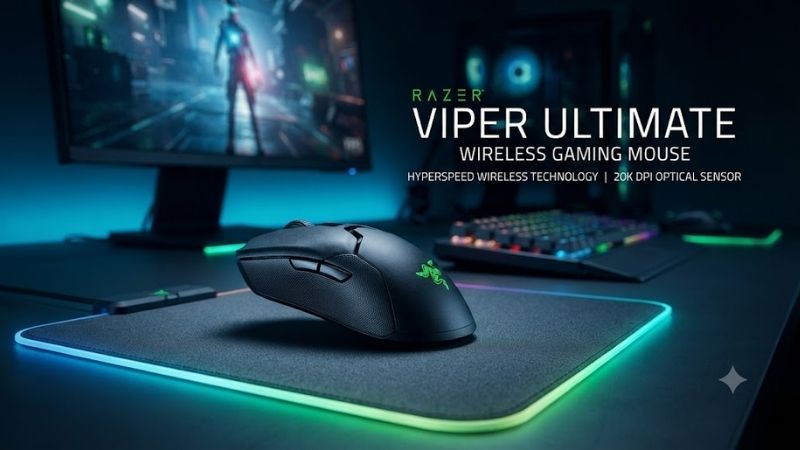
Razer Viper Ultimate – Best Classic Ambidextrous Pick
Best For: Competitive players who want a low-profile symmetrical mouse with side buttons on both sides
Razer lists the Viper Ultimate at 74g in the standard black version, with a true ambidextrous body measuring about 126.7mm long, 66.2mm wide, and 37.8mm high. Its low profile favors claw and fingertip styles for many players, while buttons on both sides make the layout more practical for left-handed use than many current esports mice.
The Focus+ optical sensor reaches 20,000 DPI with up to 650 IPS tracking and 50G acceleration. Razer also specifies Smart Tracking, Motion Sync, and adjustable lift-off behavior. Those numbers exceed what most players actually use, but the sensor remains technically capable for fast competitive movement, flick shots, and low-sensitivity aiming.
Key Features
- 74g standard black model
- True ambidextrous shape
- Focus+ 20,000 DPI optical sensor
- Up to 650 IPS and 50G acceleration
- Eight programmable buttons
- Optical mouse switches
- 2.4GHz HyperSpeed wireless
- Up to 70 hours of battery life
- Five onboard profiles
- Chroma RGB
- Charging dock compatibility
What Makes It Different
Eight programmable buttons distinguish the Viper Ultimate from newer five-button esports mice. The side controls are mirrored on both sides of the shell, so left-handed users can keep thumb-accessible buttons without switching to a right-handed ergonomic body. This layout is increasingly uncommon among lightweight competitive wireless designs.
The charging dock is another distinctive convenience. Instead of plugging a cable into the mouse after every few sessions, compatible versions can rest on the Razer Chroma Mouse Charging Dock between uses. The downside is the older Micro-USB wired connection, which feels dated beside newer USB-C gaming mice and modern accessories.
Pros
- True ambidextrous button layout
- Proven low-profile shape
- Eight programmable controls
- Accurate Focus+ sensor
- Optical switches
- Onboard profiles
- Charging dock support
- Competitive-friendly 74g weight
Cons
- Micro-USB instead of USB-C
- Heavier than newer esports flagships
- 70-hour battery trails newer rivals
- No native high-polling option comparable with current premium mice
Use Case
The Viper Ultimate still makes sense for shooters such as Valorant, Counter-Strike 2, Apex Legends, and Overwatch when the player likes a flat symmetrical shell. It also suits left-handed users better than many modern right-hand-only options. Its weight is not class-leading, but 74g remains light enough for quick swipes and repeated corrections.
Who It’s For
Choose the Viper Ultimate if its shape, mirrored buttons, and dock compatibility matter more than having the newest sensor or lowest possible weight. It is especially sensible when found at a strong discount. Buyers paying current flagship money should compare newer alternatives first because modern models improve charging, battery life, weight, and polling.
Razer DeathAdder V3 Pro – Best Ergonomic Upgrade
Best For: Right-handed players who want a lighter ergonomic Razer mouse
The DeathAdder V3 Pro uses a right-handed ergonomic body instead of the Viper’s low symmetrical shell. Razer lists the black model at 63g, with dimensions of 128 x 68 x 44mm. The taller hump and sculpted right side suit players who want more palm support and a fuller grip during long sessions.
Its Focus Pro 30K optical sensor supports 30,000 DPI, 750 IPS, and 70G acceleration. Razer also supports HyperPolling Wireless up to 8000Hz with compatible hardware. High polling can provide more frequent cursor updates, but it also increases battery demand and requires enough system performance for the difference to matter.
Key Features
- 63g black model
- Right-handed ergonomic shape
- Focus Pro 30K optical sensor
- Up to 750 IPS and 70G
- Up to 8000Hz with HyperPolling hardware
- Five independently programmable buttons
- Gen-3 optical switches
- Up to 90 hours at 1000Hz
- USB-C charging
- PTFE feet
What Makes It Different
Compared with the Viper Ultimate, the DeathAdder V3 Pro gives up true ambidextrous controls in exchange for lower weight and a more supportive ergonomic shell. Its 63g body is 11g lighter than the standard Viper Ultimate, which can feel noticeable during repeated low-sensitivity swipes even though comfort still depends strongly on hand size and grip.
Battery life is stronger at the standard 1000Hz setting, with Razer rating the DeathAdder V3 Pro for up to 90 hours. USB-C charging is also easier to integrate with current peripherals than the Viper Ultimate’s Micro-USB cable. The trade-off is fewer programmable controls and a shape designed specifically around right-handed use.
Pros
- 63g lightweight body
- Supportive ergonomic shape
- Newer 30K sensor
- USB-C charging
- Up to 90-hour battery
- High-polling capability
- Gen-3 optical switches
Cons
- Right-handed design
- Fewer programmable controls
- No mirrored side buttons
- Shape is less suitable for users who prefer very low mice
Use Case
The DeathAdder V3 Pro is a better fit for long FPS sessions when a low-profile Viper causes hand fatigue or insufficient palm support. Its larger shape can work well with medium-to-large hands, especially for palm or relaxed claw grip. Players with smaller hands or fingertip grip should compare dimensions carefully before switching.
Who It’s For
Choose the DeathAdder V3 Pro if you like Razer’s wireless ecosystem but want a newer, lighter, right-handed shape. It is a logical upgrade when the Viper Ultimate feels too flat or when USB-C and longer battery life matter. Left-handed players and fans of mirrored side buttons should stay with a true ambidextrous design instead.
Logitech G Pro X Superlight 2 – Best Lightweight Alternative
Best For: Competitive players who want an extremely simple, lightweight symmetrical mouse
Logitech lists the G Pro X Superlight 2 at 60g, making it 14g lighter than the standard Viper Ultimate. Its HERO 2 sensor supports 100 to 44,000 DPI, more than 888 IPS tracking, and more than 88G acceleration. The shell keeps a restrained symmetrical profile with five buttons instead of adding extra controls.
The mouse supports LIGHTSPEED wireless and a maximum report rate of 8000Hz through current Logitech software and compatible operation. Logitech rates battery life at up to 95 hours of constant motion. Those improvements make the Superlight 2 technically newer than the Viper Ultimate while preserving a minimalist competitive concept.
Key Features
- 60g weight
- HERO 2 sensor
- 100–44,000 DPI range
- More than 888 IPS tracking
- More than 88G acceleration
- Up to 8000Hz report rate
- Up to 95 hours of battery life
- LIGHTFORCE hybrid switches
- Five buttons
- USB-C charging
- PTFE feet
What Makes It Different
The Superlight 2 prioritizes weight and simplicity. There are no mirrored side buttons, large RGB zones, or charging dock contacts adding complexity. That reduction helps it reach 60g while retaining wireless operation. Players who assign many macros may find five buttons restrictive, but pure FPS users often prefer fewer controls and a lighter shell.
Compared with the Viper Ultimate, Logitech also provides longer stated battery life and USB-C charging. The Viper counters with more programmable controls and genuine left-handed side-button access. Neither shape is universally better: the Superlight 2 is taller through the rear, while the Viper remains flatter and more aggressively low-profile.
Pros
- Very light 60g design
- Long 95-hour battery
- Modern HERO 2 sensor
- Up to 8000Hz reporting
- USB-C charging
- Clean competitive layout
- Broad esports-oriented shape
Cons
- Only five buttons
- No true left-handed side-button layout
- Minimal feature set outside competitive play
- Users who like RGB or charging docks get little extra functionality
Use Case
The Superlight 2 is best suited to competitive shooters where repeated swipes, flicks, and micro-corrections dominate mouse use. Its low mass is especially useful for players running low sensitivity across a large mouse pad. Games that depend on extra commands, productivity shortcuts, or complex macros can expose the limits of its sparse layout.
Who It’s For
Choose the Superlight 2 if you want to minimize weight without moving to an unusual shell or honeycomb design. It makes a strong modern replacement for the Viper Ultimate when mirrored buttons are unnecessary. Players who love the Viper’s flatter feel should still test the Logitech shape because weight alone does not guarantee better control.
How to Choose Between the Viper Ultimate and Newer Mice
Start With Shape, Not DPI
Sensor specifications have advanced dramatically, but current gaming mice already exceed the sensitivity most players use. Shape determines how the palm, thumb, ring finger, and wrist interact with the mouse every second. A comfortable 20K sensor mouse can be a better competitive tool than a 44K model whose shell constantly fights your grip.
Consider Weight in Context
Moving from 74g to around 60g reduces inertia and can make large low-sensitivity swipes feel easier, but lighter is not automatically better. Some players prefer additional mass because it stabilizes small corrections. Mouse-pad speed, sensitivity, hand size, and grip style all influence whether a lower number actually improves control.
Check Button Layout
The Viper Ultimate remains unusually useful for left-handed players because it places side buttons on both sides. DeathAdder V3 Pro and Superlight 2 focus their side controls around right-handed thumb use. The Viper also adds more controls than minimalist rivals, making button placement important alongside sensor performance and weight.
Think About Charging
Micro-USB is one of the clearest signs of the Viper Ultimate’s age. Newer alternatives use USB-C, which is easier to share with modern keyboards, headsets, phones, and other accessories. The Viper partly compensates through its optional charging dock, so desk users who already own the dock may find cable type far less important.
Battery Life Matters Differently
The Viper Ultimate’s stated 70 hours remain enough for many gaming schedules, yet newer models extend the interval between charges. Longer runtime matters most for travel, LAN events, and users who routinely forget to recharge peripherals. At a permanent desk with a dock or accessible cable, the practical difference becomes smaller.
High Polling Is Not Everything
Polling above 1000Hz increases how often the mouse reports movement to the PC, but the benefit depends on frame rate, display refresh, system performance, and sensitivity. Higher polling can also consume more battery and CPU resources. It should be treated as an optional performance tool rather than a reason to replace a mouse that already tracks reliably.
FAQ
Is the Razer Viper Ultimate Still Good for Gaming?
Yes. Its 74g body, Focus+ 20K sensor, optical switches, 2.4GHz wireless connection, and eight programmable buttons remain suitable for competitive games. Its main disadvantages are older Micro-USB charging, lower battery life than newer flagships, and a heavier body than current 60g-class esports mice.
Is the Viper Ultimate Good for Left-Handed Players?
Yes, especially compared with many current lightweight mice. Razer describes the Viper Ultimate as true ambidextrous and equips it with side buttons on both sides. Left-handed users can therefore access thumb controls without accepting a right-handed ergonomic shell, although button placement still depends on personal hand size.
Does the Razer Viper Ultimate Have Bluetooth?
No. Razer lists wired and 2.4GHz dongle wireless operation for the Viper Ultimate rather than Bluetooth. That connection is appropriate for gaming, but users who regularly switch between a desktop and secondary device may find a newer mouse with both 2.4GHz wireless and Bluetooth more convenient.
How Long Does the Viper Ultimate Battery Last?
Razer rates the mouse for approximately 70 hours without lighting, with actual battery life depending on settings and use. That remains practical for normal gaming, although the DeathAdder V3 Pro and Superlight 2 advertise longer runtime at their standard settings and also use newer USB-C charging connections.
Is the Viper Ultimate Better Than the Superlight 2?
Neither is universally better. The Superlight 2 is lighter, uses USB-C, supports a higher maximum report rate, and has longer stated battery life. The Viper Ultimate provides more programmable controls, mirrored side buttons, RGB, and dock compatibility. The better choice depends heavily on hand shape, grip, and button needs.
Should I Upgrade From the Viper Ultimate?
Upgrade when a specific limitation affects your play. A newer mouse can cut weight, add USB-C, extend battery life, or support higher polling, but those improvements do not automatically improve aim. If the Viper shape fits your hand and tracking remains reliable, replacing it only because newer specifications exist may offer little benefit.
Conclusion
The Razer Viper Ultimate Wireless Gaming Mouse remains a capable choice for players who value its low ambidextrous shape, mirrored buttons, dock support, and proven sensor. Newer options now offer lower weight, USB-C, longer battery life, or more advanced polling, so the best pick depends on grip, handedness, and the games you play.