🛒 Best Price Today on Amazon
Prime members get fast, free shipping on everything above, plus member-only deals. New members get a 30-day free trial — cancel anytime.
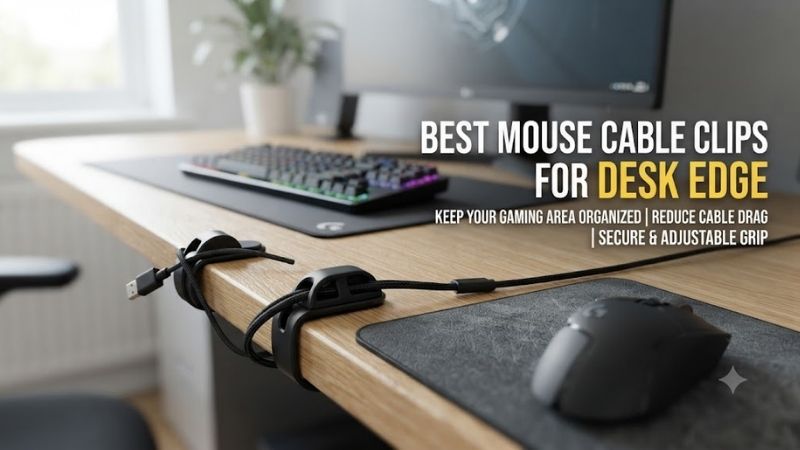
Mouse cables often slip behind gaming desks, become tangled with other peripherals, or catch on the desktop edge during movement. The best mouse cable clips for desk edge use should keep cables accessible without damaging their jackets or restricting gameplay. Choosing the right clip depends on cable thickness, mounting surface, removal requirements, and whether the cable moves during use.
Quick Verdict: Which Desk Edge Cable Clips Should You Buy?
For everyday gaming desks, adhesive cable clips provide a straightforward way to keep USB cables from falling behind the desk. However, a stationary desk-edge clip should generally manage the inactive section of a mouse cable. It is not a substitute for a flexible mouse bungee when the mouse is moving continuously.
Best overall: BlueLounge CableDrop
Best for thin charging cables: BlueLounge CableDrop Mini
Best for multiple cables: 3M Command 5-Cord Clip Organizer
Best transparent design: 3M Command Clear Round Cord Clips
Best for mixed cable storage: Anker Magnetic Cable Holder
Best integrated desk edge accessory: Orbitkey Desk Mat Cable Clip
Quick Comparison Table
| Cable clip | Mounting method | Best for | Main limitation |
|---|---|---|---|
| BlueLounge CableDrop | Adhesive | Individual mouse charging cables | Cable diameter compatibility |
| BlueLounge CableDrop Mini | Adhesive | Thin USB cables | Less suitable for thick braided cables |
| 3M Command 5-Cord Organizer | Removable adhesive | Multiple gaming cables | Larger mounting area |
| 3M Command Clear Round Clips | Removable adhesive | Discreet cable retention | Fixed clip geometry |
| Anker Magnetic Cable Holder | Adhesive base with magnetic clips | Repeated cable access | Not a true desk-edge clamp |
| Orbitkey Desk Mat Cable Clip | Desk mat edge attachment | Integrated desk organization | Requires compatible mat |
How We Selected These Desk Edge Cable Clips
Selection prioritized secure cable retention, installation simplicity, material compatibility, removal characteristics, and practical usefulness around gaming desks. We distinguished adhesive clips from magnetic organizers and mat-mounted accessories so that buyers can choose the correct installation method.
We also considered cable behavior during gameplay. An ideal desk-edge organizer should keep surplus cable out of the way without forcing the active mouse cable into a sharp bend. For competitive wired gaming, the movable section of the cable should remain free enough to accommodate the player’s full range of movement.
The 6 Best Mouse Cable Clips for Desk Edge Organization
Cable clips solve small problems that can become irritating during everyday use. A charging cable that repeatedly falls behind the desk creates inconvenience, while a wired mouse cable that catches against a hard edge can introduce inconsistent resistance. The following six products address these situations through different retention methods.
BlueLounge CableDrop – Best Overall Desk Edge Cable Clip
BlueLounge CableDrop is a compact adhesive cable organizer designed to keep individual cables accessible at a chosen location. Its flexible retention opening makes it useful for gaming desks where the mouse charging cable needs to remain within reach without being permanently connected to the mouse.
Best for: Wireless mouse charging cables and everyday USB cable organization.
Design and operation
The CableDrop uses a small body with an opening intended to retain a cable while allowing the user to reposition its free end.
This is useful for charging cables that would otherwise slide behind the desk.
The clip can be mounted near the edge, provided the surface is suitable for the adhesive.
Its compact footprint keeps it from occupying much of the main gaming area.
Cable compatibility
Cable diameter is important.
A relatively thin USB cable may sit comfortably in the holder, while a thick braided cable could be more difficult to insert.
The clip should grip the cable without forcing it into an unnatural bend.
Before installation, check whether the cable can slide through the opening as intended.
Adhesive mounting
The mounting location should be clean and dry.
Avoid textured or delicate finishes unless the manufacturer confirms compatibility.
An adhesive clip placed too close to the edge can be exposed to accidental impacts from chairs, clothing, or other accessories.
Position it where the cable remains accessible without protruding into an area that receives frequent contact.
Gaming use
For a wireless gaming mouse, the CableDrop is particularly convenient.
After charging, disconnect the mouse and leave the cable in the clip.
For a continuously wired mouse, the clip should manage the rear section of the cable rather than act as the main moving support.
Pros
-
Compact design
-
Simple adhesive mounting
-
Keeps charging cables accessible
-
Minimal desk footprint
-
Useful for multiple cable types
Cons
-
Cable thickness limitations
-
Adhesive surface requirements
-
Not a dynamic mouse bungee
-
Position changes may require new adhesive
Buy If: You want a simple clip to stop your mouse charging cable from falling behind the desk.
Skip If: You need active cable support during large FPS mouse movements.
BlueLounge CableDrop Mini – Best for Thin Mouse Charging Cables
The BlueLounge CableDrop Mini provides a smaller variation of the CableDrop concept. Its compact design is particularly suitable for thin charging cables and gaming setups where the organizer should remain visually unobtrusive.
Best for: Slim USB charging cables and minimalist desks.
Why the smaller size matters
Some gamers prefer cable accessories that are almost invisible when not in use.
A small holder can be placed near the desk edge without attracting attention.
It may also fit locations where a larger organizer would interfere with another accessory.
For example, the clip could sit beside a monitor stand or near the side of a desk shelf.
Cable retention
The smaller opening is generally better suited to thin cables.
Thick paracord-style gaming mouse cables may not fit correctly.
Forcing a cable into the holder can damage the outer jacket or deform the clip.
Choose the size according to the actual cable rather than the device it connects to.
Practical charging workflow
A wireless gaming mouse may use USB-C for charging.
When the cable is disconnected, the Mini can retain its connector near the edge.
This creates a predictable charging location.
However, it is important to leave enough cable length for comfortable connection without pulling against the mouse’s USB port.
Pros
-
Small footprint
-
Discreet appearance
-
Suitable for thin cables
-
Simple installation
-
Useful for wireless mouse charging
Cons
-
Narrower compatibility
-
Not ideal for thick braided cables
-
No active cable movement support
-
Adhesive placement matters
Buy If: You have a thin mouse charging cable and want a subtle desk organizer.
Skip If: Your cable uses an unusually thick outer jacket.
3M Command 5-Cord Clip Organizer – Best for Multiple Gaming Cables
The 3M Command 5-Cord Clip Organizer is designed to hold several cables in one mounting location. It is particularly useful for gaming desks where the mouse cable shares space with keyboard, headset, controller, and other USB connections.
Best for: Multi-device gaming desks with several cables near one edge.
Key features
-
Five-cord organization
-
Command adhesive mounting
-
No tools required
-
Suitable for several common smooth surfaces
-
Removable adhesive system
-
Reapplication possible with appropriate replacement strips
Why multiple cable channels help
A gaming desk may contain several cables that follow similar routes.
Without organization, they can become tangled or fall behind the desk.
A multi-channel holder separates these cables while keeping them accessible.
This is useful when a keyboard and mouse are frequently disconnected.
Each cable can occupy a designated position.
Mounting considerations
3M specifies compatibility with various smooth surfaces, including finished wood, metal, laminate, glass, and certain painted materials.
However, not every desk finish is suitable.
Textured surfaces can reduce adhesive contact.
The surface should be prepared according to the manufacturer’s instructions.
Removability
One advantage of the Command system is that it is designed for removal without conventional drilling.
This can be useful for renters or users who frequently rearrange their gaming setup.
However, removal should follow the correct strip-pulling procedure.
Incorrect removal can still damage some surfaces.
Gaming limitations
The five-cord organizer is intended primarily for stationary cable management.
It is not designed to let an active gaming mouse cable move freely through a large range.
For wired FPS gaming, route the fixed section of the cable through the organizer and use a bungee for the active portion when needed.
Pros
-
Organizes several cables
-
Tool-free installation
-
Removable mounting system
-
Useful for gaming workstations
-
Replacement adhesive available
Cons
-
Larger than a single cable clip
-
Not suitable for every surface
-
Stationary cable management
-
Requires correct installation and removal
Buy If: Your gaming desk has several cables that need organized routing.
Skip If: You only need a tiny clip for one charging cable.
3M Command Clear Round Cord Clips – Best Discreet Cable Routing
3M Command Clear Round Cord Clips offer a transparent cable-retention design intended to organize cords while remaining less visually noticeable. They are useful for users who want to route a mouse or peripheral cable along the side of a desk without installing a large cable-management system.
Best for: Subtle cable routing around clean desktop setups.
Transparent construction
A clear clip may blend more easily with light-colored desks, glass surfaces, or minimalist gaming setups.
This can be useful when the cable path is visible.
However, transparency does not affect the clip’s mechanical holding ability.
The important characteristics are opening size, adhesive compatibility, and correct placement.
Cable routing
Several clips can be positioned along a cable path.
For example, a cable may travel from the back of the desk, around the side, and toward the computer.
The clips can help maintain that route.
Avoid creating sharp turns or tension near USB connectors.
The cable should follow a relaxed path.
Maintenance and adjustment
If the setup changes, the clips can be removed according to the manufacturer’s instructions.
Replacement adhesive may be needed.
Avoid repeatedly pulling a thick cable through a tightly fitted clip.
This can wear the cable jacket or loosen the mount.
Pros
-
Discreet appearance
-
Useful for defined cable paths
-
Command mounting system
-
No drilling required
-
Suitable for several common surfaces
Cons
-
Fixed retention geometry
-
Not a mouse bungee
-
Cable size limitations
-
Multiple clips may be needed
Buy If: You want a visually subtle way to route cables near the desk edge.
Skip If: You need one adjustable holder for several thick cables.
Anker Magnetic Cable Holder – Best for Frequently Disconnected Cables
The Anker Magnetic Cable Holder provides a convenient way to keep frequently disconnected cables accessible. Its magnetic clips can be detached from the base, making it useful for wireless gaming mouse charging cables that are regularly picked up and returned.
Best for: Wireless charging cables and frequently changed USB connections.
Magnetic access
A conventional clip may require the cable to be pushed through a narrow opening.
A magnetic holder allows the cable clip to separate from the base.
This can make handling more convenient.
For a wireless mouse, the user can detach the cable clip, connect the mouse, and return the clip when charging is complete.
Cable compatibility
The holder is designed for cables within a specified thickness range.
Oversized braided cables may not fit.
Before purchase, check the cable diameter and connector arrangement.
Desk-edge placement
Although the Anker holder is not a mechanical edge clamp, its adhesive base can be placed near a suitable desk edge.
The mounting surface must provide adequate contact area.
Avoid placing the adhesive where it overlaps a sharp or curved edge.
Pros
-
Convenient magnetic access
-
Multiple cable positions
-
Useful for charging cables
-
Reusable adhesive concept
-
Compact desk organization
Cons
-
Not a literal edge clamp
-
Cable diameter limits
-
Not intended for active FPS cable movement
-
Magnetic clips may be misplaced
Buy If: You frequently disconnect a wireless mouse charging cable.
Skip If: You need a spring-loaded support for a wired mouse.
Orbitkey Desk Mat Cable Clip – Best Integrated Desk Edge Organizer
The Orbitkey Desk Mat includes a cable clip designed to attach along the edge of the mat. This approach is useful for users who want a cable holder that can move with the desk mat rather than relying on adhesive applied directly to the desk.
Best for: Owners of compatible Orbitkey desk mats.
Integrated design
The clip attaches to the desk mat edge.
It can be repositioned along the supported perimeter.
This gives users flexibility when adjusting their workstation.
For example, a charging cable can be held near the mouse area during gaming and moved when the desk is reorganized.
Cable size
Orbitkey lists compatibility with a single cable of approximately 5 mm or less, depending on the accessory configuration.
This is suitable for many ordinary USB cables.
However, thick braided gaming cables may exceed the intended size.
Measure before purchasing.
Practical limitations
The main limitation is ecosystem compatibility.
This accessory is primarily relevant to users who already own the appropriate Orbitkey mat.
Buying the entire mat solely to obtain a cable clip may not represent good value.
The clip also is not designed to function as a mouse bungee during continuous movement.
Pros
-
Repositionable along compatible mat edge
-
No desk adhesive required
-
Clean appearance
-
Useful for charging cables
-
Integrated organization
Cons
-
Requires compatible desk mat
-
Limited cable size
-
Not a standalone universal clamp
-
Stationary retention design
Buy If: You already use an Orbitkey desk mat and want integrated cable organization.
Skip If: You need a universal desk-edge clip for an unrelated setup.
Buying Guide: How to Choose Mouse Cable Clips for Desk Edge Use
A cable clip should organize the mouse cable without introducing tension, damaging its jacket, or obstructing movement. The most important decision is whether the clip will hold a stationary charging cable or route the fixed portion of an actively used wired mouse connection.
Determine Whether You Need Static or Dynamic Cable Management
Static cable clips hold the cable in a fixed location.
This is useful for charging cables and surplus cable length.
Dynamic cable-management devices allow the mouse cable to move.
A mouse bungee is generally more appropriate for continuous wired gaming.
Using a tight stationary clip as the active support may create unwanted resistance.
Check Cable Diameter Before Buying
USB cables vary in thickness.
A thin charging cable may fit a small clip comfortably.
A thick braided or paracord cable may require a larger opening.
Check the actual cable diameter.
Avoid products that require excessive pressure to insert the cable.
Choose a Suitable Adhesive Surface
Adhesive clips generally work best on clean, smooth, compatible surfaces.
Dust, oil, textured finishes, and loose coatings can reduce adhesion.
Follow the manufacturer’s surface-preparation instructions.
For painted or delicate wooden desks, check whether removal could affect the finish.
Avoid Sharp Cable Bends Near the Desk Edge
USB cables should not be bent sharply near their connectors.
Repeated bending can damage internal conductors or strain-relief structures.
A clip should guide the cable along a gentle curve.
Leave sufficient slack between the clip and connected device.
Understand Adhesive Removal and Repositioning
Some cable clips use removable adhesive systems.
Others may leave residue or require replacement adhesive after removal.
If you frequently change desk layouts, a repositionable design may be preferable.
Never remove adhesive clips by pulling aggressively against a fragile desk surface.
How to Organize a Gaming Mouse Cable
Begin by identifying where the cable enters the desk area.
Position the organizer outside the active mouse movement zone.
Route excess cable behind or beneath the desk.
Leave enough free length for the mouse.
If a bungee is used, position it between the mouse and stationary cable organizer.
Test the full mouse movement range before finalizing the arrangement.
Frequently Asked Questions
Can cable clips improve gaming mouse performance?
They can reduce cable snags, but they do not change sensor specifications or electronic latency.
Are adhesive cable clips safe for wooden desks?
Only when the adhesive is compatible with the particular finish.
Can I use a desk-edge clip instead of a mouse bungee?
For stationary cables, yes. For dynamic wired gaming, a bungee may work better.
Do magnetic cable clips damage USB cables?
Properly designed clips should not, but unsuitable sizing or excessive force can damage a cable.
How many clips do I need?
It depends on cable length and routing complexity. Avoid adding unnecessary tight bends.
Can desk-edge clips hold paracord mouse cables?
Some can, provided the opening fits the cable without compression.
Final Verdict
BlueLounge CableDrop is a practical overall choice for retaining individual mouse charging cables near the desk edge. The Mini version suits thinner cables, while 3M Command organizers handle more complex wiring. Anker and Orbitkey offer convenient alternatives for compatible setups. For active wired gaming, use an appropriate bungee rather than relying on a stationary clip alone.