🛒 Best Price Today on Amazon
Prime members get fast, free shipping on everything above, plus member-only deals. New members get a 30-day free trial — cancel anytime.
- Top Mouse Brands at a Glance
- Watch: Best Mouse Brands — Video Review
- How to Choose the Right Mouse
- Best Mouse Brands by Budget Tier
- The Best Mice Reviewed
- Related Guides
- Frequently Asked Questions
- Final Thoughts
- More Top Mouse Brands and Their Best Models
- Also Consider
- How We Chose These Mouse Brands
- Mouse Brand Buying Guide: Specs and Thresholds That Matter
- Which Mouse Brand Should You Choose?
- Common Mistakes When Choosing a Mouse Brand
- Top Mouse Brands by Use Case
Choosing a mouse used to mean grabbing whatever came in the box, but the brand behind the sensor, switches, and software makes a real difference in how a mouse feels and lasts. Some names have earned their reputation through years of reliable wireless performance and durable clicks, while newcomers compete hard on value.
This roundup gathers standout wireless mice from the brands worth trusting, spanning ultra-affordable everyday pointers to a proven wireless gaming option. Whether you want something dependable for the office or a lightweight companion for your laptop bag, there is a pick here that balances price, comfort, and build quality.
Updated October 2026 — The best gaming mouse brand for most players is Logitech, followed closely by Razer and Corsair, while Logitech MX and Keychron lead among the mouse brands for office and mixed use. If you only want three models by name: the Logitech G PRO X Superlight 2 is the safest all-round wireless pick, the Razer Viper V4 Pro is the lightest premium option, and the Corsair Sabre v2 PRO Ultralight is the best ultralight value from a major brand.
These are the most popular mouse brands in 2026, ranked by build quality, sensor and switch hardware, wireless reliability, software, and how well each one supports its products. Scroll down for the brand-by-brand breakdown, tier picks, and buying guide.
Top Mouse Brands at a Glance
- Best overall mouse brand: Logitech G PRO X Superlight 2 · 60g · 44K DPI · symmetrical shape
- Best for esports and competitive FPS: Razer Viper V4 Pro · 49g · 50K DPI · 180-hour battery
- Best ultralight value: Corsair Sabre v2 PRO Ultralight · 36g · 33,000 DPI · 8,000Hz polling
- Best ergonomic shape: Razer DeathAdder V4 Pro · 56g · 8K polling · optical scroll wheel
- Best for productivity: Logitech MX Master 4 · haptic feedback · ergonomic wireless design
- Best budget gaming mouse brand: MCHOSE G3 V2 · 59g · 12K DPI · tri-mode connection
| Brand | Known for | Companion software | Model picked below | Tier |
|---|---|---|---|---|
| Logitech | Reliable wireless, balanced shapes, long support history | Logitech G HUB | G PRO X Superlight 2 | Premium |
| Razer | Esports-grade sensors, optical switches, ergonomic shapes | Razer Synapse | Viper V4 Pro, DeathAdder V4 Pro | Premium |
| Corsair | Ultralight FPS shells, high polling rates, MMO side buttons | Corsair iCUE | Sabre v2 PRO Ultralight | Mid to premium |
| BenQ Zowie | Driverless plug-and-play esports mice | None needed | EC2-CW | Premium |
| SteelSeries | Water-resistant ultralight shells, Bluetooth plus 2.4GHz | SteelSeries GG | Aerox 5 Wireless | Mid to premium |
| Glorious | Hybrid wireless, lightweight community favorite | Glorious Core | Model O 2 Wireless | Mid-range |
| ASUS ROG | Tri-mode connectivity, long battery life | ROG Armoury Crate | Keris Wireless AimPoint | Mid-range |
| HyperX | Light wireless mice with long battery life | HyperX NGENUITY | Pulsefire Haste 2 Wireless | Mid-range |
| Endgame Gear | Lightweight, esports-focused shapes at fair prices | Endgame Gear OS | XM2we | Mid-range |
| Keychron | Tri-mode wireless, 8K polling at a modest price | Keychron Launcher | M7 8K | Mid-range |
| MCHOSE | Budget wireless mice with modern sensors | Maker utility | G3 V2 | Budget |

Logitech M185 Compact Ambidextrous 2.4 GHz Wireless Mouse - Swift Grey | Ambidextrous mouse with 2.4 GHz USB-A Nano Receiver, Optical Tracking, 12-Months Battery Life, PC, Mac, Laptop compatible
Included for '13 Best Mouse Brands' as a representative home product in this roundup; selection reflects the product set returned for this topic.
View on Amazon
TECKNET Wireless Mouse, 2.4G Ergonomic Computer Mouse, 2600 DPI, Purple | Ergonomic Design with Side Grips, Adjustable DPI, 2-Year Battery, Compact Size, USB-A Plug & Play, Wide OS Compatibility
Included for '13 Best Mouse Brands' as a representative home product in this roundup; selection reflects the product set returned for this topic.
View on Amazon
Acer Wireless Mouse for Laptop, 2.4GHz Computer Mouse 3 Adjustable 1600 DPI | Office Cordless USB Mice with USBA Receiver, 6 Buttons, Medium to Large Sized Hands Compatible with PC, Laptop, Desktop
Included for '13 Best Mouse Brands' as a representative home product in this roundup; selection reflects the product set returned for this topic.
View on Amazon
Logitech G305 Lightspeed Wireless Gaming Mouse - Black | 12,000 DPI, Lightweight, 6 Programmable Buttons, 250h Battery, On-Board Memory, Compatible with PC and Mac
Included for '13 Best Mouse Brands' as a representative home product in this roundup; selection reflects the product set returned for this topic.
View on Amazon
VssoPlor Wireless Mouse, 2.4G Slim Computer Laptop Mouse, Black and Gold | Portable Mouse, Plug & Play USB Nano Receiver, Quiet Silent Optical Mice for Notebook, PC, Laptop, Computer, Windows, Mac
Included for '13 Best Mouse Brands' as a representative home product in this roundup; selection reflects the product set returned for this topic.
View on Amazon
Rii Wireless Mouse, 2.4G Portable Computer Mice | For PC, Laptop, Windows, Office Included Wireless USB dongle , Black
Included for '13 Best Mouse Brands' as a representative home product in this roundup; selection reflects the product set returned for this topic.
View on Amazon
wegear USB Wireless Mouse for Laptop PC Mac, 2.4GHz Cordless Mouse-Black | Ergonomic Portable Optical Computer Mice with 6 Buttons, 5-Level Adjustable 4000 DPI,24-Month Battery Life
Included for '13 Best Mouse Brands' as a representative home product in this roundup; selection reflects the product set returned for this topic.
View on Amazon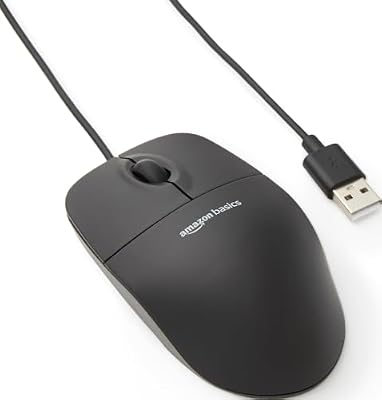
Amazon Basics 3-Button USB Wired Mouse with Responsive Tracking, Plug & Play, Compatible with Windows and Mac, Black
Included for '13 Best Mouse Brands' as a representative home product in this roundup; selection reflects the product set returned for this topic.
View on AmazonWatch: Best Mouse Brands — Video Review
How to Choose the Right Mouse
- Connection type: a 2.4GHz USB dongle offers the most reliable, low-latency link, while Bluetooth frees up a port and pairs with tablets and phones.
- Grip and size: match the shape to your hand; compact mice travel well but larger hands fatigue on them during long sessions.
- DPI and precision: adjustable DPI lets you switch between fast navigation and fine control, which matters for both design work and gaming.
- Battery approach: AA-powered mice offer huge runtime and easy swaps, while rechargeable models cut down on waste.
- Brand support: established names back their mice with better switches, software, and warranty coverage that budget unknowns often skip.
Best Mouse Brands by Budget Tier
Each tier below lists the picks that make sense at that budget level. The model details are in the full write-ups later on this page.
Best budget mouse brands
- MCHOSE G3 V2 · 59g · PAW3311 sensor · 12K DPI · tri-mode connection
- Endgame Gear XM2we · lightweight wireless · 19,000 DPI · 5 buttons
- Logitech G305 Lightspeed (reviewed above) · 12,000 DPI · single AA battery
What to expect at this tier:
- Sensors good enough for any game, though shells are heavier than premium options.
- Wireless polling is usually 1,000Hz, which is plenty for most players.
- Limited software support and shorter warranties from newer brands.
- Fewer sizes and shapes, so check dimensions before you buy.
Best mid-range mouse brands
- HyperX Pulsefire Haste 2 Wireless · 61g · 100-hour battery · dual wireless
- Keychron M7 8K · 66g · 30K DPI · 8,000Hz polling · tri-mode
- ASUS ROG Keris Wireless AimPoint · 75g · 42K DPI · up to 119 hours
- Corsair Sabre v2 PRO Ultralight · 36g · 33,000 DPI · 8,000Hz
What to expect at this tier:
- Sub-65g shells and tri-mode connectivity become common.
- Optical or high-grade mechanical switches rated for tens of millions of clicks.
- Companion software with sensitivity, polling, and button remapping.
- Battery life of roughly 70 to 120 hours on 2.4GHz depending on settings.
Best upper mid-range mouse brands
- Glorious Model O 2 Wireless · 68g · hybrid 2.4GHz and Bluetooth
- SteelSeries Aerox 5 Wireless · water-resistant ultralight · Bluetooth and 2.4GHz
- Logitech G PRO X Superlight 2 · 60g · 44K DPI
What to expect at this tier:
- Polished esports-grade sensors, more consistent build quality, and better feet.
- Wireless charging dock support on select models.
- Strong resale value on well-known brands.
Best premium mouse brands
- Razer Viper V4 Pro · 49g · 50K DPI · 180-hour battery
- Razer DeathAdder V4 Pro · 56g · 8K polling · optical scroll wheel
- BenQ Zowie EC2-CW · ergonomic · driverless · 24-step scroll wheel
What to expect at this tier:
- The lightest shells, the newest sensors, and 8,000Hz polling.
- Diminishing returns over the mid-range unless you play at 240Hz or higher.
- Excellent support and software, but you pay for the brand and R&D.
The Best Mice Reviewed
Logitech M185
Logitech’s reputation for dependable everyday mice is well earned, and the compact M185 is the proof. Its ambidextrous shape suits any grip, the 2.4GHz connection is rock-steady, and battery life stretches for months. It is the safe, no-drama pick for office and travel use.
Logitech G305 Lightspeed
The G305 shows what Logitech’s gaming pedigree brings to a wireless mouse: the Lightspeed connection is genuinely low-latency, the sensor is accurate, and a single AA battery lasts a remarkably long time. It bridges the gap between casual and serious play beautifully.
TECKNET Wireless Mouse
TECKNET has carved out a niche in affordable ergonomics, and this 2600 DPI model delivers a contoured shape and adjustable sensitivity at a bargain price. It is a smart choice for anyone wanting comfort without spending much.
Acer Wireless Mouse
Acer’s laptop-focused mouse keeps things simple with three DPI settings up to 1600 and a comfortable everyday shape. It pairs naturally with an Acer notebook but works with any Windows machine, making it a tidy, low-cost companion.
VssoPlor Wireless Mouse
The slim VssoPlor proves budget brands can nail the essentials. Its black-and-gold styling looks smarter than the price suggests, the 2.4GHz link is stable, and the low-profile body slips easily into a bag for travel.
Related Guides
- Best Mouse Brands (2026)
- Best FPS Gaming Mice (2026)
- Best Gaming Mice For Fortnite (2026)
- Fnatic Mouse (2026)
Frequently Asked Questions
Which mouse brand is most reliable?
Logitech consistently leads for reliability, with dependable switches, strong software, and long battery life across both office and gaming lines.
Is 2.4GHz better than Bluetooth?
For latency and stability, yes. A 2.4GHz dongle is ideal for gaming and precision work, while Bluetooth wins on convenience and port savings.
Do I need a gaming mouse for everyday use?
Not necessarily, but a gaming model like the G305 offers better sensors and switches that benefit any user, not just gamers.
How long do wireless mouse batteries last?
AA-powered mice like the M185 and G305 often run for many months, while rechargeable models typically last weeks between charges.
What is the best gaming mouse brand?
Logitech is the best gaming mouse brand for most players, with Razer and Corsair close behind. Logitech’s G PRO X Superlight 2 combines low weight, a symmetrical shape, and reliable wireless, while Razer leads on ergonomic options and Corsair on ultralight value.
Which mouse brands are the most popular?
Logitech, Razer, Corsair, SteelSeries, and HyperX are the most popular mouse brands in gaming, and Logitech also dominates office mice. Newer names such as Keychron, Glorious, and MCHOSE are growing because of lower prices.
Is Logitech or Razer better?
Neither is better for everyone. Logitech tends to offer more balanced shapes and longer support history, while Razer often leads on sensor specs and ergonomic designs. Pick based on shape, weight, and budget, not brand loyalty.
Are cheap mouse brands worth buying?
Yes, for casual play or office use, since modern budget sensors are accurate. The trade-offs are heavier shells, weaker software, and shorter warranty support. Established brands usually hold up better for years of heavy use.
Do I need an 8K polling rate mouse?
No, 1,000Hz is enough for most players. Higher polling rates can feel smoother on 240Hz or faster monitors but cost more battery life and processing, so they are a small bonus, not a requirement.
How do I contact a gaming mouse brand’s support or press team?
Use the brand’s official support page for warranty and product help, and its press or media page for review samples and partnership questions. Avoid third-party contact lists, and confirm the address on the maker’s own site.
Final Thoughts
For most people the Logitech M185 is the reliable everyday winner, while the Logitech G305 Lightspeed is the standout if you want gaming-grade performance without a cord. Budget hunters will be well served by the TECKNET, which delivers comfort and adjustable DPI for a fraction of the cost of premium options.
More Top Mouse Brands and Their Best Models
The five mice reviewed above cover the entry level. These twelve additions fill the gaps in the 2026 brand landscape: premium esports flagships, ergonomic shapes, and value options from brands that have earned their reputation.
Logitech G PRO X Superlight 2 — Best overall mouse brand pick

Logitech G PRO X Superlight 2 Wireless Gaming Mouse - Black | 60g, Symmetrical Shape, <8 kHz Polling, 44K DPI, PowerPlay Wireless Charging Supported, USB-C, 5 Buttons, For PC/Mac
Included for '13 Best Mouse Brands' as a representative home product in this roundup; selection reflects the product set returned for this topic.
View on AmazonLogitech G PRO X Superlight 2 is the model most players picture when they ask which brand makes the best gaming mouse. It pairs a very light shell with a symmetrical shape that suits palm, claw, and fingertip grips.
Specs: 60g · symmetrical shape · 44K DPI sensor · PowerPlay-compatible · Lightspeed wireless
Pros:
- Light enough for fast flicks without feeling hollow
- Ambidextrous-style shape fits many hand sizes
- Works with Logitech’s wireless charging system
Cons:
- Premium tier price
- Few extra buttons for MMO or productivity use
Skip it if
Razer Viper V4 Pro — Best for competitive FPS

Razer Viper V4 Pro Wireless Esports Gaming Mouse, 49g,180Hr Battery, Black | Ultra Lightweight, 50K DPI Optical Sensor, 8K Polling, Gen-4 Optical Switches, Scroll Wheel, USB-C Charging, for PC & Mac
Included for '13 Best Mouse Brands' as a representative home product in this roundup; selection reflects the product set returned for this topic.
View on AmazonRazer Viper V4 Pro is the brand’s lightest esports flagship, built for players who want the least weight to move. The 50K DPI optical sensor offers more headroom than most players will ever need.
Specs: 49g · 50K DPI optical sensor · up to 180-hour battery · ultralight ambidextrous shell · high-rate wireless polling
Pros:
- Among the lightest mainstream wireless mice
- Very long battery life per charge
- Strong sensor and optical switches
Cons:
- Highest price tier on this page
- Minimal button count
Skip it if you prefer a mouse with weight and a contoured palm shape.
Razer DeathAdder V4 Pro — Best ergonomic shape from a major brand

Razer DeathAdder V4 Pro Wireless Gaming Mouse, 8K Polling Rate, 56g, Black | HyperSpeed Wireless Gen-2, Optical Scroll Wheel, Optical Switches Gen-4, Focus Pro 45K Sensor Gen-2, Up to 150 Hr Battery
Included for '13 Best Mouse Brands' as a representative home product in this roundup; selection reflects the product set returned for this topic.
View on AmazonRazer DeathAdder V4 Pro continues the brand’s long-running ergonomic shape, tuned for right-handed palm and claw grips. It trades the Viper’s symmetry for a rounded hump and curved right side.
Specs: 56g · right-handed ergonomic · 8K polling · optical scroll wheel · HyperSpeed Wireless Gen-2
Pros:
- Comfortable contour for long sessions
- Optical scroll wheel adds durability
- 8K polling for high-refresh monitors
Cons:
- Right-handed only
- Premium price
Skip it if you are left-handed or use a fingertip grip.
Corsair Sabre v2 PRO Ultralight — Best ultralight value from a major brand

Corsair Sabre v2 PRO Ultralight FPS Wireless Gaming Mouse – White | 33,000 DPI, 36g Weight, 8,000Hz Hyper-Polling, Mechanical Switches, Up to 70-Hour Wireless Battery Life
Included for '13 Best Mouse Brands' as a representative home product in this roundup; selection reflects the product set returned for this topic.
View on AmazonCorsair Sabre v2 PRO Ultralight shows how far the brand moved from RGB-heavy mice toward competitive FPS gear. At 36g it is the lightest model on this page.
Specs: 36g · 33,000 DPI · 8,000Hz hyper-polling · wireless FPS shell · iCUE software
Pros:
- Extremely light
- High polling rate
- Good value compared with other flagship-class mice
Cons:
- Ultralight shells suit claw and fingertip grips more than large palm grips
- Software is feature-heavy
Skip it if you want a heavier, more planted feel.
BenQ Zowie EC2-CW — Best driverless ergonomic mouse

BenQ Zowie EC2-CW Wireless Ergonomic Gaming Mouse for Esports | Enhanced Receiver | 24-Step Scroll Wheel | Driverless | Matte Black Coating | Medium Size
Included for '13 Best Mouse Brands' as a representative home product in this roundup; selection reflects the product set returned for this topic.
View on AmazonBenQ Zowie EC2-CW is a wireless version of the esports favorite EC series. It is driverless, so settings live on the mouse itself with no account or software needed.
Specs: wireless · driverless · ergonomic right-handed shape · 24-step scroll wheel · enhanced receiver
Pros:
- Plug-and-play with no software
- Shape loved by palm and claw users
- Tactile scroll steps
Cons:
- Premium price for a plain-looking mouse
- Few customization options
Skip it if you want RGB, many buttons, or deep software tuning.
SteelSeries Aerox 5 Wireless — Best water-resistant ultralight

SteelSeries Aerox 5 Wireless - Black | Holey RGB Gaming Mouse - Ultra-lightweight Water Resistant Design - Bluetooth/2.4 GHz - 18K DPI TrueMove Air Optical Sensor
Included for '13 Best Mouse Brands' as a representative home product in this roundup; selection reflects the product set returned for this topic.
View on AmazonSteelSeries Aerox 5 Wireless stands out for its perforated shell with a water-resistant design and Bluetooth plus 2.4GHz connectivity.
Specs: ultralight perforated shell · water resistant · Bluetooth and 2.4GHz · extra programmable buttons · SteelSeries GG software
Pros:
- Dual-mode wireless for laptop and desktop
- Shell resists splashes and dust
- Extra buttons for MOBA and MMO play
Cons:
- Shape is not symmetrical
- Shorter battery rating than some rivals
Skip it if you want a symmetrical shell or the longest possible battery life.
Glorious Model O 2 Wireless — Best hybrid wireless mouse for the money

Glorious Gaming Model O 2 Wireless Gaming Mouse - Hybrid 2.4GHz & Bluetooth Wireless, 68g Superlight, Long Battery Life, 26k BAMF 2.0 Sensor, RGB, Ambidextrous, 6 Buttons, PTFE Feet - White
Included for '13 Best Mouse Brands' because the listing is a hybrid/pocket-spring build, which is the attribute this article compares.
View on AmazonGlorious Model O 2 Wireless adds Bluetooth to a 2.4GHz dongle in a lightweight shell. It’s a popular upgrade for players moving from a budget wireless mouse.
Specs: 68g · hybrid 2.4GHz and Bluetooth · lightweight shell · long battery life · Glorious Core software
Pros:
- Both connection types
- Lightweight for the price tier
- Mid-range price
Cons:
- Heavier than the ultralight models above
- Software is basic
Skip it if you need the lowest possible weight.
ASUS ROG Keris Wireless AimPoint — Best for long battery life and tri-mode

ASUS ROG Keris Wireless Aimpoint Gaming Mouse – Right-Handed Ergonomic, 75g, Tri-Mode Connectivity, 42K DPI, up to 119Hr Battery, PC/Mac Support - White
Included for '13 Best Mouse Brands' as a representative home product in this roundup; selection reflects the product set returned for this topic.
View on AmazonASUS ROG Keris Wireless AimPoint is a tri-mode right-handed mouse with a large sensor range and up to 119 hours of battery life per the maker.
Specs: 75g · tri-mode connectivity · 42K DPI · up to 119 hours · right-handed ergonomic
Pros:
- Three ways to connect
- Long battery life
- Ergonomic right-handed shape
Cons:
- Heavier than ultralight models
- ROG styling
Skip it if you want a lightweight symmetrical mouse.
HyperX Pulsefire Haste 2 Wireless — Best lightweight value

HyperX Pulsefire Haste 2 – Wireless Gaming Mouse- Ultra Lightweight, 61g, 100 Hour Battery Life, Dual Wireless Connectivity, Precision Sensor - Black
Included for '13 Best Mouse Brands' as a representative home product in this roundup; selection reflects the product set returned for this topic.
View on AmazonHyperX Pulsefire Haste 2 Wireless is a fast, light mouse with dual wireless connectivity and a 100-hour battery rating.
Specs: 61g · up to 100-hour battery · dual wireless (2.4GHz and Bluetooth) · NGENUITY software
Pros:
- Light and quick
- Long battery life
- Good value for a major brand
Cons:
- Right-handed shape
- Fewer extra buttons
Skip it if you prefer a larger palm grip shape.
Endgame Gear XM2we — Best lightweight wireless pick from an esports specialist

ENDGAME GEAR XM2we Lightweight Wireless Gaming Mouse, 5 Buttons, Black | Programmable gaming mouse, 19,000 DPI sensor, claw grip esports with side buttons for FPS PC gaming
Included for '13 Best Mouse Brands' as a representative home product in this roundup; selection reflects the product set returned for this topic.
View on AmazonEndgame Gear XM2we is the wireless version of a well-regarded claw-grip shape with a straightforward button layout.
Specs: lightweight wireless build · 19,000 DPI sensor · 5 buttons · programmable · Endgame Gear OS settings
Pros:
- Simple, proven shape
- Light for its price tier
- Strong value
Cons:
- Smaller brand with fewer retail options
- No Bluetooth
Skip it if you want Bluetooth or lots of buttons.
Keychron M7 8K — Best 8K polling value

Keychron M7 8K Wireless Mouse, 30K DPI, 2.4 GHz/Bluetooth/Wired, 66g, Black | PixArt 3950 sensor, 8000 Hz polling, Contoured thumb rest, Programmable buttons, Up to 140 hours for Laptop macOS/Windows
Included for '13 Best Mouse Brands' as a representative home product in this roundup; selection reflects the product set returned for this topic.
View on AmazonKeychron M7 8K brings 8,000Hz polling and a tri-mode connection to the mid-range tier, and it comes from a brand known for keyboards.
Specs: 66g · PixArt 3950 sensor · 30K DPI · 8,000Hz polling · 2.4GHz, Bluetooth, and wired
Pros:
- 8K polling at a modest price
- Three connection modes
- Web-based configuration through Keychron Launcher
Cons:
- Newer to mice than Logitech or Razer
- Heavier than ultralight picks
Skip it if you want a sub-60g shell.
MCHOSE G3 V2 — Best budget gaming mouse brand pick

MCHOSE G3 V2 Wireless Gaming Mouse, Symmetrical, PAW3311, 12K DPI, Tri-Mode Connection, Wireless/Wired 1K Polling, 59g Weight, 800mAh Battery - White
Included for '13 Best Mouse Brands' as a representative home product in this roundup; selection reflects the product set returned for this topic.
View on AmazonMCHOSE G3 V2 shows what newer budget brands offer: a symmetrical shell, modern sensor, and tri-mode connection at a low price.
Specs: 59g · PAW3311 sensor · 12K DPI · tri-mode connection · 1K polling
Pros:
- Very low entry price
- Tri-mode wireless
- Light for the tier
Cons:
- Newer brand with thinner support history
- 1K polling only
Skip it if you want long-term warranty confidence from an established brand.
Also Consider
Logitech MX Master 4 — Best for productivity

Logitech MX Master 4 Ergonomic Wireless Mouse with Haptics - Graphite | Advanced performance haptic feedback, Ultra-Fast Scrolling, 8K DPI Any-surface, Quiet Clicks, Wireless, USB-C, Windows/MacOS
Included for '13 Best Mouse Brands' as a representative home product in this roundup; selection reflects the product set returned for this topic.
View on AmazonLogitech MX Master 4 is an ergonomic wireless mouse with haptic feedback and ultra-fast scrolling, aimed at office and creative work instead of gaming. Trade-off: heavier than gaming mice and not built for fast shooters.
MSI Clutch GM51 — Best wireless mouse with a charging dock

msi Clutch GM51 Lightweight Wireless Gaming Mouse & Charging Dock, 26K DPI Optical Sensor, 2.4G & Bluetooth, 60M Omron Switches, Fast-Charging, 150Hr Battery, RGB, 5 Programmable Buttons, PC/Mac
Included for '13 Best Mouse Brands' as a representative home product in this roundup; selection reflects the product set returned for this topic.
View on AmazonMSI Clutch GM51 is a lightweight wireless gaming mouse with a 26K DPI optical sensor, Omron switches, 2.4G and Bluetooth, and a charging dock. Trade-off: the dock takes desk space.
Redragon M686 — Best entry-level wireless gaming mouse

Redragon M686 Wireless RGB Optical Gaming Mouse 16000 DPI Remapping Keys | Cable-Free 0 Delay, Smooth Precise Tracking, Custom Macro Keybinds, Vibing Backlight, Ergonomic Grip Body Comfort
Included for '13 Best Mouse Brands' as a representative home product in this roundup; selection reflects the product set returned for this topic.
View on AmazonRedragon M686 is a wireless RGB optical gaming mouse with up to 16,000 DPI and remappable keys at a very low price. Trade-off: sensor and shell quality sit below the named brands above.
Lamzu Maya X — Best boutique ultralight

Lamzu Maya X Wireless Gaming Mouse, Ultra Lightweight 47g, Optical Switch, Maximum 30000 DPI, Symmetrical, MCU Nordic 52840, Dust-Proof Encoder, PAW3950 Sensor(Larger Maya) (White)
Included for '13 Best Mouse Brands' as a representative home product in this roundup; selection reflects the product set returned for this topic.
View on AmazonLamzu Maya X is a 47g symmetrical wireless mouse with optical switches and up to 30,000 DPI. Trade-off: a smaller brand with fewer retail and support options.
Pulsar X2 Crazylight — Best ultralight for small and medium hands

Pulsar Gaming Gears X2 Crazylight Wireless Gaming Mouse, Medium, Jet Black | Ultra Lightweight 1.38 oz (39g), Symmetrical, Flat Side, Back-Moderate Hump, Fingertip/Claw Grip, XS-1, 32K DPI, 8K
Included for '13 Best Mouse Brands' as a representative home product in this roundup; selection reflects the product set returned for this topic.
View on AmazonPulsar Gaming Gears X2 Crazylight weighs about 39g in a symmetrical medium shell. Trade-off: premium price and a size that may be small for large hands.
How We Chose These Mouse Brands
This is a research-based guide built from maker specifications and published reviews. We selected brands that sell wireless mice with current sensors, a mix of price tiers, and a record of support through software updates and warranty service. For each pick we checked the maker’s specification sheet for weight, sensor, polling rate, and battery claims, then cross-checked against independent editorial reviews. Where sources disagreed, we left the spec out. We limited each brand to two main picks so the list reflects the market, not one company’s catalog.
Selection criteria:
- Current-generation model sold in 2026
- Sensor quality, switch type, and wireless implementation
- Weight, shape, and grip fit
- Software, firmware, and warranty support
- Price tier relative to what a model offers
Mouse Brand Buying Guide: Specs and Thresholds That Matter
Weight: how light is light enough?
Under 60g counts as ultralight, 60g to 80g is standard for wireless gaming mice, and above 80g is a heavier “workhorse” class. Ultralight models such as the Corsair Sabre v2 PRO Ultralight at 36g and the Razer Viper V4 Pro at 49g suit fast flick aim. Larger hands and palm grips often prefer 60g to 75g, like the ASUS ROG Keris Wireless AimPoint at 75g, because the extra mass feels more stable.
Sensor DPI and polling rate
Most players use 400 to 1,600 DPI in games, so 12K to 50K DPI numbers are headroom, not a reason to upgrade. Polling matters more: 1,000Hz is fine for most people, while 4,000Hz to 8,000Hz can feel smoother on 240Hz or faster monitors. Higher polling rates use more battery and CPU, so enable them only if your display and games benefit.
Connection type and latency
A 2.4GHz dongle is the best choice for gaming because it has the lowest latency and the most stable link. Bluetooth is for laptops, tablets, and travel. Tri-mode mice like the Keychron M7 8K and ASUS ROG Keris Wireless AimPoint cover both.
Battery life targets
Look for at least 70 hours of 2.4GHz use per charge on a rechargeable mouse. Models claiming 100 to 180 hours, such as the HyperX Pulsefire Haste 2 Wireless and Razer Viper V4 Pro, are rated by the maker under specific settings. Higher polling cuts that number.
Shape and hand size
As a rule of thumb, measure from your wrist crease to the tip of your middle finger. Under 17cm is small, 17cm to 19cm is medium, and above 19cm is large. Small and medium hands handle most symmetrical shells. Large hands benefit from ergonomic shapes like the Razer DeathAdder V4 Pro or BenQ Zowie EC2-CW.
Software, warranty, and support
Established brands usually provide a desktop app (G HUB, Synapse, iCUE, SteelSeries GG), firmware updates, and a one- to two-year warranty. BenQ Zowie skips software entirely. Newer brands may offer web configurators instead. Check the maker’s warranty page before you buy, since terms vary.
Which Mouse Brand Should You Choose?
- You want one safe default: Logitech G PRO X Superlight 2.
- You play competitive shooters: Razer Viper V4 Pro or Corsair Sabre v2 PRO Ultralight.
- You have a larger hand or like palm grip: Razer DeathAdder V4 Pro or BenQ Zowie EC2-CW.
- You want plug-and-play without software: BenQ Zowie EC2-CW.
- You also use it for work: Logitech MX Master 4 or Keychron M7 8K.
- You are on a tight budget: MCHOSE G3 V2, Endgame Gear XM2we, or Logitech G305 Lightspeed.
- You want 8K polling without a flagship price: Keychron M7 8K.
- You want a long battery: ASUS ROG Keris Wireless AimPoint or HyperX Pulsefire Haste 2 Wireless.
Common Mistakes When Choosing a Mouse Brand
- Choosing by DPI number instead of weight and shape.
- Buying an ultralight shell that is too small for your hand.
- Skipping the warranty details on newer brands.
- Paying for 8K polling on a 60Hz or 144Hz display.
- Assuming a gaming brand’s cheapest mouse matches its flagship sensor or switches.
Top Mouse Brands by Use Case
The best mouse brand depends on what you do at your desk. Use these shortcuts if you already know your main use.
Best mouse brands for office and everyday work
Logitech leads this category thanks to its MX line. The Logitech MX Master 4 offers an ergonomic shape, haptic feedback, and fast scrolling for spreadsheets, editing, and long documents. Keychron’s M7 8K is a more affordable tri-mode alternative that works on a laptop over Bluetooth and on a desktop with the 2.4GHz dongle. For simple, reliable office use, the Logitech M185 reviewed above remains a dependable low-cost choice.
Best mouse brands for left-handed users
True left-handed ergonomic mice are rare, so left-handed users usually choose symmetrical shells. The Logitech G PRO X Superlight 2, Razer Viper V4 Pro, and Lamzu Maya X all use symmetrical shapes. Check where the side buttons sit. Some symmetrical mice only place buttons on one side, and a few include swappable side panels.
Best mouse brands for MMO and MOBA players
MMO players want many programmable buttons within thumb reach. Corsair’s Scimitar line is the standard reference, with the Corsair Scimitar RGB Elite listing 17 programmable buttons. SteelSeries Aerox 5 Wireless is a lighter option with extra buttons for MOBA play. Razer’s Naga and Basilisk lines also serve this niche.
Best mouse brands for small hands and travel
Small hands and bag-friendly carry both favor compact, light shells. The Logitech G305 Lightspeed and MCHOSE G3 V2 are inexpensive compact options, while the Pulsar X2 Crazylight in a medium shell suits players with small to medium hands who want an ultralight build. Dual-mode models such as the HyperX Pulsefire Haste 2 Wireless can pair with a laptop over Bluetooth on the road and with a dongle at your desk.
How long should a good mouse brand last?
A well-built mouse from an established brand typically serves several years under daily use, with switches usually rated in the tens of millions of clicks. The first parts to wear are the feet, the scroll wheel encoder, and the battery. Brands that sell replacement feet, publish firmware updates, and offer a clear warranty page tend to be the safest long-term buys.