
🛒 Best Price Today on Amazon
Prime members get fast, free shipping on everything above, plus member-only deals. New members get a 30-day free trial — cancel anytime.
- Best Rapid Trigger Keyboards Compared
- Wooting 80HE+ — Best for Deep Rapid Trigger Tuning
- Razer Huntsman V3 Pro TKL 8KHz — Best for Onboard Control
- SteelSeries Apex Pro TKL Gen 3 — Best for Easy Presets
- Keychron Q1 HE 8K — Best Custom-Style Rapid Trigger Keyboard
- How the Best Rapid Trigger Keyboards Differ
- How to Choose a Rapid Trigger Keyboard
- Which Games Benefit Most From Rapid Trigger?
- Rapid Trigger Settings for Competitive Gaming
- FAQ
- Conclusion
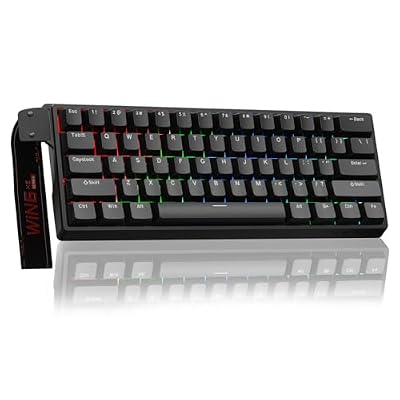
Aula WIN60 HE - 60% Mechanical Gaming Keyboard Wired, Magnetic Switch Hot Swappable, Adjustable Actuation Rapid Trigger Mode, 8000 Hz Polling Rate, RGB Small Keyboard 60 Percent Compact Design for PC
Included for 'Best Rapid Trigger Keyboard for Competitive Gaming 2026' because the listing specifies 60% Mechanical Gaming Keyboard Wired and Magnetic Switch Hot Swappable, details this guide uses to compare options.
View on Amazon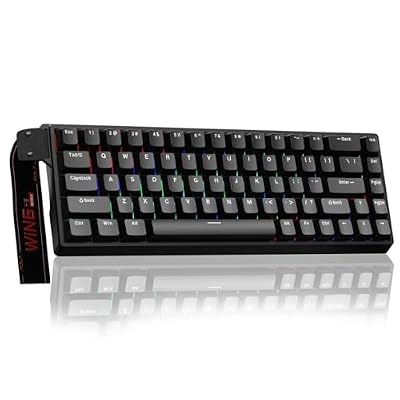
AULA WIN68 HE Mechanical Gaming Keyboard 60%, Hall Effect Magnetic Switch, Fast Trigger Mode Adjustable Actuation, 8000Hz Polling Rate, RGB Backlit, Wired Black Keyboard for Laptop/PC Gamer
Included for 'Best Rapid Trigger Keyboard for Competitive Gaming 2026' because the listing specifies Hall Effect Magnetic Switch and Fast Trigger Mode Adjustable Actuation, details this guide uses to compare options.
View on Amazon
BTXETUEL SayoDevice O3C OSU Keyboard Rapid Trigger Hall Switches Magnetic Linear Switches Keyboard with Knob and Screen,Copy Paste,Shotcut,Macro Hotswap Mini Keypad.…
Included for 'Best Rapid Trigger Keyboard for Competitive Gaming 2026' because the listing specifies Copy Paste and Shotcut, details this guide uses to compare options.
View on AmazonFinding the best rapid trigger keyboard means looking beyond raw speed. Competitive players need precise actuation, fast key resets, stable software, and a layout that suits their game. This guide compares top Hall Effect and analog keyboards for FPS, rhythm games, and other titles where rapid inputs matter.
Best Rapid Trigger Keyboards Compared
| Keyboard | Best For | Switch Technology | Layout | Rapid Trigger | Key Advantage |
|---|---|---|---|---|---|
| Wooting 80HE+ | Deep competitive tuning | Hall Effect | 80% | Yes | Extensive per-key control |
| Razer Huntsman V3 Pro TKL 8KHz | Onboard esports controls | Analog optical | TKL | Yes | 8KHz plus onboard adjustment |
| SteelSeries Apex Pro TKL Gen 3 | Easy competitive presets | Magnetic | TKL | Yes | Rapid Trigger, Rapid Tap, Protection Mode |
| Keychron Q1 HE 8K | Custom-keyboard enthusiasts | Hall Effect | 75% | Yes | Aluminum build and 8K polling |
Wooting 80HE+ — Best for Deep Rapid Trigger Tuning
Best For: Competitive players who want extensive per-key configuration
Key Features
- Hall Effect switches
- Rapid Trigger
- Per-key Rapid Trigger configuration
- 0.1–4.0 mm adjustable actuation
- Independent press and release sensitivity
- True 8 kHz polling
- Dynamic Keystroke
- SOCD configuration
- Wootility configuration platform
What Makes It Different
Wooting 80HE+ is built around Hall Effect input and deep per-key control through Wootility. Its rapid trigger system lets users tune press and release sensitivity independently, while adjustable actuation spans 0.1 to 4.0 mm. True 8 kHz polling targets players who want a high-performance competitive keyboard layout.
Pros
- Extensive Rapid Trigger customization
- Individual key configuration
- Adjustable actuation
- True 8 kHz polling
- Advanced SOCD options
- Web-based configuration
- Multiple analog input features
Cons
- Extensive settings may overwhelm casual users
- No numeric keypad
- Advanced features require time to configure properly
Use Case
Its main advantage is configuration depth rather than a single headline setting. Rapid Trigger, adjustable actuation, SOCD tools, Dynamic Keystroke, remapping, and per-key profiles can be combined around different games. The trade-off is that players who want a simple plug-and-play board may not need this level of control.
Who It’s For
Choose the Wooting 80HE+ if you play competitive shooters, rhythm games, or movement-heavy titles and enjoy tuning individual keys. It suits players who want separate rapid trigger behavior across WASD, utility keys, and other inputs. It is less compelling if you prefer fixed settings and rarely adjust profiles after setup.
Razer Huntsman V3 Pro TKL 8KHz — Best for Onboard Control
Best For: Esports players who frequently adjust actuation settings
Key Features
- Razer Analog Optical Switches Gen-2
- Rapid Trigger Mode
- 0.1–4.0 mm adjustable actuation
- Up to 8,000 Hz polling
- Razer Snap Tap
- Analog input
- Dual-step actuation
- Doubleshot PBT keycaps
- Digital control dial
- Magnetic wrist rest
What Makes It Different
Razer Huntsman V3 Pro Tenkeyless 8KHz uses Gen-2 analog optical switches with Rapid Trigger Mode and adjustable actuation from 0.1 to 4.0 mm. It also supports up to 8,000 Hz polling, doubleshot PBT keycaps, onboard adjustments, a digital dial, and a magnetic wrist rest for a feature-rich competitive setup.
Pros
- Rapid Trigger Mode
- Wide adjustable actuation range
- 8,000 Hz polling support
- Quick onboard adjustments
- Snap Tap
- PBT keycaps
- Included wrist rest
Cons
- Wired connection only
- Requires adjustment to very sensitive settings
- TKL layout omits a numeric keypad
Use Case
Razer also includes Snap Tap and quick onboard controls for actuation and rapid trigger, so players can change behavior without always opening software. That is useful for esports setups or shared PCs. The trade-off is a wired-only connection and a more software-centered ecosystem than browser-based configuration platforms.
Who It’s For
The Huntsman V3 Pro Tenkeyless 8KHz fits players who want rapid trigger plus physical controls that make tournament-side adjustments easier. It is especially relevant to Razer users already comfortable with Synapse. Players seeking wireless connectivity or a lighter software footprint should consider a different option.
SteelSeries Apex Pro TKL Gen 3 — Best for Easy Presets
Best For: Players who want rapid trigger with accessible game profiles
Key Features
- Analog magnetic switches
- Rapid Trigger
- 0.1–4.0 mm adjustable actuation
- Rapid Tap
- Protection Mode
- QuickSet presets
- Per-key lubrication
- Aluminum top plate
- Sound-dampening foam
- Per-key RGB lighting
What Makes It Different
SteelSeries Apex Pro TKL Gen 3 uses analog magnetic switches with adjustable actuation from 0.1 to 4.0 mm. Its Rapid Trigger resets keys as they are released, while Protection Mode aims to reduce accidental neighboring presses and Rapid Tap prioritizes the latest directional input. QuickSet provides game-focused presets.
Pros
- Rapid Trigger
- Wide actuation adjustment
- Rapid Tap directional control
- Protection Mode
- QuickSet game presets
- TKL competitive layout
- Sound-dampening material
Cons
- TKL layout lacks a number pad
- Advanced features depend on configuration
- Very shallow actuation can increase accidental inputs
Use Case
This model fits players who want rapid trigger with familiar SteelSeries software and ready-made game profiles rather than extensive manual tuning from scratch. Protection Mode is especially relevant for very sensitive actuation settings. The limitation is that advanced users may prefer platforms with deeper per-key analog experimentation.
Who It’s For
Choose the Apex Pro TKL Gen 3 if you want a familiar TKL shape, magnetic actuation control, and competitive features presented through SteelSeries’ software ecosystem. It suits players who value game presets and accidental-press protection. Enthusiasts who want the deepest analog customization may prefer another platform.
Keychron Q1 HE 8K — Best Custom-Style Rapid Trigger Keyboard
Best For: Players who want competitive features in a heavy aluminum keyboard
Key Features
- Keychron Ultra-fast Lime Magnetic Switches
- Rapid Trigger
- 0.1–3.35 mm adjustable actuation
- 0.01 mm sensitivity
- Up to 8,000 Hz polling
- Last Keystroke Prioritization
- Dynamic Keystrokes
- Analog gamepad input
- Aluminum case
- 75% layout
What Makes It Different
Keychron Q1 HE 8K combines rapid trigger with a heavier aluminum custom-keyboard design. It uses Keychron Ultra-fast Lime magnetic switches, supports 8,000 Hz wired polling, offers 0.01 mm sensitivity, and adjustable actuation from 0.1 to 3.35 mm. The 75% layout keeps arrows and a function row without a numpad.
Pros
- Rapid Trigger
- 8,000 Hz wired polling
- Fine actuation adjustment
- Aluminum construction
- Dynamic Keystrokes
- Last Keystroke Prioritization
- Dedicated arrow keys
- Web-based configuration
Cons
- Wired-only design
- Heavy for frequent transportation
- Magnetic switch compatibility is model-specific
- No dedicated number pad
Use Case
Its appeal is the blend of competitive magnetic features and enthusiast-style construction. Dynamic Keystrokes, Last Keystroke Prioritization, analog gamepad input, and web-based configuration add gaming flexibility. The trade-off is weight and wired-only operation, making it better for a fixed desk than frequent travel.
Who It’s For
The Q1 HE 8K is for players who want rapid trigger without giving up the dense feel of an aluminum custom keyboard. Its 75% layout suits mixed gaming and desktop use, while magnetic features support competitive tuning. It is less practical for LAN travel or anyone who prioritizes a lightweight board above build density.
How the Best Rapid Trigger Keyboards Differ
| Feature | Wooting 80HE+ | Razer Huntsman V3 Pro TKL 8KHz | Apex Pro TKL Gen 3 | Keychron Q1 HE 8K |
|---|---|---|---|---|
| Rapid Trigger | Yes | Yes | Yes | Yes |
| Adjustable Actuation | 0.1–4.0 mm | 0.1–4.0 mm | 0.1–4.0 mm | 0.1–3.35 mm |
| 8K Polling | Yes | Yes | Not highlighted here | Yes |
| Directional Priority Feature | SOCD options | Snap Tap | Rapid Tap | LKP |
| Per-Key Tuning | Extensive | Yes | Yes | Yes |
| Layout | 80% | TKL | TKL | 75% |
| Connection Focus | Wired competitive | Wired | Wired | Wired |
| Configuration Style | Wootility | Synapse + onboard | SteelSeries software | Keychron Launcher |
How to Choose a Rapid Trigger Keyboard
Choose the Right Keyboard Layout
Start with layout because rapid trigger does not compensate for a board that feels cramped or wastes mouse space. A 60% model gives the most room for low-sensitivity FPS movement, while TKL and 75% boards retain arrows and more dedicated keys. Full-size layouts make sense only when you also need a numpad for daily work.
Understand Actuation and Reset Sensitivity
Actuation range determines where a key first registers, while rapid trigger sensitivity controls how little movement is needed to reset and reactivate it. Very shallow settings can feel extremely responsive but may increase accidental inputs. Competitive players often benefit from tuning movement keys aggressively while leaving utility keys deeper.
Do Not Judge a Keyboard by Polling Rate Alone
Polling rate describes how often the keyboard reports input to the computer, but it should not be treated as the only measure of responsiveness. A well-tuned rapid trigger system, stable firmware, switch sensing, and your chosen actuation settings all influence the experience. Higher polling also matters less outside fast competitive play.
Check the Configuration Software
Software matters because rapid trigger keyboards are defined by configuration. Look for per-key actuation, separate press and release sensitivity, profile storage, easy remapping, and clear visual controls. Browser-based tools reduce installation needs, while desktop suites can offer deeper integration with lighting and other peripherals.
Understand Rapid Trigger vs SOCD Features
SOCD-style features such as Snap Tap, Rapid Tap, LKP, or similar directional-priority tools are separate from rapid trigger. They decide which key wins when opposite directions overlap, while rapid trigger changes reset behavior. Some tournaments or games may restrict certain input-assistance features, so check current rules before competition.
Which Games Benefit Most From Rapid Trigger?
Rapid trigger has the clearest purpose in games where movement keys must deactivate and reactivate repeatedly. Competitive shooters can benefit during rapid strafing, while rhythm games use repeated key presses at high frequency. Fighting and movement-heavy games can also benefit when precise release timing is important to the next input.
For slower games, the difference may be much less meaningful. Strategy games, turn-based RPGs, simulation titles, and casual single-player games rarely require constant rapid key resets. In those cases, switch feel, layout, acoustics, wireless connectivity, and comfort may have a larger effect on the overall keyboard experience than rapid trigger.
Rapid Trigger Settings for Competitive Gaming
A sensible starting point is to configure rapid trigger primarily on movement keys instead of immediately applying maximum sensitivity everywhere. WASD can benefit from faster reset behavior, while abilities, inventory commands, or menu keys may work better with deeper actuation. This reduces unintended inputs while preserving responsiveness where it matters.
Sensitivity should then be reduced gradually rather than set to the minimum immediately. If keys react when your fingers merely shift position, increase the reset distance or actuation depth. The objective is not achieving the smallest numerical setting; it is finding the shortest travel you can control reliably during actual competitive gameplay.
FAQ
What is a rapid trigger keyboard?
A rapid trigger keyboard uses analog sensing to reset a key based on movement rather than requiring it to return past one fixed reset point. As you release the key, it can deactivate sooner, then reactivate when pressed again. This is most useful for repeated movement inputs, rhythm taps, and fast corrections in competitive games.
Is rapid trigger useful for Valorant and Counter-Strike?
Rapid trigger can help in Valorant and Counter-Strike because movement accuracy often depends on stopping or changing direction quickly. Faster key reset may make repeated strafes feel more immediate. It does not improve aim by itself, and the benefit depends on settings, technique, game mechanics, and whether you can control sensitive actuation.
Is Hall Effect better than optical for rapid trigger?
Hall Effect switches use magnetic sensing to measure key travel, enabling adjustable actuation and rapid trigger without a traditional fixed electrical contact. Analog optical switches can offer similar travel-based behavior through light sensing. The better choice depends more on implementation, tuning, layout, and software than on sensor type.
Should I use the lowest rapid trigger sensitivity?
A very sensitive rapid trigger setting is not always better. Minimal reset distance can speed repeated inputs, but it can also cause unwanted activations if your fingers rest heavily on movement keys. Start with a moderate setting, then reduce the distance gradually. Keep less critical keys deeper if accidental presses become a problem.
What games benefit most from rapid trigger?
Rapid trigger is most useful for competitive FPS, rhythm games, and titles with repeated movement or timing-sensitive inputs. It offers less practical value for turn-based games, slower strategy titles, or casual typing. If you mainly play games without frequent directional corrections, layout and switch feel may matter more than rapid trigger.
Conclusion
The best rapid trigger keyboard depends on how much control, layout flexibility, and software depth you want. Wooting 80HE+ emphasizes per-key tuning, Razer adds strong onboard control, SteelSeries focuses on preset-driven competitive features, and Keychron Q1 HE 8K combines magnetic input with a heavier custom-style build.









