🛒 Best Price Today on Amazon
Prime members get fast, free shipping on everything above, plus member-only deals. New members get a 30-day free trial — cancel anytime.
Laptops keep losing ports. Thin ultrabooks and tablets often ship with a couple of USB-C sockets, and giving one up to a mouse dongle feels wasteful. A Bluetooth mouse connects straight to the computer, leaves the port free, and slips into a bag without a tiny receiver to lose. That convenience is the reason shoppers search for the best Bluetooth mouse under 50 dollars, and the reason this list stays strictly in the entry price tier.
The mice below suit office workers, students, travelers and anyone who wants a quiet pointer on a couch or a hotel desk. They are not tuned for fast-twitch competitive gaming, where a wired or 2.4GHz mouse with a high-polling sensor is still the safer route. In 2026 the useful questions are about how a mouse connects, how long it runs, how loud it clicks and whether it fits your hand. Duplicate color versions of the same Logitech model are reviewed once, so you see eight distinct options.
Quick Picks

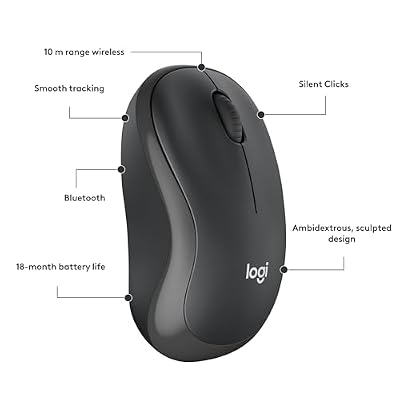
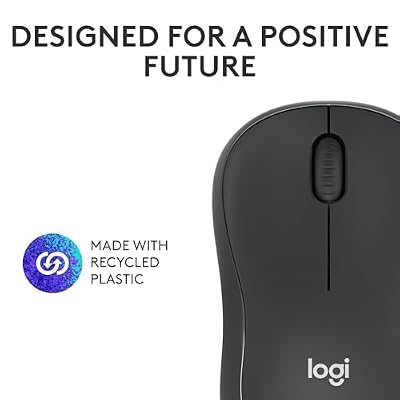
Logitech M240 Compact Silent Bluetooth Wireless Mouse - Graphite | Bluetooth connectivity, no USB receiver, quiet clicks, 3 non-customizable buttons, 18-month battery life, PC Mac compatible


As an Amazon Associate we earn from qualifying purchases. Product prices and availability are accurate as of the date/time indicated.

Logitech M196 Compact Ambidextrous Bluetooth Wireless Mouse - Rose | Bluetooth connectivity, no USB receiver, quiet clicks, 3 non-customizable buttons, 12-month battery life, PC Mac compatible


As an Amazon Associate we earn from qualifying purchases. Product prices and availability are accurate as of the date/time indicated.

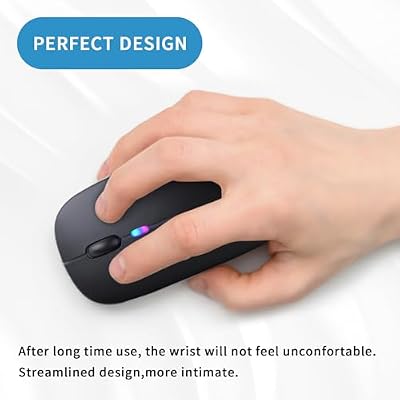
Afaartcci Rechargeable Wireless Mouse, Silent Bluetooth Mouse (Black) | ergonomic design,Bluetooth 5.2 and 2.4GHz USB Receiver,Portable Computer Mouse for Laptops, iPads, MacBooks & Apple Devices



As an Amazon Associate we earn from qualifying purchases. Product prices and availability are accurate as of the date/time indicated.

Lenovo WL310 Bluetooth Silent Mouse, Ergonomic, Adjustable DPI, Silent Clicks, Bluetooth 5.0, Portable for Windows, Mac, and Chromebook, Grey


As an Amazon Associate we earn from qualifying purchases. Product prices and availability are accurate as of the date/time indicated.

Logitech M196 Compact Ambidextrous Bluetooth Wireless Mouse - Off White | Bluetooth connectivity, no USB receiver, quiet clicks, 3 non-customizable buttons, 12-month battery life, PC Mac compatible


As an Amazon Associate we earn from qualifying purchases. Product prices and availability are accurate as of the date/time indicated.

wegear Bluetooth Mouse Silent Wireless Mice, Cordless Computer Mouse-Grey | Quiet Click, 6 Buttons, Sculpted Grip, Adjustable DPI for Laptop, PC, Mac, 18-Month Battery Life for Work Travel


As an Amazon Associate we earn from qualifying purchases. Product prices and availability are accurate as of the date/time indicated.

TECKNET Wireless Mouse, Side Scroll Bluetooth Rechargeable, 3-Device | Switch Among 3 Devices, 6 DPI Levels (up to 4800 DPI), BT 5.3/2.4G USB-A, Quiet Clicks, 7 Buttons, Non-Programmable, Black


As an Amazon Associate we earn from qualifying purchases. Product prices and availability are accurate as of the date/time indicated.

Lenovo Bluetooth Silent Mouse (WL300) - 5 Button Computer Mouse with Silent Left & Right Click – Sculpted Grip, Microsoft Swift Pair, Up to 1600 DPI (Grey)


As an Amazon Associate we earn from qualifying purchases. Product prices and availability are accurate as of the date/time indicated.
| Product | Best for | Key spec from the title |
|---|---|---|
| Logitech M240 | Quiet shared spaces | Silent Bluetooth, no USB receiver, 3 buttons |
| Logitech M196 | Left- or right-handed travelers | Compact, ambidextrous, no USB receiver |
| Afaartcci Rechargeable | Users who want rechargeable power and a backup dongle | Bluetooth 5.2 and 2.4GHz receiver, rechargeable |
| Lenovo WL310 | Windows, Mac and Chromebook households | Bluetooth 5.0, adjustable DPI, silent clicks |
| wegear Silent | Larger hands wanting extra buttons | 6 buttons, sculpted grip, adjustable DPI |
| TECKNET Side Scroll | Switching between three computers | 3-device switching, up to 4800 DPI, BT 5.3 |
| Lenovo WL300 | Windows users who value quick pairing | 5 buttons, Swift Pair, up to 1600 DPI |
| TECKNET 4000DPI | Laptop users who want both connection types | BT 5.0/3.0 plus 2.4GHz receiver, 4000 DPI |
How to Choose
Bluetooth only or dual connection
A Bluetooth-only mouse saves a port and is perfect for tablets and slim laptops. A dual-mode mouse adds a 2.4GHz USB receiver as a backup, which helps with desktops that have older Bluetooth hardware or with the occasional flaky connection. Check whether the receiver is included and whether it stores inside the mouse. Pairing is also worth a thought: some mice remember only one host, while others hold several, and a mouse that reconnects within a second of waking is much less irritating than one that needs a button press.
DPI and why higher is not better
DPI is how far the cursor travels per inch of hand movement. A range from 800 to 1600 handles office work and a 1080p screen; up to 4800 helps on a large or high-resolution display. Selectable DPI steps matter more than the top number. For precise work, a lower setting is easier to control.
Power: batteries or rechargeable
A replaceable AA or AAA battery can last months, and swapping takes seconds. A built-in rechargeable cell eliminates waste but needs a charging cable and can go flat at an awkward moment. If the listing does not state a type, check the product page before buying.
Size, buttons and noise
Compact mice are easy to carry, but large hands tend to cramp on them. Extra side buttons help with browser back and forward, though budget models may not let you reprogram them. Quiet-click switches cut noise without changing function, which matters in libraries, offices and bedrooms. Budget models cut corners on scroll wheel smoothness and software support.
The 8 Best Options
Logitech M240
The M240 is a compact, silent Bluetooth mouse with no USB receiver, quiet clicks and three buttons that cannot be customized. It is built for people who need a no-fuss pointer that works with a modern laptop or tablet and does not make noise in a shared room. Picture a couch-side laptop, a hotel desk or a dorm room at midnight: the mouse disappears into the routine instead of clicking loudly beside someone else. Because the listing says there is no receiver, the entire package is the mouse itself, which also makes it easy to hand to a family member.
- Strength: silent clicks suit libraries, offices and late-night browsing.
- Strength: no receiver to lose and no port occupied.
- Trade-off: three buttons with no customization, so no extras for shortcuts.
Skip it if you want side buttons or dual connectivity. Its compact size also means large hands may cramp after long sessions, so a bigger body suits them better.
Logitech M196
The M196 is a compact ambidextrous Bluetooth mouse with no receiver, quiet clicks and three buttons that cannot be customized. Its symmetrical shape works for left-handed and right-handed users alike, which is uncommon at this level. That makes it a sensible shared mouse for a household or classroom where several people of different handedness use the same computers. The quiet-click description carries over from the M240, so it fits the same libraries and shared offices. It is offered in several colors, but all share the same specification.
- Strength: ambidextrous shape suits left-handed users.
- Strength: compact and light for a laptop bag.
- Trade-off: the fixed three-button layout limits shortcuts.
Skip it if you need a rechargeable mouse or adjustable DPI, since neither is listed.
Afaartcci Rechargeable
The Afaartcci is a rechargeable silent mouse with Bluetooth 5.2 and a 2.4GHz USB receiver, in an ergonomic and portable form. Having both connection types means it works with a laptop through Bluetooth and a desktop through the receiver. The rechargeable design means no spare batteries in a drawer, though you will need to keep a charging cable nearby. For someone who owns an older desktop without Bluetooth and a newer laptop with it, one mouse covers both machines, and the portable shape travels well.
- Strength: dual connection gives flexibility across devices.
- Strength: rechargeable, so no battery purchases.
- Trade-off: it uses a USB receiver, taking a port if you rely on the dongle.
Skip it if you want a recognized brand name for support.
Lenovo WL310
Lenovo’s WL310 is a silent Bluetooth 5.0 mouse with an ergonomic shape, adjustable DPI and silent clicks. The listing names Windows, Mac and Chromebook compatibility, so it fits mixed households and school setups. It is a conservative, familiar design: no flashy extras, just silent clicks and a pointer speed you can tune. Parents buying for a student who may use a Chromebook at school and a Windows laptop at home will appreciate that the compatibility is stated rather than implied.
- Strength: broad platform compatibility.
- Strength: adjustable DPI suits different screens.
- Trade-off: Bluetooth 5.0 is an older version than some competitors list.
Skip it if you want multi-device switching.
wegear Silent
The wegear Bluetooth mouse offers quiet clicks, six buttons, a sculpted grip and adjustable DPI for laptops, PCs and Macs. The extra buttons and shaped body target users who spend hours in a browser or document editor. Extra buttons often default to back and forward, which cuts down on keyboard trips during research or editing. Since the listing mentions adjustable DPI, you can slow the pointer for spreadsheet precision and speed it up for a large monitor.
- Strength: six buttons give room for shortcuts.
- Strength: sculpted grip is friendlier to larger hands than a flat compact mouse.
- Trade-off: bulkier, so less pocketable than a travel mouse.
Skip it if you want the smallest, lightest option.
TECKNET Side Scroll
This TECKNET model is a rechargeable Bluetooth mouse with side scroll, three-device switching, six DPI levels up to 4800, Bluetooth 5.3 and a 2.4G USB-A receiver, plus quiet operation. The multi-device feature is its calling card. For a freelancer who keeps a work laptop, a personal laptop and a tablet on the same desk, one button press to move the cursor between machines is a real time-saver. The 4800 DPI ceiling also helps on a large display, and quiet operation keeps it office-friendly.
- Strength: switch among three computers without re-pairing.
- Strength: side scroll helps with wide spreadsheets.
- Trade-off: more buttons and modes bring a learning curve.
Skip it if you only use one computer.
Lenovo WL300
The Lenovo WL300 is a silent five-button Bluetooth mouse with a sculpted grip, Microsoft Swift Pair and up to 1600 DPI. Swift Pair speeds up the connection on Windows machines by prompting you to pair as soon as the mouse is switched on. Lenovo also lists a sculpted grip, which tends to suit medium and large hands better than flat travel mice. With five buttons, it offers a bit more control for browsing and office work than the three-button Logitech models, while keeping the silent-click behavior that shared spaces demand.
- Strength: Swift Pair makes setup quick on Windows.
- Strength: five buttons and a sculpted body for comfort.
- Trade-off: DPI tops out at 1600, which is plenty for most but lower than some rivals.
Skip it if you use mostly Apple devices.
TECKNET 4000DPI
The other TECKNET is a 2-in-1 mouse with Bluetooth 5.0/3.0 and a 2.4GHz receiver, 4000 DPI and a portable shape for laptops and PCs. The older Bluetooth 3.0 support helps with legacy hardware. Owners of an older laptop that predates current Bluetooth standards may find that feature decisive. At 4000 DPI it also gives room to speed up the pointer across a big monitor, and the portable body fits a laptop sleeve with little fuss.
- Strength: supports both Bluetooth 5.0 and 3.0 plus a receiver.
- Strength: 4000 DPI suits large or high-resolution displays.
- Trade-off: an older Bluetooth version listing than the side-scroll TECKNET.
Skip it if you want multi-device switching.
Which One Fits Your Situation
You work in a quiet library or shared office
The Logitech M240 is the most direct answer: silent clicks, no dongle, and nothing to configure.
You are left-handed
The Logitech M196 is listed as ambidextrous, so it fits either hand without compromise.
You juggle a work laptop, a personal laptop and a tablet
The TECKNET Side Scroll lists three-device switching, which saves pairing every time you change machines.
You want extra buttons for a long workday
The wegear Silent or Lenovo WL300 add side buttons and a sculpted grip for browser navigation.
Common Mistakes
- Assuming every Bluetooth mouse works with an older desktop that lacks Bluetooth hardware.
- Chasing a high DPI number instead of a comfortable shape.
- Buying a compact mouse for large hands.
- Counting on customizable buttons that the listing says are fixed.
- Using a Bluetooth mouse for competitive gaming, where lag and polling rate matter.
Related guides
- Logitech G Pro X 2 Vs Steelseries Arctis Nova Pro Wireless
- Travel Controller Case For 8Bitdo Ultimate Series
- Gaming Pc Under 600 For Roblox And Minecraft
Frequently Asked Questions
Does a Bluetooth mouse need a USB receiver?
No. If your computer has Bluetooth, it pairs directly. A receiver only helps on machines without Bluetooth or as a backup.
Are silent mice slower?
No. Silent switches change the click sound, not how quickly the click registers. The trade-off is a softer, less tactile feel, which some people like and others miss.
Is Bluetooth 5.3 much better than 5.0?
For mice, differences are small. Look at battery type, shape and switching features first.
Can these work with a tablet or Chromebook?
Most can, provided the device supports Bluetooth mice, which current Android tablets, iPads and Chromebooks generally do. The Lenovo WL310 lists Chromebook support in its title.
Top picks from this guide
LenovoLenovo WL310 Bluetooth Silent Mouse, Ergonomic, Adjustable DPI, Silent Clicks,…wegearwegear Bluetooth Mouse Silent Wireless Mice, Cordless Computer Mouse-Grey |…LogitechLogitech M240 Compact Silent Bluetooth Wireless Mouse - Graphite |…LogitechLogitech M196 Compact Ambidextrous Bluetooth Wireless Mouse - Off White…