🛒 Best Price Today on Amazon
Prime members get fast, free shipping on everything above, plus member-only deals. New members get a 30-day free trial — cancel anytime.
- Logitech G502 Lightspeed Specifications
- Design and Ergonomics
- HERO 25K Sensor Performance
- LIGHTSPEED Wireless Performance
- Eleven Programmable Controls
- Dual-Mode Scroll Wheel
- Adjustable Weight System
- Battery Life
- Logitech G HUB and Onboard Memory
- Gaming Performance
- Everyday Productivity
- What Makes the G502 Lightspeed Different?
- Pros and Cons
- Who Should Buy the Logitech G502 Lightspeed?
- FAQ
- Conclusion
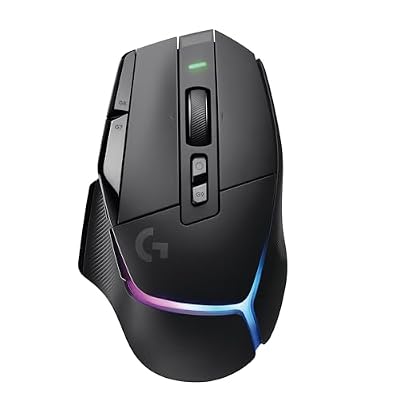
Logitech G502 X Plus Wireless RGB Gaming Mouse - Black | Optical Switches, RGB, 13 Buttons , Infinite Scroll Toggle, <130 hr Battery, USB-C, Wireless Charging Capable, for PC/MacOS
Included for 'Logitech G502 Lightspeed Wireless Gaming Mouse Review' because the listing specifies Black and Optical Switches, details this guide uses to compare options.
View on Amazon
Logitech G502 X Lightspeed Wireless Gaming Mouse - Black | Optical Switches, 13 Buttons, <140 hrs Battery, USB-C, Infinite Scroll Toggle, Wireless Charging Capable, for PC/MacOS
Included for 'Logitech G502 Lightspeed Wireless Gaming Mouse Review' because the listing specifies Black and Optical Switches, details this guide uses to compare options.
View on Amazon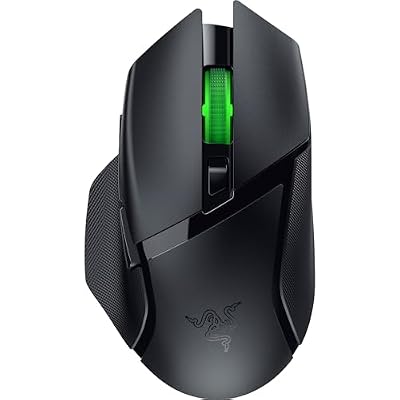
Razer Basilisk V3 X HyperSpeed Customizable Wireless Gaming Mouse, Black | Mechanical Switches Gen-2, 5G Advanced 18K Optical Sensor, Chroma RGB, 9 Programmable Controls, 285 Hr Battery
Included for 'Logitech G502 Lightspeed Wireless Gaming Mouse Review' because the listing specifies Black and Mechanical Switches Gen-2, details this guide uses to compare options.
View on AmazonThe Logitech G502 Lightspeed Wireless Gaming Mouse combines the familiar G502 shape with low-latency wireless, the HERO 25K sensor, 11 programmable controls, adjustable weights, and a dual-mode scroll wheel. It remains a feature-rich choice for gamers who value extra buttons and versatility more than the ultralight design of newer esports mice.
Logitech G502 Lightspeed Specifications
The G502 Lightspeed uses Logitech’s HERO 25K optical sensor with sensitivity up to 25,600 DPI. It supports LIGHTSPEED wireless connectivity and includes onboard memory, programmable controls, RGB lighting, adjustable weights, and compatibility with Logitech’s POWERPLAY wireless charging ecosystem.
| Specification | Logitech G502 Lightspeed |
|---|---|
| Sensor | HERO 25K |
| Maximum DPI | 25,600 |
| Programmable Controls | 11 |
| Wireless | LIGHTSPEED 2.4 GHz |
| Battery Life | Up to 60 hours without lighting |
| Weight | About 114 g before optional weights |
| Adjustable Weights | Yes |
| Scroll Wheel | Dual-mode hyper-fast wheel |
| RGB | LIGHTSYNC |
| Onboard Profiles | Up to 5 |
| Charging | USB cable / POWERPLAY support |
| Shape | Right-handed ergonomic |
Design and Ergonomics
The G502 Lightspeed keeps the distinctive right-handed shape that made the wired G502 series popular. The shell includes a pronounced thumb rest, sculpted sides, textured grips, and several buttons positioned around the left side and main clicks. It feels substantial in the hand rather than minimal or lightweight.
Palm and relaxed claw users with medium or large hands are the strongest fit. The rear body supports much of the palm while the thumb rest reduces contact with the mouse pad. Smaller hands can still use the mouse, but reaching every side button comfortably may require more hand movement.
The shape is especially useful for players who dislike narrow symmetrical esports mice. It provides more physical support and gives the thumb a defined resting position. The trade-off is reduced freedom for aggressive fingertip grip and fast repositioning because the mouse is heavier and fills more of the hand.
At roughly 114 grams before adding optional weights, the G502 Lightspeed is heavy by modern competitive-gaming standards. Many current wireless gaming mice weigh dramatically less. The extra mass is not automatically uncomfortable, but players using very low sensitivity will need more effort during repeated large swipes.
HERO 25K Sensor Performance
The HERO 25K sensor provides sensitivity from low DPI levels up to 25,600 DPI. Maximum sensitivity is mainly a specification rather than something most gamers will use directly. Competitive players commonly operate at far lower settings where predictable tracking and consistent movement matter more than the maximum number.
The sensor is well suited to FPS, action games, strategy titles, RPGs, and general desktop use. Fast movements remain accurately tracked, and players can configure several DPI stages through Logitech G HUB. Dedicated DPI controls make switching sensitivity possible without leaving a game or application.
A dedicated DPI Shift button sits near the thumb and can temporarily switch to another sensitivity while held. Logitech markets this as a sniper-style function, but the button can be reassigned if sensitivity switching is unnecessary. This makes it useful for push-to-talk, melee attacks, productivity shortcuts, or another frequently used command.
The sensor is also designed around power efficiency. That matters in a wireless mouse because tracking performance and battery endurance must coexist. HERO allows the G502 Lightspeed to deliver gaming-grade tracking without requiring constant recharging after short sessions.
LIGHTSPEED Wireless Performance
LIGHTSPEED is Logitech’s proprietary 2.4 GHz wireless system. The included USB receiver provides a dedicated connection intended to deliver low latency suitable for gaming. For normal play, the G502 Lightspeed behaves much more like a wired gaming mouse than an old-generation wireless peripheral with noticeable delay.
Receiver placement still matters in crowded environments. Keeping the receiver reasonably close to the mouse and away from heavy wireless interference can improve reliability. Logitech includes hardware that makes it possible to position the receiver closer to the desk surface rather than leaving it hidden behind a desktop PC.
The mouse does not rely on Bluetooth for normal wireless operation. That is appropriate for gaming because LIGHTSPEED is optimized around performance, but users who want to switch between several laptops or tablets without moving the receiver may prefer a mouse with both 2.4 GHz and Bluetooth connectivity.
A charging cable allows the mouse to operate while connected. This provides a fallback when the battery is depleted, although the older charging connector makes the design feel less modern than newer USB-C wireless gaming mice.
Eleven Programmable Controls
One of the G502 Lightspeed’s greatest advantages is its button count. Eleven programmable controls provide significantly more flexibility than minimalist five- or six-button gaming mice. Users can map abilities, weapon commands, macros, communication controls, media functions, or productivity shortcuts through Logitech G HUB.
The two main thumb buttons are easy to reach, while additional buttons sit beside the primary left click. These extra controls are useful in games where several commands need quick access without moving the left hand away from movement keys.
The layout works particularly well for RPGs, shooters, survival games, strategy titles, and productivity. It does not provide the twelve-button thumb grid of a dedicated MMO mouse, but it offers substantially more input flexibility than a traditional FPS design.
The downside is complexity. Users who need only left click, right click, scroll, and two side buttons may find the extra controls unnecessary. The shell also becomes busier, and accidental presses are possible until muscle memory develops.
Dual-Mode Scroll Wheel
The scroll wheel is one of the G502 family’s most recognizable features. A button behind the wheel switches between a conventional ratcheted mode and a free-spinning mode that can move rapidly through long documents, websites, inventories, or timelines.
Ratcheted mode provides defined steps that work well for weapon switching, browser navigation, and other tasks where precise movement is useful. Free-spin mode is far faster for productivity because one strong flick can move through a long spreadsheet or document without repeated finger movements.
The wheel can also tilt sideways for additional inputs, increasing the total number of available controls. These horizontal actions can be useful for navigating timelines, spreadsheets, or assigning additional game commands.
Its metal construction contributes to the mouse’s overall weight, but it also gives the wheel a distinctive substantial feel. Users focused purely on lightweight esports performance may consider it unnecessary, while productivity-oriented gamers may see it as one of the best reasons to choose the G502 platform.
Adjustable Weight System
The G502 Lightspeed includes removable weights that let users alter the overall mass and weight distribution. This was once a common premium gaming-mouse feature, although the market has increasingly moved toward reducing weight instead.
Adding weights can make the mouse feel more planted during slower movements or high-sensitivity gaming. Users who prefer a substantial mouse may enjoy being able to tune balance toward the front, rear, or center depending on weight placement.
Competitive FPS players are more likely to remove every optional weight. Since the base mouse is already heavy by current standards, adding additional mass generally moves it farther away from modern ultralight design philosophy.
The system is therefore about preference rather than objective performance. Some players associate lower weight with easier rapid aiming, while others prefer the controlled momentum of a heavier device. G502 Lightspeed is one of the few wireless mice that still allows meaningful customization in this area.
Battery Life
Logitech rates the G502 Lightspeed for up to 60 hours of continuous use with lighting disabled and less with default RGB operation. This is enough for several gaming sessions before charging, although newer wireless mice can offer longer endurance.
Battery status can be monitored through G HUB, making it easier to recharge before the mouse unexpectedly shuts down. Disabling or reducing RGB lighting can noticeably extend operating time because lighting consumes additional power.
The mouse is compatible with Logitech POWERPLAY, which uses a specialized mouse pad to provide continuous wireless charging while the mouse is in use. This can effectively remove normal charging routines for users willing to purchase the additional hardware.
POWERPLAY is convenient but not essential. Standard cable charging works adequately, and many users will find plugging in occasionally easier to justify than buying an expensive charging mat.
Logitech G HUB and Onboard Memory
Logitech G HUB controls DPI levels, button assignments, macros, lighting, battery information, and game-specific profiles. Each application can trigger different control layouts, allowing the same physical buttons to behave differently in a shooter, productivity program, or video editor.
The mouse also supports onboard profile storage. This allows selected configurations to remain available even when G HUB is not running or when the mouse is connected to another computer. It is particularly useful for tournament PCs, work systems, or users who prefer not to keep peripheral software open continuously.
Learning the software can take some time because eleven programmable buttons create many possibilities. A simple approach is to configure a few frequently used commands first and expand gradually rather than assigning every control immediately.
Once configured, the G502 Lightspeed can function as both a gaming mouse and a productivity controller. Its button count and scroll wheel give it considerably more versatility than ultralight mice designed almost exclusively around competitive shooters.
Gaming Performance
For shooters, the sensor and LIGHTSPEED connection remain fully capable, but weight is the primary compromise. Players who use high or medium sensitivity may find the mass manageable, while very low-sensitivity users making repeated large movements can fatigue faster than with a modern 60-gram mouse.
The additional buttons are particularly useful in battle royale, tactical shooters, and games with many equipment commands. Grenades, melee, abilities, push-to-talk, map functions, or weapon actions can be moved to the mouse, reducing how much the keyboard hand needs to manage.
For RPGs and action games, the G502 becomes even more compelling. Eleven inputs are enough to move several abilities or inventory functions onto the mouse without adopting the dense grid layout of a traditional MMO model.
Strategy and productivity users also benefit from the free-spinning wheel. The ability to move rapidly through maps, documents, spreadsheets, or long pages gives the mouse usefulness well beyond gaming.
Everyday Productivity
The G502 Lightspeed works surprisingly well as an office mouse. Its ergonomic shape supports the hand, the wheel handles long documents efficiently, and the extra buttons can be assigned to browser navigation, copy and paste, application shortcuts, media controls, or editing commands.
The lack of Bluetooth makes it less convenient for users constantly switching between multiple devices. A productivity mouse with multi-device Bluetooth can move between computers more easily, while G502 Lightspeed is fundamentally designed around one high-performance receiver connection.
Its gaming appearance is also more aggressive than minimalist office hardware. In a home workstation this rarely matters, but users seeking a subtle professional design may prefer a Logitech MX-series product or another productivity-focused mouse.
What Makes the G502 Lightspeed Different?
The G502 Lightspeed stands out because it combines gaming performance with an unusually large feature set. The HERO sensor, low-latency wireless, eleven programmable buttons, adjustable weights, dual-mode scroll wheel, onboard memory, and POWERPLAY compatibility create a level of versatility that lightweight esports mice intentionally avoid.
Its biggest weakness comes from the same philosophy. Modern competitive mice remove extra buttons, metal wheels, weight systems, and complex shells to reduce mass. G502 keeps those features, so it feels heavy compared with newer models.
That makes the purchase decision relatively simple. Users who want features and controls may love it. Players who want the lightest possible shell for FPS aiming should look elsewhere.
Pros and Cons
Pros
- Accurate HERO 25K sensor
- Reliable LIGHTSPEED wireless
- Eleven programmable controls
- Excellent dual-mode scroll wheel
- Comfortable right-handed shape
- Adjustable weight system
- Onboard profile storage
- Good battery endurance
- POWERPLAY compatibility
- Strong productivity features
Cons
- Heavy by modern gaming standards
- Older charging connector
- No Bluetooth
- Busy button layout
- POWERPLAY requires separate hardware
- Large shape may not suit small hands
Who Should Buy the Logitech G502 Lightspeed?
The G502 Lightspeed is best for gamers who value extra buttons, an ergonomic shape, a versatile scroll wheel, and reliable wireless performance. It works especially well for players who move between shooters, RPGs, strategy games, and general desktop tasks rather than playing competitive FPS exclusively.
It is also a strong choice for users who want one mouse for both gaming and work. Its programmable buttons and free-spinning wheel provide productivity advantages that minimalist gaming mice cannot match.
Players with smaller hands, aggressive fingertip grip, or a strong preference for ultralight mice should consider alternatives. The G502 Lightspeed is designed around functionality and control rather than minimum mass.
FAQ
Is the Logitech G502 Lightspeed Good for Gaming?
Yes. Its HERO 25K sensor and LIGHTSPEED wireless connection provide strong gaming performance. The main limitation is weight, particularly for competitive FPS players who prefer very light mice.
How Many Buttons Does the G502 Lightspeed Have?
It provides 11 programmable controls. These can be reassigned through Logitech G HUB for gaming commands, macros, media controls, or productivity shortcuts.
Does the G502 Lightspeed Have Bluetooth?
No. It uses Logitech LIGHTSPEED 2.4 GHz wireless through the included USB receiver. Wired use is also possible while charging.
How Long Does the Battery Last?
Logitech rates it for up to 60 hours with lighting disabled. RGB use reduces endurance, while POWERPLAY can provide continuous compatible wireless charging.
Can You Remove the Weights?
Yes. The optional weights can be added or removed to change the total mass and balance. Competitive players will generally prefer using the mouse without extra weights.
Is G502 Lightspeed Good for Large Hands?
Yes. Its large ergonomic right-handed shape works particularly well for medium and large hands using palm or relaxed claw grip. Small-handed users may find some buttons difficult to reach comfortably.
Conclusion
The Logitech G502 Lightspeed Wireless Gaming Mouse remains a versatile option for gamers who prefer features over ultralight weight. Its HERO 25K sensor, LIGHTSPEED connection, 11 programmable controls, dual-mode wheel, adjustable weights, and solid battery life make it excellent for mixed gaming and productivity, though competitive FPS users may prefer something lighter.