🛒 Best Price Today on Amazon
Prime members get fast, free shipping on everything above, plus member-only deals. New members get a 30-day free trial — cancel anytime.
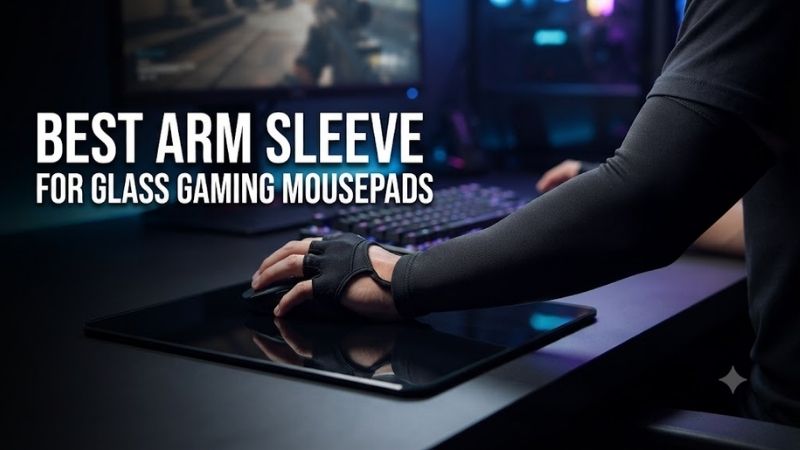
Glass gaming mousepads offer exceptionally smooth movement, but skin contact can introduce unwanted friction during long gaming sessions. Finding the best arm sleeve for glass gaming mousepads helps reduce sweat-related drag and maintain a more consistent arm movement. The right sleeve should balance fabric texture, coverage, fit, and comfort.
Quick Verdict: Which Gaming Arm Sleeve Should You Buy?
The most suitable arm sleeve depends on the glass mousepad’s surface finish, the user’s aiming technique, and whether the wrist or palm contacts the pad. A sleeve that feels smooth on one glass surface may behave differently on another, so individual compatibility matters more than claims of universally frictionless performance.
Best overall: Pulsar eS eSports Arm Sleeve
Best for Wallhack glass pads: Wallhack Pro Sleeve
Best for flexible coverage: KIBU Gaming Finger Arm Sleeve
Best for lightweight protection: NRV Gaming Sleeve Performance
Best for a close-fitting fabric feel: GHOSTGLIDES SECONDSKIN V3
Best for traditional arm coverage: KIBU Gaming Arm Sleeve
Quick Comparison Table
| Arm sleeve | Design | Primary advantage | Main consideration |
|---|---|---|---|
| Pulsar eS eSports | Compression sleeve | Designed for glass and hybrid pads | Choose correct coverage |
| Wallhack Pro Sleeve | Bonded-seam gaming sleeve | Designed for low-friction gaming | Fit and surface compatibility |
| KIBU Gaming Finger | Extended finger coverage | Reduces exposed hand contact | May affect grip comfort |
| NRV Performance | Compression gaming sleeve | Flexible, breathable coverage | Glide varies by mousepad |
| GHOSTGLIDES SECONDSKIN V3 | Close-fitting gaming sleeve | Thin, fitted design | Check seam and cuff comfort |
| KIBU Gaming Arm Sleeve | Traditional arm sleeve | Simpler wrist-free coverage | Palm contact remains exposed |
How We Selected These Glass Mousepad Arm Sleeves
Selection focused on products specifically marketed for gaming use, with attention to material construction, coverage, sizing, moisture management, and potential compatibility with glass mousepads. We distinguished products with manufacturer-documented specifications from those requiring further confirmation of their exact fabric and fit.
Glass mousepad compatibility is particularly important because different surfaces have different microtextures. An independent sleeve compatibility index has also demonstrated that fabric performance changes significantly between mousepad models. Therefore, this roundup does not invent friction coefficients or promise measurable aiming improvements.
The 6 Best Arm Sleeves for Glass Gaming Mousepads
Choosing a gaming sleeve involves more than selecting a comfortable piece of compression fabric. During low-sensitivity aiming, the forearm can travel across a substantial part of the mousepad, while wrist-focused players may need protection only near the hand. These differences influence which sleeve construction is most appropriate.
Pulsar eS eSports Arm Sleeve – Best Overall for Glass Mousepads
The Pulsar eS eSports Arm Sleeve is a strong overall choice for gamers using glass or hybrid mousepads. It is designed to reduce friction between the arm and playing surface while providing a close, breathable fit. Multiple coverage configurations allow players to select a design that suits their preferred aiming posture.
Best for: FPS players using glass mousepads with significant forearm contact.
Key features
-
Gaming-oriented compression design
-
Nylon and spandex fabric construction
-
Breathable, quick-drying material
-
Multiple sizes and coverage options
-
Anti-slip upper band
-
Seam-focused construction intended to reduce irritation
-
Versions designed for arm, palm, and finger coverage
Fabric and glide characteristics
The main purpose of the Pulsar sleeve is to replace direct skin contact with a more consistent textile surface.
Bare skin can behave differently depending on humidity, body temperature, and perspiration.
On a glass mousepad, these variations may become noticeable during long tracking movements.
A suitable sleeve provides a relatively consistent interface between the forearm and glass.
However, that interface is not automatically friction-free. The weave, seam orientation, and glass surface finish still influence movement.
Pulsar markets its gaming sleeves for glass and hybrid surfaces, making them more relevant to this application than ordinary athletic compression sleeves.
Coverage options
One important advantage is the availability of different coverage styles.
A conventional arm sleeve covers the forearm but leaves the palm exposed.
Palm and finger-oriented versions extend protection farther toward the hand.
This matters because some FPS players rest the side of their palm or little finger on the mousepad while aiming.
If that contact point remains uncovered, skin drag can continue even when the forearm is protected.
Fit and comfort
Compression should hold the sleeve in place without restricting circulation or movement.
A loose sleeve may bunch near the wrist, creating another source of friction.
An excessively tight sleeve can cause discomfort during extended sessions.
The best fit should remain secure while allowing the elbow and wrist to move naturally.
Pros
-
Designed for glass mousepad use
-
Multiple coverage configurations
-
Breathable construction
-
Convenient for long FPS sessions
-
Several available sizes
Cons
-
Actual glide depends on the glass surface
-
Sizing requires careful measurement
-
Certain versions may feel restrictive
-
More coverage is not always more comfortable
Buy If: You want a dedicated gaming sleeve with coverage options for glass mousepad use.
Skip If: You rarely touch the mousepad with your forearm or hand.
Wallhack Pro Sleeve – Best for Wallhack Glass Mousepads
The Wallhack Pro Sleeve is designed for gaming environments where consistent arm movement is important. Its low-friction fabric, bonded seams, and secure cuff distinguish it from ordinary stitched compression sleeves, making it particularly relevant to users of Wallhack glass mousepads.
Best for: Wallhack mousepad owners and players who prioritize seam comfort.
Design and construction
Wallhack uses bonded seams rather than relying entirely on conventional stitching.
This approach aims to reduce raised fabric edges that could catch against the desk or mousepad.
For players who make large horizontal movements, seam placement can matter because the forearm may rotate slightly during aiming.
A raised seam positioned underneath the arm can introduce localized resistance.
A low-profile construction reduces this potential source of interference.
Hand and no-hand configurations
Wallhack offers different sleeve coverage arrangements.
The Hand version extends coverage toward the hand, while the No-Hand version ends closer to the wrist.
Neither design is universally preferable.
A player who rests the outer palm against the glass may benefit from additional coverage.
Someone who keeps the hand elevated may prefer the simpler wrist-ending configuration.
Mousepad compatibility
The product is particularly relevant to Wallhack’s glass-pad ecosystem.
Nevertheless, it should not be assumed that every Wallhack sleeve performs identically across all glass surfaces.
Small changes in texture can influence fabric glide.
Players using another brand’s pad should prioritize compatibility evidence for their exact surface.
Pros
-
Bonded seam construction
-
Multiple fit options
-
Hand and no-hand versions
-
Gaming-specific design
-
Secure upper cuff
Cons
-
Premium-oriented accessory
-
Fit remains important
-
Not guaranteed to glide identically on every glass pad
-
Extended hand coverage may feel unfamiliar
Buy If: You use a compatible Wallhack glass pad and want low-profile seams.
Skip If: You prefer a loose athletic sleeve without hand coverage.
KIBU Gaming Finger Arm Sleeve – Best for Extended Hand Coverage
The KIBU Gaming Finger Arm Sleeve is useful for players whose fingers and palm contact the mousepad during movement. Its extended design addresses a common limitation of ordinary arm sleeves: covering the forearm does not necessarily eliminate skin contact near the mouse.
Best for: Palm-dragging players and low-sensitivity aiming styles.
Why finger coverage matters
During rapid movement, some players maintain contact between the mousepad and the side of their hand.
This can influence how consistently the mouse moves across the surface.
A sleeve extending toward the fingers creates an additional fabric barrier.
However, the fabric must not interfere with the grip on the mouse.
Players using fingertip or claw grips may notice the material differently from those using palm grip.
Fit considerations
The extended design requires additional care when choosing size.
A sleeve may fit the forearm comfortably but pull excessively around the thumb or fingers.
This can affect freedom of movement and create unwanted pressure.
The material should remain comfortable when the hand opens, closes, and changes grip position.
Practical gaming use
A finger-covering sleeve is most useful when the exposed hand is a major source of drag.
If only the forearm touches the pad, a conventional arm sleeve may be simpler and more comfortable.
The extended coverage should solve a specific problem rather than merely add fabric.
Pros
-
Extended contact coverage
-
Relevant to palm-dragging techniques
-
Designed for gaming use
-
May reduce exposed skin contact
Cons
-
More complex fit
-
May interfere with certain grips
-
Requires adjustment
-
Performance varies by surface
Buy If: Your hand regularly contacts the glass mousepad during tracking.
Skip If: You want unrestricted bare-hand contact with the mouse.
NRV Gaming Sleeve Performance – Best for Breathable Compression
The NRV Gaming Sleeve Performance offers a gaming-focused compression design for players who want to reduce direct forearm contact with their mousepad. It is an alternative for users who prefer conventional arm coverage and want flexible fabric suitable for extended desk use.
Best for: Players seeking straightforward arm coverage without a complex hand extension.
Material behavior
A compression sleeve should stretch without creating excessive tension.
The material must accommodate elbow movement and changes in forearm shape during aiming.
Breathability also matters because moisture accumulating between the fabric and skin can reduce comfort.
A sleeve that becomes uncomfortable after an hour may be unsuitable even if its initial glide feels smooth.
Glass mousepad considerations
The NRV design may help reduce direct skin-to-glass friction.
However, its actual behavior depends on the pad’s finish.
A fabric that glides well over one textured glass surface may experience more drag on another.
The sleeve should therefore be evaluated according to fit and compatibility rather than assuming universal performance.
Pros
-
Gaming-oriented construction
-
Flexible compression
-
Conventional coverage
-
Multiple sizes
Cons
-
No universal compatibility guarantee
-
May not cover palm contact
-
Fit can change after repeated washing
Buy If: You want a comfortable conventional sleeve for arm movement.
Skip If: You specifically need full hand or finger coverage.
GHOSTGLIDES SECONDSKIN V3 – Best Close-Fitting Alternative
The GHOSTGLIDES SECONDSKIN V3 is a gaming sleeve designed for players who prefer fabric coverage that stays close to the arm. Its appeal is a fitted form that aims to minimize loose material during repeated movements.
Best for: Gamers who dislike bulky compression sleeves.
Why fit matters
Loose fabric can fold or bunch near the wrist.
When that folded section contacts the mousepad, it may produce inconsistent resistance.
A closer fit can reduce this issue.
However, a sleeve should not be so tight that it restricts wrist rotation.
Gaming compatibility
A thin sleeve can be attractive to FPS players who want minimal interference with mouse grip.
The contact surface still needs to work with the specific pad.
Before purchasing, check the sizing chart and review any documented compatibility information.
Pros
-
Close-fitting concept
-
Minimal fabric bulk
-
Gaming-oriented design
-
Relevant to repeated aiming movements
Cons
-
Sizing is important
-
Not proven equally effective on every glass pad
-
Limited benefit without arm contact
Buy If: You want a fitted sleeve rather than a loose compression accessory.
Skip If: You prefer thick fabric or extensive hand coverage.
KIBU Gaming Arm Sleeve – Best Simple Arm-Only Option
The KIBU Gaming Arm Sleeve is an alternative for players who need forearm coverage without extending fabric around the hand. Its conventional design makes it suitable for users who want to address sweat-related arm drag while preserving their usual mouse grip.
Best for: Forearm-heavy aiming with minimal palm contact.
Practical benefits
The principal advantage is simplicity.
There is no finger opening or hand-covering section to position.
The sleeve can be pulled over the forearm and adjusted so the lower edge rests comfortably near the wrist.
This is convenient for players who frequently remove the sleeve between sessions.
Limitations
An arm-only sleeve does not prevent the palm or fingers from contacting the pad.
Players should observe their aiming posture before choosing this design.
If the primary friction occurs at the base of the palm, additional coverage may be necessary.
Pros
-
Simple design
-
Less interference with grip
-
Suitable for forearm contact
-
Easy to remove
Cons
-
No palm or finger protection
-
Glide remains surface-dependent
-
Fit and seam placement matter
Buy If: Your main problem is forearm drag on glass.
Skip If: Your palm is the primary source of friction.
Buying Guide: How to Choose an Arm Sleeve for Glass Mousepads
The ideal sleeve should improve consistency without changing the way the player naturally controls the mouse. Fabric, fit, coverage, and surface compatibility all influence the experience.
Understand Why Skin Sticks to Glass Mousepads
Glass mousepads have hard, nonporous surfaces that behave differently from cloth.
Skin moisture can increase the resistance experienced when the forearm slides across the pad.
The effect may change with room temperature, humidity, and perspiration.
A sleeve replaces the variable skin contact with a textile surface.
This can make arm movement feel more predictable, although it does not change the mouse sensor’s technical performance.
Choose the Right Sleeve Coverage
An arm-only sleeve is suitable when the forearm is the primary contact point.
Palm-covering designs are useful when the outer hand slides across the mousepad.
Finger-covering versions extend protection farther but may affect grip comfort.
The correct choice depends on how the user holds the mouse and moves the arm.
Check Fabric Compatibility With Your Glass Pad
Glass mousepads are not identical.
Surface texture can vary between manufacturers and generations.
A sleeve may glide easily in one direction but create more resistance in another.
Independent compatibility testing can help identify likely matches.
However, personal technique and contact pressure still matter.
Understand Compression and Sizing
Measure the arm according to the manufacturer’s guide.
A sleeve should stay in place without creating numbness, tingling, or restricted movement.
Excessive compression is not necessary for smooth aiming.
A comfortable fit is more important than choosing the smallest available size.
How to Maintain an Arm Sleeve
Wash the sleeve according to its fabric-care instructions.
Avoid excessive heat that may damage elastic fibers.
Keep the glass mousepad free from dust and debris.
A clean sleeve and clean surface provide more predictable contact than either component alone.
Frequently Asked Questions
Do arm sleeves improve FPS accuracy?
They may improve movement consistency for users affected by skin drag, but they do not guarantee higher accuracy.
Are arm sleeves necessary for glass mousepads?
No. Their usefulness depends on skin contact, perspiration, and personal preference.
Can I use an ordinary sports compression sleeve?
Possibly, although its fabric and seams may not glide as smoothly on a particular glass surface.
Should a gaming arm sleeve be tight?
It should fit securely without restricting movement or circulation.
Are palm-covering sleeves better?
Only when palm contact contributes to the problem.
Can I use the same sleeve on cloth and glass pads?
Yes, but the glide characteristics may differ substantially.
Final Verdict
The Pulsar eS eSports Arm Sleeve is the strongest all-around starting point for glass mousepad users because of its gaming-specific construction and multiple coverage options. Wallhack Pro Sleeve is particularly relevant to compatible Wallhack pads, while KIBU and NRV provide alternatives. Prioritize fit and surface compatibility over claims of frictionless performance.