🛒 Best Price Today on Amazon
Prime members get fast, free shipping on everything above, plus member-only deals. New members get a 30-day free trial — cancel anytime.
- 5.1 vs 7.1 on a PC: What Actually Gets Output
- Optical S/PDIF to an AVR or Soundbar: Know the Limits
- Best 5.1 and 7.1 Sound Cards at a Glance
- Dolby and DTS Encoding Limits in Plain English
- Analog Cabling: How to Connect a 5.1 Card to Speakers
- Best 5.1 Sound Cards by Tier
- Budget Cards
- Mid-Range Cards
- Premium Cards
- External Alternatives
- Best Sound Cards to Connect to an AVR
- Best Sound Cards Optical: What to Check
- Best Sound Cards for 2.1 Music Playback
- Best Speakers for Sound Cards
- Pick X If… Decision Table
- Compatibility and Fit Notes
- Frequently Asked Questions
Updated November 2026 – For the best 5.1 sound cards, Creative’s Sound Blaster AE-9 suits buyers who want the most complete feature set, the AE-7 is the lower-cost step down with similar surround output, and the AE-5 Plus or Audigy Fx fit smaller budgets. For a 7.1 speaker system, be aware that most of these cards output discrete 5.1 and add virtual 7.1 for headphones.
Surround on a PC comes down to three questions: how many analog outputs the card really has, whether it can send an encoded multichannel stream over optical to a receiver, and what speakers or receiver you pair it with. This guide covers the best 5.1 sound cards and the realities of 7.1, how optical and S/PDIF behave with an AV receiver or soundbar, what Dolby and DTS encoding can and cannot do, and which speakers pair well. It also covers 2.1 music playback for people who just want better stereo with a subwoofer. Specifications below are the ones makers list or reviewers report.
5.1 vs 7.1 on a PC: What Actually Gets Output
A 5.1 setup uses front left and right, a center, rear left and right surrounds and a subwoofer. A 7.1 setup adds two side surround channels. Searching for the best 7.1 sound cards often leads to cards that advertise 7.1 but deliver it as a virtual effect for headphones. For speakers, reviewers report that the current Creative PCIe cards give discrete 5.1 analog output plus virtual 7.1, rather than eight separate analog channels.
True multichannel 7.1 to speakers is more commonly achieved in other ways: through motherboard analog jacks on boards that provide eight channels, or through HDMI to a receiver, which can carry uncompressed multichannel PCM from the graphics card. If a card’s product page does not say it has side-surround outputs, assume it does not.
Optical S/PDIF to an AVR or Soundbar: Know the Limits
Optical TOSLINK output sends digital audio over a fiber cable. It is the easiest way to reach an AV receiver or soundbar that has an optical input, and it keeps analog noise out of the path. There is a key limit: standard optical S/PDIF carries two channels of uncompressed PCM, or a compressed bitstream such as Dolby Digital or DTS. It cannot carry uncompressed 5.1 or 7.1 PCM.
That is why encoding features matter. Dolby Digital Live and DTS Connect are real-time encoders that take multichannel game audio, compress it into a 5.1 Dolby Digital or DTS stream, and send it down the optical cable to a receiver that decodes it. Makers list this feature on the Sound Blaster AE-9 and AE-7. Without an encoder, an optical connection from a PC is limited to stereo.
- Use optical encoding when your receiver or soundbar has optical input only.
- Expect lossy 5.1, not lossless surround, over optical.
- If your graphics card and receiver both have HDMI, HDMI audio can carry higher-resolution multichannel audio and may remove the need for a card.
- Check the receiver’s input menu and the card’s control software for the correct output format setting.
Best 5.1 and 7.1 Sound Cards at a Glance
| Model | Type | Best for | Stated surround | Optical | Limits |
|---|---|---|---|---|---|
| Sound Blaster AE-9 | Internal PCIe | Feature-rich 5.1 and headphones | 5.1 discrete, up to 7.1 virtual | Optical in and out | Control module needs PCIe power header |
| Sound Blaster AE-7 | Internal PCIe | Lower-cost AE-9 alternative | 5.1 discrete, 7.1 virtual | Optical out with Dolby Digital Live and DTS Connect | No optical input listed in comparisons |
| Sound BlasterX AE-5 Plus | Internal PCIe | Mid-range with extras | 5.1 discrete, virtual 7.1 as listed by the maker | Optical out as listed by the maker | Fewer premium features than AE-9 |
| Sound Blaster Audigy Fx | Internal PCIe | Entry 5.1 | 5.1 channel | Not confirmed | Basic feature set |
| Sound Blaster Z SE | Internal PCIe | Previous generation, if found | 5.1 | Optical out per older listings | Previous generation |
| Sound BlasterX G6 | External USB | Console and PC headphone use | Virtual 7.1 for headphones | Optical out as listed by the maker | Not a multichannel analog output |
| HDMI audio to an AV receiver | GPU output | True multichannel without a card | Up to the receiver’s decoding | Not needed | Requires an HDMI-capable receiver |
Dolby and DTS Encoding Limits in Plain English
Encoding is where buyers most often get surprised. Games produce multichannel audio on the fly, and a card with Dolby Digital Live or DTS Connect compresses that into one stream that a receiver unpacks. This works well for games and movies, but there are limits worth knowing.
- Lossy, not lossless: encoded optical output is compressed. It is fine for gaming, but it is not equal to lossless Blu-ray formats over HDMI.
- Sample-rate ceiling: makers list optical playback up to 96 kHz for the AE-7, so very high-resolution music will be limited on that path.
- Latency: real-time encoding adds a small delay. Reviewers rarely find it noticeable in games, but competitive players may prefer analog or wired headphones.
- Receiver support: the receiver must decode the format. Confirm Dolby Digital and DTS support in its manual.
- Virtual surround is different: the 7.1 on headphones is a software effect that mixes down to two channels. It is not an eight-channel output.
If you only use stereo headphones, you do not need any of this, and a good DAC and headphone amplifier matters more than surround counts.
Analog Cabling: How to Connect a 5.1 Card to Speakers
Analog 5.1 cards use separate 3.5 mm jacks for front, rear and center/subwoofer, each carrying a stereo pair. A 5.1 speaker system with matching inputs, such as many desktop 5.1 sets, plugs into those three jacks directly. In the card’s control software and in Windows sound settings, pick 5.1 speakers, run the speaker test and confirm each channel comes from the correct speaker. If the center and subwoofer are swapped, check the cable and the software’s channel mapping option. Cards that connect through RCA cables, like the AE-9’s supplied stereo-to-RCA cables for its module, are meant for amplifiers and receivers with RCA inputs.
Best 5.1 Sound Cards by Tier
Budget Cards
Creative Sound Blaster Audigy Fx – Best for Entry-Level 5.1
5.1-channel playback · PCI Express · up to 24-bit/192 kHz playback · analog outputs
The Audigy Fx is the low-cost way to add a 5.1 analog output to a PC. Reviewers describe it as a basic upgrade over weaker onboard audio. Product comparison listings do not show optical output or Dolby Digital Live encoding for it, so if you need an encoded optical stream for a receiver, confirm with Creative’s spec sheet or look at the AE-7 instead.

Creative Sound Blaster Audigy FX PCIe 5.1 Internal Sound Card with High Performance Headphone Amp
Included for 'Best 5.1 and 7.1 Sound Cards for Surround Sound on PC' as a representative home product in this roundup; selection reflects the product set returned for this topic.
View on AmazonCreative Sound BlasterX AE-5 Plus – Best Mid-Budget Option
5.1 discrete outputs · virtual 7.1 · PCI Express · customizable lighting as listed by the maker
The AE-5 Plus sits between the Audigy Fx and the AE-7 in the lineup. It suits buyers who want a stronger DAC and headphone output than an entry card without paying for the AE-9. Compare its port list with your speakers before buying, since the exact output arrangement and optical features matter more than the model name.

Creative Sound BlasterX AE-5 Plus SABRE32-class Hi-res 32-bit/384 kHz PCIe Gaming Sound Card and DAC with Dolby Digital and DTS, Xamp Discrete Headphone Bi-amp, Up to 122dB SNR, RGB Lighting System
Included for 'Best 5.1 and 7.1 Sound Cards for Surround Sound on PC' as a representative home product in this roundup; selection reflects the product set returned for this topic.
View on AmazonMid-Range Cards
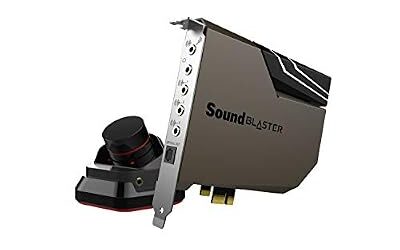
Creative Sound Blaster AE-7 – Best Value for 5.1 and Optical Encoding
ESS SABRE-class 9018 DAC · 127 dB DNR · 32-bit/384 kHz · 5.1 discrete · virtual 7.1
The AE-7 lists optical out carrying Dolby Digital Live or DTS Connect encoded streams, plus rear, center/sub, front and headphone outputs and a mic/line input. Optical playback resolution is listed at 16 or 24-bit and up to 96 kHz. It also ships with an Audio Control Module, a desktop knob for volume and headphone gain. Reviewers describe it as a strong choice for anyone wanting AE-9 style features at a lower tier, with the trade-off that it is not the top DAC in the range.

Creative Sound Blaster AE-7 Hi-Res PCIe Gaming Sound Card and ACM | Hi-res, PCIe DAC, Headphone Amp, Xamp, Audio Control Module, Hi-Res Audio, Sound Card
Included for 'Best 5.1 and 7.1 Sound Cards for Surround Sound on PC' as a representative home product in this roundup; selection reflects the product set returned for this topic.
View on AmazonCreative Sound Blaster Z SE – Best Previous-Generation Option If Found
5.1 analog · PCI Express · headphone amp · previous generation
The Z SE is previous generation, so availability varies and the AE-series cards have largely replaced it. It is mentioned because secondhand and remaining-stock listings still turn up. Confirm driver support for your Windows version on Creative’s driver page before choosing it.

Creative Sound Blaster Z SE Internal PCI-e Gaming Sound Card and DAC, 24-bit / 192 kHz, 116 dB SNR, ASIO, 600Ω Headphones Amp, Mic EQ, Discrete 5.1 / Virtual 7.1, Supports Dolby Digital Live, DTS …
Included for 'Best 5.1 and 7.1 Sound Cards for Surround Sound on PC' as a representative home product in this roundup; selection reflects the product set returned for this topic.
View on AmazonPremium Cards
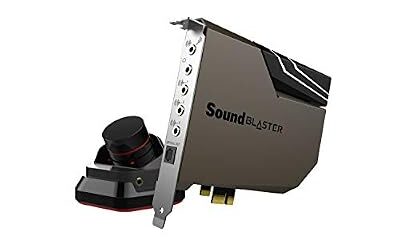
Creative Sound Blaster AE-9 – Best for Full-Featured 5.1 and Headphones
ESS SABRE-class 9038 DAC · 129 dB dynamic range · 32-bit/384 kHz PCM and DSD64 · 5.1 discrete · virtual 7.1
The AE-9 is the flagship PCIe card in Creative’s current line. Makers list both optical input and output, Dolby Digital Live and DTS Connect encoding, and a removable control module with two stereo-to-RCA cables and an optical cable in the box. The control module needs a 6-pin PCIe power connector from the PC’s power supply, so confirm your power supply has a free connector. Do not open the power supply to find one. It also offers a high-gain mode that Creative aims at 150 to 600 ohm headphones, which matters if you use demanding studio headphones.
External Alternatives
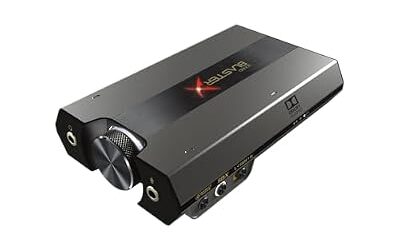
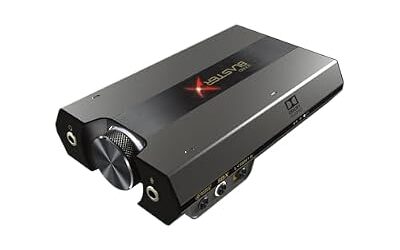
Creative Sound BlasterX G6 – Best for Headphones and Consoles
External USB · virtual 7.1 for headphones · optical out · DAC and amplifier
The G6 is a small external USB DAC/amp aimed at headphone gaming and console use. It is not the right choice for a multichannel analog speaker setup. If your priority is a clean headphone feed and easy plug and play, it is easier to install than a PCIe card, but it will not give you discrete 5.1 outputs to speakers.

Sound BlasterX G6, Hi-Res Gaming DAC, Headphone Amp, 7.1 Surround, Dolby | Hi-Res DAC, 130dB SNR, 7.1 Surround, Dolby Digital, Console Support, Headphone Amplifier, Portable
Included for 'Best 5.1 and 7.1 Sound Cards for Surround Sound on PC' as a representative home product in this roundup; selection reflects the product set returned for this topic.
View on AmazonHDMI Audio to an AV Receiver – Best for True Multichannel
HDMI output from the GPU · receiver decodes multichannel PCM or bitstream · no sound card needed
For a living-room PC with a receiver, HDMI is often the cleanest route to real 5.1 or 7.1. The graphics card sends multichannel audio to the receiver, which handles the decoding and amplification. Set the Windows speaker configuration to match your speaker layout and confirm the receiver’s input mode. This removes the encoding limits of optical.
Best Sound Cards to Connect to an AVR
If you want a card that sends sound to an AV receiver, the two main routes are optical with encoding and analog multichannel. Optical needs an encoder, so the AE-7 and AE-9 are the models makers list with Dolby Digital Live and DTS Connect. The analog route uses the card’s rear, center/sub and front outputs into the receiver’s multichannel input, if the receiver has one. That path gives you discrete 5.1 without compression, but cabling is more involved. If the receiver has HDMI, using the graphics card output is the simplest approach and avoids both limits.
Best Sound Cards Optical: What to Check
- Confirm the card lists optical output, not only an optical input.
- Confirm Dolby Digital Live or DTS Connect if you need 5.1 over optical.
- Use a quality TOSLINK cable and do not bend it sharply.
- In the control software, select the output format that your receiver or soundbar accepts.
Best Sound Cards for 2.1 Music Playback
For 2.1 music, you do not need surround features. A card or DAC with a clean stereo output and a subwoofer output is enough. The Sound Blaster AE-7 and AE-9 have the needed outputs and software equalizers, but an external USB DAC feeding powered speakers is a simpler route, and onboard audio is often enough for desktop stereo. Make sure the speaker’s input type matches your card: analog RCA or 3.5 mm cables, or digital optical.
Best Speakers for Sound Cards
Speakers for a PC sound card fall into 2.0, 2.1 and 5.1 groups. Some reviewers and buyers pair these cards with Logitech Z906, a 5.1 system that lists digital optical and coaxial inputs plus analog inputs and a separate control console. Its decoding of Dolby Digital and DTS bitstreams lets it work well with an encoded optical signal from a card, per the maker’s listing. For 2.1 music, Edifier’s S350DB class systems and similar powered 2.1 sets are common picks, as are 2.0 Edifier or Klipsch ProMedia sets for desktops. These are examples of types, so confirm current availability and input lists on the makers’ pages.
- 5.1 desktop system with optical decoding: good match for AE-7 or AE-9 encoded output.
- Powered 2.1 speakers: pair with analog outputs, no encoding needed.
- AV receiver and passive speakers: pair with optical encoding or HDMI.
Pick X If… Decision Table
| Pick this | If you |
|---|---|
| Sound Blaster AE-9 | Want the most complete features and use demanding headphones |
| Sound Blaster AE-7 | Want optical encoding and 5.1 at a lower tier |
| Sound BlasterX AE-5 Plus | Want a mid-range card with extras |
| Audigy Fx | Only need a simple 5.1 analog upgrade |
| Sound BlasterX G6 | Use headphones and consoles, not speakers |
| HDMI to receiver | Have an AV receiver with HDMI and want true multichannel |
Compatibility and Fit Notes
- Slot: internal Creative cards use PCI Express, so confirm your motherboard has a free slot and that a large graphics card does not block it.
- Power: the AE-9 control module needs a 6-pin PCIe power connector.
- Operating system: control software is built around Windows, so check the maker’s driver page for your version, and for Linux or Mac look at USB DAC options.
- Installation safety: shut down and unplug the PC before installing a card, and follow the card and motherboard manuals.
Frequently Asked Questions
What are the best 5.1 sound cards?
The Creative Sound Blaster AE-9 and AE-7 are the two most commonly named current options. The AE-9 is the premium choice, and the AE-7 offers similar surround features at a lower tier. The Audigy Fx covers entry-level 5.1.
Are there true 7.1 sound cards?
Many current cards listed as 7.1 provide discrete 5.1 plus virtual 7.1 for headphones. For true 7.1 to speakers, use motherboard jacks that provide eight channels, or send HDMI audio to a receiver. Read the maker’s port list before buying.
Can a sound card send 5.1 over optical to a receiver?
Yes, if the card encodes in real time. Cards with Dolby Digital Live or DTS Connect, such as the AE-7 and AE-9, send compressed 5.1 over optical. Without encoding, optical carries only stereo from a PC.
Do I need a sound card if I have an AV receiver?
Often not. If your graphics card and receiver have HDMI, the receiver can handle multichannel audio directly. A card helps when your receiver only has optical or analog inputs.
What speakers pair well with a PC sound card?
Match the speaker’s inputs to the card’s outputs. A 5.1 system with optical decoding such as the Logitech Z906 works with encoded optical, and powered 2.0 or 2.1 sets work with simple analog outputs. Confirm current inputs on the maker’s page.
Is a sound card worth it for 2.1 music playback?
Usually a decent onboard output or a small USB DAC is enough. A card adds value only if you need its inputs, headphone amplifier or equalizer software. Surround features add nothing for stereo music.