🛒 Best Price Today on Amazon
Prime members get fast, free shipping on everything above, plus member-only deals. New members get a 30-day free trial — cancel anytime.
- Best External Sound Cards at a Glance
- What an External USB Sound Card Does
- Best USB Sound Cards for Gaming
- Best External Sound Cards for Laptops
- Best External Sound Cards for Audiophiles
- Best USB Sound Cards with Preamp and for Recording
- Plug-and-Play, ASIO and Operating System Notes
- How to Match a Sound Card to Your Headphones
- Common Mistakes When Buying a Sound Card
- Troubleshooting a New Sound Card
- Pick X If… Decision Table
- Bus Power, Wall Power and Portability
- Connections to Look For
- Choosing Between a DAC, a Sound Card and an Audio Interface
- Alternatives
- Setup and Safety Tips
- Frequently Asked Questions
Updated November 2026 – The best external sound cards for a PC or laptop in 2026 are the Creative Sound BlasterX G6 for gaming and consoles, the FiiO K11 for desk listening, the FiiO K7 for more power, and the Focusrite Scarlett Solo (4th Gen) for recording with a microphone.
The best external sound cards are small USB units that replace a weak onboard headphone output, add a proper microphone input, or bring better audio to a laptop with no expansion slot. This guide explains the best USB sound cards by use: gaming, laptop listening, audiophile desk setups, preamp and recording work. It names models that 2026 roundups still cover and states specs as the makers or reviewers list them. Many roundups are affiliate-style, so use them as pointers and read the maker pages for exact numbers.
Best External Sound Cards at a Glance
| Model | Best for | Key stated specs | Limits |
|---|---|---|---|
| Sound BlasterX G6 | Gaming, PC and console | 130 dB DNR, 32-bit/384 kHz, 16-600 ohm Xamp | MicroUSB on original model |
| Sound Blaster G8 | Dual-DAC gaming desk unit | Dual-DAC design reported | Limited coverage |
| Sound Blaster X5 | Full desktop hub | Multiple inputs and outputs reported | Larger and costlier |
| FiiO K11 | Desk music and gaming | 1400 mW balanced reported, 4.4 mm and 6.35 mm outputs | No game surround features |
| FiiO K7 | Power-hungry headphones | Dual AK4493SEQ DACs, 2000 mW THX AAA reported | Needs wall power, desk only |
| iFi Zen DAC 3 | Audiophile balanced output | Balanced output reported, MQA mentioned | Desk unit |
| Schiit Modi 3+ | Budget DAC to powered speakers | Several digital inputs reported | No headphone amplifier |
| Focusrite Scarlett Solo (4th Gen) | Recording and preamp | XLR and 6.3 mm input, balanced monitor outputs | Interface, not a listening DAC |
| FiiO KA11 | Phone or laptop dongle | Small USB-C dongle DAC | Low power, no desktop controls |
What an External USB Sound Card Does
An external sound card takes digital audio over USB, converts it with its own DAC, amplifies it, and sends it to headphones or speakers. Because the conversion happens outside the computer, electrical noise from the laptop or motherboard has less chance to reach the signal. Most connect as a class-compliant USB audio device, so Windows and macOS can use them without a vendor installer; vendor software adds equalizer, surround and microphone features. Check the maker’s driver page for Windows 10 and 11, macOS and Linux notes.
Best USB Sound Cards for Gaming
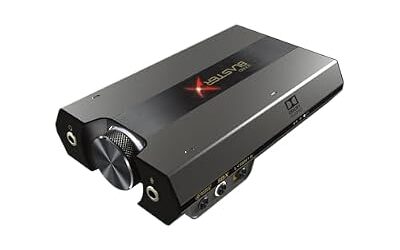
Creative Sound BlasterX G6 – Best for gaming and consoles
Several 2026 guides name the G6 the most consistent external gaming DAC. Reviewers list 130 dB dynamic range, 32-bit/384 kHz playback and a Xamp headphone amplifier for 16 to 600 ohm headphones. It works with PS4, PS5, Xbox and Switch. One guide criticizes microUSB on the original and lists a USB-C version; it also says some console features rely on optical and that there is no physical analog 7.1 output.
Specs: 130 dB DNR · 32-bit/384 kHz · 16-600 ohm · optical · bus powered

Sound BlasterX G6, Hi-Res Gaming DAC, Headphone Amp, 7.1 Surround, Dolby | Hi-Res DAC, 130dB SNR, 7.1 Surround, Dolby Digital, Console Support, Headphone Amplifier, Portable
Included for 'Best External USB Sound Cards for PC and Laptop in 2026' as a representative home product in this roundup; selection reflects the product set returned for this topic.
View on AmazonCreative Sound Blaster G8 – Best for a dual-DAC desk unit
The G8 is listed in a roundup for its dual-DAC architecture. It targets players who want a more capable desk unit than the G6; read the maker page for consoles and output details.
Specs: dual-DAC design reported · USB · desktop
Creative Sound Blaster X5 – Best for a full desktop hub
Roundups describe the X5 as a hub with multiple inputs and outputs, suited to a desk that connects speakers, headphones and a microphone. Read the maker’s specification sheet for the exact connector list.
Specs: multi-input hub reported · USB · desktop

Creative Sound Blaster X5 Hi-Res Dual DAC USB Headphone Bi-Amplifier | Hi-Res USB DAC, External DAC, Dual DAC, Fully Balanced, Xamp, Headphone Amplifier, Audiophile
Included for 'Best External USB Sound Cards for PC and Laptop in 2026' as a representative home product in this roundup; selection reflects the product set returned for this topic.
View on AmazonBest External Sound Cards for Laptops
A laptop has limited space and often a noisy headphone jack, so the best laptop sound cards are either dongles or compact desk DACs. Reviewers suggest USB-C dongles for phones and thin laptops, and desk units like the K11 if you want more power at home.
FiiO KA11 – Best for a cheap laptop dongle
One roundup names the KA11 as the best inexpensive DAC in its list. It is a small USB-C dongle, handy for travel and for improving a laptop’s headphone jack. Expect enough power for efficient headphones, not for demanding high-impedance models.
Specs: USB-C dongle DAC · portable · low power tier

FiiO KA11 USB C to 3.5mm Audio Adapter 32bit/384KHz, USB Type C Dongle HiFi DAC Amplifier for Android/iOS/Windows/Mac (Black, TC)
Included for 'Best External USB Sound Cards for PC and Laptop in 2026' as a representative home product in this roundup; selection reflects the product set returned for this topic.
View on AmazonFiiO K11 – Best for a laptop on a desk
The K11 appears as the most frequent top pick in 2026 roundups. Reviewers report 1400 mW balanced output, 4.4 mm and 6.35 mm outputs, and the ability to drive 350 ohm headphones. It needs wall power, so it stays on the desk.
Specs: 1400 mW balanced reported · 4.4 mm + 6.35 mm · 350 ohm drive reported · USB DAC

FiiO K11 DAC and Headphone Amplifier for Home Audio or PC, 6.35mm and Balanced 4.4mm, RCA, Coaxial, Optical, 1400mW, 384kHz/24Bit DSD256 (Black)
Included for 'Best External USB Sound Cards for PC and Laptop in 2026' as a representative home product in this roundup; selection reflects the product set returned for this topic.
View on AmazonBest External Sound Cards for Audiophiles
FiiO K7 – Best for more power
Reviewers describe the K7 as the pick when the K11 is not enough, with dual AK4493SEQ DACs and 2000 mW of THX AAA output. It is positioned as a desktop DAC and amp combination at a mid-range price tier.
Specs: dual AK4493SEQ DACs · 2000 mW THX AAA reported · wall powered

FiiO K7 Desktop DAC and Amplifier
Included for 'Best External USB Sound Cards for PC and Laptop in 2026' as a representative home product in this roundup; selection reflects the product set returned for this topic.
View on AmazoniFi Zen DAC 3 – Best for balanced output and iFi features
One guide recommends the Zen DAC 3 for listeners with mid-to-high-end headphones, citing balanced output and MQA support. Read the maker’s page for the current feature list, as format support can change with firmware.
Specs: balanced output reported · MQA mentioned · desk unit

Zen DAC V3 -Desktop DAC Preamp, Digital to Analog Audio Converter | Supports all high-res music formats up to PCM 768kHz/DSD512 & MQA
Included for 'Best External USB Sound Cards for PC and Laptop in 2026' as a representative home product in this roundup; selection reflects the product set returned for this topic.
View on AmazonSchiit Modi 3+ – Best for a DAC feeding speakers
The Modi 3+ is cited as a budget-friendly option with several digital inputs. It is not a headphone amplifier, so it pairs with powered speakers or a separate amp. The Modi 5 is also listed in roundups as a newer step.
Specs: multiple digital inputs reported · no headphone amp · DAC only
Best USB Sound Cards with Preamp and for Recording
Focusrite Scarlett Solo (4th Gen) – Best for recording with a microphone
Roundups describe two inputs, one XLR and one 6.3 mm, Air modes, balanced TRS monitor outputs and a capable headphone output. It is an audio interface rather than a gaming card. Choose it for vocals, podcasts or guitar. The maker lists ASIO drivers for Windows; check the driver page for your operating system.
Specs: XLR + 6.3 mm inputs · Air modes · balanced TRS outputs · headphone output

Focusrite Scarlett Solo 4th Gen USB-C Audio Interface | 1 XLR Mic Preamp, 1 Hi-Z Instrument Input, 24-Bit/192kHz, 120dB Dynamic Range, Air Modes, PC/Mac/iPad Compatible
Included for 'Best External USB Sound Cards for PC and Laptop in 2026' as a representative home product in this roundup; selection reflects the product set returned for this topic.
View on AmazonWhat to look for in a preamp
Look for phantom power if you use a condenser microphone, enough gain for quieter dynamic microphones, and a direct monitor switch to hear yourself without delay. Latency depends on the driver and buffer size, and ASIO on Windows is the usual choice for low delay.
Plug-and-Play, ASIO and Operating System Notes
- Class-compliant USB devices usually work on Windows, macOS and many Linux distributions without a vendor driver.
- Vendor drivers unlock ASIO, surround and equalizers on some units, so read the maker’s driver page.
- Bus-powered units draw current from the USB port; a laptop with weak ports may reduce headphone output headroom.
- Use a short, good quality USB cable and plug directly into the computer rather than through an unpowered hub.
How to Match a Sound Card to Your Headphones
Start with the headphone maker’s stated impedance and sensitivity. Low-impedance headphones, roughly under 50 ohms, work on almost any output and gain little from an expensive amplifier. Mid-impedance models around 80 to 150 ohms benefit from a stronger stage, and 250 to 600 ohm studio designs are the ones where a dedicated amplifier is most often reported to matter. Amplifiers such as the Xamp stage in the G6 and the AE series list a 16 to 600 ohm range, and desktop DACs like the FiiO K11 are reported at 350 ohm drive. Planar magnetic and some open-back designs are inefficient and want current as well as voltage, so compare the milliwatt rating at your headphone’s impedance when the maker states it.
Output impedance is the other half of the match. A low output impedance, such as the 1 ohm the maker lists for the AE-9, helps keep the frequency response of sensitive in-ear monitors from changing. If you own sensitive in-ear monitors, listen for hiss at zero volume, because a powerful amplifier can reveal noise that a weaker output hides. In that case a unit with a low-gain setting is the better choice.
Common Mistakes When Buying a Sound Card
- Buying for decibel figures alone. Differences in quoted dynamic range above a certain point are hard to hear, so connections and power matter more.
- Forgetting that a USB headset uses its own DAC, so a card changes nothing for it.
- Ignoring slot space and power leads on internal cards.
- Expecting a card to fix a poor headset or a noisy room.
- Installing drivers from third-party sites. Use the maker’s driver page only.
Troubleshooting a New Sound Card
| Symptom | Common cause | Fix |
|---|---|---|
| No sound | Wrong default playback device | Set the new device as default in Windows sound settings |
| Crackling or popping | Duplicate onboard device or outdated driver | Disable the onboard device and install the maker’s current driver |
| Card not detected | Loose seating or missing power lead | Power down, unplug, reseat the card and attach any required lead |
| Hiss at idle | Too much gain for sensitive headphones | Lower the gain setting or volume and keep cables away from the graphics card |
| Microphone too quiet | Input level or boost off | Raise input level in the maker’s software |
If a problem persists after reseating and reinstalling the maker’s driver, contact the maker or a technician rather than opening other components. Never open a power supply.
Pick X If… Decision Table
| Pick this | If you |
|---|---|
| Sound BlasterX G6 | Game on laptop, PC and console |
| FiiO K11 | Want a strong desk DAC and amp at a mid-range tier |
| FiiO K7 | Own power-hungry headphones |
| iFi Zen DAC 3 | Want balanced output and a polished desk unit |
| Schiit Modi 3+ | Feed powered speakers with a clean DAC |
| Scarlett Solo | Record a microphone or instrument |
| FiiO KA11 | Want a small dongle for a laptop or phone |
Bus Power, Wall Power and Portability
External units fall into three power groups. Dongles such as the FiiO KA11 draw current from the host and are built for travel, which limits output power. Bus-powered desk units like the G6 get everything from USB and are convenient, though a laptop on battery will drain faster when driving demanding headphones. Wall-powered units like the K11, K7 and Zen DAC 3 have separate supplies, which reviewers associate with more headroom and a steadier output into hard-to-drive headphones.
For a laptop you carry, a dongle and a pair of efficient headphones is the lightest setup. For a desk, a wall-powered unit gives more power and usually more connections. If you split time between both, a bus-powered unit such as the G6 sits in the middle, and you can keep a dongle in the bag for travel.
Connections to Look For
- Headphone outputs: 3.5 mm, 6.35 mm and balanced 4.4 mm outputs suit different cables; the K11 is reported with 4.4 mm and 6.35 mm.
- Line outputs: RCA or balanced outputs connect powered speakers; the Modi 3+ is a DAC without a headphone stage.
- Digital inputs: optical and coaxial let you connect a console or television; the G6 is listed with optical.
- Microphone input: XLR for a studio microphone, as on the Scarlett Solo, or 3.5 mm for a headset microphone.
- USB port type: USB-C is common now, but the original G6 is reported with microUSB, so check your cable.
Choosing Between a DAC, a Sound Card and an Audio Interface
These terms overlap. A DAC converts digital to analog and often includes a headphone amplifier. A gaming sound card, such as the G6, adds software features like virtual surround, equalizers and microphone processing. An audio interface, such as the Scarlett Solo, focuses on inputs and low-latency monitoring for recording. If you only listen, a DAC is enough; if you game, a gaming unit gives extra features; if you record, an interface is the right type.
Alternatives
- Fosi Audio K7: a roundup lists 2100 mW and Bluetooth for a compact desk unit.
- iFi Hip-dac 3: a portable, battery-powered choice in one guide.
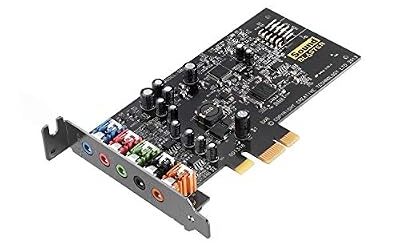
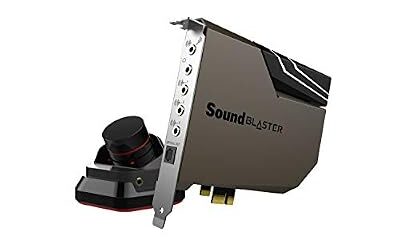
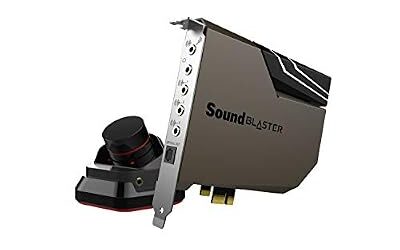
- Internal PCIe cards: a desktop with a free slot can use a Sound Blaster AE-series card instead.
Setup and Safety Tips
Lower the system volume before plugging in new headphones, because an amplifier with more power can be much louder than the laptop jack. Keep volume at a comfortable level to protect hearing. If a unit gets unusually hot or shows signs of damage, stop using it and contact the maker.
Frequently Asked Questions
What are the best USB sound cards?
The G6 leads for gaming, the FiiO K11 for desk listening and the Scarlett Solo for recording. Roundups agree on these names, though they differ on ranking.
What are the best external sound cards for laptops?
A small dongle like the FiiO KA11 suits travel, while the K11 gives more power at a desk. Match the choice to your headphones’ impedance.
Which USB sound card has a preamp?
The Focusrite Scarlett Solo has an XLR microphone preamp. The Sound Blaster AE-9 control module also has a microphone input, but it is an internal card.
Are external sound cards good for audiophiles?
Yes, desktop DACs like the K7 and Zen DAC 3 are common audiophile choices. Look for balanced output and enough power for your headphones.
Do external sound cards need drivers?
Many work as standard USB audio devices. Vendor drivers add features or ASIO, so check the maker’s driver page.
Will an external sound card improve game performance?
No, it does not raise frame rates. It can improve headphone sound and microphone handling.