🛒 Best Price Today on Amazon
Prime members get fast, free shipping on everything above, plus member-only deals. New members get a 30-day free trial — cancel anytime.
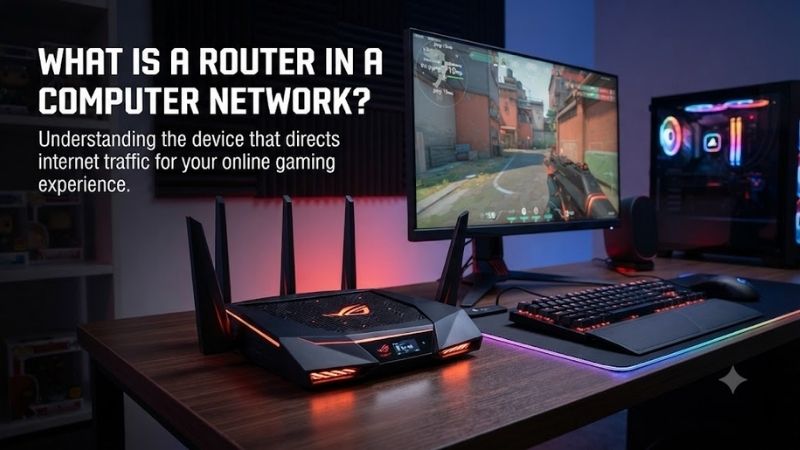
A router in a computer network is a device that connects different networks and directs data packets from one network to another. It examines destination IP addresses, chooses an efficient path, and forwards traffic toward the correct device or network, allowing computers, phones, servers, and internet services to communicate reliably.
What Is a Router in Computer Network?
A router is a Layer 3 networking device that forwards packets based on IP addresses. Its main job is to connect separate networks, such as a home local area network and an internet service provider network. Unlike a switch, which mainly connects devices inside one LAN, a router moves traffic between different IP networks.
How Does a Router Work?
When a device sends data to another network, it usually sends that traffic to its default gateway, which is often the router. The router reads the packet header, checks the destination IP address, compares it with its routing table, and forwards the packet through the interface that provides the best available path.
For example, when a laptop opens a website, the request first travels to the local router. The router recognizes that the destination is outside the home network and sends the traffic toward the internet provider. Other routers continue forwarding those packets until they reach the server hosting the requested website.
The response follows a similar path in reverse. The website server sends packets back across several networks until they reach the user’s internet connection. The home router then directs the returning traffic to the correct laptop, phone, or other device, allowing many local devices to share one external connection.
Main Functions of a Router
One important router function is path selection. A router may know several routes to the same destination, especially in business or internet infrastructure. Routing tables and routing protocols help it choose an appropriate path using factors such as route cost, hop count, bandwidth, policy, or administrative preference.
Many home routers also perform network address translation, commonly called NAT. Devices on the local network often use private IP addresses that are not directly routed on the public internet. NAT lets several private devices share the public IP address assigned by the internet service provider safely and efficiently.
Routers commonly provide security and traffic-control features in addition to packet forwarding. Depending on the model, these may include firewall rules, guest networks, VPN support, port forwarding, parental controls, and quality of service. These tools help manage how traffic enters, leaves, or moves through the network.
Main Components of a Router
A router contains a processor, memory, network interfaces, and software that work together to forward traffic. The processor runs routing functions, memory stores routing and configuration information, and physical interfaces connect the router to Ethernet, fiber, wireless, or other networking technologies.
Home wireless routers also contain Wi-Fi radios and antennas. Wi-Fi and routing are technically separate functions, but consumer devices usually combine them with an Ethernet switch and firewall in one enclosure. This is why people often use the word router to describe the device that also provides wireless access throughout the home.
Types of Routers
Home routers are designed for small networks and usually combine internet routing, Ethernet switching, Wi-Fi, security, and basic management. Enterprise routers are built for larger networks and may provide more interfaces, higher throughput, redundancy, advanced routing protocols, and stronger policy controls.
Core routers operate inside large backbone or service-provider networks where enormous traffic volumes must move efficiently. Edge routers sit near the boundary between networks and often handle traffic entering or leaving an organization. Their scale differs, but both use routing information to forward packets toward the correct destination.
Router vs Switch
A router and a switch have different primary roles. A switch usually connects devices inside the same local network and forwards Ethernet frames mainly by using MAC addresses. A router connects separate IP networks and forwards packets by using IP addresses, allowing communication between one network and another.
| Feature | Router | Switch |
|---|---|---|
| Main purpose | Connects different networks | Connects devices within a LAN |
| Main address used | IP address | MAC address |
| Typical OSI layer | Layer 3 | Layer 2 |
| Internet gateway role | Yes | Usually no |
| Connects separate subnets | Yes | Not by default |
Router vs Modem
A modem also serves a different purpose. It connects a customer to the access technology used by an internet service provider, while the router manages the local IP network and forwards traffic between that network and the internet. Some provider gateways combine both functions, so the distinction is not always visible to home users.
| Device | Primary Role |
|---|---|
| Modem | Connects to the ISP access network |
| Router | Connects and routes between IP networks |
| Switch | Connects wired devices in a LAN |
| Access Point | Provides wireless connectivity |
Router vs Access Point
A wireless access point provides Wi-Fi connectivity and bridges wireless devices onto an existing local network. It does not necessarily route between different IP networks. In larger homes or offices, several access points may connect to one central router, separating wireless coverage from routing, firewall, and internet gateway functions.
What Is a Routing Table?
A routing table is a list of network destinations and instructions that tell the router where traffic should go. Entries may be added manually or learned automatically through routing protocols. When a packet arrives, the router finds the most specific matching route and sends the packet through the associated interface or next hop.
Small home routers usually have a simple routing table containing local network routes and a default route toward the internet provider. Enterprise and service-provider routers can maintain far larger tables and use protocols such as OSPF or BGP. The basic principle remains the same: match the destination and choose a forwarding path.
Why Is a Router Important?
Without routers, devices could communicate only within directly connected networks unless another forwarding mechanism existed. Routers make interconnected networks possible by moving traffic between separate address spaces. The global internet is therefore built from many independent networks linked together through routers and routing protocols.
For home users, the router lets several devices share internet access, keeps the private network separate from the public internet, and often provides Wi-Fi and firewall protection. In organizations, routers can also support network segmentation, redundant links, branch connectivity, secure remote access, and traffic policies.
Common Router Features
Modern consumer routers often combine several networking functions in one device. Depending on the model, users may find dual-band or tri-band Wi-Fi, Ethernet ports, guest networks, VPN features, traffic prioritization, mesh support, USB sharing, parental controls, automatic updates, and built-in security tools.
These extra features are useful, but they are not what technically defines a router. The essential function remains forwarding packets between separate IP networks. A device could perform routing without Wi-Fi, USB ports, parental controls, or even a graphical interface, provided it can make and execute routing decisions.
FAQ
What is the simple meaning of router in networking?
A router is a device that connects different networks and sends data toward the correct destination. It uses IP addresses and routing information to decide where packets should travel next. In a typical home, the router connects the private local network to the internet and often also provides Wi-Fi through an integrated access point.
Is a router necessary for internet access?
A router is usually needed when several devices share one internet connection or when a private local network must reach another network. A single device can sometimes connect directly through provider equipment, but homes and offices normally use a router for addressing, security, Wi-Fi, traffic management, and network sharing.
Does a router provide Wi-Fi?
Many home routers provide Wi-Fi because they include a wireless access point, but routing and Wi-Fi are separate functions. Enterprise routers may have no wireless radio, while standalone access points can provide Wi-Fi without performing the main routing role between the local network and the internet.
What is the main purpose of a router?
The primary purpose of a router is to forward IP packets between different networks. It checks destination addresses, consults routing information, and selects the appropriate next path. Features such as NAT, Wi-Fi, VPN support, firewalling, and parental controls are additional functions commonly included in modern routers.
Can a router work without the internet?
Yes. A router can operate on a local network without an active internet connection. Devices can still communicate with local servers, storage systems, printers, or other networks connected to the router. Internet access is only one common use of routing, even though it is the role most home users encounter every day.
Conclusion
The meaning of router in computer network is a device that connects separate IP networks and directs packets toward their destinations. Routers make internet and inter-network communication possible through IP addresses, routing tables, and forwarding rules, while modern models may also provide Wi-Fi, NAT, firewalling, VPNs, and traffic management.