🛒 Best Price Today on Amazon
Prime members get fast, free shipping on everything above, plus member-only deals. New members get a 30-day free trial — cancel anytime.
- ASUS ZenWiFi XT8 Specifications
- Design and Build Quality
- Tri-Band Wi-Fi 6 Performance
- Dedicated Wireless Backhaul
- Wired Backhaul Support
- Real-World Coverage
- 2.5GbE WAN Connectivity
- LAN Ports and USB
- Setup Experience
- ASUS AiMesh Features
- Security Features
- Gaming Performance
- Streaming and 4K Video
- Smart-Home Performance
- Noise and Thermal Behavior
- Who Should Buy the ASUS ZenWiFi XT8?
- Who Should Skip It?
- ASUS ZenWiFi XT8 Pros and Cons
- ASUS ZenWiFi XT8 vs Basic Dual-Band Mesh
- FAQ
- Conclusion
The ASUS ZenWiFi XT8 mesh router is a tri-band Wi-Fi 6 system designed for larger homes, apartments with difficult layouts, and users who want stronger coverage without relying on one central router. Its dedicated 5 GHz backhaul, 2.5GbE WAN port, AiMesh support, and advanced ASUS software make it more flexible than basic mesh kits.
ASUS ZenWiFi XT8 Specifications
| Specification | ASUS ZenWiFi XT8 |
|---|---|
| Wi-Fi Standard | Wi-Fi 6 / 802.11ax |
| Wireless Bands | Tri-band |
| 2.4 GHz | Up to 574 Mbps |
| 5 GHz-1 | Up to 1201 Mbps |
| 5 GHz-2 | Up to 4804 Mbps |
| Combined Class | AX6600 |
| Backhaul | Dedicated 5 GHz-2 or wired Ethernet |
| WAN Port | 2.5 Gigabit Ethernet |
| LAN Ports | Three Gigabit Ethernet per node |
| USB | USB 3.1 Gen 1 |
| Mesh Platform | ASUS AiMesh |
| Security | AiProtection |
| WPA3 | Supported |
| Processor | Quad-core |
| Antennas | Internal |
Design and Build Quality
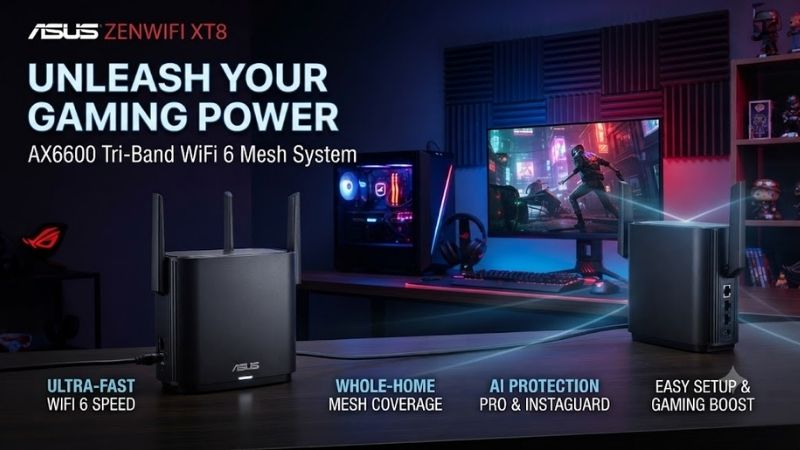
The ZenWiFi XT8 uses a tall rectangular enclosure rather than exposed antennas, giving it a cleaner appearance than many enthusiast routers. Because mesh nodes normally sit in visible areas around a home, this understated design helps the system blend into a living room, office, bedroom, or media space without looking like aggressive gaming hardware.
Its internal antennas also simplify placement because there are no external antenna arms to adjust. The trade-off is that users cannot manually reposition individual antennas toward problem areas. In practice, mesh placement matters more: each node should remain in an open location with a strong connection to the primary router or wired network.
Tri-Band Wi-Fi 6 Performance
The XT8 is an AX6600 tri-band system, combining one 2.4 GHz network with two 5 GHz radios. The fastest 5 GHz band supports a theoretical link rate up to 4804 Mbps, while the second 5 GHz band reaches up to 1201 Mbps. Actual device speeds remain lower because wireless overhead, distance, walls, and client hardware affect throughput.
Wi-Fi 6 support adds technologies such as OFDMA, MU-MIMO, and improved handling of many connected devices. These features are especially useful in busy homes with phones, laptops, smart TVs, consoles, cameras, and smart-home equipment all competing for airtime. The XT8 is therefore more valuable in dense networks than its raw speed numbers alone suggest.
Dedicated Wireless Backhaul
One of the strongest features of the ZenWiFi XT8 is its dedicated 5 GHz-2 radio for communication between mesh nodes. This allows the router and satellite to exchange data without relying entirely on the same wireless band used by phones, laptops, televisions, and other client devices connected throughout the home.
Dedicated backhaul matters because inexpensive dual-band mesh systems must share wireless capacity between clients and node-to-node traffic. The XT8 reduces that competition, helping remote nodes maintain better performance when the mesh is connected wirelessly. Results still depend heavily on distance and obstacles between the units.
Wired Backhaul Support
Users with Ethernet cabling can connect XT8 nodes through wired backhaul instead of depending on the dedicated wireless band. This is the preferred configuration when the home already has Ethernet between rooms because it gives each mesh point a stable wired path and frees additional wireless capacity for client devices.
Wired backhaul also helps in houses with thick concrete walls or floors where even a strong 5 GHz signal struggles between rooms. A cable removes that wireless bottleneck entirely. The system can still operate as a unified mesh network, so devices roam between nodes while the infrastructure underneath uses Ethernet.
Real-World Coverage
The XT8 is designed for multi-room coverage rather than maximum speed from one single location. A two-node kit can cover a much larger area than a conventional router when the nodes are positioned correctly. The best results come from placing the second unit within strong reach of the first instead of hiding it inside the dead zone.
Coverage claims should always be treated as approximate because building materials matter enormously. Drywall, wood, and open hallways are easier for Wi-Fi than concrete, metal, mirrors, or multiple floors. The XT8 improves coverage by moving the access point closer to devices rather than trying to brute-force every wall from one room.
2.5GbE WAN Connectivity
The main node includes a 2.5 Gigabit Ethernet WAN port, allowing the XT8 to accept internet connections faster than standard Gigabit Ethernet. This is useful for users with multi-gig fiber or cable plans, although individual wired devices connected through the standard LAN ports are still limited to Gigabit Ethernet speeds.
The 2.5GbE port can also be relevant in advanced wired-backhaul configurations depending on network design. Users expecting several 2.5GbE or 10GbE LAN ports, however, should look at newer router generations. The XT8 was designed during an earlier stage of multi-gig adoption, so its wired connectivity is less ambitious than current flagship models.
LAN Ports and USB
Each XT8 unit provides three Gigabit LAN ports, which is more generous than compact mesh systems offering only one or two Ethernet connections. This allows users to wire a desktop PC, television, game console, network switch, or other fixed hardware directly into the nearby mesh node without buying an additional switch immediately.
A USB 3.1 Gen 1 port is also included for compatible storage or other supported functions. USB storage can provide basic network file sharing, but the XT8 should not be treated as a replacement for a dedicated NAS. Router-based storage is more appropriate for light file access than heavy multi-user backup or media workloads.
Setup Experience
Initial setup can be completed through ASUS Router software or the browser interface. Users create the wireless network, configure the internet connection, add the second node, and select security settings. The interface offers far more controls than minimalist mesh platforms, which gives advanced users flexibility but can feel complex to beginners.
For most households, the default mesh configuration works without heavy tuning. More experienced users can separate wireless bands, modify channel width, configure guest networks, change backhaul behavior, or adjust roaming settings. This combination of simple startup and deep configuration is one of ASUS AiMesh’s strongest advantages.
ASUS AiMesh Features
AiMesh allows compatible ASUS routers to participate in one mesh network. That means an XT8 system can potentially be expanded later with supported ASUS hardware rather than requiring another identical kit. This flexibility is useful when a user moves into a larger home or discovers one remaining weak coverage area.
The trade-off is that mixed-router AiMesh environments can become more complicated than an all-identical mesh kit. Different radios, firmware versions, and feature sets can affect behavior. For the simplest experience, using matching XT8 nodes remains the most predictable option, while mixed AiMesh systems are better suited to technically confident users.
Security Features
ASUS includes AiProtection security tools, malicious-site blocking, network protection features, and parental controls. WPA3 is also supported for compatible clients. These features make the XT8 more complete than a basic access point, particularly for families that want network-level filtering and device management without purchasing separate hardware.
Security features still depend on keeping firmware updated and using strong account credentials. A router should not be viewed as a substitute for endpoint security on computers and phones. The advantage is that the XT8 can provide an additional network-level layer while also helping users identify connected devices and control access.
Gaming Performance
For gaming, the main benefit of the XT8 is connection stability rather than a special reduction in internet ping. A wired connection from a gaming PC or console to the nearest mesh node can provide more consistent local networking than weak Wi-Fi from a distant main router, especially when the dedicated backhaul remains strong.
Competitive players should still use direct Ethernet to the main router whenever possible because every additional wireless hop can introduce variability. The XT8 is most valuable when running a cable across the entire home is impractical. In that situation, a nearby mesh node with dedicated backhaul can be a meaningful improvement over poor direct Wi-Fi.
Streaming and 4K Video
The XT8 handles normal 4K streaming comfortably when signal quality and internet bandwidth are sufficient. Multiple televisions, tablets, and smart devices can operate across different nodes while the mesh distributes traffic around the home. Wi-Fi 6 also helps in households where many devices remain connected even when they are not all actively transferring large amounts of data.
Streaming performance depends less on maximum theoretical Wi-Fi speed than on maintaining a stable connection with low packet loss. Moving a node closer to a television or wiring the TV into the satellite can often produce a larger improvement than chasing the highest possible wireless link rate from one distant router.
Smart-Home Performance
Smart-home environments benefit from the XT8’s 2.4 GHz coverage because many cameras, plugs, sensors, and appliances still use that band. A mesh network can help these devices remain connected in corners of a home where the main router’s signal would otherwise be weak, particularly across several rooms or floors.
Some smart-home devices can be sensitive during setup when phones are connected to different bands. ASUS provides enough wireless controls to troubleshoot these cases, but less technical users may find band management confusing. Once configured correctly, however, the network can handle a large combination of low-bandwidth IoT and high-bandwidth client devices.
Noise and Thermal Behavior
The ZenWiFi XT8 is passively cooled and does not introduce fan noise into a room. Its vertical case allows heat to rise through internal ventilation, so users should avoid placing the unit inside closed cabinets or stacking objects around its vents. Open placement also improves wireless propagation at the same time.
Like most routers, the XT8 can become warm under sustained traffic, but warmth alone does not indicate a problem. Long-term reliability depends partly on airflow and ambient temperature. Keeping the units on open shelves rather than inside entertainment cabinets is a simple way to improve both cooling and wireless consistency.
Who Should Buy the ASUS ZenWiFi XT8?
The XT8 makes sense for users with a larger home, thick internal walls, several connected devices, or weak coverage from a single router. It is particularly attractive when wireless backhaul is necessary because the dedicated 5 GHz radio provides a stronger architecture than inexpensive dual-band mesh systems.
It also suits users who prefer advanced network control. AiMesh, guest networks, security features, USB options, and detailed wireless settings provide more flexibility than highly simplified mesh platforms. Home users willing to spend some time learning the ASUS interface can configure the network more precisely around their needs.
Who Should Skip It?
Users living in a small apartment with one central router may not need a multi-node XT8 system at all. A newer single Wi-Fi 6 or Wi-Fi 7 router can be simpler and may provide faster multi-gig wired connectivity. Buying mesh only makes sense when additional access points solve a real coverage problem.
The XT8 is also less attractive for buyers building a completely new premium network around Wi-Fi 7 clients and multi-gig LAN devices. Newer systems provide 6 GHz radios, faster Ethernet, and more modern wireless features. The XT8 remains capable, but its value increasingly depends on pricing and actual household requirements.
ASUS ZenWiFi XT8 Pros and Cons
Pros
- Tri-band Wi-Fi 6 design
- Dedicated 5 GHz wireless backhaul
- 2.5GbE WAN port
- Three Gigabit LAN ports per node
- Wired backhaul support
- AiMesh compatibility
- Strong ASUS configuration options
- WPA3 and network-security features
- Good coverage for larger homes
Cons
- No Wi-Fi 6E or Wi-Fi 7
- No 6 GHz wireless band
- LAN ports are limited to Gigabit
- Advanced interface can feel complex
- Performance depends heavily on node placement
ASUS ZenWiFi XT8 vs Basic Dual-Band Mesh
The XT8’s biggest structural advantage over basic dual-band mesh is the third radio. A dual-band system must often use the same 5 GHz capacity for both client devices and mesh communication, while the XT8 can reserve its stronger second 5 GHz band for backhaul traffic when operating in its standard wireless mesh configuration.
That advantage becomes less important if every node uses wired Ethernet backhaul because the cable already handles inter-node traffic. In a wired home, buyers can consider less expensive dual-band systems. The XT8 makes the strongest case when Ethernet is unavailable and wireless nodes must still deliver good speeds several rooms away.
FAQ
Is the ASUS ZenWiFi XT8 Still Good?
Yes. The XT8 remains a capable Wi-Fi 6 mesh system with dedicated wireless backhaul, 2.5GbE WAN, and mature AiMesh software. It is especially useful when available at a competitive price. Buyers starting a high-end network from scratch may prefer newer Wi-Fi 6E or Wi-Fi 7 alternatives.
Does the ZenWiFi XT8 Support Wi-Fi 6?
Yes. The XT8 uses Wi-Fi 6 across its wireless bands and includes technologies designed to improve efficiency with multiple devices. Client devices must also support Wi-Fi 6 to receive all related benefits, although older Wi-Fi devices remain compatible through previous wireless standards.
Can I Use Ethernet Backhaul With the XT8?
Yes. Ethernet backhaul can connect the mesh nodes directly and is often the best option when network cabling is available. It removes the need for inter-node traffic to travel wirelessly, improving consistency in difficult buildings and allowing more wireless capacity to remain available for client devices.
Is the XT8 Good for Gaming?
Yes, particularly when it improves a weak connection in another room. Connecting a gaming PC or console by Ethernet to a nearby XT8 node can be more stable than distant Wi-Fi. Direct wired Ethernet to the primary router remains preferable for the lowest possible local-network variability.
Does the XT8 Have 2.5Gb Ethernet?
The XT8 includes a 2.5GbE WAN port, allowing it to accept multi-gig internet service. Its standard LAN connections are Gigabit Ethernet, so users needing several 2.5GbE wired devices should consider a compatible switch or a newer router platform with more native multi-gig ports.
How Many XT8 Nodes Do I Need?
The correct number depends on home size, floor plan, wall construction, and node placement. Two nodes are enough for many multi-room homes, while additional units may help larger or difficult layouts. Adding too many access points unnecessarily can complicate roaming and wireless-channel management.
Conclusion
The ASUS ZenWiFi XT8 remains a strong Wi-Fi 6 mesh router for homes that need reliable multi-room coverage and dedicated wireless backhaul. Its 2.5GbE WAN, AiMesh flexibility, security tools, and three LAN ports per node still make it useful, although buyers focused on Wi-Fi 7 or multi-gig LAN should consider newer alternatives.