🛒 Best Price Today on Amazon
Prime members get fast, free shipping on everything above, plus member-only deals. New members get a 30-day free trial — cancel anytime.
For most gaming desktops, the TP-Link AX1800 USB 3.0 adapter is the best all-around pick: it brings Wi-Fi 6 (the 802.11ax standard, with better handling of crowded networks than older Wi-Fi 5) to a PC that has no built-in wireless, and it plugs into any free USB 3.0 port. Players with a Wi-Fi 7 router and a 6GHz-capable setup should look at the Wavlink BE6500, while anyone on a tight budget or an older router can stay with the AC-class options below. Every adapter here is a USB dongle, so the right choice depends on your router, your free ports, and how far the PC sits from it.
Quick List
- TP-Link AC600 – best for older routers and light gaming on a basic setup
- TP-Link AX1800 (USB 3.0) – best overall for Wi-Fi 6 gaming PCs
- Nineplus AC1300 – best for Wi-Fi 5 upgrades on a Windows desktop
- TP-Link AX1800 (5dBi antenna) – best for a desk with a clear line of sight to the router
- BrosTrend AX1800 – best for long-range Wi-Fi 6 with high-gain antennas
- Wavlink BE6500 – best for Wi-Fi 7 and 6GHz-ready gaming rigs
Which One Is Right for You?
| If you… | Choose |
|---|---|
| Own a Wi-Fi 7 router and want the newest standard and the 6GHz band | Wavlink BE6500 |
| Want a straightforward Wi-Fi 6 upgrade with a USB 3.0 connection | TP-Link AX1800 (USB 3.0) |
| Sit far from the router or have walls in the way | BrosTrend AX1800 |
| Prefer an adjustable external antenna on a Wi-Fi 6 adapter | TP-Link AX1800 (5dBi antenna) |
| Have a Wi-Fi 5 router and want a faster dual-band adapter | Nineplus AC1300 |
| Only need a simple, low-cost way to get a secondary PC online | TP-Link AC600 |
The adapter should match your router before anything else: a Wi-Fi 7 dongle on a Wi-Fi 5 router will connect, but it will only run at Wi-Fi 5 speeds. If your router is Wi-Fi 6, the AX1800 group is the sweet spot. Wired Ethernet is still the lowest-latency choice for competitive play, so treat these adapters as the next best thing when a cable cannot reach the PC.

TP-Link AC600 USB WiFi Adapter for Desktop PC - USB Wireless Adapter for PC | WiFi dongle for PC with 2.4GHz, 5GHz High Gain Dual Band 5dBi Antenna, Supports Win11/10/8.1/8/7/XP, Black (Archer T2U Plus)
Included for '6 Best USB WiFi Adapters for Gaming PCs (October 2026) Expert Picks' because the listing specifies USB Wireless Adapter for PC and WiFi dongle for PC with 2.4GHz, details this guide uses to compare options.
View on Amazon
TP-Link USB WiFi 6 Adapter for PC-1800 Mbps, High Gain Antennas, 5/2.4GHz | USB 3.0 WiFi Dongle, Plug and Play Wireless Adapter for Desktop, 2×High Gain Antenna, WPA3, Win11/10 Only (Archer TX30U Plus)
Included for '6 Best USB WiFi Adapters for Gaming PCs (October 2026) Expert Picks' because the listing specifies High Gain Antennas and 5/2.4GHz, details this guide uses to compare options.
View on Amazon
Nineplus Wireless USB WiFi Adapter for PC - 1300Mbps Dual 5Dbi Antennas 5G/2.4G WiFi Adapter for Desktop PC Laptop Windows11/10/7, Wireless Adapters for Desktop Computer Network Adapters
Included for '6 Best USB WiFi Adapters for Gaming PCs (October 2026) Expert Picks' because the listing specifies Wireless Adapters for Desktop Computer Network Adapters, details this guide uses to compare options.
View on Amazon
TP-Link USB WiFi 6 Adapter for Desktop PC,AX1800 Dual Band WiFi Antenna | USB Wireless Network Adapter with 2.4/5GHz, High Gain 5dBi Antenna, WPA3, MU-MIMO Supports Windows 11/10 (Archer TX20U Plus)
Included for '6 Best USB WiFi Adapters for Gaming PCs (October 2026) Expert Picks' because the listing specifies AX1800 Dual Band WiFi Antenna and USB Wireless Network Adapter with 2.4/5GHz, details this guide uses to compare options.
View on Amazon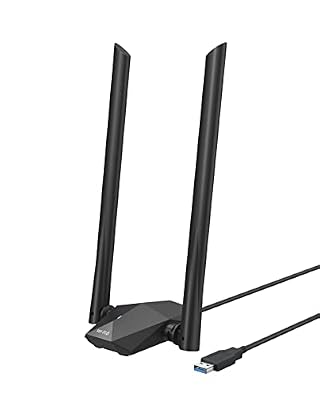
BrosTrend AX1800 USB WiFi 6 Adapter Long Range, High Gain Antennas, USB 3.0 | USB WiFi Adapter for Desktop PC Laptop Windows 11/10, Dual Band 5GHz 1201Mbps + 2.4G 574Mbps, Ideal for Gaming 4K Video, WPA3
Included for '6 Best USB WiFi Adapters for Gaming PCs (October 2026) Expert Picks' because the listing specifies High Gain Antennas and USB 3.0, details this guide uses to compare options.
View on Amazon
WAVLINK BE6500 USB WiFi 7 Adapter for Desktop PC, Tri-Band PC WiFi Adapter | 6GHz/5GHz/2.4GHz, Multicolor Status LED, 4x5dBi High Gain Antennas, USB 3.0, WPA3, MLO, OFDMA, 4K-QAM, Only for Windows 11/10
Included for '6 Best USB WiFi Adapters for Gaming PCs (October 2026) Expert Picks' because the listing specifies Tri-Band PC WiFi Adapter and 6GHz/5GHz/2.4GHz, details this guide uses to compare options.
View on AmazonAll 6 Picks in Detail
1. TP-Link AC600 – Best for Older Routers and Basic Setups
As an Amazon Associate we earn from qualifying purchases at no extra cost to you.

The TP-Link AC600 is the entry point on this list and the only adapter that is clearly a budget-class model. Its listing describes a dual-band design with 2.4GHz and 5GHz support and a high-gain 5dBi antenna, aimed at desktop PCs that have no wireless of their own. It suits a gamer with a spare PC, a younger player’s first rig, or anyone whose router is a Wi-Fi 5 unit that never supported anything faster.
AC600 is a speed class, not a promise of real-world throughput. The name adds a theoretical 433 Mbps on 5GHz to 200 Mbps on 2.4GHz, and those two bands cannot be used at the same time by one connection. For browsing, streaming, and many online games that need stable latency more than raw bandwidth, that is plenty. For large game downloads or a crowded household, it will feel limited.
It is also a reasonable spare to keep around: if an internal card fails or a USB Wi-Fi 6 adapter needs a driver you cannot install, a simple AC600 stick usually works with built-in operating system drivers or a short manufacturer download. Treat it as a bridge or a backup rather than a long-term gaming upgrade.
- Standard: 802.11ac (Wi-Fi 5), dual band 2.4GHz and 5GHz
- Speed class: AC600 (about 433 Mbps on 5GHz plus about 200 Mbps on 2.4GHz, theoretical)
- Antenna: 5dBi high-gain external antenna per the listing
- Platform: desktop PC; confirm operating system support on the listing
- Interface: USB; confirm USB version on the listing
Pros:
- Lowest-cost way to add 5GHz wireless to a desktop
- Works fine for web use, streaming, and latency-sensitive games on a decent signal
Cons:
- Wi-Fi 5 only, so no OFDMA or other Wi-Fi 6 efficiency gains
- Lower ceiling than every other adapter in this list
Compared with the Nineplus AC1300, it gives up roughly half the theoretical 5GHz speed in exchange for a simpler, lighter setup.
2. TP-Link AX1800 (USB 3.0) – Best Overall for Wi-Fi 6 Gaming PCs

This TP-Link model is the one we would point most gaming desktop owners toward. The listing calls out Wi-Fi 6, an AX1800 rating, high-gain antennas, 5GHz and 2.4GHz bands, a USB 3.0 connection, and plug-and-play use. That is the combination that matters for a desktop: a current standard, enough bandwidth for fast downloads, and a port that does not bottleneck the radio.
The AX1800 label splits into roughly 1,201 Mbps on 5GHz and 574 Mbps on 2.4GHz for a two-stream adapter, again as theoretical link rates. In practice what you gain from Wi-Fi 6 is less about the headline number and more about how the network behaves when many devices share the air. That is exactly the situation in a house with consoles, phones, and streaming boxes all active during a match.
A two-stream adapter like this can negotiate the same 1,201 Mbps 5GHz link rate as a router with two streams, but only if the router offers the same channel width. If your router is set to a narrow 20MHz or 40MHz channel on 5GHz, the link rate will be lower, so check your router settings if the numbers look low.
- Standard: 802.11ax (Wi-Fi 6), dual band 2.4GHz and 5GHz
- Speed class: AX1800
- Interface: USB 3.0 per the listing
- Antennas: high-gain external antennas per the listing
- Setup: plug and play; confirm driver and Windows version notes on the listing
Pros:
- USB 3.0 gives the adapter headroom beyond what Wi-Fi 6 at this class can use
- Wi-Fi 6 helps in homes with lots of connected devices
Cons:
- No 6GHz band, so it will not use the clearest Wi-Fi 6E or Wi-Fi 7 channels
- A USB 3.0 port on the back of a case can add noise on 2.4GHz unless you use an extension cable
It is the natural middle path between the AC-class models below it and the Wavlink BE6500 above it.
3. Nineplus AC1300 – Best for Wi-Fi 5 Upgrades on a Windows Desktop

The Nineplus adapter targets people with a Wi-Fi 5 router who want better performance than an AC600 stick without changing their whole network. Its listing names a 1300Mbps rating, two 5dBi antennas, 5GHz and 2.4GHz bands, and compatibility with Windows 11, 10, and 7 on desktops and laptops. Support for Windows 7 is a quiet advantage for anyone running an older gaming machine.
The 1300 figure is the sum of about 867 Mbps on 5GHz and 400 Mbps on 2.4GHz for a two-stream design, so it is the same idea as AC1200 and AC1300 labels elsewhere. It is a good fit for a household that has not moved to Wi-Fi 6 yet and wants a decent bump over the lowest tier.
For a household that is not ready to replace a router, this is the more sensible spend than jumping straight to Wi-Fi 6. If you later upgrade to a Wi-Fi 6 router, the adapter will keep working at Wi-Fi 5 speeds, and you can replace it with an AX model at that time.
- Standard: 802.11ac (Wi-Fi 5), dual band
- Speed class: AC1300 (about 867 Mbps on 5GHz plus about 400 Mbps on 2.4GHz, theoretical)
- Antennas: dual 5dBi external antennas per the listing
- OS support: Windows 11, 10, and 7 per the listing
- Interface: USB; confirm USB version on the listing
Pros:
- Two external antennas help with signal on a desk away from the router
- Broad Windows version support, including older gaming PCs
Cons:
- Wi-Fi 5 means no Wi-Fi 6 efficiency gains
- Less future-proof than any AX or BE model here
Next to the AX1800 options, you save on technology but get a clear step down in performance on busy networks.
4. TP-Link AX1800 (5dBi Antenna) – Best for a Clear Line of Sight to the Router

This second TP-Link AX1800 is aimed at the same buyer as the USB 3.0 model, with a listing that emphasizes the dual-band design, 2.4GHz and 5GHz support, and a high-gain 5dBi antenna. It makes sense for a PC placed on a desk with a reasonably open path to the router, perhaps in the same room or one wall away.
If you already know the TP-Link family, the main difference you will notice on paper is how each listing presents the interface and antenna. Since this one does not state the USB version in the title, check the product page before buying and confirm that your port matches. A Wi-Fi 6 adapter on a USB 2.0 port would lose much of its advantage.
One practical advantage of an adjustable antenna is that you can rotate it to fine-tune reception. Try pointing it straight up first, then angle it toward the router if the signal is weaker than expected. Small changes in orientation can make a noticeable difference in the signal bars on a desk-level device.
- Standard: 802.11ax (Wi-Fi 6), dual band 2.4GHz and 5GHz
- Speed class: AX1800
- Antenna: high-gain 5dBi antenna per the listing
- Platform: desktop PC; confirm Windows support on the listing
- Interface: USB; confirm version on the listing
Pros:
- Wi-Fi 6 at an AX1800 rating from a brand with broad driver support
- Adjustable antenna makes it easy to aim the signal
Cons:
- USB version is not stated in the listing name
- Same lack of 6GHz as the other AX1800 models
Choose it over the USB 3.0 TP-Link only if the listing details suit your desk and ports better.
5. BrosTrend AX1800 – Best for Long-Range Wi-Fi 6

BrosTrend positions its AX1800 adapter around range: the listing says long range, high-gain antennas, USB 3.0, and support for desktops and laptops on Windows 11 and 10, with dual band operation. It fits a gamer whose router is down the hall, one floor away, or behind a couple of walls, where antenna gain and placement matter more than a few extra megabits.
High-gain antennas concentrate the radio signal, which helps at distance but does not create bandwidth that the router cannot deliver. The strongest results come from combining the adapter with an extension cable so the antennas sit on top of the desk, away from the metal case and the noise of other USB 3.0 devices.
If your PC sits in a corner behind a metal case, a long-range adapter is only as good as its placement. Use a USB extension cable, put the antennas on the desk, and angle them away from large metal objects such as the case itself. This simple step often helps more than switching to a more expensive model.
- Standard: 802.11ax (Wi-Fi 6), dual band
- Speed class: AX1800
- Interface: USB 3.0 per the listing
- Antennas: high-gain external antennas per the listing
- OS support: Windows 11 and 10 per the listing; confirm other systems on the product page
Pros:
- Range-focused design suits difficult router placement
- USB 3.0 and Wi-Fi 6 in the same package
Cons:
- Listing mentions Windows 11 and 10, so older systems are not covered
- Still dual band, with no 6GHz
Against the TP-Link USB 3.0 model, it is the better choice when distance is your main concern.
6. Wavlink BE6500 – Best for Wi-Fi 7 and 6GHz-Ready Rigs
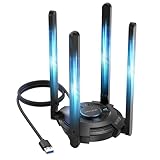
The Wavlink BE6500 is the only tri-band Wi-Fi 7 adapter in this group. Its listing describes 6GHz, 5GHz, and 2.4GHz support, a multicolor status LED, and four 5dBi high-gain antennas. That combination makes it the one to pick if your router is Wi-Fi 7 or Wi-Fi 6E, because the 6GHz band is the cleanest part of the spectrum and is less crowded than the neighbors’ 2.4GHz and 5GHz networks.
BE6500 is a speed class that adds up the theoretical rates of three bands. It is meant to future-proof the PC rather than to deliver a huge jump on an older router. Wi-Fi 7 also brings Multi-Link Operation and 320MHz channels in 6GHz, both of which need support on the router side as well. Confirm the USB interface and driver notes on the listing, since a modern adapter like this needs a fast port and a current Windows build.
A tri-band adapter can connect to only one band at a time unless the router and operating system support Multi-Link Operation for that client. That means the biggest everyday gain is access to 6GHz rather than a doubling of speed. If your router has a separate 6GHz network name, connect to it directly and leave the 5GHz network for other devices.
- Standard: 802.11be (Wi-Fi 7), tri band 6GHz, 5GHz, and 2.4GHz
- Speed class: BE6500
- Antennas: four 5dBi high-gain antennas per the listing
- Extras: multicolor status LED per the listing
- Interface and OS support: confirm on the listing
Pros:
- Only option here with 6GHz, giving a clear lane for gaming traffic
- Four antennas for strong reception on a desk setup
Cons:
- Needs a Wi-Fi 7 or 6E router to show its full value
- Larger footprint and likely driver requirements that are stricter than for AX1800 models
It is the most forward-looking of the six, and the AX1800 models are the safer pick if your router is not Wi-Fi 6E or Wi-Fi 7.
Specs Compared
| Adapter | Wi-Fi standard | Speed class | Bands | Antennas | USB interface |
|---|---|---|---|---|---|
| TP-Link AC600 | Wi-Fi 5 (802.11ac) | AC600 | 2.4GHz, 5GHz | 5dBi high gain | confirm on listing |
| TP-Link AX1800 (USB 3.0) | Wi-Fi 6 (802.11ax) | AX1800 | 2.4GHz, 5GHz | High gain | USB 3.0 |
| Nineplus AC1300 | Wi-Fi 5 (802.11ac) | AC1300 | 2.4GHz, 5GHz | Dual 5dBi | confirm on listing |
| TP-Link AX1800 (5dBi) | Wi-Fi 6 (802.11ax) | AX1800 | 2.4GHz, 5GHz | 5dBi high gain | confirm on listing |
| BrosTrend AX1800 | Wi-Fi 6 (802.11ax) | AX1800 | 2.4GHz, 5GHz | High gain | USB 3.0 |
| Wavlink BE6500 | Wi-Fi 7 (802.11be) | BE6500 | 2.4GHz, 5GHz, 6GHz | Four 5dBi high gain | confirm on listing |
How We Chose These
This guide is a research-based shortlist built from manufacturer product pages, listing titles, and the specification fields on each product page. We grouped the six adapters by Wi-Fi generation and band support, then ranked them on what matters for a gaming desktop: the Wi-Fi standard, whether the listing names a USB 3.0 interface, antenna design for range, and operating system coverage. We did not run performance measurements, so the speed classes are theoretical ratings from the listings and the standards themselves. Where a listing does not state a detail, the article says to confirm it on the product page rather than guessing. Product details can change, so always compare the current listing before you buy.
What to Look For
Match the Wi-Fi Generation to Your Router
The adapter and the router negotiate the best standard they share. A Wi-Fi 6 dongle on a Wi-Fi 5 router connects as Wi-Fi 5, and a Wi-Fi 7 dongle on a Wi-Fi 6 router connects as Wi-Fi 6. Before spending more, open your router’s admin page or check its label to see whether it is Wi-Fi 5 (AC), Wi-Fi 6 (AX), Wi-Fi 6E, or Wi-Fi 7 (BE). If your router is a Wi-Fi 6 model, an AX1800 adapter is usually the best value. If it is a Wi-Fi 7 model with a 6GHz band, the BE adapter is the only way to use that band from a USB device in this list.
The 6GHz band, available in the US across 1,200 MHz of spectrum, matters because far fewer neighbors and old devices use it. Fewer competing signals mean steadier latency, which is what gamers care about.
USB Port Version and Placement
A USB 2.0 port tops out at 480 Mbps, which is below what even a Wi-Fi 5 adapter can deliver on 5GHz. USB 3.0 (5 Gbps) removes that cap, so for any AC1300, AX1800, or BE adapter you should use a USB 3.0 or faster port. Plug it into a rear motherboard port rather than a front-panel one when possible, since front-panel cables are often longer and noisier.
USB 3.0 ports and cables are known to radiate interference in the 2.4GHz band. A short USB extension cable or cradle that lifts the adapter above the desk both reduces that noise and gives the antennas a better position than behind a metal case.
Antennas, Bands, and Range
High-gain antennas of 5dBi are common in this category. They focus the signal outward, which helps in a different room but also makes the pattern flatter vertically. Angle them for the router’s direction. Use 5GHz for gaming when the router is within a room or two, because it is faster and less crowded than 2.4GHz. Fall back to 2.4GHz only when walls or distance make 5GHz drop out.
Operating System and Driver Support
Check the Windows version in the listing. Some adapters need a manual driver install from the manufacturer, and Wi-Fi 7 hardware may need a recent Windows 11 build to work properly. If you run an older system, the Nineplus AC1300 lists Windows 7 support, while the other adapters here mostly point to Windows 11 and 10.
A Simple Rule of Thumb
Count the devices that use your Wi-Fi at peak time. If it is under ten, an AC1300 can be enough. If it is more than twenty, favor Wi-Fi 6 or newer, because OFDMA lets the router schedule many clients more efficiently. For example, a household of four with laptops, phones, a TV, and a gaming PC that also streams should lean toward an AX1800 adapter, while a single-person apartment with a Wi-Fi 7 router may justify the BE6500.
Questions
Is a USB WiFi adapter good enough for gaming?
For most online games, yes, provided your signal is strong and your router is not overloaded. A wired Ethernet connection is still more consistent, so use an adapter when a cable is impractical. Keeping the adapter close to the router and on 5GHz or 6GHz gives the best chance of low, steady latency.
Do I need a WiFi 7 adapter?
Only if you own a Wi-Fi 7 router, or plan to buy one soon. Without a matching router, a Wi-Fi 7 adapter behaves like a Wi-Fi 6 or Wi-Fi 5 one. If your router is Wi-Fi 6, an AX1800 adapter is a more sensible match.
Why does my adapter speed look slower than the box says?
The numbers on the packaging, such as AX1800 or AC1300, are the combined theoretical rates of both bands. A single connection runs on one band at a time, and real throughput is reduced by distance, walls, interference, and the router. Expect noticeably lower numbers than the label.
Should I use the 2.4GHz or 5GHz band for gaming?
Use 5GHz when you can, because it is faster and less crowded. Switch to 2.4GHz only for range through walls. If your router and adapter support 6GHz, that band is usually the cleanest choice.
Does the adapter work with a laptop too?
Most do, since they are standard USB devices, and several listings mention laptops. Confirm operating system compatibility on the listing first. Laptops usually have built-in Wi-Fi already, so an external adapter is mainly useful when the internal card is weak or broken.
How can I improve the signal from a USB adapter?
Use a short USB extension cable to move the adapter to the top of the desk, point the antennas upward, and avoid placing it next to other USB 3.0 devices. Moving the router a few feet or switching its channel can also help. If the signal is still weak, a mesh node nearer to the PC may be a better fix than a stronger adapter.
Update History
- October 20, 2026 – Initial publication; product set drawn from current catalog listings.
- Check the product page for current specifications and availability before buying.
Sources
- Manufacturer product and specification pages for TP-Link, BrosTrend, Nineplus, and Wavlink
- Retailer listing titles and specification fields for each adapter
- Wi-Fi Alliance generation naming for Wi-Fi 5, Wi-Fi 6, and Wi-Fi 7
- USB-IF interface speed definitions for USB 2.0 and USB 3.0