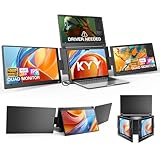
- Top Pick: KYY Triple Screen Laptop Monitor Extender 15.6" Quad Laptop Screen Extender
- Best Value: 15.6" Laptop Screen Extender, 1080P FHD Triple Portable Monitor for Laptops, Ultra-Slim Travel Dual Monitor Fit for 12"-17.3" Laptops, USB-C Plug&Play Extended Screen Compatible with Win/Mac/Android
- Premium Choice: Xebec Tri-Screen 3 for PCs | Portable Triple Monitor
A foldable 3 screen monitor is the ultimate portable multitasking tool, packing two extra displays that fan out from a central panel and fold flat for travel. Attached to a laptop, it turns a single cramped screen into a panoramic triple-monitor workstation you can deploy in a hotel room, a coffee shop, or your home office, then collapse into a slim package when you are done.
We compared the leading foldable triple and quad screen extenders, evaluating panel quality, weight, connection simplicity, and how steadily they stay put once unfolded. Here is our full review of the best foldable multi-screen options.
As an Amazon Associate we earn from qualifying purchases at no extra cost to you.




🎮 Get More From Your Setup — Free
Prime Gaming gives you free PC games every month, in-game loot, and a free Twitch channel sub — plus fast free shipping on all the gear above. New members get a 30-day free trial.
Watch: Foldable 3 Screen Monitor — Video Review
Design & Build
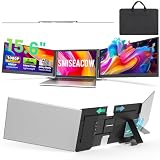
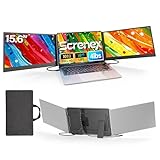
The engineering challenge with a foldable triple is delivering rigidity in a thin, light package, and the best models manage it well. The SMISEACOW triple is just 0.18 inches thick at 3.9 pounds, while the 15.6-inch triple keeps an ultra-slim profile. The Xebec Tri-Screen 3 is a well-known premium option with a polished folding mechanism, and the KYY quad-capable units push even further with a fourth panel for extreme multitaskers. The 235-degree rotation extender adds a detachable, angle-flexible panel. Aluminum frames feel sturdiest and stay wobble-free when fully deployed, which matters with panels extended on both sides.
Performance
These FHD IPS panels deliver sharp 1080p images with wide, stable viewing angles across all screens. The 15.6-inch triple and SMISEACOW offer clean plug-and-play output over USB-C or HDMI, while the KYY quad scales to a four-screen workstation from a single USB-C connection for serious power users. Driving three or four panels leans meaningfully on your laptop’s graphics, and several of these units require a DisplayLink driver install to run all screens. Once configured, the panoramic workspace is genuinely transformative for spreadsheets, coding, trading, and content work on the move.
Pros & Cons
- Panoramic triple or quad workspace from a single laptop.
- Folds flat for genuinely portable transport.
- Rotation and detachable options for flexible viewing.
- Wide laptop compatibility across most mainstream sizes.
- Heavier than dual setups once fully deployed.
- Often requires a driver and taxes your laptop’s graphics.
Alternatives to Consider
If you only need one extra screen, a dual extender is far lighter and simpler. If you work at a fixed desk, matched external monitors deliver more screen area per dollar. But for maximum portable workspace, a foldable triple like the SMISEACOW is the sweet spot, while the KYY quad is the pick for those who genuinely need four panels on the road.
Related Guides
- Best 4K Gaming Monitor G Sync (2026)
- Best Response Time For Gaming Monitor (2026)
- Tri Monitor Portable (2026)
- Best Dell Monitor Settings For Gaming (2026)
Frequently Asked Questions
How does a foldable triple monitor attach?
Most use a magnetic or clip bracket on the back of your laptop lid, with the extra panels folding out to each side and collapsing flat against the lid for travel.
Does it need special software?
Some plug-and-play models work instantly over USB-C, but many triple and quad units use DisplayLink drivers that require a one-time install to run all panels.
Will it slow my laptop down?
Driving three or four extra screens does use graphics resources and, with DisplayLink, some CPU. Lighter laptops may see increased fan activity during heavy multitasking.
Can I use fewer than all the panels?
Yes. These extenders let you deploy one, two, or all panels, so you can travel light with a single screen and expand when space allows.
Verdict
For most portable power users the SMISEACOW triple is our top pick, blending slimness, light weight, and a broad fit range. If you want a premium folding mechanism, the Xebec Tri-Screen 3 is worth a look, and the KYY quad is the choice for anyone who truly needs four screens on the move.