🛒 Best Price Today on Amazon
Prime members get fast, free shipping on everything above, plus member-only deals. New members get a 30-day free trial — cancel anytime.
- Top Picks at a Glance
- Best Gaming Laptops With Mechanical Keyboards Compared
- Alienware 16 Area-51 — Best Overall
- Alienware 18 Area-51 — Best Large-Screen Pick
- MSI Titan 18 HX A2WJ — Best for Maximum Performance
- Alienware x16 R2 — Best Thin Previous-Gen Option
- Best Gaming Laptop With Mechanical Keyboard by Tier
- Best Standard-Keyboard Alternatives to a Mechanical Gaming Laptop
- Gaming Laptops With Mechanical Keyboards: Spec Comparison
- How We Chose These Gaming Laptops
- How to Choose a Gaming Laptop With a Mechanical Keyboard
- Buying Guide: Specs and Thresholds That Matter
- Mechanical Laptop Keyboard vs External Mechanical Keyboard
- Which Gaming Laptop With a Mechanical Keyboard Should You Buy?
- Alienware Area-51 vs MSI Titan 18 HX AI: Which Mechanical Gaming Laptop Fits You?
- FAQ
- Conclusion
A mechanical keyboard can change how a gaming laptop feels in every match, especially if you value crisp actuation, stronger feedback, and precise repeated inputs. The best gaming laptop with mechanical keyboard should also balance GPU power, display speed, cooling, size, and the exact switch option included in the configuration.
Updated October 2026 — The best gaming laptop with mechanical keyboard is the Alienware 16 Area-51 with the optional Cherry MX ultra-low-profile keyboard. The Alienware 18 Area-51 suits a fixed desk, and the MSI Titan 18 HX AI is the no-limits flagship.
Top Picks at a Glance
- Best overall: Alienware 16 Area-51 · 16-inch WQXGA 240Hz option · Cherry MX ultra-low-profile keyboard option · RTX 50-series
- Best for a desk setup: Alienware 18 Area-51 · 18-inch WQXGA 300Hz option · Cherry MX ultra-low-profile keyboard option
- Best flagship: MSI Titan 18 HX AI · 18-inch UHD+ Mini LED 240Hz · Cherry MX ultra-low-profile keyboard · RTX 5090
- Best thin alternative with a standard keyboard: Razer Blade 16 (2026) · 16-inch QHD+ 240Hz OLED · RTX 5070 Ti
- Best value alternative with a standard keyboard: Acer Predator Helios Neo 16 AI · 16-inch WQXGA 240Hz · RTX 5070 Ti
Only two brands currently sell laptops with real mechanical switches: Alienware and MSI. Everything else in this guide is clearly labeled as a standard-keyboard alternative, so you always know what you are buying.
Best Gaming Laptops With Mechanical Keyboards Compared
| Model | Mechanical Keyboard | Display | Best For | Main Trade-Off |
|---|---|---|---|---|
| Alienware 16 Area-51 | Optional CherryMX ultra-low-profile | 16-inch WQXGA, high-refresh options | Best overall balance | Mechanical keyboard is configuration-dependent |
| Alienware 18 Area-51 | Optional CherryMX ultra-low-profile | 18-inch WQXGA 300Hz option | Large-screen gaming | Large chassis |
| MSI Titan 18 HX A2WJ | Cherry mechanical per-key RGB | 18-inch UHD+ Mini LED 240Hz | Maximum performance | Size and power requirements |
| Alienware x16 R2 | Cherry mechanical configuration available | 16-inch QHD+ 240Hz / FHD+ 480Hz options | Thin previous-generation option | Discontinued in the U.S. |
Alienware 16 Area-51 — Best Overall
Best For: Gamers who want mechanical keys without moving to an 18-inch desktop replacement.

ASUS ROG Strix SCAR 18 (2025) Gaming Laptop, 18” ROG Nebula HDR 16:10 2.5K 240Hz/3ms, NVIDIA GeForce RTX 5090, Intel Core Ultra 9 275HX, 32GB DDR5, 2TB PCIe Gen 4 SSD, Wi-Fi 7, Win 11 Pro, G835LX-XS97
Included for 'Best Gaming Laptop With Mechanical Keyboard: Top 15 Picks' as a representative consumer electronics in this roundup; selection reflects the product set returned for this topic.
View on AmazonASUS ROG Strix SCAR 18 (2025) Gaming Laptop, 18” ROG Nebula HDR 16:10 2.5K 240Hz/3ms, NVIDIA GeForce RTX 5090, Intel Core Ultra 9 275HX, 32GB DDR5, 2TB PCIe Gen 4 SSD, Wi-Fi 7, Win 11 Pro, G835LX-XS97
Included for 'Best Gaming Laptop With Mechanical Keyboard: Top 15 Picks' as a representative consumer electronics in this roundup; selection reflects the product set returned for this topic.
View on AmazonASUS ROG Strix SCAR 18 (2025) Gaming Laptop, 18” ROG Nebula HDR 16:10 2.5K 240Hz/3ms, NVIDIA® GeForce RTX™ 5080, Intel® Core™ Ultra 9 275HX, 32GB DDR5-5600, 2TB PCIe Gen 4 SSD, Wi-Fi 7, Windows 11 Pro
Included for 'Best Gaming Laptop With Mechanical Keyboard: Top 15 Picks' as a representative consumer electronics in this roundup; selection reflects the product set returned for this topic.
View on AmazonKey Features
- Optional CherryMX ultra-low-profile mechanical keyboard
- Per-key AlienFX RGB lighting
- 16-inch WQXGA display options
- Up to 240Hz anti-glare OLED display configuration
- NVIDIA GeForce RTX 50-series laptop GPU options
- 96Wh battery on listed configurations
What Makes It Different
The Alienware 16 Area-51 stands out because it pairs a modern 16-inch chassis with an optional CherryMX ultra-low-profile mechanical keyboard rather than forcing buyers into a bulky 18-inch desktop replacement. That gives competitive players tactile key response while preserving a more manageable footprint for travel, classes, or hybrid desk use.
Pros
- True CherryMX mechanical keyboard option
- Easier to transport than an 18-inch system
- High-refresh WQXGA display choices
- Current RTX 50-series graphics platform
- Per-key RGB customization
Cons
- Mechanical keyboard is not standard on every configuration
- High-performance configurations remain substantial gaming laptops
- Buyers must inspect marketplace listings carefully
Use Case
Its 16-inch form factor works well for players who want one system for esports, AAA gaming, and everyday productivity. Dell offers high-refresh display options and RTX 50-series laptop graphics, while the mechanical keyboard is selectable. Confirm the listing says CherryMX before buying, because standard RGB keyboards also exist.
Who It’s For
Choose this model if keyboard feel matters almost as much as frame rate, but you do not want an 18-inch machine taking over your desk or backpack. It is especially appealing to gamers who type for work, code, or school between sessions and want a laptop keyboard that feels closer to a compact desktop mechanical board than a typical membrane deck.
Alienware 18 Area-51 — Best Large-Screen Pick
Best For: Players building a desktop-replacement gaming setup with integrated mechanical keys.
Key Features
- Optional CherryMX ultra-low-profile mechanical keyboard
- Per-key AlienFX RGB lighting
- 18-inch WQXGA display
- 300Hz refresh-rate configuration
- NVIDIA GeForce RTX 50-series laptop graphics
- 19.05 mm keyboard pitch
What Makes It Different
The Alienware 18 Area-51 is built around a larger gaming canvas and gives its CherryMX ultra-low-profile option more room to breathe. The spacious chassis also suits users who keep the laptop docked most of the time, want a wide keyboard layout, and prefer an 18-inch high-refresh display over the portability advantages of a smaller gaming notebook.
Pros
- Spacious 18-inch gaming display
- CherryMX mechanical option
- 300Hz panel configuration
- Large keyboard layout
- High-end GPU configurations available
Cons
- Much less portable than a 16-inch notebook
- Requires significant desk and bag space
- CherryMX keyboard must still be selected or verified
Use Case
This is the better fit for a bedroom desk, dorm setup, LAN station, or semi-permanent office where screen size and input comfort matter more than weight. The current 18 Area-51 can be configured with a 300Hz WQXGA panel and high-end RTX 50-series graphics, making it a natural choice for fast shooters as well as demanding single-player games.
Who It’s For
Buy the 18 Area-51 if you want a desktop-replacement experience without adding an external mechanical keyboard immediately. Its size is the trade-off: it is easier to enjoy on a desk than on a plane tray or small café table. For players who rarely move their system, however, the larger display and full-size-feeling layout are practical advantages.
MSI Titan 18 HX A2WJ — Best for Maximum Performance
Best For: Enthusiasts who want flagship hardware and a mechanical keyboard in one desktop-replacement laptop.
Key Features
- Cherry mechanical per-key RGB gaming keyboard by SteelSeries
- 18-inch UHD+ 3840 × 2400 Mini LED display
- 240Hz refresh rate
- NVIDIA GeForce RTX 5090 Laptop GPU configuration
- Up to 270W combined CPU-GPU power
- Multiple M.2 storage slots
- 99.9Wh battery
What Makes It Different
The MSI Titan 18 HX A2WJ is the most uncompromising option here. MSI pairs an 18-inch UHD+ Mini LED 240Hz display with a Cherry mechanical per-key RGB keyboard, plus an RTX 5090 Laptop GPU in this configuration. It targets buyers who want maximum desktop-replacement capability and accept premium size, weight, and power demands.
Pros
- Mechanical keyboard is central to the design
- 4K-class Mini LED display
- 240Hz refresh rate
- RTX 5090 Laptop GPU configuration
- Extensive storage expansion
- Strong desktop-replacement feature set
Cons
- Large 18-inch chassis
- High power requirements
- Excessive for users focused mainly on lightweight esports titles
- Not designed around frequent commuting
Use Case
The Titan makes the most sense for creators and enthusiasts who game at high settings, edit large projects, or run heavy workloads on the same machine. Its Cherry mechanical keyboard adds firmer feedback than a standard scissor-switch board, while the large display and cooling-focused chassis are designed for long sessions at a fixed desk.
Who It’s For
Choose the Titan if you are deliberately shopping at the top end and want the keyboard to match the rest of the hardware ambition. It is less sensible for commuters, frequent flyers, or anyone prioritizing battery life. Its value comes from pairing a mechanical typing feel with an 18-inch premium display and a very high-end graphics configuration.
Alienware x16 R2 — Best Thin Previous-Gen Option
Best For: Shoppers looking for a thinner 16-inch mechanical-keyboard gaming laptop through remaining, refurbished, or marketplace stock.
Key Features
- Cherry mechanical backlit keyboard configuration
- Per-key AlienFX RGB
- 16-inch QHD+ 2560 × 1600 240Hz display option
- 16-inch FHD+ 480Hz display option
- RTX 40-series configurations
- Advanced Optimus and G-SYNC support on listed displays
What Makes It Different
The Alienware x16 R2 remains notable because few thin 16-inch gaming laptops were offered with a true Cherry mechanical keyboard. Its QHD+ 240Hz display option, premium chassis, and RTX 40-series configurations balanced portability with tactile input. Dell now lists it as discontinued in the United States, so availability is the main limitation.
Pros
- Cherry mechanical keyboard configuration
- Thinner format than 18-inch desktop replacements
- QHD+ 240Hz option
- FHD+ 480Hz option
- Still relevant for buyers finding discounted stock
Cons
- Discontinued by Dell in the U.S.
- Seller and configuration quality can vary
- Previous-generation graphics platform
- Mechanical keyboard cannot be assumed from the model name alone
Use Case
The x16 R2 is best considered when you find a clearly identified new-old-stock, refurbished, or reputable marketplace listing. It suits buyers who want a slimmer mechanical-keyboard laptop and do not need the newest GPU generation. Verify the exact keyboard wording, condition, return policy, and seller because configurations can differ.
Who It’s For
This model is for shoppers who care about a thinner chassis more than owning the newest platform. It can still be compelling for 1440p-class gaming and travel, but only at the right price and from a trustworthy seller. If a current Alienware 16 Area-51 is close in total cost, the newer platform is usually the more straightforward purchase.
Best Gaming Laptop With Mechanical Keyboard by Tier
Real mechanical switches in a laptop are rare, so the honest shortlist is short. These are the three families that use Cherry MX ultra-low-profile switches. Each line gives the key specs in one row, and the cards show a current configuration to compare.
Tier 1: Mechanical keyboard, 16-inch (typically $2,500 to $3,500)
Alienware 16 Area-51 — 16-inch 2560 × 1600 240Hz · Intel Core Ultra 9 275HX · RTX 50-series (RTX 5070 Ti in this configuration) · 32GB DDR5 · Cherry MX ultra-low-profile keyboard as an option.

Alienware 16 Area-51 Gaming Laptop, RTX5070 Ti, Intel Core Ultra 9 275HX | 2560x1600 Display, 240Hz, 32GB DDR5 RAM, 1TB SSD, NVIDIA GeForce, Windows 11 Home, Esports Ready, AA16250
Included for 'Best Gaming Laptop With Mechanical Keyboard: Top 15 Picks' as a representative consumer electronics in this roundup; selection reflects the product set returned for this topic.
View on AmazonTier 2: Mechanical keyboard, 18-inch desktop replacement (typically $3,000 to $5,000)
Alienware 18 Area-51 — 18-inch WQXGA 300Hz · Intel Core Ultra 9 275HX · RTX 50-series (RTX 5070 in this configuration) · 32GB DDR5 · Cherry MX ultra-low-profile keyboard as an option.

Alienware 18 Area-51 Gaming Laptop, RTX5070,Intel Core Ultra 9-275HX | WQXGA 300Hz Display, 32GB DDR5 RAM, 1TB SSD, NVIDIA GeForce, Windows 11 Home, Liquid Teal, AA18250
Included for 'Best Gaming Laptop With Mechanical Keyboard: Top 15 Picks' as a representative consumer electronics in this roundup; selection reflects the product set returned for this topic.
View on AmazonTier 3: Mechanical keyboard, no-compromise flagship (above $5,000)
MSI Titan 18 HX AI — 18-inch UHD+ 240Hz Mini LED · Intel Core Ultra 9 290HX · RTX 5090 · 64GB DDR5 · Thunderbolt 5 · Cherry MX ultra-low-profile keyboard.

msi Titan 18 HX AI 18" 240Hz MiniLED UHD+ Gaming Laptop: Intel Ultra 9-290HX, NVIDIA Geforce RTX 5090, 64GB DDR5, 4TB NVMe SSD, Thunderbolt 5, Wi-Fi 7, Win 11 Pro: Black A2WJ-1258US
Included for 'Best Gaming Laptop With Mechanical Keyboard: Top 15 Picks' as a representative consumer electronics in this roundup; selection reflects the product set returned for this topic.
View on AmazonWhat to expect at the mechanical tier
- Short, clicky travel. The Cherry MX ultra-low-profile switch is about 3.5 mm tall, so travel is much shorter than a desktop switch.
- More sound than a normal laptop keyboard. Plan on headphones and a quiet-room compromise.
- Big, heavy chassis. The Alienware 16 Area-51 weighs about 7.5 pounds, and the 18-inch models weigh more.
- Short battery life under load. Treat these as plug-in machines.
- Configuration risk. The mechanical keyboard is an option on Alienware, so read the keyboard line on the listing before you buy.
Best Standard-Keyboard Alternatives to a Mechanical Gaming Laptop
If you want a strong gaming laptop but do not want to pay for the mechanical tier, these five do not use mechanical switches. They use standard laptop keyboards, so the comparison is about everything around the keys. Keyboard travel and feel vary by model, so check the maker spec page if typing comfort is your top priority.
Razer Blade 16 (2026) — Best for a Thin Premium Build

Razer Blade 16 (2026) Thin Gaming Laptop, RTX 5070 Ti, 32GB DDR5, 1TB | Intel Ultra 9 386H, 16" QHD+ 240Hz 0.2ms OLED Display, 32GB DDR5, 1TB SSD, Wi-Fi 7, TB5, Windows 11, PC for Gaming & Creating
Included for 'Best Gaming Laptop With Mechanical Keyboard: Top 15 Picks' as a representative consumer electronics in this roundup; selection reflects the product set returned for this topic.
View on Amazon- Display: 16-inch QHD+ 240Hz OLED, 16:10
- CPU and GPU: Intel Core Ultra 9 386H, RTX 5070 Ti
- Memory and storage: 32GB DDR5, 1TB SSD
- Connectivity: Wi-Fi 7, Thunderbolt 5
The Razer Blade 16 is the pick for players who want a slim, polished laptop that still runs a modern RTX card. The OLED panel responds fast, which pairs well with competitive shooters.
Pros: slim premium chassis; fast OLED panel; Thunderbolt 5 and Wi-Fi 7; strong RTX 5070 Ti tier.
Cons: standard keyboard, not mechanical; premium pricing for the GPU tier.
Skip it if real mechanical switches are the main reason you are shopping.
Acer Predator Helios Neo 16 AI — Best Value Alternative

acer Predator Helios Neo 16 AI Gaming Laptop | Intel Core Ultra 9 Processor 275HX | NVIDIA GeForce RTX 5070 Ti | 16" WQXGA 240Hz G-SYNC | 16GB DDR5 | 1TB Gen 4 SSD | Killer Wi-Fi 6E | PHN16-73-92B8
Included for 'Best Gaming Laptop With Mechanical Keyboard: Top 15 Picks' as a representative consumer electronics in this roundup; selection reflects the product set returned for this topic.
View on Amazon- Display: 16-inch WQXGA 240Hz with G-SYNC
- CPU and GPU: Intel Core Ultra 9 275HX, RTX 5070 Ti
- Memory and storage: 16GB DDR5 (as listed), 1TB Gen 4 SSD
- Connectivity: Killer Wi-Fi 6E
- Model number on the listing: PHN16-73
The Helios Neo 16 AI puts an RTX 5070 Ti and a 24-core HX processor in a 16-inch frame at a lower price tier than the premium brands. It is the sensible choice if frame rate matters more than the keyboard.
Pros: strong GPU for the money; G-SYNC panel; HX-class processor with plenty of cores.
Cons: 16GB RAM in the listed configuration is the minimum for modern games; standard keyboard; Wi-Fi 6E rather than Wi-Fi 7.
Skip it if you want an OLED screen or a premium aluminum feel.
Lenovo Legion Pro 7i Gen 10 — Best for Raw Performance in a 16-Inch Body
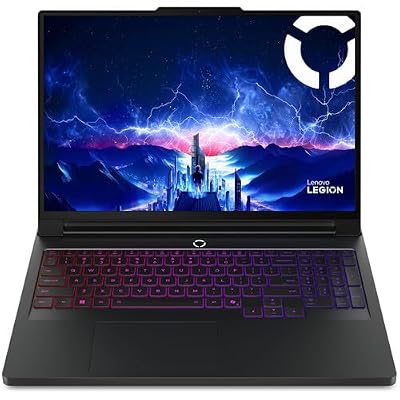
Lenovo Legion Pro 7i Gen 10 w/ Ultra 9, NVIDIA GeForce RTX 5080, 16” OLED | Gaming Laptop with Intel Core Ultra 9 275HX 24C, 16GB, 32GB RAM, 1TB Gen 5 NVMe SSD, WQXGA 500 nits 240Hz, Windows 11 Pro
Included for 'Best Gaming Laptop With Mechanical Keyboard: Top 15 Picks' as a representative consumer electronics in this roundup; selection reflects the product set returned for this topic.
View on Amazon- Display: 16-inch WQXGA OLED, 500 nits, 240Hz
- CPU and GPU: Intel Core Ultra 9 275HX, RTX 5080
- Memory and storage: 32GB RAM, 1TB Gen 5 NVMe SSD
- Operating system: Windows 11 Pro
The Legion Pro 7i Gen 10 targets players who want RTX 5080 power in a 16-inch machine. It sits at the same tier as an Alienware 16 Area-51 with an RTX 5080, and the difference is a standard keyboard.
Pros: RTX 5080 tier; bright OLED panel; Gen 5 storage; Windows 11 Pro.
Cons: standard keyboard; high power and heat under load; priced like a flagship.
Skip it if you want a mechanical keyboard or a smaller, lighter body.
ASUS ROG Strix G16 (2026) — Best for High-Refresh 16-Inch Play

ASUS ROG Strix G16 (2026) Gaming Laptop, 16” ROG Nebula HDR 2.5K 240Hz/3ms, Intel Core Ultra 9 290HX Plus, NVIDIA GeForce RTX 5080, 32GB DDR5, 1TB PCIe Gen4 SSD, Wi-Fi 7, Win11 Home, G615LW-AB96
Included for 'Best Gaming Laptop With Mechanical Keyboard: Top 15 Picks' as a representative consumer electronics in this roundup; selection reflects the product set returned for this topic.
View on Amazon- Display: 16-inch ROG Nebula HDR 2.5K 240Hz
- CPU and GPU: Intel Core Ultra 9 290HX Plus, RTX 5080
- Memory and storage: 32GB DDR5, 1TB PCIe Gen 4 SSD
- Connectivity: Wi-Fi 7
- Model number on the listing: G615LW
The ROG Strix G16 is a fast 2.5K panel wrapped around an RTX 5080. It fits players who want high frame rates and an HDR panel without paying the Titan premium.
Pros: RTX 5080 tier; 240Hz 2.5K HDR panel; Wi-Fi 7; current Core Ultra HX Plus processor.
Cons: standard keyboard; 16-inch gaming laptops of this class run warm and loud under load.
Skip it if you want a mechanical keyboard or a quiet machine for a shared room.
MSI Stealth 16 AI+ — Best for a Lighter Travel Build
- Display: 16-inch QHD+ 240Hz OLED
- CPU and GPU: Intel Core Ultra 9 386H, RTX 5070 Ti
- Memory and storage: 32GB DDR5, 1TB NVMe SSD
- Connectivity: Wi-Fi 7
- Model number on the listing: B3WH-036US
The MSI Stealth 16 AI+ is the travel-friendly MSI. It uses a standard keyboard, unlike the Titan, and trades the Titan’s raw power for a slimmer build.
Pros: OLED panel; RTX 5070 Ti; Wi-Fi 7; lighter than the 18-inch machines.
Cons: standard keyboard; less cooling headroom than a thick chassis.
Skip it if you want the Titan’s Cherry keyboard; that comes only on the Titan line.
Also Consider
MSI Crosshair 18 HX AI — 18-inch 2560 × 1600 240Hz · Core Ultra 9 275HX · RTX 5070 · standard keyboard. A large-screen option at a lower tier than the Alienware 18 Area-51.

msi Crosshair 18 HX AI 18" 2560x1600 240Hz Display Gaming Laptop, Intel Core Ultra 9 275HX (24 Cores, 2.1-5.4 GHz), NVIDIA RTX 5070 8GB GDDR7, 32GB RAM, 1TB NVMe SSD, Windows 11 Home
Included for 'Best Gaming Laptop With Mechanical Keyboard: Top 15 Picks' as a representative consumer electronics in this roundup; selection reflects the product set returned for this topic.
View on AmazonRazer Blade 14 (2025) — 14-inch 3K 120Hz OLED · Ryzen AI 9 365 · RTX 5060 · 16GB DDR5. Compact and light; standard keyboard.

Razer Blade 14 (2025) Gaming Laptop, RTX 5060, 16GB DDR5 RAM, 1TB, Black | AMD Ryzen AI 9 365, 3K 120Hz OLED Display, Thin & Lightweight, Chroma RGB, Windows
Included for 'Best Gaming Laptop With Mechanical Keyboard: Top 15 Picks' as a representative consumer electronics in this roundup; selection reflects the product set returned for this topic.
View on AmazonLenovo Legion Pro 5i — 16-inch 2.5K WQXGA OLED · Core Ultra 9 275HX · RTX 5070 · 32GB RAM · Wi-Fi 7. A step down from the Legion Pro 7i.
ASUS ROG Strix G16 (2025) — 16-inch FHD+ 165Hz · Core i7-14650HX · RTX 5060 · 16GB DDR5. The entry point for a 16-inch ROG.

ASUS ROG Strix G16 (2025) Gaming Laptop, 16” FHD+ 16:10 165Hz/3ms, NVIDIA® GeForce RTX™ 5060, Intel® Core™ i7 Processor 14650HX, 16GB DDR5, 1TB Gen 4 SSD, Wi-Fi 7, Windows 11 Home, G615JMR-AS74
Included for 'Best Gaming Laptop With Mechanical Keyboard: Top 15 Picks' as a representative consumer electronics in this roundup; selection reflects the product set returned for this topic.
View on AmazonGaming Laptops With Mechanical Keyboards: Spec Comparison
| Laptop | Keyboard | Display | GPU (as listed) | Price tier |
|---|---|---|---|---|
| Alienware 16 Area-51 | Cherry MX ultra-low-profile (option) | 16-inch 2560 × 1600 240Hz | RTX 5070 Ti | Upper-mid |
| Alienware 18 Area-51 | Cherry MX ultra-low-profile (option) | 18-inch WQXGA 300Hz | RTX 5070 | Premium |
| MSI Titan 18 HX AI | Cherry MX ultra-low-profile | 18-inch UHD+ 240Hz Mini LED | RTX 5090 | Flagship |
| Razer Blade 16 (2026) | Standard | 16-inch QHD+ 240Hz OLED | RTX 5070 Ti | Premium |
| Acer Predator Helios Neo 16 AI | Standard | 16-inch WQXGA 240Hz | RTX 5070 Ti | Mid |
| Lenovo Legion Pro 7i Gen 10 | Standard | 16-inch WQXGA OLED 240Hz | RTX 5080 | Premium |
| ASUS ROG Strix G16 (2026) | Standard | 16-inch 2.5K 240Hz | RTX 5080 | Premium |
| MSI Stealth 16 AI+ | Standard | 16-inch QHD+ 240Hz OLED | RTX 5070 Ti | Upper-mid |
How We Chose These Gaming Laptops
This guide is based on desk research of maker specs and published reviews. We looked for laptops that actually ship with mechanical switches first, then added standard-keyboard laptops that compete on the same hardware tier. Sources were maker spec sheets, current product listings and independent reviews from established outlets.
- Keyboard type: true mechanical switches ranked first, and every other keyboard is labeled as standard.
- Current generation: RTX 50-series graphics and recent Intel Core Ultra processors only.
- Display speed: 240Hz or faster where offered, since a fast panel matters as much as the keys.
- Configuration clarity: we favor models where the exact configuration is easy to verify.
- Tier coverage: at least one pick per budget band, from mid-range to flagship.
How to Choose a Gaming Laptop With a Mechanical Keyboard
Confirm the Keyboard Configuration First
On Alienware models, the mechanical keyboard is often an option rather than a universal feature. That matters because two listings with the same laptop name can use different keyboards. Before checkout, look for wording such as CherryMX or Cherry mechanical keyboard in the configuration details instead of assuming every RGB keyboard is mechanical.
Do Not Confuse Keyboard Feel With Gaming Performance
Mechanical laptop switches improve tactile definition, but they do not automatically make a machine faster in games. GPU power, cooling, display refresh rate, and system latency still determine performance. Treat the keyboard as an input-quality upgrade for consistency and feel, not a substitute for choosing the right graphics configuration.
Consider the Games You Actually Play
A mechanical keyboard is more valuable when you play shooters, rhythm games, MOBAs, or titles that demand repeated key presses. It also benefits heavy typists who use the same laptop for work. The trade-off is that mechanical laptop keyboards can sound sharper and may feel more pronounced in shared rooms, classrooms, or late-night spaces.
Decide Between 16-Inch and 18-Inch Designs
Screen size should match where the laptop will live. A 16-inch system is easier to move and fits more bags, while an 18-inch model gives you a larger visual field and more desk-like ergonomics. If the machine rarely leaves home, the bigger panel can be worth it. If you travel weekly, portability may matter more than the extra screen area.
Balance the Keyboard Against the Rest of the Hardware
Do not choose by keyboard alone. Check whether the GPU tier matches your target resolution and game library, then consider RAM, SSD capacity, ports, display quality, and cooling. A mechanical board is most satisfying when the rest of the laptop suits your workload; otherwise, you may pay for premium switches while compromising on mobility.
Buying Guide: Specs and Thresholds That Matter
GPU Tier by Resolution
For 1440p-class panels such as WQXGA, an RTX 5070 or better is a comfortable starting point. An RTX 5070 Ti or RTX 5080 gives headroom for high settings, and the RTX 5090 in the Titan 18 HX AI is for 4K-class panels and heavy creative work. At 1080p or 1200p, an RTX 5060 is enough for most esports titles.
Memory and Storage
Aim for 32GB of RAM and a 1TB SSD. 16GB still runs games, but modern titles plus a browser and chat apps leave little spare. If a listing shows 16GB, check whether the slots can take a second module before you assume it is a dead end.
Refresh Rate and Panel Type
A 240Hz panel is the sweet spot for competitive play. The Alienware 18 Area-51 offers 300Hz on some configurations, which only matters if your GPU can feed it in the games you play. OLED panels respond faster and look richer, while Mini LED, as on the Titan, gives high peak brightness for HDR.
Weight, Battery and Power
Mechanical-keyboard laptops are heavy because they pack top-tier cooling. The Alienware 16 Area-51 is around 7.5 pounds before the charger. If you carry the laptop daily, a standard-keyboard 16-inch such as the Razer Blade 16 or MSI Stealth 16 AI+ is a more realistic choice, and you can pair it with an external mechanical keyboard.
Ports and Connectivity
Look for Thunderbolt 5 or at least Thunderbolt 4 if you plan to dock the laptop to a monitor and keyboard. Wi-Fi 7 is now common on current models, and it helps on a modern router, but a wired Ethernet connection is still the safest choice for competitive play.
How to Verify the Mechanical Keyboard Before You Buy
Search the listing text for the words Cherry or mechanical. If the title and bullets only say per-key RGB, you are probably looking at a standard keyboard. On Alienware models, the mechanical option is a configuration choice, so confirm the keyboard line on the product page or with the seller.
Mechanical Laptop Keyboard vs External Mechanical Keyboard
| Factor | Built-In Mechanical Keyboard | External Mechanical Keyboard |
|---|---|---|
| Portability | Excellent | Requires another device |
| Desk space | Minimal | Requires additional space |
| Switch choice | Limited | Extensive |
| Keycap customization | Limited | Extensive |
| Replacement | Difficult | Easy |
| Travel gaming | Convenient | Less convenient |
| Desktop setup | Clean and simple | More flexible |
Which Gaming Laptop With a Mechanical Keyboard Should You Buy?
Match the laptop to how you actually play and where it will live.
- You want the best balance of mechanical keys and portability: Alienware 16 Area-51 with the Cherry MX option.
- The laptop stays on a desk: Alienware 18 Area-51 for the larger panel and spacious key layout.
- You want the strongest hardware available and size is no object: MSI Titan 18 HX AI.
- You travel often: Razer Blade 16 (2026) or MSI Stealth 16 AI+, plus a compact external mechanical keyboard.
- You want the lowest cost for high frame rates: Acer Predator Helios Neo 16 AI.
- You want the fastest 16-inch GPU tier without a mechanical keyboard: Lenovo Legion Pro 7i Gen 10 or ASUS ROG Strix G16 (2026).
If you are torn between a mechanical laptop and a standard laptop plus an external keyboard, remember that the second route costs less and gives you more switch choices. The built-in mechanical keyboard wins when you want one clean device for desk and travel.
Alienware Area-51 vs MSI Titan 18 HX AI: Which Mechanical Gaming Laptop Fits You?
These are the two families that offer Cherry MX ultra-low-profile switches, so the real choice is between them. Here is how they differ on the points that matter.
Size and Weight
The Alienware 16 Area-51 is the only 16-inch model with a mechanical keyboard option, and it weighs around 7.5 pounds. The Alienware 18 Area-51 and the MSI Titan 18 HX AI are both 18-inch machines, so they take more desk and bag space. If portability matters at all, the 16-inch Alienware wins by a wide margin.
Display
The Alienware line offers WQXGA panels with 240Hz on the 16-inch and up to 300Hz on the 18-inch. The Titan 18 HX AI uses an 18-inch UHD+ Mini LED panel at 240Hz, which favors sharpness and HDR brightness over raw refresh rate. Competitive shooter players tend to prefer the 300Hz option, while creators and single-player gamers tend to prefer the Titan panel.
Graphics and Power
The Titan 18 HX AI is the highest tier here, with an RTX 5090 laptop GPU and an Intel Core Ultra 9 290HX in the configuration we list. The Alienware models are offered across RTX 50-series tiers, so you can pick RTX 5070 Ti or RTX 5080 and spend less. Choose the Titan only if you will actually use the extra headroom.
Keyboard Coverage
MSI states that the Titan uses its Cherry MX ultra-low-profile switch on the typewriter keys, so some larger keys may not be mechanical. Alienware sells the mechanical keyboard as an option, so the same laptop name can ship with a standard keyboard. In both cases, read the keyboard line on the product page before ordering.
Quick Verdict
- Pick the Alienware 16 Area-51 for the best balance of size, price tier and mechanical feel.
- Pick the Alienware 18 Area-51 for a big, fast panel on a permanent desk.
- Pick the MSI Titan 18 HX AI when the budget is flexible and you want the maximum GPU tier and a Mini LED display.
FAQ
Are There Gaming Laptops With Real Mechanical Keyboards?
Yes, but the selection is small compared with standard gaming laptops. Alienware offers CherryMX options on selected configurations, while MSI uses Cherry MX Ultra Low Profile switches on Titan models. Because keyboard options can vary by region and configuration, always verify the exact product page or marketplace listing before ordering.
Is a Mechanical Keyboard Better for Gaming on a Laptop?
Not necessarily. A mechanical keyboard can provide crisper feedback and a more defined actuation feel, which some players prefer for rapid inputs. Competitive performance still depends more on the laptop’s frame rate, display refresh rate, response time, and system latency. The keyboard mainly changes input feel and consistency rather than raw FPS.
What Are Cherry MX Ultra Low Profile Switches?
Cherry MX Ultra Low Profile switches are compact mechanical switches designed for thin devices such as laptops. They preserve a mechanical contact mechanism while fitting into a shallower chassis than conventional desktop switches. The result is a more tactile, click-like key feel without requiring the height of a full-size mechanical keyboard.
Are Mechanical Gaming Laptop Keyboards Loud?
They can be louder than ordinary scissor-switch laptop keyboards, although sound depends on the chassis, keycap design, and how firmly you type. If you share a room, attend meetings, or game late at night, consider whether the sharper key sound could distract others. Headphones solve game audio, but they do not reduce keyboard noise nearby.
Is a Built-In Mechanical Keyboard Worth It?
It depends on your priorities. A built-in mechanical keyboard is convenient for travel, small desks, and all-in-one setups, while an external board offers more switch choices, layouts, keycaps, and easier replacement. If you mostly game at one desk, an external keyboard is more flexible. Frequent travelers benefit more from the integrated option.
What Is the Best Gaming Laptop With a Mechanical Keyboard?
The Alienware 16 Area-51 with the Cherry MX ultra-low-profile option is the best overall. It balances a 16-inch size, current RTX 50-series graphics and a true mechanical keyboard better than the 18-inch Alienware or the MSI Titan 18 HX AI, which cost more and weigh more.
Which Gaming Laptops Have Real Mechanical Keyboards?
Alienware models such as the Area-51 line and MSI Titan models use Cherry MX ultra-low-profile switches. Most other gaming laptops use standard keyboards, even when they advertise per-key RGB or a mechanical feel, so verify the wording on the listing.
Is a Mechanical Gaming Laptop Keyboard Worth the Extra Cost?
It is worth it if you value tactile feedback and want one device for travel and desk use. If you mostly game at a desk, a cheaper laptop plus an external mechanical keyboard gives more switch and keycap choices for the same money.
Do Mechanical Laptop Keyboards Make You Better at Games?
No, not directly. A mechanical keyboard changes feel and consistency, but frame rate, display refresh rate and latency decide competitive performance. Choose the GPU and panel first, then the keyboard.
How Heavy Are Gaming Laptops With Mechanical Keyboards?
They are heavy. The Alienware 16 Area-51 weighs about 7.5 pounds, and the 18-inch Area-51 and MSI Titan models weigh more. Plan for a desk-first machine with an occasional trip, not a daily commuter.
Conclusion
The best gaming laptop with mechanical keyboard depends mainly on size, portability, and how much performance you need. Alienware’s 16 Area-51 offers the strongest balance, the 18 Area-51 favors a larger desk setup, MSI’s Titan targets maximum power, and the x16 R2 suits bargain hunters who still want a thinner Cherry-equipped machine.