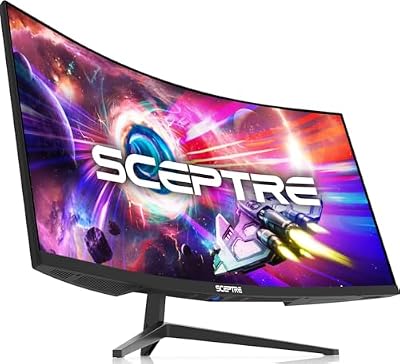
- Top Pick: SANSUI 32 Inch Curved 240Hz Gaming Monitor High Refresh Rate, FHD 1080P
- Best Value: Samsung 27" Essential S3 (S36GD) Series FHD 1800R Curved Computer Monitor
- Premium Choice: SANSUI 27 Inch Curved 240Hz Gaming Monitor FHD 1080P, 1500R Curve Computer Monitor, 130% sRGB, 4000:1 Contrast, HDR, FreeSync, MPRT 1Ms, Low Blue Light, HDMI DP Ports, Metal Stand, Cable Incl.
Walk into any gaming setup discussion in 2026 and the curved-versus-flat debate still comes up within the first five minutes. It’s no longer a question of which panel technology is better on paper — both form factors now ship with 240Hz refresh rates, 1ms response figures, FreeSync support and wide color coverage at prices that would have looked absurd three years ago. What’s actually changed is that the curve has stopped being a premium upsell and become a default option, which means the decision is now about ergonomics and desk geometry rather than budget.
The short version: a curved monitor bends the panel toward you so the edges sit roughly the same distance from your eyes as the center, while a flat panel keeps every pixel on a single plane. That difference is nearly irrelevant on a 24-inch screen and increasingly significant as you scale up to 32-inch and ultrawide formats. Below we break down where each format genuinely wins, and which of today’s popular displays make the most sense for your setup.
As an Amazon Associate we earn from qualifying purchases at no extra cost to you.






⚡ Save on Your Next PC — Amazon Prime
Prime members get fast free shipping on the systems above, plus early access to Prime Day & Black Friday PC deals. New members get a 30-day free trial.
Watch: Curved vs Flat Gaming Monitor: 2026 Guide — Video Review
Quick Verdict
Buy curved if you sit close to a large or ultrawide display and play immersive single-player, racing, or simulation games — the Sceptre 34-Inch Curved Ultrawide WQHD and the SANSUI 32-Inch Curved 240Hz are built for exactly that. Buy flat if you’re a competitive FPS player on a 24-inch or 27-inch screen, do color-critical creative work, or plan to run a multi-monitor array where mismatched curves create awkward seams.
Key Differences
- Viewing distance uniformity: A curved panel keeps screen edges roughly equidistant from your eyes; a flat panel puts the corners measurably farther away, which becomes noticeable past 30 inches.
- Curve radius matters: 1500R (as on the SANSUI 27-Inch 240Hz and the Sceptre C248W) is an aggressive, immersive bend; 1800R (Samsung Essential S3) is gentler and more forgiving at typical desk distances. Flat has no radius to match to your seating position.
- Geometry and straight lines: Flat panels render straight lines as straight lines — critical for CAD, photo editing, spreadsheets, and pixel-precise design work. Curved screens introduce mild distortion that most people stop noticing within a week.
- Reflections: Curved surfaces can smear window and lamp glare across a wider area; flat panels concentrate reflections in one predictable spot that’s easier to eliminate with repositioning.
- Multi-monitor setups: Flat panels tile cleanly side by side. Curved panels can be angled inward into a cockpit-style array but rarely sit flush.
- Price parity: In 2026 the curve costs almost nothing extra. Feature sets — 240Hz, HDR, sRGB coverage, DisplayPort — are effectively identical across both formats at the same size.
Curved Gaming Monitors
Curved displays earn their keep at scale. The Sceptre 34-Inch Curved Ultrawide WQHD is the clearest example: at 3440 × 1440 with an R1500 curve and up to 180Hz, the bend is what makes a screen that wide usable without constant head-turning. In racing sims, flight sims, and open-world titles, that peripheral fill genuinely changes how present the game feels. The SANSUI 32-Inch Curved 240Hz makes a similar case at 16:9 — a 32-inch flat 1080p panel viewed from two feet away has noticeably distant corners, and the curve pulls them back into your comfortable field of view.
The 27-inch class is where curved options have gotten genuinely compelling for gaming. The SANSUI 27-Inch Curved 240Hz pairs a 1500R curve with 130% sRGB, 4000:1 contrast, HDR and MPRT 1ms — a spec sheet that would have been flagship territory not long ago. The SANSUI 27-Inch Curved 160Hz covers the same ground for players who don’t need the top refresh tier, while Samsung’s 27″ Essential S3 (S36GD) uses a gentler 1800R curve that suits mixed work-and-play use better than an aggressive bend does.
Flat Gaming Monitors
Flat panels remain the correct default for competitive play at 24 and 27 inches. At those sizes the geometric benefit of a curve is marginal, and esports players overwhelmingly favor flat screens because crosshair placement, recoil patterns, and tracking muscle memory all developed on flat references. If you play Valorant, CS2, or Rocket League seriously, there’s no performance argument for curving the panel — and consistency with tournament hardware has real value.
Flat is also the safer pick for anyone whose monitor does double duty. Straight-line accuracy matters if you edit photos, draft, animate, or spend hours in spreadsheets, and flat panels are far easier to calibrate and evaluate for color-critical work. They mount cleanly on standard VESA arms without the clearance quirks a deep curve can introduce, and they tile properly in dual- and triple-monitor setups — something to weigh even against a well-specced curved budget option like the Sceptre Curved 24-inch C248W.
Which Should You Buy?
- For competitive FPS at 24–27 inches: pick flat — the curve adds nothing and consistency with esports standards is worth more.
- For ultrawide immersion: pick curved, specifically the Sceptre 34-Inch Curved Ultrawide WQHD. A flat 34-inch panel is genuinely uncomfortable up close.
- For a 32-inch main display: pick curved — the SANSUI 32-Inch Curved 240Hz keeps the corners in a usable viewing cone.
- For mixed work and gaming: pick flat, or a gentle 1800R curve like the Samsung Essential S3 if you want a compromise.
- For a budget second screen or dorm setup: either works; the Sceptre Curved 24-inch is a solid low-cost entry with built-in speakers.
Frequently Asked Questions
Does a curved monitor give a competitive advantage?
No. There’s no measurable aiming or reaction-time benefit, and no professional esports circuit uses curved panels. Refresh rate, response time, and input lag determine competitive performance — not panel geometry.
What curve radius should I choose?
Lower numbers mean a tighter bend. 1500R suits close seating and immersive gaming; 1800R is a gentler, more versatile curve for desks where you sit farther back or split time between gaming and productivity.
Is 1080p enough on a 32-inch curved monitor?
It’s a real tradeoff. Pixel density drops noticeably at 32 inches, so text looks softer than on a 27-inch 1080p panel. If you sit two feet or more away and prioritize 240Hz over sharpness, it’s a reasonable choice; if you sit close, 27 inches is the better fit.
Can I wall-mount or arm-mount a curved monitor?
Yes, provided it’s VESA compatible. Curved panels need slightly more clearance from the wall because of their depth, so confirm your arm’s range of motion before committing to a tight mounting position.
Final Verdict
Let screen size decide for you. At 24 and 27 inches, flat is the safer, more versatile choice — and the right one if you play competitively or do any color-critical work. At 32 inches and above, and especially in ultrawide, the curve stops being a gimmick and starts solving a real ergonomic problem, which makes displays like the Sceptre 34-Inch Curved Ultrawide and the SANSUI 32-Inch Curved 240Hz the smarter buys in their categories.