🛒 Best Price Today on Amazon
Prime members get fast, free shipping on everything above, plus member-only deals. New members get a 30-day free trial — cancel anytime.
- Quick answer: which Threadripper to buy
- What Threadripper is, and how it differs from Ryzen 9 and EPYC
- Threadripper generations at a glance
- Threadripper 9000 series: the current non-PRO lineup
- Threadripper PRO 9000 WX: when you need the professional line
- Worked examples: memory bandwidth, PCIe lanes and power
- Platform requirements: motherboard, memory, cooler, case, PSU
- Used and previous-generation Threadripper: is it worth it?
- Threadripper vs Ryzen 9 for gaming and everyday use
- Step by step: choosing your Threadripper
- Recommended parts for a Threadripper build
- Common buying mistakes
- Is it worth waiting or buying now?
- Frequently Asked Questions
- Sources
Buy a current Ryzen Threadripper 9000 series chip on a TRX50 board if you need many cores, lots of memory bandwidth and PCIe lanes, and buy a Threadripper PRO 9000 WX chip only if you need eight-channel ECC memory and up to 128 PCIe 5.0 lanes. For gaming or general desktop use, a Ryzen 9 is almost always the better and cheaper choice. The right Threadripper depends on your workload, not on benchmark bragging rights.
This guide explains how the AMD Threadripper line is organised (Threadripper vs Threadripper PRO), which generation to buy in 2026, how many cores you actually need, what motherboard, memory, cooler and power supply it requires, and when you should skip the platform and buy a Ryzen 9 or an older used chip instead.
Quick answer: which Threadripper to buy
| Your workload | Best match | Why |
|---|---|---|
| Video editing, 3D rendering, heavy compiling, creator workstation | Threadripper 9960X or 9970X | 24 or 32 cores, quad-channel DDR5, TRX50 platform |
| Maximum cores for rendering and simulation | Threadripper 9980X | 64 cores and 128 threads, 256 MB of L3 cache |
| Professional workstation with ECC memory, many GPUs or NVMe drives | Threadripper PRO 9000 WX | Eight-channel DDR5 ECC, up to 128 PCIe 5.0 lanes |
| Tight budget, workstation tasks | Used or previous-generation Threadripper | Cheaper, but on older sockets with fewer upgrades |
| Gaming, streaming, general use | A Ryzen 9, not Threadripper | Higher clocks per core, lower cost, simpler platform |
What Threadripper is, and how it differs from Ryzen 9 and EPYC
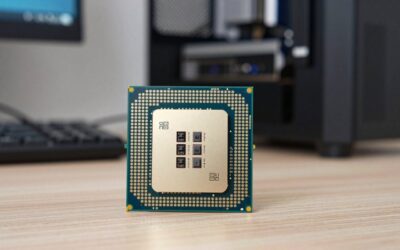
AMD Threadripper is the high-end desktop and workstation line above Ryzen 9. It uses a larger socket (currently sTR5), more memory channels and far more PCIe lanes than a normal Ryzen desktop. It sits between consumer Ryzen and the EPYC server line, and it is built for people who run several heavy tasks at once or need huge core counts, memory capacity or I/O.
| Line | Typical user | Memory channels | PCIe | Platform |
|---|---|---|---|---|
| Ryzen 9 (AM5) | Gamers, creators, general power users | 2 | Fewer lanes, enough for one GPU and a few SSDs | Mainstream |
| Threadripper | Enthusiast creators and engineers | 4 | Many PCIe 5.0 lanes | TRX50 |
| Threadripper PRO | Professional workstations | 8 | Up to 128 PCIe 5.0 lanes | WRX90 or TRX50 |
| EPYC | Servers | More than Threadripper (not detailed here) | Very high | Server |
If a normal Ryzen 9 gives you enough cores, enough RAM and enough PCIe lanes, it is the cheaper and faster choice for most tasks. Threadripper only makes sense when one of those three limits actually hurts your work.
Threadripper generations at a glance
Each Threadripper generation changed sockets or memory in a way that matters when buying used. This table follows the generation overview on Wikipedia and should be cross-checked against AMD’s product pages before you buy any specific part.
| Generation | Architecture | Socket | Max cores | Memory | Launch |
|---|---|---|---|---|---|
| 1000 series | Zen | TR4 | 16 | Quad-channel DDR4 | 2017 |
| 2000 series | Zen+ | TR4 | 32 | Quad-channel DDR4 | 2018 |
| 3000 series | Zen 2 | sTRX4 (PRO on sWRX8) | 64 | DDR4 | 2019 |
| 5000 WX (PRO) | Zen 3 | sWRX8 | 64 | Eight-channel DDR4 | 2022 |
| 7000 series | Zen 4 | sTR5 | 96 (PRO) | DDR5 | November 2023 |
| 9000 series | Zen 5 | sTR5 | 96 (PRO) | DDR5-6400 | July 2025 |
The practical takeaway: sockets before sTR5 are not interchangeable. TR4, sTRX4 and sWRX8 boards each lock you into a generation, so a used Threadripper from those eras has no meaningful upgrade path. The 7000 and 9000 series share the sTR5 socket, and AMD’s table lists the TRX50 chipset as supporting both the Threadripper 9000 and PRO 9000 WX series, so a board bought for a 7000-series chip can often take a 9000-series chip after a BIOS update. Confirm this on the board maker’s support page.
Threadripper 9000 series: the current non-PRO lineup
The Threadripper 9000 series launched in July 2025 on Zen 5, with the code name Shimada Peak. All three launch models use the sTR5 socket and a 350W TDP, boost up to 5.4 GHz, and support quad-channel DDR5-6400 memory on TRX50 boards.
| Model | Cores / threads | Base clock | L3 cache | Best for |
|---|---|---|---|---|
| Threadripper 9960X | 24 / 48 | 4.2 GHz | 128 MB | Entry workstation, high clocks per core |
| Threadripper 9970X | 32 / 64 | 4.0 GHz | 128 MB | Balanced rendering and compiling |
| Threadripper 9980X | 64 / 128 | 3.2 GHz | 256 MB | Maximum multi-thread throughput |
One retailer listing gives the 9960X a 250W TDP, which conflicts with AMD’s own 350W figure and appears to be an error. Plan power and cooling for 350W.
9960X vs 9970X vs 9980X: how to choose
- 9960X (24 cores): choose it if your software scales to about two dozen threads and you still care about single-thread speed. It carries the highest base clock of the three.
- 9970X (32 cores): the middle choice for rendering, simulation and compiling. It doubles as a sensible step up from a Ryzen 9 with 16 cores.
- 9980X (64 cores): choose it only when your tasks keep all cores busy for hours, such as final-frame rendering, large builds or scientific batch jobs. The lower base clock means individual tasks run no faster than on the smaller chips.
Threadripper PRO 9000 WX: when you need the professional line
The PRO 9000 WX series is aimed at professional workstations. It supports up to 128 PCIe 5.0 lanes and eight-channel DDR5-6400 ECC memory, and it runs on WRX90 or TRX50 boards. The range includes the 9995WX (96 cores, 192 threads, 2.5 GHz base, 5.4 GHz boost, 384 MB of L3 cache), the 9985WX (64 cores), the 9975WX (32 cores), the 9965WX (24 cores) and the 9955WX (16 cores). All the larger models carry a 350W TDP.
| Need | Non-PRO Threadripper | Threadripper PRO |
|---|---|---|
| Memory channels | 4 | 8 |
| ECC registered memory | Platform-dependent | Yes, core feature |
| PCIe lanes | Many | Up to 128 PCIe 5.0 |
| Maximum cores | 64 (9980X) | 96 (9995WX) |
| Chipset | TRX50 | WRX90 or TRX50 |
| Typical buyer | Creators and enthusiasts | Studios, engineers, AI workstations |
Choose PRO only if you need all of the following together: very large amounts of RAM, ECC reliability, and many GPUs or NVMe drives at full bandwidth. Otherwise the non-PRO line gives you most of the core performance on a more affordable platform.
Worked examples: memory bandwidth, PCIe lanes and power
Memory bandwidth in theory
Peak theoretical bandwidth equals channels times 8 bytes times the transfer rate. For quad-channel DDR5-6400: 4 x 8 x 6400 = 204,800 MB/s, about 205 GB/s. For eight-channel DDR5-6400 on PRO: 8 x 8 x 6400 = 409,600 MB/s, about 410 GB/s. For a dual-channel Ryzen 9 with the same speed the figure is about 102 GB/s. These are theoretical peaks; real throughput is lower, and the memory type and kit you use will decide how close you get.
| Platform | Channels | Theoretical bandwidth at DDR5-6400 |
|---|---|---|
| Ryzen 9 (AM5) | 2 | About 102 GB/s |
| Threadripper 9000 | 4 | About 205 GB/s |
| Threadripper PRO 9000 WX | 8 | About 410 GB/s |
Memory bandwidth matters for simulation, large dataset work and some rendering. If your tasks fit in cache and do not saturate RAM, extra channels bring little benefit.
Power budget
Take the CPU at 350W, a high-end GPU at roughly 450W by its maker’s spec (check your card), and about 150W for board, RAM, drives and fans. The total is roughly 950W to 1,075W under combined load, so a 1,200W to 1,300W power supply gives sensible headroom. Add margin if you run multiple GPUs or many drives.
PCIe lane budget
A typical creator build might use one GPU at x16, two NVMe drives at x4 each, a capture card at x4 and a 10GbE adapter at x4. That is 32 lanes, comfortably more than a mainstream Ryzen provides and well within Threadripper. Multi-GPU compute rigs or storage arrays are where the PRO platform’s lane count starts to matter.
Platform requirements: motherboard, memory, cooler, case, PSU
Motherboard
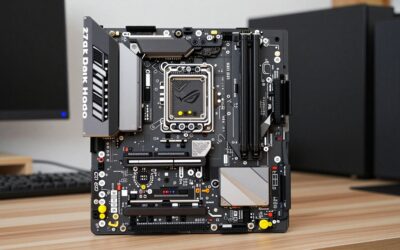
The 9000 series uses the sTR5 socket on TRX50 boards for the non-PRO line. The PRO line can use WRX90 or TRX50. These are large E-ATX or CEB boards, so check case support before buying.
Memory
The platform is built around DDR5, and workstation boards are designed for registered (RDIMM) memory. Check the board’s memory support list for validated kits and capacity limits, and populate all channels for full bandwidth.
Cooler
sTR5 is a very large socket, and a normal AM5 cooler will not fit. Look for coolers listed explicitly for sTR5 or TR5-SP6, and budget for a model rated for the 350W class. Air towers and large AIOs both exist for this socket.
Case and power supply
Choose a case with E-ATX or CEB support, strong front-to-back airflow and room for a 360mm radiator if you use liquid cooling. A quality 1,200W-class ATX 3.x power supply is a sensible baseline for a high-end single-GPU workstation.
Used and previous-generation Threadripper: is it worth it?
Used Threadripper chips from the TR4 and sTRX4 era are cheap relative to their core count, and they can run well for rendering. The catch is the platform: DDR4 memory, older PCIe generations and no upgrade path to sTR5. Boards for those sockets are also scarce and sometimes expensive. For a hobbyist who wants many cores for batch rendering, an old chip can be a bargain. For a business that needs reliability, support and a future upgrade, buy current sTR5 hardware.
- Check the socket first: TR4, sTRX4 and sWRX8 are not cross-compatible.
- Check the board: a used chip without a working board is a paperweight.
- Check memory: older generations use DDR4; do not buy DDR5 for them.
- Check the seller: prefer sellers who show a working system and allow returns.
Threadripper vs Ryzen 9 for gaming and everyday use
For gaming, a Ryzen 9 or Ryzen 7 X3D chip is a better choice. Games benefit from high per-core clocks and large cache, not from 64 cores, and the Threadripper platform costs far more. Reasons to choose Threadripper even if you game include a workload that regularly stalls a 16-core Ryzen 9, a need for more RAM than a mainstream board allows, or a requirement for many fast PCIe devices.
| Question | If yes |
|---|---|
| Does your work finish fast enough on a 16-core Ryzen 9? | Stay on Ryzen 9 |
| Do you need more than the mainstream RAM capacity? | Look at Threadripper |
| Do you need many GPUs, NVMe drives or capture cards at full speed? | Look at Threadripper or PRO |
| Do you need ECC memory and certified workstation hardware? | Choose Threadripper PRO |
| Is your priority gaming frame rates? | Choose Ryzen 7 X3D or Ryzen 9 |
Step by step: choosing your Threadripper
- List your workload. Note whether it uses all cores, relies on RAM capacity, or needs many PCIe lanes.
- Decide PRO or non-PRO. Choose PRO only if you need ECC, eight memory channels or the full lane count.
- Pick the core count. Choose 24 cores for mixed use, 32 for heavy multi-thread work and 64 or more only if all cores stay busy.
- Match the board. Pick a TRX50 or WRX90 board that fits your case and offers the slots you need.
- Plan the cooling and PSU. Select an sTR5 cooler and a power supply sized for the full system.
- Verify compatibility. Check the board’s CPU support list and BIOS version before you order.
Recommended parts for a Threadripper build
AMD Ryzen Threadripper 9960X
The entry point to the current non-PRO line, with 24 cores, 48 threads, a 4.2 GHz base clock and 128 MB of L3 cache on the sTR5 socket. It suits creators who want high per-core speed and a lower platform cost than the larger models. Plan for a 350W-class cooler and a TRX50 board.
AMD Ryzen Threadripper 9970X
The 32-core, 64-thread middle option with a 4.0 GHz base clock and 128 MB of L3 cache. It is a good fit for rendering, compiling and simulation work that scales to many threads without needing the 64-core flagship. Same platform and cooler requirements as the 9960X.
ASUS Pro WS TRX50-SAGE WIFI A
A CEB workstation board for TRX50 processors with Wi-Fi and a workstation-class power design. It is aimed at builds that need multiple PCIe slots for GPUs and expansion cards. Check that your case supports the CEB form factor before ordering.
GIGABYTE TRX50 AERO D
An E-ATX TRX50 board that lists compatibility with Threadripper 9000 series processors, with a 16+8+4 phase digital power design, PCIe 5.0 and Wi-Fi 7. It is a good alternative for creator builds that want a more compact feature set than a full workstation board.
Noctua NH-U14S TR5-SP6
An air tower built for the sTR5 and SP6 sockets, 165mm tall, aimed at quiet cooling in workstations. Air cooling can suit builds that favour reliability and low noise. Confirm its rating against your chosen chip’s 350W class and check case clearance.
Cooler Master PL 360 TR5-SP6
A 360mm all-in-one liquid cooler listed for Threadripper 9000 and PRO processors on TR5-SP6 sockets. It suits builds that need more thermal headroom for the 64-core chips or heavy sustained loads. Check radiator mounting space in your case.
Common buying mistakes
- Buying cores you cannot feed. A 64-core chip with a handful of memory modules and a single slow SSD will not reach its potential. Match RAM capacity, storage speed and GPU count to the core count.
- Forgetting the case. TRX50 and WRX90 boards are large, and the cooler, radiator and power supply all need room. Check the case’s supported motherboard sizes first.
- Assuming an AM5 cooler will fit. The sTR5 socket is far larger, so only coolers listed for sTR5 or TR5-SP6 will mount.
- Skipping the BIOS check. If you pair a newer chip with an older board, confirm the board’s CPU support list and BIOS version before ordering.
- Paying for PRO you will not use. If you do not need ECC memory, eight channels or the full lane count, the non-PRO line is the more economical platform.
Is it worth waiting or buying now?
The 9000 series is the newest generation as of October 2026 according to the sources we checked, and the 7000 series on the same sTR5 socket remains a sensible way to save money if you find one at a lower cost tier. If your project needs a workstation now, buy the current generation on TRX50 so a later CPU swap stays possible. If your workload runs acceptably on a Ryzen 9 today, the cheapest upgrade is more RAM or a faster SSD, not a new platform.
Frequently Asked Questions
Which Threadripper should I buy?
For most creators, the Threadripper 9960X or 9970X on a TRX50 board. Choose the 9980X only if all 64 cores stay busy, and choose PRO only if you need ECC memory and eight channels.
What is the difference between Threadripper and Threadripper PRO?
PRO offers eight memory channels with ECC support and up to 128 PCIe 5.0 lanes. Non-PRO Threadripper has four memory channels and a more affordable platform.
Is Threadripper good for gaming?
It runs games fine, but it is poor value for them. A Ryzen 9 or Ryzen 7 X3D offers higher per-core speed at a far lower platform cost.
What socket does the newest Threadripper use?
Threadripper 7000 and 9000 series use sTR5. Earlier generations used TR4, sTRX4 or sWRX8, which are not compatible with sTR5.
Can a 9000 series Threadripper run on a 7000 series board?
AMD’s table lists TRX50 as supporting both generations, so it is often possible with a BIOS update. Always confirm on the board maker’s CPU support list first.
How much power does a Threadripper need?
The current chips are rated at 350W. A full workstation with a high-end GPU generally needs a quality 1,200W to 1,300W power supply.
Is a used Threadripper worth it?
It can be for batch rendering on a tight budget, but older generations use DDR4 and have no upgrade path. Current sTR5 hardware is the safer long-term choice.
Sources
- AMD Ryzen Threadripper 9000 Series partner page and product listings
- Wccftech and Guru3D coverage of the Threadripper 9000 launch
- TechSpot report on Threadripper PRO 9000
- Wikipedia, AMD Threadripper generation overview
Last updated: October 2026