🛒 Best Price Today on Amazon
Prime members get fast, free shipping on everything above, plus member-only deals. New members get a 30-day free trial — cancel anytime.
- Which CPU should you buy for a PC with a dedicated graphics card?
- What changes when the discrete GPU renders the game?
- How much does PCIe 4.0 x8 matter for your graphics card?
- When does the 8700G make sense after the card arrives?
- How should you set up and verify either build?
- Which details can make a dedicated-GPU comparison misleading?
- Conclusion
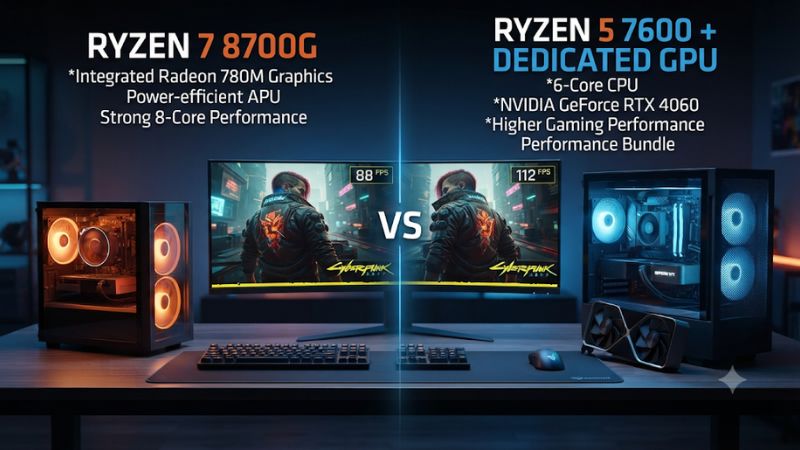
Choose the Ryzen 5 7600 if your gaming PC will use a discrete card from day one. Its larger L3 cache and wider CPU-side graphics link suit that build. This Ryzen 7 8700G vs Ryzen 5 7600 with a dedicated GPU comparison explains when the 8700G’s eight cores and Radeon 780M are worth keeping or buying instead.
Which CPU should you buy for a PC with a dedicated graphics card?
Buy the Ryzen 5 7600 for a new, gaming-first system that already has a discrete GPU in the budget. Choose the Ryzen 7 8700G if a substantial part of your ownership will depend on its Radeon 780M, or your workload genuinely benefits from eight CPU cores. An existing 8700G owner should usually test the new GPU before replacing the processor.
| Feature | Ryzen 7 8700G | Ryzen 5 7600 |
|---|---|---|
| CPU architecture | Zen 4 | Zen 4 |
| Cores and threads | 8 cores and 16 threads | 6 cores and 12 threads |
| Maximum listed boost | Up to 5.1 GHz | Up to 5.1 GHz |
| L3 cache | 16 MB | 32 MB |
| Standard CPU-side graphics link | PCIe 4.0 x8 | Up to PCIe 5.0 x16, subject to board and card support |
| Integrated graphics | Radeon 780M | Basic AMD Radeon graphics |
| Default TDP | 65 W | 65 W |
| Platform | AM5 with DDR5 | AM5 with DDR5 |
Pick the 7600 for gaming-first value
A system equipped with a dedicated graphics card already has a renderer with its own graphics memory. The 7600 lets you spend the processor budget on a CPU designed around that arrangement. Its 32 MB of L3 cache and broader possible graphics link remain relevant after the dedicated card takes over rendering.
The 7600 still gives you a basic display fallback through a compatible motherboard port. Use it to get into firmware, install Windows, or isolate a problem with the graphics card. If that is all you need from integrated graphics, the Radeon 780M is a feature you may seldom use.
Use the delivered CPU price and the actual included cooler when comparing. If choosing the 7600 also leaves room for a graphics card with the performance or memory capacity you need, evaluate that complete build first. A comparison that ignores the GPU change misses one of the main reasons to choose the lower-cost processor.
Pick the 8700G when its other features will earn their cost
The 8700G gives you eight CPU cores and a much more capable integrated graphics engine. A build that must game for months before receiving a graphics card can make meaningful use of the Radeon 780M. A compact machine that will regularly operate without the card can also justify it.
The extra cores deserve attention when the PC doubles as a workstation. Compare your specific compile, export, or threaded application on comparable hardware.
A game benchmark describes the gaming side of the purchase. A threaded task may value two extra cores even if a game favors the 7600’s cache and desktop layout.
If you already own the 8700G, its original purchase price is a sunk cost. Installing a compatible GPU is the most direct way to improve rendering performance. Judge the result on the system you actually have before budgeting for both a GPU and a replacement AM5 processor.
What changes when the discrete GPU renders the game?
The CPU still runs simulation, application threads, and the work needed to submit frames. The dedicated GPU renders those frames. The Radeon 780M and the graphics card have separate rendering resources, and an ordinary game generally uses the selected device for its rendering workload.
Understand why eight cores do not settle the gaming result
The 8700G has more execution cores, while the 7600 has twice the L3 cache. How much either matters depends on the game. A title that relies on a small number of busy threads and frequently reuses data can behave differently from a multithreaded application that keeps all eight cores busy.
The two chips share Zen 4 branding and the same listed maximum boost, but their implementations differ. An equal maximum clock is not an assurance of equal sustained frequency, memory behavior, or frame times. Use measured game data rather than calculating a predicted percentage from any one specification.
The graphics card can still become the primary limit. A busy GPU at demanding settings may leave the two CPUs close in a particular scene.
At a lighter preset or with a faster future GPU, the processor can have a greater effect. This is why benchmark settings and your intended upgrade path belong in the comparison.
Interpret the published discrete-GPU tests carefully
Tom’s Hardware tested the 8700G with a discrete card and reported about a 10% average advantage for the Ryzen 5 7600X in its 1080p comparison. The outlet used the X model as a stand-in when discussing lower-cost non-X alternatives.
The published margin therefore belongs to 7600X versus 8700G on that bench. It is useful directionally for the 7600 choice, without establishing an exact 7600 result.
TechSpot’s 8700G review also compared discrete configurations under several workloads. It highlighted cases where a faster desktop Zen 4 platform gained more from the same card. Those tests are another reason to separate an APU’s integrated gaming performance from its behavior after you install a discrete GPU.
Prefer game results for your exact processors and graphics card when available. If a published result uses the 7600X, state that difference before using it as context. A narrow gap in one engine or a large gap in another should not be generalized to every game or resolution.
Check whether your own system is CPU limited
Run one familiar game route at your normal settings, then lower render resolution while keeping the engine-related settings the same. If frame time improves clearly, the GPU has a notable role in the result. If GPU work falls and the frame rate barely moves, examine the limiter, game threads, and other CPU-side conditions.
Record both the important slow moments and the normal capped experience. A high benchmark average can coexist with isolated stalls caused by compilation, an asset stream, or another application.
Repeat the same segment before attributing the issue to the CPU. An upgrade decision is easier to defend when the bottleneck appears in the actual scene you want to improve.
For a 1440p system with a modest card, changing graphics settings or the card can have more effect than switching between these two CPUs. For a fast card paired with a low competitive preset, a CPU-side difference becomes easier to observe. Let the frame data and actual workload determine which situation applies.
How much does PCIe 4.0 x8 matter for your graphics card?
The 8700G supplies up to eight PCIe 4.0 lanes for dedicated graphics. The 7600 can support a wider CPU-side link.
The actual link depends on the motherboard’s routing, the device, and the installed slot. That makes the bus a compatibility check rather than a fixed FPS penalty.
Check the slot and the negotiated link
Read the motherboard manual for the primary graphics slot. Its connector can be physically x16 while the electrical link is narrower with a particular CPU.
A different slot may run through the chipset, have fewer lanes, or share resources with another device. Use the documented primary CPU-connected slot unless your build calls for another arrangement.
Check the negotiated link while the GPU is active with a compatible hardware utility. Power-saving behavior can lower the reported link speed at idle. Compare what the card reports during a supported render check with the board and CPU’s intended configuration.
If the link is unexpectedly narrow or slow under load, check card seating, the chosen slot, and any riser cable. A compact case with a riser can introduce a separate link issue. Establish a stable, expected link before blaming the number of lanes available from either processor.
Judge the effect with the intended card and workload
A card designed to use eight lanes may already operate within that width on a 7600 build. A card capable of using more lanes can negotiate a narrower link on the 8700G. In either case, the actual impact depends on the game, card, and its memory behavior.
A workload with substantial transfers between the system and GPU can be more sensitive to bus bandwidth than one that keeps most assets in the card’s local memory. VRAM capacity, streaming behavior, and scene settings can affect this. A lane-width label alone cannot tell you how large the performance change will be.
If the system is stable and your own performance already meets its target, leave the link decision in context. A dedicated GPU can still make an 8700G system much faster than the iGPU. Buying a 7600 just to widen the link makes the most sense when the complete rebuild or upgrade produces a measured benefit you value.
When does the 8700G make sense after the card arrives?
Its strongest case is a real second role for the system. That can be gaming with no card, fallback use while the main GPU is away, a smaller deployment later, or an application that benefits from its extra CPU cores.
Price a staged build on the length of the no-card phase
For a short wait, the 7600’s basic display engine can get the system set up while the gaming card ships. You can check firmware, storage, and memory first. Buy the 8700G for the interim phase only if the stronger integrated gaming performance has real value during that period.
A several-month no-card phase can change the decision. In that case, compare both stages.
Decide whether the 780M will run the games you want at settings you can accept and whether the eventual discrete configuration remains satisfactory. Counting the upgrade as if the GPU were already present ignores the months when the iGPU will do the work.
A planned component swap also involves extra cost and effort. If the 8700G will handle the second stage well enough, keep it after installing the card. Do not budget for a CPU replacement simply because the chip was originally purchased for its integrated graphics.
Include your regular CPU work and cooling limits
Check a workload that uses the complete eight-core processor when comparing the two. A recurring compilation or video task can strengthen the 8700G case. For your main games, use the dedicated card and measure the performance separately rather than combining both use cases into a single score.
Both are rated for a default 65 W TDP. That label does not imply equal actual package power, temperature, or fan noise under all work. Compare each processor at comparable settings and include the GPU’s heat load when judging a small enclosure.
If you only need a basic fallback desktop, the 7600 can cover that role through a compatible output. The 8700G is easier to justify when you intend to use its stronger built-in renderer for games or other graphics work. Name that use before paying for it.
How should you set up and verify either build?
Get the system working with the discrete GPU before making other changes. Verify the cable, selected rendering device, supported board firmware, and memory configuration. A setup error can look like a processor-performance problem.
Start with the same baseline on both PCs
- Connect the main gaming display to the card and verify the game is using that GPU when you measure performance.
- Use a supported BIOS and matched DDR5 setup with both modules installed in the board’s recommended slots.
- Check the negotiated link under load and keep the Resizable BAR state and graphics driver consistent for an A/B test.
- Run comparable gameplay with the same GPU, preset, game build, and cap, then compare frame times and GPU load.
Check whether the game is rendering on the intended device in Windows or the application before drawing conclusions. The motherboard and the card can both have display connectors, and adapters can be enabled simultaneously. A monitor connected to the board does not make an integrated result comparable to a dedicated-card run.
Verify that the cooling setup is mounted correctly and the GPU has an unobstructed intake. In a small case, a faster card can change overall temperatures more than swapping the CPU. A reliable baseline helps you locate the real bottleneck.
Make the checkout or upgrade decision on the whole system
For a new system, compare the processor, board, cooler, memory, and graphics card together. If the savings from the 7600 keep you in a better GPU class or simply lower the complete cost, that is a strong reason to pick it for a dedicated build. The 8700G’s features matter when you will use them often enough to offset the premium.
For an existing 8700G machine, install the new card and test first. If it reaches the settings, frame rate, and slow-frame targets you need, there is little reason to change the processor at the same time. If a clear CPU-side constraint remains, use title-specific data before spending on another CPU.
Keep a short record of the card model, preset, measured frame times, and link state. Future GPU upgrades, game patches, and monitor changes can alter the balance. The best choice is the one that meets the current target while preserving a sensible upgrade path.
Which details can make a dedicated-GPU comparison misleading?
A valid comparison uses the same graphics hardware and identifies which device is rendering each capture. These processors make that especially important because both can provide a motherboard display, even though their integrated graphics differ greatly in capability.
Match the render device and the monitor path
When the dedicated card is part of the test, connect the gaming monitor to that card and confirm which device the game reports. Some operating systems and games offer a graphics preference for individual applications. Verify that the mode you choose is reflected in the game or in a monitoring capture.
The 8700G can remain capable of using its Radeon 780M for displays or supported secondary tasks while a card is installed. That flexibility can be useful, but it can complicate troubleshooting if you compare a run rendered on one adapter with a run rendered on another. Give each configuration a descriptive name in your notes.
Keep the same display resolution and render scale in both captures. A driver update, new default preset, or change to dynamic resolution can make one system perform more render work than the other. Restart the game when settings require it and check that the intended values remain active before collecting data.
Check graphics-slot behavior alongside storage placement
Read the board’s slot-sharing table for the processor you plan to use. Some high-speed expansion slots and M.2 connectors can change availability or routing depending on the installed processor or which ports are occupied. The graphics connector’s length alone cannot reveal its electrical arrangement.
For a build with a capture card, extra drive, or riser, make a short list of the populated connectors in each configuration. A useful compatibility check asks whether every required device can fit and operate at an appropriate link. The 8700G can still be a sensible choice if the documented layout suits the actual GPU and accessories.
Check stability under sustained work after you fit the components. If a card runs at an unexpectedly low link speed with one riser but operates as expected in the primary slot without it, confirm the riser and board settings before buying a different CPU. Treat board layout and negotiated bandwidth as separate observations.
Decide how to spend savings without compromising the baseline
Consider a hypothetical buyer who can pick the 7600 and use the difference to keep a GPU with enough local memory for a demanding title. The whole system could deliver a better result even if the 8700G were faster in a separate CPU task. The result depends on what the graphics card and the game need.
Another buyer may already own the intended GPU and expect to move it out of the PC later. In that situation, the 8700G’s ability to run lighter games on its own can give the machine a useful second life. The benefit comes from future use of the Radeon 780M rather than a contribution to the same frame rendered by the card.
If your expected GPU is particularly old or marginal for your games, benchmark that exact combination against a realistic goal. A dedicated card’s presence does not by itself guarantee higher game performance than the 780M.
Check the software, memory capacity, and actual workload before assigning value to either setup. A dated spare card may simply be a temporary display or troubleshooting device.
Finally, keep performance and cost records together. Note whether the quote includes a cooler, whether the graphics card is already owned, and which parts will be reused later. This makes the decision reproducible when a seller price or a future upgrade changes the calculation.
Compare the included cooling on the actual listing
If a boxed cooler changes the price comparison, check the actual packaging. AMD’s launch materials listed a Wraith Spire for the boxed 8700G and a Wraith Stealth for the boxed 7600. A tray listing, used part, or custom bundle may have different contents.
Count either as a saving only if it fits your case and your noise expectations. If the same aftermarket cooler will be used with both CPUs, the bundle cooler is a spare rather than part of the spending gap.
Conclusion
Choose the Ryzen 5 7600 for most new gaming PCs that will use a dedicated GPU immediately. Choose the Ryzen 7 8700G when Radeon 780M gaming or eight-core applications will be a regular part of the system’s use. If you already own an 8700G, install the card and verify real game performance before buying another processor.