🛒 Best Price Today on Amazon
Prime members get fast, free shipping on everything above, plus member-only deals. New members get a 30-day free trial — cancel anytime.
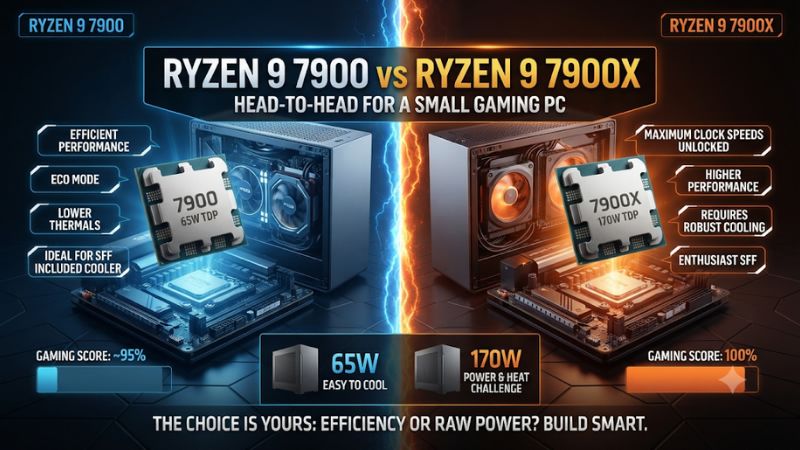
Buy the Ryzen 9 7900 for most small gaming PCs. It gives you twelve cores with a lower stock power limit, which is easier to cool in a tight enclosure. This Ryzen 9 7900 vs Ryzen 9 7900X for a small gaming PC comparison shows when the 7900X’s faster sustained work or a better purchase price can justify it.
Which Ryzen 9 is a better fit for a compact gaming build?
Choose the Ryzen 9 7900 if you want a simpler stock setup with less sustained processor heat to remove. Consider the 7900X when your case and cooler can handle its normal operating profile, or when a better deal makes it worthwhile to use a supported lower-power mode. Both offer twelve Zen 4 cores.
| Feature | Ryzen 9 7900 | Ryzen 9 7900X |
|---|---|---|
| CPU architecture | Zen 4 | Zen 4 |
| Cores and threads | 12 cores and 24 threads | 12 cores and 24 threads |
| Base and maximum boost | 3.7 GHz and up to 5.4 GHz | 4.7 GHz and up to 5.6 GHz |
| L3 cache | 64 MB | 64 MB |
| Default TDP | 65 W | 170 W |
| Common stock socket power limit | 88 W PPT | 230 W PPT |
| Boxed cooling | Wraith Prism in AMD’s retail launch package | Cooler purchased separately |
| Platform | AM5 and DDR5 | AM5 and DDR5 |
Start with the 7900 for small-case reliability and noise
The 7900’s lower stock socket power limit is helpful when the cooler is short, airflow is restricted, or the GPU and CPU share a small volume of air. It lets you start from a lower thermal design target without depending on a special firmware profile.
The stock Wraith Prism matters only if it is included and fits. Some compact cases require a shorter cooler or orient the exhaust in a way that favors an alternate design.
Count the cooler you will actually install. A boxed accessory can be helpful in one enclosure and irrelevant in another.
A lower CPU power limit is especially attractive if you want predictable behavior after a firmware reset or motherboard replacement. The 7900’s standard configuration remains the starting point. Verify the effective board settings anyway, because a performance preset can alter behavior.
Choose the 7900X when you can use its sustained performance
The 7900X has higher listed clocks and a much larger stock socket power allowance. It is better suited to a small system with capable cooling that regularly performs long CPU work. Examples include renders, compression, and other jobs where greater sustained throughput changes your day.
For gaming, a larger power limit by itself cannot help a scene limited by the GPU, engine, or frame cap. It can matter in a title that pushes the 7900 against its lower limit. Check the games you actually run and the frame rates you want before buying a more demanding cooling setup.
A discounted 7900X can also be a good starting point for a compact PC if the motherboard offers a documented lower-power mode. Include the price of a cooler, compare the actual behavior after applying the mode, and keep the option to restore a known stable profile. A low CPU price is useful only when the complete system remains within budget.
How different are stock gaming and sustained CPU workloads?
The stock power limit is much more informative under heavy CPU work than it is for every game. A compact gaming PC spends time in several operating states, from a capped game to an application that can keep all cores busy.
Read published gaming tests with the GPU in mind
GamersNexus showed how the graphics card can change the apparent difference in Shadow of the Tomb Raider. With an RTX 3090 Ti in its 1080p test, the stock 7900 and 7900X were effectively tied within the test’s variation. In its repeat with an RTX 4090, the 7900X was about 7% ahead of the stock 7900, which the outlet tied to the lower processor power limit being reached.
That is a useful paired example. It illustrates that a single game can reveal or hide the processor difference depending on the GPU. It does not establish that every GPU or compact build will see the same margin.
Consider whether your settings behave more like a GPU-heavy setup or a test built to expose CPU differences. A modest card or high image-quality preset can make a CPU swap less effective. A faster graphics card and lighter settings may make a CPU-side constraint easier to see.
Judge gaming by your capped and uncapped results
A practical cap can keep a compact system quieter if it reduces unnecessary CPU and GPU work. Compare the target you use with the actual slow frames in a representative game. If both CPUs maintain a cap at the settings you want, an uncapped lead can be less important than system noise or cost.
For a diagnostic run, keep the scene, graphics settings, driver, and frame cap identical across systems. Track frame times and GPU work as well as the CPU power reading.
If you also run without a cap, label that as a separate test. Mixing the two conditions can make an ordinary setting difference look like a processor difference.
Some demanding games benefit from more CPU headroom even in a small enclosure. Test the busy part you actually notice rather than comparing only average FPS from a simple route. If an improvement occurs repeatedly and cooling remains acceptable, it gives the 7900X a more specific advantage.
Treat rendering and similar work as a separate comparison
In a Blender render reported by GamersNexus, the stock 7900 took 9.6 minutes and the 7900X finished in about 8 minutes. The difference reflects that particular scene and configuration. It shows why the 7900X can matter for sustained work even if a game shows almost no stock difference.
Measure completion time and sustained cooling costs together. A lower-power processor can take longer and still be easier to cool quietly.
A faster processor can be a better fit if you run that work every day and have enough airflow. Decide which outcome matters for the PC you are assembling.
Do not use the gaming power reading to choose a cooler for a system that also does long CPU renders. Record the heaviest realistic CPU workload separately. A case that feels quiet during play can become noticeably louder when both the CPU and GPU are busy for a long time.
How should you think about case fit, airflow, and power?
In a small case, cooler clearance and airflow can be more important than a specification on a product page. Price the system that can actually fit within the enclosure and sustain the workloads you expect.
Verify the cooler and case as a complete assembly
Start with the case’s actual CPU cooler height, radiator thickness, and fan clearance. Consider memory height and the position of the GPU or riser. A cooler can fit the AM5 socket and still fail to fit the complete enclosure or conflict with side-panel airflow.
If the case supports a radiator, verify the fan stack and tube routing. A slim case can support a radiator size by name while limiting the thickness of the assembly or the size of the graphics card. Check whether the proposed layout lets the radiator and GPU both get cool air.
Look at how the CPU fan will move air through the case. A down-draft cooler, a tower, and a radiator can put warm air in different places.
Test temperature and fan sound with the panel in place. Open-panel results can help identify airflow problems, but they do not represent the machine you will actually use.
Compare power readings at the correct boundary
TDP is a thermal design class. PPT refers to the processor socket power limit.
A monitoring field showing CPU package power describes a processor reading, while a wall meter includes the whole system. Use the same measurement and workload when comparing results.
The 7900’s common 88 W PPT and the 7900X’s common 230 W PPT represent stock limits, not constant consumption during gaming. Actual draw can be much lower. Verify your board settings if you see a different limit, especially if it has a performance enhancement or a saved lower-power profile active.
Power supply planning should consider the card as well as the CPU. Check the case’s supported PSU size, cabling, and the graphics card vendor’s requirements. A higher CPU allowance can add to demanding combined work, but it should be evaluated as part of the complete system rather than by adding marketing labels together.
Choose a fan and thermal baseline you can actually live with
Use the same fan policy when comparing stock CPU modes if you want to see their effect clearly. Record temperature, fan RPM, and effective clocks after the case has warmed up. A hotter CPU at the same RPM tells a different story from similar temperature achieved with noticeably higher fan noise.
At the same CPU settings, GPU exhaust can warm a neighboring cooler in a tight layout. Compare a CPU-only run and a typical gaming session if temperatures are unexpectedly high. The difference can show whether the graphics card changes the cooler’s available air temperature.
Check the sound where the machine will sit. A fan that is acceptable across a desk can be distracting beside a monitor.
If the PC is for a living room, compare the sound at that seating distance. A slightly slower profile may be a good choice when it preserves the intended gaming experience.
When does a lower-power 7900X make sense?
A discounted 7900X with a supported Eco preset is a legitimate compact-build option. Compare the package and the actual applied limits. A firmware label alone does not guarantee behavior identical to a stock 7900.
Verify the lower-power mode and repeat the test
- Before buying Check the exact board’s supported CPU power controls and calculate the 7900X price with the cooler it needs.
- After setup Apply the documented lower-power preset if you intend to use it. Read back the actual limits after a restart.
- Compare the real workload Test the same game and sustained task while recording power, fan speed, and frame times or completion time.
- If the result is inconsistent Confirm which profile is active and return to a known stable configuration before changing other settings.
A lower-power 7900X may land near the 7900 in some tests. Their clock and firmware behavior can still differ. Treat the comparison as a choice between two measured configurations rather than assuming that the processor changes identity when its power limit is reduced.
If the low-power result meets your needs, compare the cost and ease of setup against the 7900. If the higher mode is useful for occasional work, make sure the case and cooler can actually support it before relying on that flexibility.
Compare prices with the cooler and case constraints included
A standard boxed 7900 can include the Wraith Prism. A tray or used unit may include only the processor.
The 7900X normally needs a separate cooler purchase. Check the listing details and the case fit before assigning value to either package.
If the 7900X is cheaper only before buying cooling, the 7900 may remain the better compact system. If both need the same aftermarket cooler and the 7900X costs less, its price advantage is real once you have checked the supported power profile. The complete checkout total matters more than the traditional X-series hierarchy.
For a gaming-first compact build, keep enough room for the graphics card and suitable airflow. A cheaper, lower-power CPU can make it easier to preserve both. For a mixed-use PC that regularly runs all-core work, a higher-performing configuration may be worth the cooling cost if you measure a useful time saving.
How can you validate the cooling layout before keeping a power profile?
Start from a stable, documented configuration. Compare the assembled case under the workloads that will matter most. A small gaming PC often behaves differently during a short graphics benchmark than after a long session or a CPU-heavy export.
Measure it with the side panels in place
Install the filters and panels you will use. Check that all intended fans can turn freely and that cables do not crowd the intake. Pay attention to whether the graphics card can draw fresh air or is feeding heat toward the CPU cooler.
Capture temperatures and fan speeds after a comparable warm-up. If you test each CPU or mode right after boot, use the same startup point.
If you start after several hours of play, compare similar late-session conditions. Cooler results can differ depending on how much heat was already in the case.
Observe whether airflow is still sufficient once the graphics card is active. A CPU stress run can look fine when the graphics card is mostly idle, and a game can warm the air around the cooler under a much lighter CPU load. Use both results to understand how the layout behaves.
If an open panel helps dramatically, check the routing and intake rather than treating the open run as the benchmark you want. Owning a quieter device and being able to close the case are part of the goal. Adjust one reversible detail at a time and recheck the closed configuration.
Compare all-core work and mixed use separately
Pick one processor-heavy workload you actually run. Note its completion time, CPU temperature, and fan behavior. Then play a representative game or run your normal game-and-application combination and check how that result differs.
The 7900X may complete a processor-heavy job more quickly and still gain very little in a capped game. A lower-power setting can be pleasant in ordinary play while costing time elsewhere. Only count the performance of the configuration you are willing to use regularly.
If the machine is quiet while playing but too loud during a regular export, decide how often that export runs and whether the faster result is useful. Separating the jobs can help. A quiet everyday profile and a separately verified configuration for sustained work give you a concrete basis for switching if the hardware can support both.
If you notice clock reductions alongside higher temperature, inspect the cooler and active limits before raising the power setting. A faster test on a large bench does not guarantee a faster result in a tight enclosure. The compact machine must be able to reject the heat its own configuration produces.
Keep track of the settings you can restore
Record the BIOS version, CPU power profile, and fan settings that produced a stable result. A firmware update or reset can change an option or return a limit to its default. Verify what is active after a reboot, especially if you chose the 7900X because it could run in a quieter mode.
A saved user profile can be helpful when the board supports it. Keep written notes as well if an update changes which settings can be imported. The important data are the observed limit, the cooling configuration, and the test result that gave you confidence.
Avoid using a copied list of manual power settings from another system as the first comparison. A documented board preset is easier to identify and reproduce. Check which limit actually applies with your cooler and compare the resulting performance rather than assuming an option label guarantees behavior.
Spend the difference on the constraint that matters most
A hypothetical compact system can benefit more from a better case fan layout than from buying the faster processor. If both CPUs preserve the same capped gaming result but the 7900 is quieter under your normal mixed workload, the simpler power profile makes sense. If the 7900X finishes a frequent local job faster without an unacceptable noise penalty, the argument changes.
Record how much each system costs after you add the cooler, any low-profile hardware, and the power supply required for the actual build. If a bundled cooler will not fit, compare both processors with the cooler you plan to install. The CPU with the lower listing price can lead to the more expensive finished system.
If you already own one model, begin with the settings that work today. An upgrade is worth considering when a measured limitation persists after sensible airflow and profile adjustments. Start with the smaller reversible test before paying to replace a working processor.
Distinguish a stock power difference from a different measurement method
GamersNexus reported about 86 W for the 7900 and about 199 W for the 7900X at the CPU power cables in its heavy power test. Those are measured cable inputs during that test, not the formal PPT caps and not idle or everyday gaming consumption.
The difference shows why sustained work can matter to cooling even when two game scores are close. Use the same sensor and operating state for your own comparison. If you see nearly the same gaming draw on both, it can reflect a lighter workload rather than an incorrect stock limit.
Remember to separate noise from power. One system can use more power while maintaining a similar temperature by running its fans faster. Check those outputs together before deciding which configuration is more comfortable in a small room.
Conclusion
Choose the Ryzen 9 7900 for most small gaming PCs because its lower stock power limit is easier to cool while retaining twelve cores. Choose the 7900X when measured gains in your workload justify the heat, or when a better complete price and a verified lower-power preset make it the better package. Verify the result in the assembled case.