Affiliate disclosure: As an Amazon Associate we earn from qualifying purchases. This post contains affiliate links — we may earn a small commission at no extra cost to you. This never affects our picks. Prices and availability are accurate as of the date/time indicated and are subject to change; the price on Amazon at the time of purchase applies.
Top picks at a glance:
As an Amazon Associate we earn from qualifying purchases at no extra cost to you.


At $1500, the complete gaming setup crosses into pro-tier peripherals, large-format 4K monitors, and L-shaped desk territory that doubles as a serious workspace. This is the budget where you stop compromising and start making aesthetic choices. The setup below is what I assemble for serious gamers who also work from home and want one space that handles both jobs without flinching.
Quick answer: In our research the our top pick scored highest for gaming and everyday use, while the the value pick won best value for money.
I’m Alex Rivera, builder of many setups across many budgets. The $1500 tier is the goldilocks zone in 2026.
🛒 Best Price Today on Amazon
Prime members get fast, free shipping on everything above, plus member-only deals. New members get a 30-day free trial — cancel anytime.
Setup Parts Breakdown
| Category | Pick | Why It’s Here | Approx Price (May 2026) |
|---|---|---|---|
| Monitor | Gigabyte M32U or LG 32GS95UE 32″ 4K 144Hz | Big enough for productivity, 4K for visual fidelity, 144Hz for gaming | $549 |
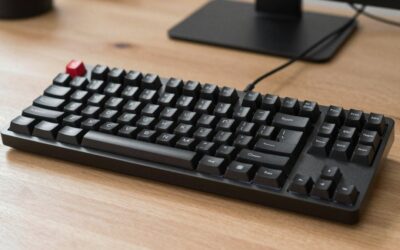
| Keyboard | Wooting 80HE (white or black) | TKL with HE switches, Snappy Tappy, function row for productivity | $229 |
| Mouse | Razer DeathAdder V4 Pro or Pulsar X2H | Ergonomic, 8000Hz polling, 90-hour battery | $159 |
| Mousepad | Artisan Hayate Otsu XL or Pulsar Paracontrol V2 XL | Large surface for low-DPI play, premium glide | $59 |
| Headset | SteelSeries Arctis Nova Pro Wireless | Dual-battery swap, dedicated DAC, exceptional mic | $329 |
| Desk | L-shaped FlexiSpot E7L sit-stand 71″x71″ | Corner setup, real ergonomic workspace | $549 |
| Chair | Herman Miller Aeron (used) or new Steelcase Series 2 | True ergonomic chair, decade+ lifespan | $300-500 |
The total runs $2174 MSRP. With a used chair (an Aeron at $350 from office liquidation), routine peripheral sales, and Black Friday timing, it comes in at $1450-1550. The chair and desk are non-negotiable for an ergonomic L-shaped setup; everything else has flex.
Performance Expectations
Paired with a $1500-2000 gaming PC (RTX 5070 Ti tier), this setup delivers:
- 4K 144Hz on a 32″ panel gives sharp text for work and visually striking gaming, with 144Hz refresh keeping motion clarity high
- Wooting 80HE with full function row supports both productivity (function keys for IDEs, Photoshop, video editing) and tournament-grade gaming inputs
- Arctis Nova Pro Wireless: dedicated DAC delivers genuine audiophile-tier music quality, dual battery means zero downtime
- L-shaped desk: enough surface area for triple-monitor expansion, dedicated streaming station, or large-format CAD/3D work
- Aeron chair: 12-year warranty, holds up under 10+ hour work sessions
This tier graduates from “good gaming setup” to “lifetime workspace that happens to game very well.”
Where to Skip and Where to Splurge
Skip: 32″ 4K OLED at this price point (they start at $900+ and would eat most of the budget). Skip dedicated audio interfaces; the Arctis Nova Pro’s DAC handles desktop audio well. Skip RGB at this tier; the L-shape commands attention without lights. Skip “gaming desks” with weird shapes and decals; office L-shapes look more professional and cost less.
Splurge: The chair. An Aeron (used) at $350-500 is the single best investment in this whole setup. Splurge on the L-shaped sit-stand frame; cheap motors fail at the corner pivot. Splurge on the headset if you’re a music listener; the Arctis Nova Pro’s DAC genuinely elevates everyday audio.
Upgrade Path
This setup grows in clear directions:
- +$400: Swap 32″ 4K to 32″ 4K QD-OLED (LG 32GS95UE OLED or MSI MPG 321URX)
- +$250: Add 27″ 1440p secondary monitor on a dual arm for productivity
- +$200: Studio mic (Shure MV7+, Rode NT-USB+) for serious streaming or podcasting
- +$150: Stream Deck XL for productivity macros and stream control
- +$300: Powered studio monitors (Kali LP-6 V2, Adam Audio T5V) for non-headphone listening
From this $1500 tier you can grow into a $2500-3000 streaming/creator setup without replacing anything, only adding.
Bottlenecks to Watch
At this tier the gear is excellent; the bottlenecks shift to room and behaviour:
- 32″ 4K viewing distance: Needs 28-32 inches from your eyes for text comfort. L-shaped desk depth matters
- Monitor refresh limit: 144Hz is plenty for AAA gaming but if you play competitive shooters at 240+ FPS, the monitor caps you
- 4K on RTX 5070 Ti: Native 4K is GPU-bound; lean on DLSS 4 Quality for high refresh in AAA
- Cable management on L-shape: Corner pivot is where cables die. Dedicated cable channels per side, with a slack loop at the corner, is mandatory
- Chair height with sit-stand: Aeron’s max height is around 45cm. Make sure your standing desk drops low enough to pair
Frequently Asked Questions
Why 32″ 4K instead of 27″ 1440p OLED? Productivity. At 32″ 4K you can fit two full-size documents side by side with room for a video call. 27″ 1440p is great for gaming-only setups, less great for serious WFH.
Aeron vs Embody vs Leap V2? The Aeron is the all-rounder. The Embody is the gamer pick (highest dynamic support). The Leap V2 is the value pick. All three are excellent; pick by what’s available used in your area.
Is the Arctis Nova Pro really $329? The wireless version, yes. There’s a wired version at $249 with the same DAC. Wireless is worth the upgrade if you move around at your desk.
L-shaped vs straight desk? L-shaped if you have the corner space. A straight desk is fine if you mount a monitor arm and have a separate productivity nook. L-shape is better for streaming-adjacent workflows.
Why TKL instead of a full-size keyboard? Number pads waste mouse space. If you genuinely use a numpad daily for accounting or data entry, get a separate USB numpad ($25) or step up to a full-size HE board.
Do I need a desk mat at this size? A 36″ x 16″ desk mat under your peripherals is functional and looks polished. Larger full-desk mats trap dust.
Final Take
This $1500 setup is the answer to “I want one workspace that does everything well for the next 5-7 years.” Every piece is durable, ergonomic, and capable of growing with your needs. The Aeron will outlast everything else here by a decade.
What surprises people most at this tier is how little of the budget goes to gaming-specific gear. The chair, desk, and monitor take two-thirds. That’s correct. The parts you touch all day matter more than the parts that flash lights.
I’d put a serious gamer, a remote-work professional, or a hybrid streamer at this setup with full confidence.
Related Guides
Ready to decide? Our #1 pick for 2026 is the Monitor.
Live price & availability on Amazon.