🛒 Best Price Today on Amazon
Prime members get fast, free shipping on everything above, plus member-only deals. New members get a 30-day free trial — cancel anytime.
- Legion Tower Configurations Worth Shortlisting
- How to Read Lenovo’s Confusing Config Codes
- Tower 5i vs Tower 7i: What Actually Separates Them
- Which CPU and GPU Pairings Make Sense
- RAM and Storage: Lenovo’s Upgrade Charges vs Doing It Yourself
- The Proprietary Parts Question
- Cooling and Noise Under Load
- What About the Bundled Keyboard and Mouse?
- Prebuilt vs Self-Build at the Same Budget
- Which Lenovo Legion Tower Configuration Is Worth It in 2026?
- Related Guides
- Frequently Asked Questions
For most players in 2026, the Legion Tower 5i with a Core Ultra 7 and an RTX 5070 is the configuration worth buying — it is where Lenovo’s pricing, CPU-GPU balance and stock cooling line up. The RTX 5060 Ti version is fine for 1080p; the Tower 7i only earns its premium at 4K.
The hard part of buying a Legion Tower is not the hardware, it is the menu. Lenovo sells the same chassis under a dozen SKUs with near-identical names, and two listings that look the same can differ in RAM slots, cooler type and even power supply. This guide breaks down how to read those configurations and which ones are actually balanced.

Lenovo Legion Tower 5-2026 - Gaming Desktop - NVIDIA GeForce RTX 5070 - Ryzen 7 7800X3D - 32GB Memory - 1TB Storage - Windows 11 Home - Eclipse Black - Free 3 Months PC Game Pass
Included for 'Lenovo Legion Tower Desktops in 2026: Which Configuration Is Worth It?' because the listing specifies Gaming Desktop and NVIDIA GeForce RTX 5070, details this guide uses to compare options.
View on AmazonLenovo Legion Tower 5-2026 - Gaming Desktop - NVIDIA GeForce RTX 5070 Ti - Ryzen 7 9800X3D - 32GB Memory - 1TB Storage - Windows 11 Home - Eclipse Black - Free 3 Months PC Game Pass
Included for 'Lenovo Legion Tower Desktops in 2026: Which Configuration Is Worth It?' because the listing specifies Gaming Desktop and NVIDIA GeForce RTX 5070 Ti, details this guide uses to compare options.
View on Amazon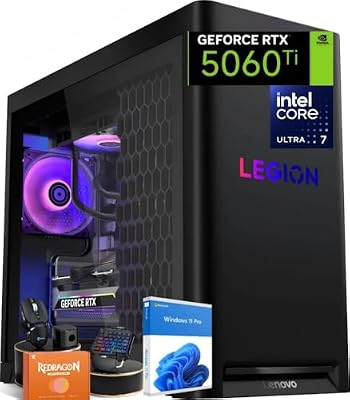
Lenovo Legion Tower 5i AI Gaming Desktop PC, Intel Ultra 7 Series 2 (20-Core) 265F, 32 GB DDR5 5600MHz RAM, 1 TB SSD, NVIDIA GeForce RTX 5060 Ti, Legion Liquid Cooling, Windows 11 Pro, Eclipse Black
Included for 'Lenovo Legion Tower Desktops in 2026: Which Configuration Is Worth It?' because the listing specifies Intel Ultra 7 Series 2 (20-Core) 265F and 32 GB DDR5 5600MHz RAM, details this guide uses to compare options.
View on AmazonLegion Tower Configurations Worth Shortlisting
Availability rotates constantly on Lenovo’s own store and through third-party sellers, and prices move week to week — always check current pricing before committing. These are the configurations most worth comparing right now.
How to Read Lenovo’s Confusing Config Codes
Every Legion Tower carries a machine type code in parentheses, like Legion Tower 5i Gen 8 (34IRB8). It is not random. The leading number is the chassis volume in liters — 34L in that example, 30L on the smaller variants. The I means Intel (an A in that slot means an AMD Ryzen build, which is also why the product name drops the “i”: Legion Tower 5 versus Legion Tower 5i). The letters that follow identify the platform and board revision, and the trailing digit repeats the generation.
Why this matters: the liter figure tells you which physical chassis you are getting, and the chassis determines cooler clearance, fan count and how much room a future GPU has. A 30L Tower 5i and a 34L Tower 5i are genuinely different machines wearing the same marketing name. When you compare two listings, compare the codes, not the headline model names. Retailers frequently list last-generation stock beside current stock with no visual difference in the thumbnail.
Tower 5i vs Tower 7i: What Actually Separates Them
The 7i is not simply “the faster one.” It is a different tier of chassis and cooling built around unlocked K-series silicon and top-end GPUs. If you are not buying an RTX 5080 or 5090, the 7i’s advantages largely go unused.
| Configuration | Typical CPU | Typical GPU | Cooling | Best for |
|---|---|---|---|---|
| Tower 5i — entry | Core Ultra 5 | RTX 5060 / 5060 Ti | Air tower cooler | 1080p high refresh, esports |
| Tower 5i — mid (the sweet spot) | Core Ultra 7 | RTX 5070 | Air or 240mm AIO | 1440p high/ultra, 100+ fps |
| Tower 5i — top | Core Ultra 7 / Ultra 9 | RTX 5070 Ti | 240mm AIO | 1440p ultra, entry 4K |
| Tower 7i | Core Ultra 9 (K-series) | RTX 5080 / 5090 | 360mm AIO | 4K ultra, ray tracing, streaming |
One quiet detail worth knowing: Lenovo often pairs F-suffix Intel chips (Core Ultra 7 265F, for example) in gaming configs. Those have no integrated graphics. That is fine while the GPU works, but it removes your ability to troubleshoot a dead card by plugging a monitor into the motherboard. Buyers coming from a laptop — and this site’s readers often arrive from our Legion laptop coverage — are frequently surprised by that.
Which CPU and GPU Pairings Make Sense
Most Legion Tower configurations are sensibly matched, but a few are not, and Lenovo’s discounting sometimes pushes the unbalanced ones to the front page.
Balanced: Core Ultra 5 with an RTX 5060 Ti, and Core Ultra 7 with an RTX 5070 or 5070 Ti. In both cases the CPU keeps the GPU fed at 1440p without you paying for headroom you will never touch.
Unbalanced, skip unless heavily discounted: a Core Ultra 9 paired with an RTX 5060 Ti. You are paying a large premium for cores that gaming will not use while the GPU is the limiter in every title. The reverse case — a Core Ultra 5 under an RTX 5070 Ti — is less damaging but still leaves performance on the table in CPU-heavy simulation and strategy games. If you play a lot of those, spend the money on the CPU tier rather than the GPU tier.
Also match the machine to the display you actually own. An RTX 5070 Ti behind a 1080p 60Hz panel is wasted silicon; budget for a 1440p high-refresh monitor before you climb a GPU tier.
RAM and Storage: Lenovo’s Upgrade Charges vs Doing It Yourself
This is where the most money is left on the table. Lenovo’s configurator charges a meaningful premium for RAM and SSD upgrades, and both are among the easiest parts to change yourself on a Legion Tower.
Buy the base RAM tier — usually 16GB or 32GB of DDR5 — and check how many DIMM slots your specific SKU has and how many are populated. Some configurations ship 32GB as two 16GB sticks in a four-slot board, which leaves a clean upgrade path. Others ship it as a single stick or fill all slots, which means any upgrade replaces rather than supplements. The Lenovo spec sheet lists this per SKU; it is worth reading before you order. Our notes on choosing DDR5 kits cover speed and capacity trade-offs in more detail.
Storage is even clearer. Legion Towers include M.2 slots and 2.5-inch bays, and adding an aftermarket NVMe drive costs a fraction of Lenovo’s per-terabyte upcharge. Take the 1TB boot drive and add your own second drive later.
The Proprietary Parts Question
Lenovo’s reputation here is worse than the current reality, but it is not spotless. Recent Legion Towers use standard ATX-form power supplies and standard motherboard mounting in the larger chassis, which is a real improvement over older Lenovo gaming desktops that used bespoke PSUs. What remains restricted is the firmware and the board itself.
| Component | Can you swap it? | What to watch for |
|---|---|---|
| Graphics card | Yes | Check card length and PSU wattage/connectors first; the stock PSU is sized for the stock GPU with little margin |
| RAM | Yes | Slot count varies by SKU; BIOS memory tuning options are limited compared with a retail board |
| NVMe / SATA storage | Yes | Easiest upgrade on the machine; confirm free M.2 slots for your SKU |
| Power supply | Usually yes on recent gens | Verify the unit is standard ATX before ordering — check the label inside the case, not the marketing page |
| CPU | Technically yes, practically limited | BIOS microcode support caps which chips work; no overclocking on locked boards |
| CPU cooler | Limited | Clearance in the 30L chassis is tight; radiator mounting points are fixed |
| Motherboard | No, in practice | OEM board with non-standard front-panel wiring; replacing it usually means replacing the case too |
| Case / front panel | No | Front I/O and RGB headers do not map to retail boards without adapters |
The honest summary: a Legion Tower is upgradeable as a GPU-and-storage machine for years, and a dead end as a platform. If your plan is to keep the same box through two CPU generations by swapping the board, buy something else.
Cooling and Noise Under Load
The stock air cooler on entry Tower 5i configurations is adequate rather than good. It holds the Core Ultra 5 and Ultra 7 within spec in games, but the fan curve is aggressive — the machine gets audibly louder within a minute of a game launching and stays there. Lenovo’s Vantage software offers performance/balanced/quiet modes, and balanced is genuinely the right default for most people; quiet mode throttles enough to cost frames in demanding titles.
Configurations with a 240mm or 360mm AIO run noticeably quieter under sustained load because the radiator fans spin slower for the same heat. The chassis front mesh and intake fan layout are decent; the common mistake is shoving the tower into a closed desk cabinet, which turns a quiet machine into a loud one. Basic airflow placement rules apply here as much as to any self-build.
What About the Bundled Keyboard and Mouse?
Legion Towers frequently ship with a membrane keyboard and a basic optical mouse. They work, and they are also the first things most buyers replace. Treat them as packing material, not as value, and do not let a bundle sway a comparison between configurations.
Prebuilt vs Self-Build at the Same Budget
Honestly: at identical spend, a self-build gives you roughly one GPU tier more performance, a better power supply, a better case, and full BIOS control. That gap is real and we are not going to pretend otherwise. Our prebuilt versus custom breakdown quantifies it across budgets.
What the Legion Tower buys you instead is a single warranty covering every part, a machine that boots the day it arrives, and no risk of a dead-on-arrival component becoming your problem to diagnose. Lenovo also discounts aggressively and often, and during a strong sale the value gap narrows considerably. The decision is less about price than temperament: if a failed POST is an interesting puzzle to you, build. If it is a ruined weekend, buy the Legion. Readers weighing the same choice at a fixed budget may find our mid-budget gaming PC picks a useful cross-check.
Which Lenovo Legion Tower Configuration Is Worth It in 2026?
Buy the Tower 5i with a Core Ultra 7 and an RTX 5070, in the largest chassis variant available, with base RAM and a 1TB SSD. Add memory and storage yourself. Step down to the RTX 5060 Ti only if you are locked to 1080p; step up to the Tower 7i only if you have a 4K display and intend to use it. Everything else in the lineup is either unbalanced or overpriced for what it delivers.
Related Guides
Frequently Asked Questions
Is the Legion Tower 5i’s power supply a standard ATX unit?
On recent generations, yes — Lenovo moved Legion Towers to standard-form ATX power supplies, unlike some older Lenovo gaming desktops. Because this has varied by generation and chassis size, verify it on your exact SKU before buying a replacement: open the side panel and read the label on the unit itself rather than trusting a retailer specification page.
Can I upgrade the graphics card in a Legion Tower later?
Yes, and it is the upgrade most owners actually make. The two constraints are physical length inside the chassis and the stock power supply, which Lenovo sizes closely to the shipped GPU rather than leaving generous headroom. Measure the available clearance, check the wattage and available power connectors, and plan on replacing the PSU if you jump more than one GPU tier.
How much RAM should I order from Lenovo?
Order the base tier, typically 16GB or 32GB of DDR5, and upgrade yourself. Lenovo’s configurator premium for memory is well above retail kit pricing. Before ordering, check how many DIMM slots your SKU has and how many arrive populated, because some configurations fill every slot and force you to replace rather than add sticks later.
Does the Legion Tower 7i justify its price over the Tower 5i?
Only if you are buying an RTX 5080 or 5090 and gaming at 4K. The 7i’s larger chassis, 360mm liquid cooling and unlocked K-series processor exist to feed and cool that class of card. Paired with anything less, you pay for thermal headroom and CPU performance that your games will never reach, making the 5i the better value.
Why does my Legion Tower have no display output on the motherboard?
Many Legion gaming configurations use Intel F-suffix processors, which ship with the integrated graphics disabled. All video must come from the discrete card, so the motherboard’s video ports are non-functional. This is normal and not a fault, but it does mean you cannot troubleshoot a suspected GPU failure by plugging your monitor into the board instead.