Affiliate disclosure: As an Amazon Associate we earn from qualifying purchases. This post contains affiliate links — we may earn a small commission at no extra cost to you. This never affects our picks. Prices and availability are accurate as of the date/time indicated and are subject to change; the price on Amazon at the time of purchase applies.
Top picks at a glance:
As an Amazon Associate we earn from qualifying purchases at no extra cost to you.


At $1000, the complete gaming setup turns serious. You move up to 27-inch 144Hz monitors, premium wireless peripherals, an entry-tier ergonomic chair, and a genuine sit-stand desk. This is the budget where you stop compromising on the parts you touch every day. The build below is what I’d put together for a young professional who games seriously after work and treats the setup as both office and gaming station.
Quick answer:
I’m Alex Rivera, a longtime builder, and the $1000 setup is where picking parts actually starts being fun for me.
🛒 Best Price Today on Amazon
Prime members get fast, free shipping on everything above, plus member-only deals. New members get a 30-day free trial — cancel anytime.
Setup Parts Breakdown
| Category | Pick | Why It’s Here | Approx Price (May 2026) |
|---|---|---|---|
| Monitor | LG 27GS75Q 27″ 1440p 180Hz IPS | Sharp 1440p, fast IPS, real HDR400 | $269 |
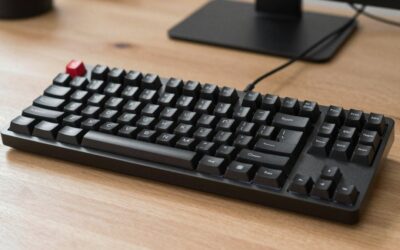
| Keyboard | Wooting 60HE+ hall-effect | Industry-leading rapid trigger, Snappy Tappy, tournament-grade | $195 |
| Mouse | Logitech G Pro X Superlight 2 | Refined ergonomics, 8000Hz polling, 90-hour battery | $159 |
| Mousepad | Artisan Hayate Otsu (XL) | Premium glide, lasts 3+ years | $59 |
| Headset | HyperX Cloud Alpha Wireless | 300-hour battery, excellent comfort, mic upgrade-friendly | $169 |
| Desk | FlexiSpot E7 Pro sit-stand frame + 60″ bamboo top | Smooth motor, repairs available, holds 35kg | $329 |
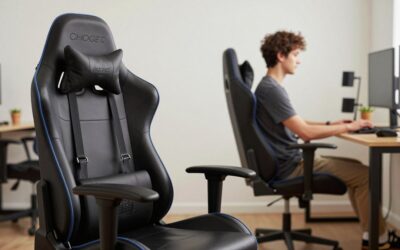
| Chair | Used Steelcase Leap V2 or new Sihoo Doro C300 | Real ergonomic chair under $300 | ~$300 |
The total lands at $1480 MSRP if you buy everything new. The realistic build cost – used chair (Leap V2 around $200) plus routine Wooting/Logitech sales – runs $980-1050. The chair and desk are the biggest line items, and both are worth it for the long haul.
Performance Expectations
This setup pairs with a $1000-1500 gaming PC (RTX 5070 tier) for an excellent overall experience:
- 27″ 1440p 180Hz IPS: Sharp, fast, color-accurate enough for casual creative work and competitive gaming alike
- Wooting 60HE+: Rapid trigger and Snappy Tappy give measurable advantages in counter-strafing games (CS2, Valorant)
- G Pro X Superlight 2: 60g wireless with the most consistent sensor in the industry, 8000Hz polling
- Cloud Alpha Wireless: 300+ hour battery is genuinely useful, sound quality competes with $300 headsets
- Sit-stand desk: Real productivity boost for work-from-home, reduces back fatigue during long gaming sessions
- Ergonomic chair: Steelcase Leap V2 will outlast 4-5 PCs; Sihoo Doro is the new-chair budget option
The compound effect of premium inputs at this tier is real. Once you’ve spent six months with a hall-effect keyboard and an 8000Hz wireless mouse, dropping back to membrane and wired feels archaic.
Where to Skip and Where to Splurge
Skip: OLED at this budget. 27″ 1440p OLEDs start around $600 and eat your peripheral and chair budget. Skip the marketing-heavy gaming chair brands (Secretlab, DXRacer, Razer Iskur), the office-furniture ergonomic chairs win on long-term comfort. Skip dedicated streaming gear; the Cloud Alpha Wireless mic is enough for Discord and casual streaming.
Splurge: The chair. A real ergonomic chair (Leap V2, Embody, Aeron) is the single biggest quality-of-life upgrade in any setup. Splurge on the desk frame; FlexiSpot E7 Pro outlasts cheap motors that fail in 2-3 years. Splurge on the keyboard; you spend more time with it than any other peripheral.
Upgrade Path
This setup grows in clear, incremental upgrades:
- +$300: Upgrade monitor to 27″ 1440p 240Hz QD-OLED (MSI 271QR, LG 27GS95QE)
- +$200: Add a secondary 27″ monitor for productivity, dual-monitor mount
- +$150: Webcam (Logitech MX Brio) and dedicated mic (Shure MV6 USB) for streaming
- +$100: LED bias lighting, Govee strip behind monitor, soft front fill
- +$80: Monitor arm to clear desk space
The route from this $1000 setup to an $1800 one is the next guide up. The path to a $2500 streaming setup is two upgrades beyond that.
Bottlenecks to Watch
At this budget, the bottlenecks stop being the gear and become the room and the body:
- Chair height match: Sit-stand desk needs to coordinate with chair. Test the sitting height range before buying
- Cable management: Dropping cables from a moving desk is messy. Buy a cable tray ($25)
- Room lighting: 27″ 1440p IPS shows reflections aggressively. Add bias lighting and consider blackout curtains
- Wrist position: Wooting 60HE+ is small; high-mount keyboard trays can cause wrist deviation. Use a wrist rest
- Audio environment: Wireless headsets shine in quiet rooms; if the room is loud, closed-back wired is still king
Frequently Asked Questions
Why 1440p 180Hz instead of 1440p 240Hz? Budget. 240Hz 1440p panels cost $400+ in 2026. The 180Hz LG hits the sweet spot at $269. Step up later when budget allows.
Is the Wooting 60HE+ overkill? If you play competitive shooters, no. Rapid trigger is a measurable advantage. If you only play strategy or RPGs, the K2 HE at $99 is enough.
Why not a Razer or Logitech keyboard? The HE switch class (Wooting, Akko MOD HE) is genuinely better for gaming than any mechanical board. Razer Huntsman V3 HE is competitive but more expensive.
Sihoo Doro vs Steelcase Leap V2? Sihoo Doro C300 is the best new chair under $300. Steelcase Leap V2 is the best chair under $300 if you can find one used. Both will be vastly more comfortable than any gaming chair.
Is 60% keyboard too small? If you use the function row a lot for work, get a TKL (75% or 80%) instead. Wooting 80HE exists for $230. For pure gaming, 60% is fine.
Should I add desk mat? Yes, a $20-30 desk mat protects the wood and acts as a giant mousepad for low-DPI players.
Final Take
The $1000 setup is where I’d settle in and stay for years if I didn’t write about gear for a living. Everything here is durable, ergonomic, and tournament-viable. The chair and desk in particular will last a decade with light maintenance.
The single biggest mistake at this budget is overspending on the monitor and underspending on the chair. Flip that priority and you’ll thank yourself five years out, when your back still works.
I’d build this for any work-from-home professional who games seriously, no hesitation.
Related Guides
Ready to decide? Our #1 pick for 2026 is the Monitor.
Live price & availability on Amazon.