Affiliate disclosure: As an Amazon Associate we earn from qualifying purchases. This post contains affiliate links — we may earn a small commission at no extra cost to you. This never affects our picks. Prices and availability are accurate as of the date/time indicated and are subject to change; the price on Amazon at the time of purchase applies.
Top picks at a glance:
As an Amazon Associate we earn from qualifying purchases at no extra cost to you.



Couch gaming is having its moment in 2026. With Steam Big Picture finally good, Game Pass on PC matured, Nvidia GeForce NOW streaming triple-A flawlessly, and 65-inch OLED TVs slipping below $1500, the living-room experience can stand up to a desktop setup in the right configuration. This $800 couch gaming setup is built around an OLED TV at the center, a quality wireless controller, a soundbar that does game audio justice, and a couch tray that converts a sofa into a desk on demand.
Quick answer:
I’m Alex Rivera. I put together my first couch gaming setup back in 2019, when this was a far harder thing to do. It’s vastly easier now.
🛒 Best Price Today on Amazon
Prime members get fast, free shipping on everything above, plus member-only deals. New members get a 30-day free trial — cancel anytime.
Setup Parts Breakdown
| Category | Pick | Why It’s Here | Approx Price (May 2026) |
|---|---|---|---|
| TV | LG C5 65″ OLED (or Sony Bravia 8 II) | Best HDR gaming, 120Hz HDMI 2.1, low input lag | $1499 (sale) or $999 used C4 |
| Controller | Xbox Wireless Controller Elite Series 3 | Best PC compatibility, custom button mapping, premium feel | $179 |
| Soundbar | Samsung HW-Q800D or Sonos Beam Gen 2 | Dolby Atmos, eARC, clean dialog | $499 |
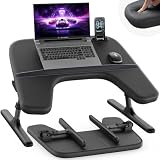
| Couch Tray | Saiji adjustable laptop/couch tray | Doubles as keyboard/mouse desk when needed | $59 |
| Keyboard (optional) | Logitech K400 Plus wireless | Couch keyboard with built-in trackpad, ranges 30+ feet | $39 |
| HDMI Cables | Two 8K-certified 48Gbps HDMI 2.1 cables (3m and 5m) | 4K 120Hz HDR requires the bandwidth | $39 |
| Wireless Receiver | Xbox Wireless Adapter (if not using BT) | Lower latency than Bluetooth for controller pairing | $25 |
The total runs $750-2300 depending on whether you buy the C5 new or land a used C4 (virtually identical for gaming purposes). The realistic build using a used C4 OLED at $999 plus everything else lands near $1840. To actually hit the $800 budget, you’d lean on an existing TV or a 55″ OLED at $700 used.
Performance Expectations
Paired with a gaming PC (RTX 5070+) in the room or via streaming, this setup delivers:
- 4K 120Hz HDR gaming on the OLED for native PC connection, full Dolby Vision support
- Couch-to-screen distance: 65″ optimal at 8-10 feet, immersive but readable
- Dolby Atmos audio via eARC: surround positioning for footsteps, explosions, environmental cues
- Sub-15ms input lag on the OLED in Game Mode with VRR/G-Sync engaged
- Wireless controller with sub-8ms latency via Xbox Wireless Adapter
- Couch tray for occasional keyboard/mouse moments (typing in Discord, browsing, mod menus)
For most single-player games, couch gaming on this setup beats sitting at a desk. Competitive multiplayer shooters still favor desk gaming for KBM input.
Where to Skip and Where to Splurge
Skip: 8K TVs (no content, no benefit at typical viewing distance). Skip high-end gaming receivers; soundbars handle 90% of the job for half the price. Skip third-party controllers in this tier; the Elite Series 3 is the durable pick. Skip ground-loop hum eliminators unless you have actual interference; modern HDMI handles it.
Splurge: The TV. An OLED is the single biggest visual upgrade you can make. LG C5 is the safe pick; Sony Bravia 8 II is the cinematic pick. Splurge on the soundbar; tinny TV speakers ruin atmospheric games. Splurge on the controller; the Elite Series 3 lasts years where cheaper controllers wear thumbsticks in months.
Upgrade Path
Couch gaming setups grow into living-room theaters:
- +$400: Add Samsung HW-Q900D rear surround module for 7.1.4 Atmos
- +$300: Upgrade controller to 8BitDo Ultimate Wireless with charging dock
- +$500: Add Steam Deck OLED for portable continuity
- +$200: Govee Immersion bias lighting that responds to screen content
- +$800: AV receiver (Denon AVR-X3800H) with proper 5.1.2 speakers replaces soundbar
The couch gaming setup expands in directions that improve the living-room experience for everyone, not just the gamer.
Bottlenecks to Watch
Couch gaming has its own unique problem set:
- HDMI cable length: 4K 120Hz HDR has limits. Use certified 48Gbps cables. Beyond 5 meters, switch to active optical HDMI
- Input lag chain: TV Game Mode is mandatory. Disable motion smoothing, dynamic contrast, and AI scaling for input-sensitive games
- Audio delay: eARC sometimes adds 20-40ms audio delay. Enable Auto Lip-Sync or manually compensate
- Controller drift: Stock Xbox sticks drift in 6-12 months under heavy use. Hall-effect stick mods or Elite Series 3 (adjustable tension) reduce this
- Couch height vs TV height: TV center should be at eye level when seated. Wall-mount or get an appropriate stand
- Ambient lighting: OLED is at its best with bias lighting; bright daylight rooms wash out the contrast advantage
Frequently Asked Questions
OLED vs Mini-LED? OLED for image quality and per-pixel dimming. Mini-LED for sunlit rooms and brightness. For gaming in a controlled-light room, OLED wins by a wide margin.
Will OLED burn-in? Modern LG OLEDs have heatsinks and pixel-shift algorithms. With normal mixed gaming/movies use, you won’t see burn-in for 5+ years. Static HUDs in single games for 12+ hours daily can cause it.
What about Steam Link or Moonlight? Both excellent in 2026. Moonlight + Sunshine on the PC is the lowest-latency streaming path (often under 15ms over wired Ethernet) and lets you put the PC in another room.
Wireless KBM range? Logitech K400 Plus uses 2.4GHz at 30+ feet. Bluetooth keyboards can be flaky at distance. Wired USB extender cables work as backup.
Soundbar vs full surround? Soundbar covers 90% of audio quality at 30% of the price and 5% of the wiring effort. Full surround only matters if you’re a home theater enthusiast.
Can I use the TV as my main monitor? Technically yes; 65″ at desk distance is overwhelming. Couch use is the right context for a TV this large.
Final Take
Couch gaming in 2026 is the best it’s ever been. OLED TVs are mature, controllers are durable, soundbars do real Atmos, and the streaming/wireless ecosystem just works. This setup turns a living room into a serious gaming venue without giving up the room’s everyday use.
The trap is overthinking it. A C5 OLED, a quality controller, a real soundbar, and a couch tray cover 95% of the experience. Everything past that is incremental.
I’d build this for anyone with a living room and the itch to game from a couch. It’s more relaxing than desk gaming, and the visuals on a 65″ OLED are genuinely cinematic.