Affiliate disclosure: As an Amazon Associate we earn from qualifying purchases. This post contains affiliate links — we may earn a small commission at no extra cost to you. This never affects our picks. Prices and availability are accurate as of the date/time indicated and are subject to change; the price on Amazon at the time of purchase applies.
Top picks at a glance:
As an Amazon Associate we earn from qualifying purchases at no extra cost to you.


A full gaming setup for under $500 in 2026 is genuinely doable, and the result no longer feels like the compromise budget setups were five years ago. Mid-range peripheral quality has caught up with what used to be flagship territory: hall-effect switches in cheap keyboards, 8000Hz wireless mice for $50, and the new wave of 24-inch 180Hz IPS panels at the $130 mark. This guide assembles a complete desk-to-display setup for someone building from scratch on a tight budget.
Quick answer:
I’m Alex Rivera. I’ve been recommending budget gear for years, and the 2026 entry tier is the best it has ever been.
🛒 Best Price Today on Amazon
Prime members get fast, free shipping on everything above, plus member-only deals. New members get a 30-day free trial — cancel anytime.
Setup Parts Breakdown
| Category | Pick | Why It’s Here | Approx Price (May 2026) |
|---|---|---|---|
| Monitor | KTC H24V13 24″ 180Hz 1080p IPS | Genuinely good IPS panel, low input lag, FreeSync | $129 |
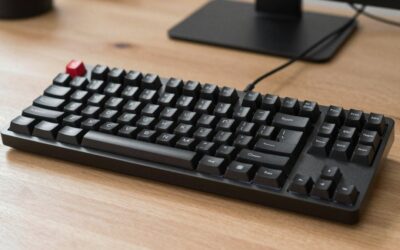
| Keyboard | Keychron K2 HE wireless hall-effect | HE switches at a budget price, programmable actuation | $99 |
| Mouse | Lamzu Maya X wireless | 55g, 8000Hz polling, PixArt 3950 sensor | $59 |
| Mousepad | Artisan Hien (medium) or Pulsar ES2 | Quality glide, lasts years | $32 |
| Headset | HyperX Cloud III wired | Comfortable, good mic, no wireless premium | $79 |
| Desk | IKEA Linnmon 47″ + Adils legs | Cheap, sturdy, repaintable, lasts forever | $49 |
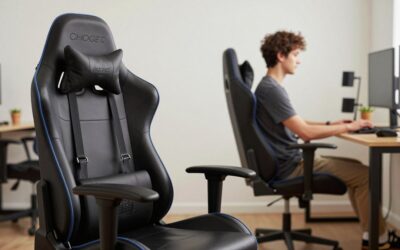
| Chair | Used or refurbished Steelcase Leap V1 | Better than any new $200 gaming chair, check Craigslist or Facebook Marketplace | ~$60-80 used |
The total lands around $506-526 depending on chair luck. A new office chair (instead of a used Steelcase) bumps it to $570+. If you’re shopping fresh and willing to settle for a budget mesh chair like the HBADA E3, you stay at $480.
Performance Expectations
This setup pairs with a budget gaming PC (RTX 4060/5060-tier) to deliver genuinely competitive performance:
- 180Hz at 1080p on the monitor is enough for any competitive shooter, well below your reaction time
- HE keyboard with adjustable actuation gives you tournament-grade input device for a fraction of the price
- 8000Hz wireless mouse at 55g matches what pro players used in 2024-2025
- Wired headset avoids battery anxiety; sound quality at this price beats wireless rivals at the same budget
- Comfortable for 6-8 hour sessions if the chair is good (the Steelcase pick is the single biggest comfort upgrade)
You’re not getting OLED, wireless headphones, or a sit-stand desk. What you are getting is a setup that competes on the inputs that actually affect gameplay.
Where to Skip and Where to Splurge
Skip: Wireless headsets at this budget; both battery life and audio quality drop. Skip RGB everything; under $500 the money is better spent on the panel and switches. Skip cheap mechanical keyboards with rubber-dome-feeling membrane switches sold as “gaming”; the HE switch revolution made $99 the new floor for keyboards worth owning. Skip new gaming chairs in this range; they wear out in two years.
Splurge: The mousepad. Spending $30 on an Artisan Hien improves aim consistency more than any other equivalent upgrade. Splurge on a used Herman Miller or Steelcase over a new gaming chair; ergonomics over aesthetics every time. And splurge on a proper monitor arm if you can stretch another $25; it reclaims desk space dramatically.
Upgrade Path
This setup is designed to grow with you:
- +$200: Swap the monitor to a 27″ 1440p 180Hz IPS. The keyboard and mouse stay.
- +$150: Add a 32″ monitor arm with cable management and a second display
- +$100: Upgrade to wireless headset (HyperX Cloud II Wireless) when you can
- +$200: Standing desk frame retrofit; the IKEA Linnmon top works on most aftermarket frames
- +$300: Sennheiser HD 560S + dedicated mic combo when audio quality starts mattering
Three years out this setup will be unrecognizable, but you can stage the upgrades over time rather than buying everything at once.
Bottlenecks to Watch
The bottlenecks in budget setups are rarely the gear – they’re the room:
- Posture: Bad chair + low desk + no monitor arm = back pain. Fix the chair first
- Lighting: Glare on a non-IPS panel ruins games. Either curtain the window or add a small bias light
- Audio bleed: Cloud III is open enough that loud music annoys roommates. Closed-back like the Cooler Master MH752 fixes this for similar money
- Desk height: IKEA Adils legs are 27.5″ tall, which is on the short side. Add 2″ leg risers ($15) if you’re over 6 feet tall
- Internet: A $30 router upgrade often outperforms hardware upgrades for online gaming feel
Frequently Asked Questions
Why not a 27-inch monitor? 27″ 1080p looks stretched and pixelated. At this budget, 24″ 1080p 180Hz is the sharpest pairing. Move to 27″ only once you can afford 1440p.
Is the Steelcase Leap V1 really available used for under $100? Yes, especially in major US cities. Office liquidations after WFH shifts flooded the market. Patience plus Facebook Marketplace alerts will land you one.
What about an HE keyboard for under $100? The Keychron K2 HE is the budget pick. The Wooting 60HE+ is the better pick at $175. The Akko MOD 008B Pro HE runs around $130 with strong build quality.
Wired vs wireless mouse? Wireless has caught up entirely. Lamzu, Pulsar, and Endgame Gear all ship sub-60g wireless mice for $50-80 with 8000Hz polling. Wired only matters if you can’t charge regularly.
Do I need a webcam? A phone tripod plus apps like Camo turn your phone into a 4K webcam for free. Skip dedicated webcams at this budget.
What desk size do I need? 47″ wide minimum for monitor, keyboard, mouse, and room for a drink. 55-60″ is more comfortable if your room allows.
Final Take
A $500 gaming setup in 2026 isn’t a stopgap. The mid-tier peripheral market has matured to the point where the keyboard and mouse here are tournament-viable, the monitor is great for everything except color-critical work, and the chair (if you score a used Steelcase) will outlast multiple PC upgrades.
The trap is buying flashy gaming-branded gear at this budget. Pre-built peripheral bundles, RGB-heavy keyboards from Walmart, and $40 “gaming chairs” all look the part but feel terrible. Stick to the picks above and you’ll be ahead of most setups twice the price.
I’d put a new gamer on this setup without a second thought.
Related Guides
Ready to decide? Our #1 pick for 2026 is the Monitor.
Live price & availability on Amazon.