Affiliate disclosure: As an Amazon Associate we earn from qualifying purchases. This post contains affiliate links — we may earn a small commission at no extra cost to you. This never affects our picks. Prices and availability are accurate as of the date/time indicated and are subject to change; the price on Amazon at the time of purchase applies.
Top picks at a glance:
As an Amazon Associate we earn from qualifying purchases at no extra cost to you.





The esports pro setup is the most opinionated category in this whole guide series. Every choice answers a single question: lowest possible end-to-end latency from intent to on-screen action. Nothing else counts – not aesthetics, not battery life, not feature totals. Just latency. This $1200 setup is what I’d build for someone genuinely chasing tournament play in Valorant, CS2, Apex, or the new Rainbow Six 2026.
Quick answer:
I’m Alex Rivera. I’m not a pro, but I’ve built setups for several, and the gap between this list and a flashy “esports” marketing build is enormous.
🛒 Best Price Today on Amazon
Prime members get fast, free shipping on everything above, plus member-only deals. New members get a 30-day free trial — cancel anytime.
Setup Parts Breakdown
| Category | Pick | Why It’s Here | Approx Price (May 2026) |
|---|---|---|---|
| Monitor | ASUS ROG Swift PG27AQNR 360Hz QD-OLED 1440p | Lowest input lag panel in 2026, fastest pixel response | $599 |
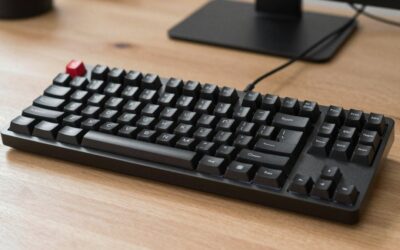
| Keyboard | Wooting 60HE+ with Lekker switches | Sub-1ms wireless rapid trigger, Snappy Tappy | $195 |
| Mouse | Logitech G Pro X Superlight 2 (or Razer Viper V3 Pro) | 55g, 8000Hz polling, HERO 2 sensor | $159 |
| Mousepad | Artisan Hien Mid XL or Hayate Otsu XL | Tournament-standard glide, lasts 2-3 years before refresh | $59 |
| Headset | HyperX Cloud III Wired (or Beyerdynamic DT 770 Pro) | Wired for zero latency, focus on positional audio | $79 |
| Mic | HyperX QuadCast S USB or Antlion ModMic Wireless GameDAC | Clear team comms without affecting audio chain | $59 |
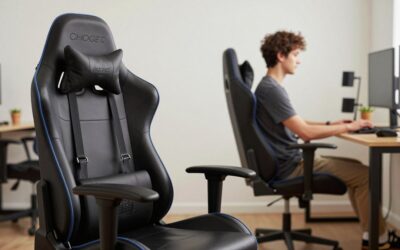
| Chair | Tactical chair (Secretlab Titan EVO or used Steelcase Series 2) | Long-session support, doesn’t break the budget | $300-500 |
| Desk | Existing or budget 60″ straight desk (not sit-stand) | Pro players sit; standing introduces aim inconsistency | $100-150 |
The total runs $1450-1700 MSRP. With a used chair and routine sales the build lands at $1100-1250. Every item is chosen for tournament viability, not aesthetics.
Performance Expectations
Paired with a competitive PC (Ryzen 7 9700X + RTX 5070 at minimum), this setup delivers the following:
- 360Hz QD-OLED: True 0.03ms pixel response, ~2ms input lag, the lowest motion blur on any panel in 2026
- Wooting 60HE+: Sub-1ms USB polling, rapid trigger advantages in counter-strafing games measurable in pixels of crosshair correction
- G Pro X Superlight 2: Reference-grade sensor, no acceleration, smooth tracking from low DPI to high
- Wired headset: Zero wireless latency, positional audio for footsteps and reload cues
- Dedicated USB mic: Team comms quality without using the headset’s mic, frees headphone audio chain
- End-to-end latency: With NVIDIA Reflex 2 enabled, total click-to-photon under 12ms in CS2 at competitive settings
The compounding effect of every component shaving 1-3ms is real. A fully latency-optimized chain can feel measurably tighter than mismatched flagship gear.
Where to Skip and Where to Splurge
Skip: Wireless headsets, even good ones – the 2-5ms Bluetooth latency isn’t worth it. Skip keyboard RGB; some implementations add 1-2ms of scan latency. Skip “gaming chairs” with bucket seats; they restrict shoulder rotation. Skip sit-stand desks; pros sit because consistent posture means consistent aim. Skip 4K monitors; they cap framerate exactly where you need it most.
Splurge: The monitor. A 360Hz QD-OLED is a genuine competitive advantage and the single biggest latency win available in 2026. Splurge on the mouse; the G Pro X Superlight 2’s sensor consistency is real. Splurge on a good mousepad; cheap pads slow down within 6 months as they pill.
Upgrade Path
Esports setups aren’t so much “upgraded” as “replaced incrementally”:
- 2027: 480Hz QD-OLED panels are rumored to drop; an incremental but real upgrade
- 2026 H2: Razer Viper V4 Pro is expected with refinements to sensor smoothing
- Mousepad refresh: Every 18-24 months as the surface dulls
- Mouse skates: PTFE skates replaced quarterly for consistent glide
- Switches: Lekker hall-effect switches in the Wooting are tunable; firmware updates improve performance
The chair and mic should outlive everything else on the list; plan on 5+ years from both.
Bottlenecks to Watch
At the pro tier, every system component has to be tuned together:
- Network latency: Wired Ethernet to tournament-grade router. Wi-Fi is non-negotiable disqualification. ISP routing matters; some ISPs have 30ms+ disadvantage to game servers
- Driver overhead: Disable Windows fullscreen optimizations, enable NVIDIA Reflex + Boost, set GPU power management to max performance
- Polling vs CPU load: 8000Hz polling can add CPU overhead. Test in your specific games; some titles benefit, some don’t
- Display sync: G-Sync + cap at 357 FPS (3 below refresh rate) is the latency-optimal config for 360Hz
- USB chain: Don’t share USB hubs between mouse, keyboard, and audio. Each on its own root controller if motherboard allows
- Body: At pro level, the limit is your reaction time and aim consistency, not the gear. Practice still matters more than buying lists
Frequently Asked Questions
Why not 540Hz LCD? The 540Hz TN and IPS panels exist, but their pixel response time and color quality trail 360Hz QD-OLED. Most pros prefer 360Hz OLED in 2026.
What about a wired mouse for zero latency? Modern 2.4GHz wireless (Logitech LIGHTSPEED, Razer HyperSpeed) has fully matched wired latency. The drag-free absence of a cable is worth the trade.
Should I get a 1080p monitor for higher FPS? 1440p 360Hz is the new standard for competitive play in 2026. The clarity edge in spotting enemies at distance outweighs the small FPS cost.
Why HyperX Cloud III instead of an audiophile headphone? The Cloud III has competitive positional-audio tuning. Audiophile cans are great for music but can muddy footstep cues. The Beyerdynamic DT 770 Pro is the upgrade pick if you want both.
Wooting 60HE+ vs Razer Huntsman V3 HE? Wooting has the most refined Snappy Tappy implementation and the strongest open-community support. The Huntsman V3 is competitive but lacks the same software depth.
Do pro players use these exact products? Many of them, yes. Browse pro player gear lists at prosettings.net. The keyboards, mice, and mousepads here appear in dozens of tournament loadouts.
Final Take
The esports pro setup is the build that proves restraint wins. No RGB, no wireless headset, no fancy chair brand, no sit-stand desk. Every dollar goes to latency reduction and consistency. The result feels stripped-down and almost clinical – and that’s exactly the point.
At $1200, this setup is more competitive than $3000 builds that prioritize aesthetics. If you genuinely want to climb ranks, this is the answer. If you want a pretty setup you also game on, the other guides in this series are for you.
At $1200, this setup outperforms $3000 builds that chase aesthetics. If you genuinely want to climb the ranks, this is the answer. If you want a pretty setup you also game on, the other guides in this series are for you.
Related Guides
Ready to decide? Our #1 pick for 2026 is the Monitor.
Live price & availability on Amazon.
Top picks from this guide
 EvounicEvounic Gaming PC Desktop Computer RTX 4060, i7-11700F, 16GB DDR4…$1,050 \xc2\xb7 99/100
 HsmienkLarge Extended Gaming Mouse Pad with Stitched Edges (31.5X15.7In) Mousepad$13 \xc2\xb7 99/100
 RazerRazer Viper V3 Pro Wireless Esports Gaming Mouse, 55g Lightweight,…$126 \xc2\xb7 99/100
 RazerRazer Viper V3 Pro 8khz Wireless Esports Gaming Mouse, Sentinels…$130 \xc2\xb7 99/100