🛒 Best Price Today on Amazon
Prime members get fast, free shipping on everything above, plus member-only deals. New members get a 30-day free trial — cancel anytime.
- Quick Comparison
- How We Chose the Best Hybrid Mice
- Razer Pro Click V2 — Best Overall for Work and Gaming
- Keychron M6 8K — Best Flexible Value Hybrid
- Razer Basilisk V3 Pro 35K — Best Gaming-First Hybrid
- Logitech G502 X LIGHTSPEED — Best for Programmable Controls
- Corsair DARKSTAR WIRELESS — Best for Button-Heavy Workflows
- Logitech MX Master 4 — Best Productivity-First Choice
- How to Choose a Mouse for Productivity and Gaming
- FAQ
- Conclusion
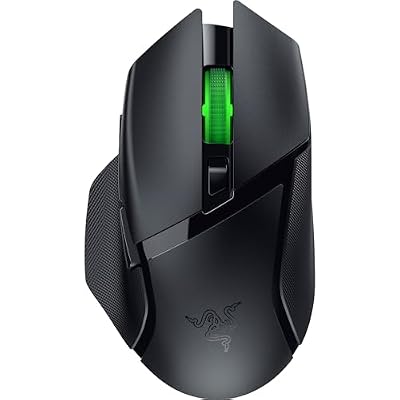
Razer Basilisk V3 X HyperSpeed Customizable Wireless Gaming Mouse, Black | Mechanical Switches Gen-2, 5G Advanced 18K Optical Sensor, Chroma RGB, 9 Programmable Controls, 285 Hr Battery
Included for 'Best Mouse for Productivity and Gaming: 6 Versatile Picks' because the listing specifies Black and Mechanical Switches Gen-2, details this guide uses to compare options.
View on AmazonThe best mouse for productivity and gaming should handle spreadsheets, editing, browsing, and long documents without giving up responsive tracking, low-latency wireless, or programmable controls for games. These six picks cover balanced hybrids, gaming-first options, button-heavy workflows, and productivity-first use.
Quick Comparison
| Mouse | Best For | Connectivity | Productivity Strength | Main Trade-Off |
|---|---|---|---|---|
| Razer Pro Click V2 | Best balanced work-and-play mouse | 2.4 GHz, Bluetooth, USB-C wired | Multi-device switching, dual-mode wheel, programmable buttons | Heavier than competitive FPS mice |
| Keychron M6 8K | Best flexible value option | 2.4 GHz, Bluetooth, wired | Dual scrolling, many controls, multiple connection modes | Specifications vary by M6 version |
| Razer Basilisk V3 Pro 35K | Best gaming-first hybrid | 2.4 GHz, Bluetooth, wired | HyperScroll wheel, 11 programmable buttons, profiles | 112 g design favors control over ultralight handling |
| Logitech G502 X LIGHTSPEED | Best for programmable controls | LIGHTSPEED wireless | 13 controls, dual-mode tilt wheel, long battery life | Less focused on multi-device switching |
| Corsair DARKSTAR WIRELESS | Best for button-heavy workflows | 2.4 GHz, Bluetooth, wired | 15 programmable buttons, five onboard profiles | Dense thumb controls require adjustment |
| Logitech MX Master 4 | Best productivity-first option | Logi Bolt, Bluetooth | MagSpeed scrolling, horizontal wheel, multi-device workflow | 125 Hz report rate limits competitive gaming |
How We Chose the Best Hybrid Mice
A strong hybrid mouse needs more than a high DPI number. For work, useful traits include fast scrolling, side buttons, multi-device switching, comfortable ergonomics, and reliable battery life. For gaming, low-latency 2.4 GHz wireless, a capable sensor, stable tracking, and sensible button placement matter more than office extras.
The list below separates true work-and-play hybrids from models that lean strongly toward one side. That distinction matters because a productivity-first mouse can feel slow in competitive games, while a gaming-first mouse may lack Bluetooth switching or office-focused scrolling. The right balance depends on how you divide your day.
Razer Pro Click V2 — Best Overall for Work and Gaming
Razer Pro Click V2 is the most balanced option here because its office features do not require giving up gaming-grade responsiveness. The ergonomic shell, dual-mode wheel, multi-device support, and programmable controls suit long work sessions, while 2.4 GHz wireless and a 1,000 Hz polling rate keep it responsive for mainstream PC gaming.
| Category | Details |
|---|---|
| Best For | Users splitting their day between productivity and gaming |
| Key Features | Focus Pro 30K optical sensor, 1,000 Hz over 2.4 GHz or wired, nine programmable buttons, dual-mode tilt wheel, multi-host connectivity |
| What Makes It Different | Combines an office-oriented ergonomic shape with gaming-focused tracking and wireless performance |
| Use Case | Workstation during the day, gaming PC after work |
| Who It’s For | Professionals, creators, remote workers, and gamers wanting one primary mouse |
Pros
- Supports 2.4 GHz, Bluetooth, and USB-C wired operation
- Bluetooth can connect with multiple hosts
- Free-spin and tactile scrolling suit work and games
- Programmable controls can handle application shortcuts
- Battery rating reaches up to 3.5 months under Razer’s standard conditions
Cons
- Approximately 110 g, so it is not an ultralight FPS mouse
- Right-handed ergonomic design
- Full customization benefits from Razer Synapse
Keychron M6 8K — Best Flexible Value Hybrid
Keychron M6 is compelling for users who want productivity features without paying for a premium office mouse. Its dual scrolling, extra buttons, Bluetooth, 2.4 GHz wireless, wired mode, and high-polling variants make it unusually flexible. The trade-off is that several sensor and wheel versions exist, so check the exact configuration.
| Category | Details |
|---|---|
| Best For | Users wanting office controls plus high-polling gaming |
| Key Features | PixArt 3950 on the 8K version, up to 30,000 DPI, up to 8,000 Hz wired or 2.4 GHz, Bluetooth 5.3, dual scrolling |
| What Makes It Different | Offers productivity-style scrolling together with an 8K gaming configuration |
| Use Case | Coding, spreadsheets, editing, browsing, and fast PC gaming |
| Who It’s For | Buyers who want one feature-rich mouse and are willing to choose the correct M6 variant |
Pros
- 2.4 GHz, Bluetooth, and wired connections
- High-polling option for gaming
- Horizontal and conventional scrolling functions
- More than ten customizable controls
- 8K version uses an ergonomic 86 g design
Cons
- M6 versions use different sensors, switches, wheels, and polling rates
- Maximum polling reduces battery runtime
- Buyers must verify the exact variant before ordering
Razer Basilisk V3 Pro 35K — Best Gaming-First Hybrid
Razer Basilisk V3 Pro 35K is the strongest choice for users who prioritize gaming but still want serious desktop utility. Its free-spin and tactile wheel modes, tilt scrolling, multiple programmable buttons, Bluetooth, and onboard profiles help with work, while the 35K sensor and low-latency wireless are built around fast, precise play.
| Category | Details |
|---|---|
| Best For | Gaming-first setups that still need productivity controls |
| Key Features | Focus Pro 35K Optical Sensor Gen-2, 11 programmable buttons, five onboard profiles, four-way HyperScroll Tilt Wheel |
| What Makes It Different | Its scroll system can serve both rapid document navigation and precise game inputs |
| Use Case | FPS, RPG, general PC gaming, browsing, editing, and office shortcuts |
| Who It’s For | Gamers who want extensive controls without using a separate work mouse |
Pros
- 2.4 GHz HyperSpeed, Bluetooth, and wired connectivity
- Free-spin and tactile wheel modes
- Eleven programmable buttons
- Five onboard profiles
- Rated for up to 140 hours on HyperSpeed or 210 hours on Bluetooth
Cons
- Approximately 112 g
- Larger and heavier than esports-oriented ultralight mice
- Extensive features may be unnecessary for minimalist users
Logitech G502 X LIGHTSPEED — Best for Programmable Controls
Logitech G502 X LIGHTSPEED suits users who want many programmable controls and a familiar gaming-first shape for both work and play. The dual-mode wheel is useful for long documents, while the side controls can handle shortcuts or macros. Its biggest limitation for mixed-device productivity is the lack of Bluetooth-style multi-host switching.
| Category | Details |
|---|---|
| Best For | Gaming, macros, application shortcuts, and long desktop sessions |
| Key Features | LIGHTSPEED wireless, 13 programmable controls, LIGHTFORCE switches, dual-mode tilt scroll wheel |
| What Makes It Different | Provides unusually extensive button customization without using an MMO-style thumb grid |
| Use Case | Gaming, editing commands, browser shortcuts, push-to-talk, and productivity macros |
| Who It’s For | Users who prefer a gaming-first design but frequently automate desktop actions |
Pros
- Thirteen programmable controls
- Hyper-fast and ratcheted wheel modes
- Left and right wheel tilt inputs
- Up to 140 hours of stated battery life
- Approximately 102 g chassis
Cons
- Connectivity centers on Logitech LIGHTSPEED rather than a multi-host Bluetooth workflow
- Heavier than current ultralight competitive mice
- Right-handed shape will not suit every grip
Corsair DARKSTAR WIRELESS — Best for Button-Heavy Workflows
Corsair DARKSTAR WIRELESS is the most button-heavy option in this roundup, making it useful for MMO gaming, editing shortcuts, browser commands, and repetitive work. Fifteen programmable buttons create a broad command surface, while 2.4 GHz and Bluetooth cover desk and mobile use. The layout is best for users who actually need many inputs.
| Category | Details |
|---|---|
| Best For | MMO players, macro users, editors, and shortcut-heavy workflows |
| Key Features | 15 programmable buttons, six-button thumb cluster, MARKSMAN 26K sensor, five onboard profiles |
| What Makes It Different | Places significantly more commands under the hand than conventional hybrid mice |
| Use Case | MMO and MOBA gaming, editing tools, productivity macros, and repetitive commands |
| Who It’s For | Users who can genuinely benefit from many programmable inputs |
Pros
- Fifteen programmable buttons
- Six-button side cluster
- 2.4 GHz SLIPSTREAM and Bluetooth
- Five onboard memory profiles
- Approximately 96 g
Cons
- More buttons create a steeper learning curve
- Designed primarily for larger hands according to Corsair
- Button density can be excessive for simple FPS or office workflows
Logitech MX Master 4 — Best Productivity-First Choice
Logitech MX Master 4 is the productivity-first option for users who game casually after work. Its MagSpeed wheel, horizontal scrolling, programmable controls, multi-device connectivity, and long battery life are excellent for office and creative tasks. The 125 Hz report rate is the limitation, making it a poor fit for competitive or fast FPS play.
| Category | Details |
|---|---|
| Best For | Productivity, creative software, office work, and casual gaming |
| Key Features | 8,000 DPI Darkfield sensor, MagSpeed wheel, thumb wheel, eight buttons, haptic feedback |
| What Makes It Different | Prioritizes workflow navigation and application control rather than competitive gaming speed |
| Use Case | Spreadsheets, coding, video timelines, design work, browsing, and slower-paced games |
| Who It’s For | Professionals who spend far more time working than playing competitive games |
Pros
- MagSpeed fast scrolling
- Dedicated horizontal thumb wheel
- Logi Bolt and Bluetooth connectivity
- Up to 70 days of stated battery life
- Tracks on a wide range of surfaces, including supported glass surfaces
Cons
- 125 Hz report rate
- Approximately 150 g
- Not designed for competitive FPS or reaction-heavy esports
How to Choose a Mouse for Productivity and Gaming
Choose the Right Wireless Connection
Start with connection type. A 2.4 GHz dongle is usually the better gaming choice because it supports lower-latency, higher-rate input than ordinary Bluetooth implementations, while Bluetooth is convenient for laptops and tablets. If you switch between work and gaming systems, a mouse that offers both modes can reduce cable and receiver clutter.
Match the Button Count to Your Workflow
Programmable buttons matter when the same mouse handles work and games. Extra controls can trigger copy, paste, push-to-talk, media actions, macros, or in-game abilities without moving a hand to the keyboard. More buttons are not automatically better, though; crowded side clusters can slow reaction time if you rarely use complex shortcuts.
Look for Dual-Mode Scrolling
Scroll design is one of the biggest differences between office and gaming mice. Free-spin wheels move quickly through long pages, while tactile steps give better control for weapon selection or precise navigation. Tilt or horizontal scrolling can also help spreadsheets and timelines, so a dual-mode wheel is especially valuable for hybrid use.
Balance Ergonomics Against Gaming Weight
Weight and shape should match the work you do most often. Heavier ergonomic mice can feel planted and supportive during long desktop sessions, while lighter designs are easier to flick in shooters. A high-backed right-handed shell may suit palm grip, but fingertip players should avoid buying purely from specifications without considering hand size.
Do Not Buy Based on Maximum DPI Alone
Do not choose a mouse only by maximum DPI. Most users play far below the sensor’s highest setting, and consistency, polling behavior, wireless stability, lift-off behavior, and shape have a larger effect on control. For mixed use, prioritize a reliable gaming sensor plus software that lets you save useful button mappings and sensitivity profiles.
FAQ
Is a Gaming Mouse Good for Productivity?
For most people, a hybrid mouse is better than keeping separate work and gaming mice if it offers low-latency 2.4 GHz wireless, a comfortable shape, and enough programmable controls. Separate mice still make sense for competitive players who want an ultralight gaming shape while using a heavier ergonomic mouse for office work.
Is Bluetooth Good Enough for Gaming?
Bluetooth is convenient for productivity because it frees a USB port and can support switching between several devices, but it is not the preferred mode for latency-sensitive gaming. Use the mouse’s 2.4 GHz receiver or wired connection for competitive play when available, then switch to Bluetooth for laptops, tablets, or routine desktop work.
Is a Free-Spin Scroll Wheel Useful for Gaming and Work?
A free-spin scroll wheel is useful when you work with long documents, code, timelines, spreadsheets, or web pages because it can cover large distances quickly. For gaming, a tactile wheel is often easier to control one step at a time. Models that switch between both modes avoid forcing you to choose one scrolling behavior.
How Many Programmable Buttons Do I Need?
More programmable buttons help when your workflow depends on shortcuts, macros, editing commands, or MMO abilities, but they are not required for every user. A few well-placed side buttons may be faster and easier to memorize than a dense cluster. Choose based on the number of commands you use repeatedly, not the largest button count.
Can a Productivity Mouse Handle Competitive Gaming?
An office mouse can work for casual strategy, simulation, turn-based, or slower single-player games, but competitive FPS and other reaction-heavy genres benefit from higher report rates and gaming-focused wireless. A productivity mouse such as MX Master 4 should be chosen for work first, with gaming treated as a secondary use case.
Conclusion
The best mouse for productivity and gaming depends on which side of the equation matters most. Razer Pro Click V2 offers the most balanced work-play feature set, while Basilisk V3 Pro 35K and G502 X LIGHTSPEED lean toward gaming. Keychron M6 adds value, DARKSTAR adds buttons, and MX Master 4 favors work.