🛒 Best Price Today on Amazon
Prime members get fast, free shipping on everything above, plus member-only deals. New members get a 30-day free trial — cancel anytime.

Razer Naga V2 HyperSpeed Wireless MMO Gaming Mouse, 400 Hr Battery, Black | 19 Programmable Buttons, HyperScroll Technology, Focus Pro 30K Optical Sensor, Mechanical Mouse Switches Gen-2
Included for 'Best Mouse for MMORPG Games: 6 Strong Picks for MMO Players' as a representative consumer electronics in this roundup; selection reflects the product set returned for this topic.
View on Amazon
Razer Naga V3 Pro Wireless MMO Gaming Mouse with Swappable Side Plates | 23 Programmable Buttons w/ 3 Swappable Side Plates, HyperScroll Tilt Wheel, 280 Hr Battery, Multi-Mode Connectivity
Included for 'Best Mouse for MMORPG Games: 6 Strong Picks for MMO Players' as a representative consumer electronics in this roundup; selection reflects the product set returned for this topic.
View on Amazon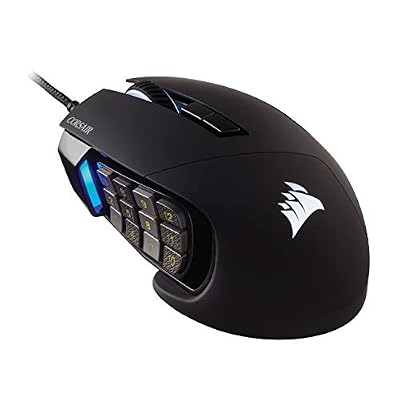
Corsair Scimitar RGB Elite Wired MMO MOBA PC Gaming Mouse – Black | 18,000 DPI, 17 Programmable Buttons, Adjustable Key Slider, Omron Switches, iCUE Compatible, PC, Mac, PS5, PS4, Xbox
Included for 'Best Mouse for MMORPG Games: 6 Strong Picks for MMO Players' as a representative consumer electronics in this roundup; selection reflects the product set returned for this topic.
View on AmazonThe best mouse for MMORPG games should put core skills, cooldowns, targeting, and utility commands under your thumb without making long sessions uncomfortable. This roundup focuses on genuine MMO mice with dense button layouts, useful software, and shapes suited to raids, dungeons, PvP, crafting, and daily questing.
Best MMORPG Mouse Comparison
| Mouse | Side Controls | Connection | Weight | Best For |
|---|---|---|---|---|
| Razer Naga V3 Pro | 12-button MMO plate; up to 23 programmable buttons | 2.4 GHz, Bluetooth, wired | 117 g mouse only | Premium multi-genre setups |
| Corsair Scimitar Elite Wireless | Adjustable 12-button grid; 16 programmable buttons | Slipstream, Bluetooth | 114 g | Adjustable thumb positioning |
| SteelSeries Aerox 9 Wireless | 12-button grid; 18 programmable buttons | 2.4 GHz, Bluetooth | 89 g | Lightweight MMO play |
| Razer Naga V2 HyperSpeed | 12-button grid; 19 programmable buttons | 2.4 GHz, Bluetooth | 95 g excluding battery | Long wireless battery life |
| Razer Naga Left-Handed Edition | 12-button grid; 20 programmable buttons | Wired | 109 g | Left-handed MMO players |
| Corsair Scimitar RGB Elite | Adjustable 12-button grid; 17 programmable buttons | Wired | — | Wired MMO setups |
Razer Naga V3 Pro
Best For: Premium MMO players who also play other genres
Key Features:
- Three swappable magnetic side plates
- 12-button MMO side plate
- Up to 23 programmable buttons
- Focus Pro 50K Optical Sensor Gen-3
- HyperSpeed Wireless, Bluetooth, and wired modes
- Five onboard profiles
- HyperScroll Tilt Wheel Gen-2
What Makes It Different
Razer Naga V3 Pro is built for players who want one premium mouse to cover both MMORPGs and other genres. Its 12-button MMO side plate can be swapped for 6-button or 2-button plates, while five onboard profiles let you keep different layouts ready for raids, PvP, alts, or non-MMO games without rebuilding every bind.
The Naga V3 Pro also adds a four-way HyperScroll Tilt Wheel Gen-2, a Focus Pro 50K optical sensor, and HyperSpeed, Bluetooth, or wired connectivity. Its 117 g mouse-only weight is not especially light, but the broad right-handed Naga shape and dense control set favor players who prioritize command access over flick-heavy movement.
Pros
- Three side layouts cover MMO, MOBA, FPS, and everyday use
- Large number of programmable controls
- Multiple wireless and wired connection modes
- Five onboard profiles
- Advanced scroll-wheel configuration
Cons
- Heavier than lightweight MMO alternatives
- Extra modular features may be unnecessary for MMO-only players
Use Case: Switching between raiding, PvP, action games, and productivity without changing mice.
Who It’s For: MMORPG players who want maximum control and one mouse for several game genres.
Corsair Scimitar Elite Wireless
Best For: Players who need an adjustable thumb-button position
Key Features:
- 16 programmable buttons
- Adjustable 12-button Key Slider side panel
- Marksman 26K optical sensor
- Slipstream Wireless
- Bluetooth
- Three onboard profiles
- 114 g weight
What Makes It Different
Corsair Scimitar Elite Wireless stands out because its 12-button Key Slider side panel can be repositioned to better match your thumb reach. That adjustment matters for MMO players who struggle with fixed grids, especially when the front or rear rows feel awkward during repeated rotations, interrupt casts, target swaps, and modifier-heavy keybinds.
The mouse provides 16 programmable buttons, onboard profile storage, a 26K optical sensor, Slipstream wireless, and Bluetooth. At 114 g, it remains substantial rather than ultralight, yet the palm-focused shape and movable side grid make it especially appealing for long raid sessions where consistent thumb access matters more than minimal weight.
Pros
- Adjustable side-button position
- Full MMO-style thumb grid
- Wireless and Bluetooth connectivity
- Onboard profile storage
- Palm-oriented ergonomic shape
Cons
- Heavier than the Aerox 9 Wireless
- Fixed 12-button format cannot be replaced with simpler side plates
Use Case: Raiding or dungeon play where every thumb button needs to sit within predictable reach.
Who It’s For: MMO players whose hand size makes fixed side-button grids uncomfortable.
SteelSeries Aerox 9 Wireless
Best For: Players who want a lightweight MMO mouse
Key Features:
- 89 g design
- 18 programmable buttons
- 12-button side panel
- TrueMove Air optical sensor
- 2.4 GHz wireless and Bluetooth
- Up to 180 hours rated battery life
- IP54-rated AquaBarrier protection
What Makes It Different
SteelSeries Aerox 9 Wireless takes a different approach by pairing a 12-button side panel with an 89 g chassis. That lower weight reduces the heavy, planted feel common to many MMO mice, which can help players who mix MMORPG combat with faster camera movement, action MMO mechanics, or other games that reward broader and quicker mouse sweeps.
Its 18 programmable buttons, TrueMove Air sensor, 2.4 GHz wireless, Bluetooth, and up to 180 hours of rated battery life give it a strong feature set without the bulk of traditional MMO designs. The trade-off is its perforated shell and fixed button grid, which will feel less familiar to players who prefer solid-sided, palm-filling mice.
Pros
- Much lighter than many full-button MMO mice
- 12 dedicated side buttons
- Dual wireless connectivity
- Long rated battery life
- Fast-charging support
Cons
- Fixed side-button position
- Perforated shell will not appeal to every player
Use Case: Action MMORPGs, fast camera movement, and players who frequently switch between MMO and faster-paced games.
Who It’s For: Gamers who want MMO controls without the weight of a traditional large MMO mouse.
Razer Naga V2 HyperSpeed
Best For: Long wireless MMO sessions
Key Features:
- 19 programmable buttons
- 12-button thumb grid
- Focus Pro 30K optical sensor
- HyperSpeed Wireless
- Bluetooth
- Four-way tilt wheel
- AA battery power
What Makes It Different
Razer Naga V2 HyperSpeed is a practical choice for MMO players who want a full 12-button thumb grid without paying for swappable side plates. It offers 19 programmable buttons, a Focus Pro 30K optical sensor, HyperSpeed wireless, Bluetooth, and a four-way tilt wheel, giving it plenty of controls for rotations, menus, mounts, and macros.
Battery life is a major reason to consider it: Razer rates the mouse for up to 250 hours on HyperSpeed wireless and up to 400 hours on Bluetooth with an AA alkaline battery. The fixed MMO layout is less flexible than the Naga V3 Pro, but that simplicity works well for players who mainly play MMORPGs and want fewer charging interruptions.
Pros
- Full 12-button MMO grid
- Very long rated battery life
- Bluetooth and gaming-focused wireless
- Extensive programmable controls
- No charging cable required during normal battery use
Cons
- Side panel cannot be swapped
- Requires a replaceable AA battery
Use Case: Extended MMO sessions, progression raiding, leveling, and players who do not want frequent charging.
Who It’s For: MMO-focused users who want wireless convenience without paying for modular side plates.
Razer Naga Left-Handed Edition
Best For: Left-handed MMORPG players
Key Features:
- True left-handed ergonomic design
- 12-button thumb grid
- 20 programmable buttons
- Focus+ 20K optical sensor
- Five onboard profiles
- Tilt-click scroll wheel
- Wired connection
What Makes It Different
Razer Naga Left-Handed Edition is a rare dedicated choice for southpaw MMO players. Its true left-handed ergonomic shell places a 12-button thumb grid on the right side, while 20 programmable controls, a tilt-click wheel, and five onboard profiles give left-handed users dense command access without adapting to a right-handed layout.
This is a wired mouse with a 20,000 DPI Focus+ optical sensor and a listed weight of 109 g. The design is specialized rather than versatile, so it makes the most sense for left-handed players who want an MMO-first shape instead of adapting to an ambidextrous mouse or reaching across a right-handed button grid that was never designed for them.
Pros
- Dedicated left-handed ergonomics
- Full 12-button thumb grid
- 20 programmable controls
- Five onboard profiles
- No battery management
Cons
- Wired only
- Specialized shape is intended specifically for left-handed use
Use Case: Raiding, PvP, crafting, and complex ability layouts controlled primarily with the left hand.
Who It’s For: Left-handed MMO players who want a genuine thumb-grid mouse instead of adapting to right-handed hardware.
Corsair Scimitar RGB Elite
Best For: Wired MMO players who want an adjustable button grid
Key Features:
- 17 programmable buttons
- Repositionable 12-button Key Slider panel
- PixArt PMW3391 optical sensor
- Up to 18,000 DPI
- Three onboard profiles
- iCUE macro programming
- Wired connection
What Makes It Different
Corsair Scimitar RGB Elite is the wired option for players who like an adjustable thumb panel but do not need wireless freedom. It has 17 programmable buttons, including a repositionable 12-button side grid, plus onboard profiles and iCUE macro support for organizing class skills, consumables, targeting, and shortcuts.
Its PixArt PMW3391 optical sensor reaches 18,000 DPI, while the braided wired connection removes battery management from the equation. The mouse is heavier than many modern options, but its adjustable grid can be more important than weight for players who want each thumb row aligned precisely with their hand and preferred palm grip.
Pros
- Adjustable side-button position
- 17 programmable buttons
- No charging or batteries
- Onboard profile storage
- Strong MMO-focused layout
Cons
- Wired connection limits desk freedom
- Bulkier than lightweight MMO designs
Use Case: Permanent desktop gaming setups where reliable wired operation and precise thumb positioning matter most.
Who It’s For: Players who want the Scimitar button layout without paying for wireless connectivity.
How to Choose the Best Mouse for MMORPG Games
Side-Button Layout
For MMORPGs, button placement matters more than raw button count. A 12-key grid is useful only if you can distinguish rows and reach them without twisting your thumb. Players with smaller hands may benefit from adjustable panels, while larger hands can favor broader shells that support the palm and keep repeated side-button presses stable.
Number of Programmable Controls
Think about how many commands you truly want on the mouse. Healers, tanks, raid leaders, and players using complex modifier layers may benefit from a full thumb grid, while action-MMO players can prefer fewer buttons with easier separation. More inputs can reduce keyboard travel, but they also increase the learning curve and risk of misclicks.
Wired vs Wireless
Wireless MMO mice remove cable drag and make desk movement cleaner, but battery management becomes part of the setup. Bluetooth is useful for lower-power everyday use, while 2.4 GHz modes are usually the gaming-focused connection. A wired model remains sensible if you prefer permanent power and do not mind routing a cable across the desk.
Weight and Ergonomics
Weight and shape should match your game style. Traditional MMO mice often feel fuller because they prioritize palm support and extra controls, while lighter models suit players who make larger camera sweeps or switch between MMOs and faster genres. Comfort over several hours matters more than chasing the lowest possible weight.
FAQ
Do I Need a 12-Button Mouse for MMORPG Games?
A 12-button side grid is not mandatory, but it is useful for classes with many abilities, consumables, targeting commands, or modifier combinations. It can move frequently used actions off the keyboard and reduce finger travel. Players with simpler rotations may prefer fewer, more separated buttons that are easier to identify by touch.
Are MMO Mice Good for World of Warcraft?
MMO mice are well suited to World of Warcraft because raids, Mythic+, PvP, macros, target commands, and utility skills can create dense keybind setups. A thumb grid can keep core actions close to the mouse hand, but the ideal layout still depends on class complexity, hand size, modifier habits, and whether you prefer keyboard-heavy control.
Is a Lightweight Mouse Better for MMORPG Games?
A lighter mouse can help if your MMORPG uses fast camera turns, action combat, or frequent large movements, but low weight is not automatically better for MMO play. Heavier ergonomic mice can feel more planted during long sessions and often provide more side controls. The better choice depends on movement style, grip, and button priorities.
Are Wireless MMO Mice Good for Raiding and PvP?
Wireless MMO mice can work very well for raiding and PvP when they use a gaming-focused 2.4 GHz connection and are kept charged. The main practical trade-off is battery management rather than button access. Players who never want to think about charging may still prefer a wired mouse, especially on a fixed desktop setup.
Which MMO Mouse Is Better for Small Hands?
For small hands, look beyond overall mouse length and focus on thumb-grid position. A panel that can slide forward or backward can improve access to the first and last columns, while a fixed grid may force extra stretching. If possible, compare the distance from your natural thumb rest to the farthest side buttons before buying.
Conclusion
The best mouse for MMORPG games depends on how many commands you bind, how your hand reaches a thumb grid, and whether you value wireless freedom, low weight, or an adjustable panel. Choose around your actual rotation and grip first; the right MMO mouse should make abilities easier to reach without adding strain or confusion.