🛒 Best Price Today on Amazon
Prime members get fast, free shipping on everything above, plus member-only deals. New members get a 30-day free trial — cancel anytime.
A wireless gaming mouse that no longer holds a reliable charge may not need to be replaced entirely. Finding the best gaming mouse replacement battery kit can help extend the life of compatible hardware while reducing unnecessary electronics waste. However, battery voltage, connector polarity, physical dimensions, and model-specific compatibility must be verified before any repair.
Quick Verdict: Which Gaming Mouse Battery Replacement Is Best?
The safest replacement approach is to choose a genuine, model-compatible battery supplied with an established repair procedure. A battery that looks similar to the original is not necessarily electrically compatible. Incorrect wiring, charging specifications, or dimensions can damage the mouse and create a safety hazard.
For supported Logitech gaming mice, the iFixit Logitech 533-000211 Genuine Battery Fix Kit is the strongest documented option. Other replacements are more model-specific, particularly for newer Superlight models and G502-series revisions, and require careful identification.
Quick Comparison Table
| Replacement option | Intended application | Main advantage | Main limitation |
|---|---|---|---|
| iFixit Logitech 533-000211 Fix Kit | Selected Logitech G mice | Genuine battery and repair tools | Specific supported models |
| iFixit Logitech 533-000211 Part Only | Same supported mice | Genuine replacement cell | Tools purchased separately |
| Logitech G Pro Wireless Battery Repair Bundle | Original G Pro Wireless | Model-specific repair approach | May require new mouse feet |
| Logitech G Pro X Superlight Battery Repair Bundle | Original Superlight | Established replacement procedure | Not automatically for Superlight 2 |
| Logitech G502 Lightspeed Battery Repair Bundle | Original G502 Lightspeed | Documented disassembly approach | Internal assembly complexity |
| G Pro X Superlight 2-Compatible Battery Kit | Superlight 2 | Model-specific aftermarket alternative | Exact electrical details must be verified |
Some entries describe model-specific repair bundles rather than six distinct battery chemistries. This reflects the fact that genuine compatible batteries can serve more than one supported mouse, while separate mouse models require different disassembly procedures.
How We Selected These Replacement Battery Kits
Selection prioritized genuine parts, documented compatibility, established repair instructions, correct nominal voltage, and availability of suitable tools. We gave particular weight to the Logitech and iFixit repair partnership because its genuine replacement battery provides a more dependable reference than an unverified third-party listing.
We did not rank batteries by inflated capacity claims. A replacement advertised with significantly greater capacity may not fit the original compartment, and an incorrect electrical configuration can create serious problems even when the connector appears similar.
The 6 Best Gaming Mouse Replacement Battery Options
Replacing a mouse battery is different from replacing mouse skates or a charging cable. Lithium-ion and lithium-polymer cells store energy in a compact package and can be hazardous if punctured, crushed, short-circuited, or charged incorrectly. The following options should be evaluated according to the exact mouse revision and the manufacturer’s documented repair process.
iFixit Logitech 533-000211 Genuine Battery Fix Kit – Best Overall
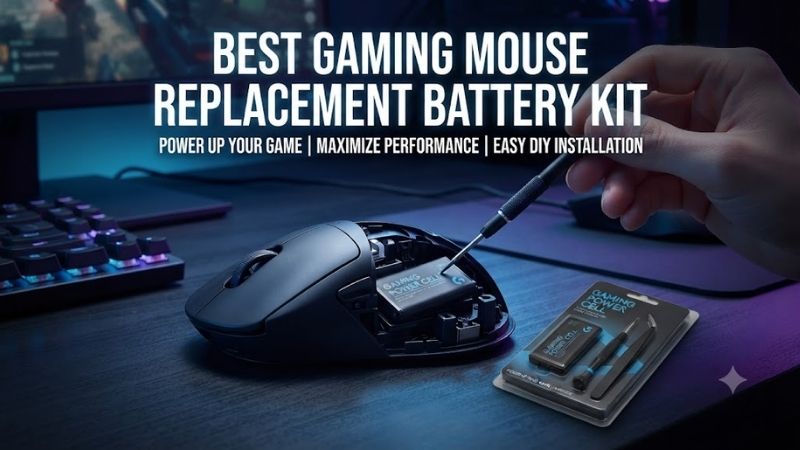
The iFixit Logitech 533-000211 Genuine Battery Fix Kit is an excellent documented option for several supported Logitech wireless gaming mice. It contains a genuine Logitech replacement battery, with a kit configuration intended to help users complete the repair using appropriate tools.
Best for: Supported Logitech G Pro Wireless, G Pro X Superlight, and G502 Lightspeed owners.
Verified battery specifications
-
Logitech part number: 533-000211
-
Battery model: 521630
-
Nominal voltage: 3.7V
-
Rated capacity: 240mAh
-
Energy: 0.888Wh
-
Rechargeable lithium battery
-
Genuine Logitech supply chain
-
Supported mouse models include specified revisions of G Pro Wireless, G Pro X Superlight, and G502 Lightspeed
Why genuine compatibility matters
A genuine battery provides greater confidence in connector wiring, expected charging behavior, and physical fit for the models explicitly supported.
This is particularly important for compact wireless gaming mice.
Small differences in cell dimensions can affect how the battery sits inside the housing.
A battery pressing against the circuit board or shell may create mechanical stress.
The replacement should fit without bending, compressing, or modifying the cell.
Repair-kit advantages
A repair kit is attractive because it combines the replacement part with suitable repair accessories.
Opening a lightweight gaming mouse often requires removing its bottom skates.
These skates may be damaged during removal, particularly when their adhesive has become difficult to separate.
Buyers should check the kit contents and consider whether replacement skates or adhesive will be needed.
Performance expectations
A new battery may restore the operating time of a mouse whose original battery has degraded.
However, it does not increase the mouse’s sensor accuracy, wireless polling capability, or tracking performance.
Battery life depends on charging condition, device settings, and power consumption.
Pros
-
Genuine Logitech replacement
-
Documented compatibility
-
Established repair instructions
-
Appropriate for selected high-value gaming mice
-
More confidence than unknown third-party cells
Cons
-
Limited to explicitly supported models
-
Opening the mouse introduces repair risk
-
Mouse feet may need replacement
-
Repairs require patience and proper tools
Buy If: Your exact Logitech mouse is included in the supported-device list and its battery no longer performs adequately.
Skip If: You own a newer or different mouse revision not covered by the published compatibility information.
iFixit Logitech 533-000211 Battery Part Only – Best for Experienced Repairers
The standalone iFixit Logitech 533-000211 battery provides the same genuine replacement cell without requiring users to purchase a complete toolkit. This can be economical for enthusiasts who already own appropriate precision screwdrivers, opening tools, and installation supplies.
Best for: Experienced users with an existing electronics-repair toolkit.
What makes it different
The battery itself is the same supported Logitech replacement component.
The distinction is the package.
A part-only purchase reduces duplication of tools when the user already has them.
However, it may not include the adhesive needed to secure the new cell.
Buyers should inspect the repair instructions and determine which consumables are required before beginning.
Repair considerations
A mouse battery should be disconnected using the specified connector rather than pulling on the wires.
The original adhesive may need careful removal.
Avoid metal tools that could accidentally puncture the cell or bridge electrical contacts.
The replacement battery should be installed using the designated mounting location and appropriate adhesive arrangement.
Advantages
-
Genuine replacement battery
-
Useful for established repair workflows
-
Avoids purchasing duplicate tools
-
Compatible with documented Logitech models
Limitations
-
Not a complete repair kit
-
Adhesive may need to be purchased separately
-
Requires appropriate technical experience
-
Incorrect handling remains hazardous
Buy If: You already own suitable tools and understand the repair procedure.
Skip If: This is your first electronics repair and you lack the necessary equipment.
Logitech G Pro Wireless Battery Repair Bundle – Best for Original G Pro Wireless
A battery repair bundle assembled around the original Logitech G Pro Wireless can be useful when the mouse is otherwise functioning normally but no longer holds a dependable charge. The critical component is a battery verified for the original G Pro Wireless model, supported by suitable tools and replacement adhesive.
Best for: Logitech G Pro Wireless M-R0070 owners.
Required components
A suitable bundle should include a verified compatible battery, tools appropriate for the housing screws, nonmetallic opening tools, and materials for reinstalling the cell.
Replacement mouse feet may also be needed.
The exact contents depend on the supplier, so users should not assume every advertised bundle includes them.
Why model identification matters
Logitech has produced several similarly named gaming mice.
The original G Pro Wireless, G Pro X Superlight, and G Pro X Superlight 2 are not automatically interchangeable at the component level.
The exterior appearance may be similar while internal assemblies differ.
Confirm the model designation before ordering.
Repair difficulty
The original G Pro Wireless can require careful separation of internal components.
Flexible cables and connectors may be located between the shell and circuit board.
Pulling the housing apart without inspecting these connections can cause damage.
Follow a reliable model-specific procedure.
Pros
-
Targets an established gaming mouse
-
Genuine battery option available
-
Can restore useful service life
-
Avoids replacing an otherwise functional mouse
Cons
-
Requires disassembly
-
Mouse skates may be damaged
-
Tools and adhesive vary by bundle
-
Model confusion is possible
Buy If: Your original G Pro Wireless has a confirmed battery problem.
Skip If: Charging-cable or USB-port problems have not been ruled out.
Logitech G Pro X Superlight Battery Repair Bundle – Best for First-Generation Superlight
A repair bundle for the original Logitech G Pro X Superlight should prioritize the correct battery and a documented disassembly procedure. The mouse’s lightweight construction makes careful handling particularly important, as internal components are compact and unnecessary pressure can damage delicate connections.
Best for: Original G Pro X Superlight MR0106 owners.
Battery compatibility
The genuine Logitech 533-000211 battery is documented for the original G Pro X Superlight.
This provides a reliable starting point for replacement.
The same assumption should not be extended to the Superlight 2 without separate confirmation.
Disassembly considerations
Removing the bottom skates may be necessary before accessing the housing screws.
A suitable procedure should identify the correct opening sequence and show where internal cables or connectors are located.
The battery should not be pried aggressively from its mounting position.
If the cell is swollen, damaged, or leaking, stop the repair and follow appropriate battery-handling precautions.
Weight and balance
Lightweight gaming mice are designed around carefully controlled internal weight distribution.
A significantly larger aftermarket battery may change the mouse’s mass and balance.
Even when the additional weight seems small, the internal compartment may not accommodate a physically larger cell.
Use a properly specified replacement rather than pursuing maximum capacity.
Pros
-
Documented genuine replacement option
-
Relevant to a popular lightweight gaming mouse
-
Can restore battery endurance
-
Established repair guidance
Cons
-
Delicate internal construction
-
Model-specific compatibility
-
Potential mouse-skate replacement
-
Unsuitable battery substitutions can be hazardous
Buy If: You own the first-generation Superlight and need a verified battery repair.
Skip If: You own a Superlight 2 or cannot confirm the exact model.
Logitech G502 Lightspeed Battery Repair Bundle – Best for Original G502 Lightspeed
The original Logitech G502 Lightspeed has a documented battery replacement process, making a model-specific repair bundle useful when the battery has reached the end of its service life. The repair involves opening a relatively complex gaming mouse with multiple internal components.
Best for: Original Logitech G502 Lightspeed MR0076 owners.
Verified replacement option
The genuine Logitech 533-000211 battery is listed as compatible with the supported original G502 Lightspeed.
This is an important distinction because newer G502 X-series devices may require different components.
A product listing that simply says G502 should not be considered sufficient evidence of compatibility.
Repair complexity
The G502 Lightspeed includes multiple controls and an internal arrangement designed around its button and scroll-wheel mechanisms.
Disassembly should follow the specific repair procedure.
Internal cables and connectors must be handled carefully.
The replacement battery should be positioned correctly and secured without creating pressure on moving components.
Why battery replacement may be worthwhile
A functioning gaming mouse with declining battery endurance may still have years of useful service life.
Replacing the cell can be more economical than replacing the entire device.
However, if the mouse also has a damaged charging circuit or other electronic faults, a battery replacement alone may not resolve the problem.
Pros
-
Genuine supported battery option
-
Documented repair procedure
-
Useful for restoring battery life
-
Avoids unnecessary device replacement
Cons
-
More involved disassembly
-
Multiple small components
-
Not equivalent to newer G502 X models
-
Requires careful battery handling
Buy If: You have the original G502 Lightspeed and have diagnosed battery degradation.
Skip If: You own a different G502 generation or suspect charging-circuit failure.
G Pro X Superlight 2-Compatible Battery Kit – Best for Newer Model-Specific Repairs
A replacement battery kit specifically advertised for the Logitech G Pro X Superlight 2 may be relevant when the mouse’s original battery has degraded. However, this category requires particularly careful verification because the Superlight 2 uses different internal hardware from the first-generation model.
Best for: Experienced repairers working with an exactly identified Superlight 2 revision.
Compatibility requirements
Aftermarket sellers may advertise replacement batteries using specific part numbers, including 533-000229.
These listings should not be treated as confirmation of genuine Logitech compatibility without supporting documentation.
The cell’s electrical specifications, connector wiring, dimensions, and supported mouse revision must all be checked.
Why capacity claims are insufficient
A battery advertised with greater milliamp-hour capacity is not automatically better.
A larger cell may be too thick or too wide.
Incorrect polarity or charging characteristics can damage the mouse.
The safe goal is restoring the original battery specification, not maximizing capacity.
When professional repair is preferable
If no verified replacement is available, a professional electronics repair service may be safer than installing an uncertain cell.
This is especially true when the battery is swollen or the charging circuit may be damaged.
Pros
-
Potential route to repairing newer models
-
Avoids replacing a working mouse unnecessarily
-
Model-specific kits may include installation materials
Cons
-
Third-party quality varies
-
Exact compatibility requires verification
-
Electrical mistakes can be hazardous
-
Not recommended without reliable documentation
Buy If: You have confirmed the replacement’s specifications and the exact supported mouse revision.
Skip If: Connector polarity, voltage, dimensions, or supplier reliability remain uncertain.
Buying Guide: How to Choose a Gaming Mouse Replacement Battery Kit
A reliable replacement starts with accurately identifying the mouse and diagnosing the original problem. Poor battery life may result from chemical aging, but charging-port damage, cable problems, firmware behavior, and incorrect power settings can create similar symptoms.
Verify the Exact Gaming Mouse Model
Check the model number printed on the mouse or in the manufacturer’s documentation.
Do not rely only on the commercial product name.
Different generations can use different batteries, connectors, and mounting arrangements.
A replacement should explicitly support the exact hardware revision.
Understand Battery Voltage and Capacity
Voltage is an essential electrical compatibility requirement.
Capacity indicates the amount of charge the cell is designed to store under specified conditions.
A higher capacity does not compensate for incorrect voltage, connector wiring, or charging compatibility.
The original battery’s specifications should guide replacement selection.
Check Connector Polarity and Physical Dimensions
Two batteries may use similar-looking plugs while having different pin assignments.
Incorrect polarity can damage the device.
The battery must also fit the designated compartment without compression.
Never modify or puncture a lithium cell to make it fit.
Prepare Appropriate Repair Tools
Depending on the mouse, the repair may require precision screwdrivers, opening picks, a nonmetallic spudger, replacement adhesive, and new mouse skates.
Some repairs involve adhesive that must be softened carefully.
Follow the model-specific repair guide and avoid overheating the battery.
Handle Lithium Batteries Safely
Turn the mouse off and disconnect external power before disassembly.
Where the repair guide recommends it, reduce the battery charge before opening the device.
Never puncture, fold, crush, or short-circuit a lithium battery.
If swelling, leakage, or unusual heat is present, stop and seek professional assistance.
Used batteries should be taken to an appropriate recycling facility.
Frequently Asked Questions
Can I replace the battery in a wireless gaming mouse?
Often, yes, but serviceability varies by model.
Are higher-capacity replacement batteries better?
Not necessarily. Physical and electrical compatibility are more important.
Can I use a Superlight battery in a Superlight 2?
Do not assume compatibility. Verify the specific replacement part.
Will a new battery improve mouse accuracy?
No. It may restore battery endurance but does not improve sensor specifications.
Do replacement kits include mouse feet?
Some do, but package contents vary.
Is battery replacement safe for beginners?
It can involve significant risk if handled incorrectly. A documented kit and repair procedure are essential.
Final Verdict
The iFixit Logitech 533-000211 Genuine Battery Fix Kit is the strongest documented option for its supported Logitech gaming mice. Part-only purchases suit experienced repairers, while model-specific bundles can simplify the repair process. Never substitute an unverified lithium battery based only on appearance or advertised capacity.