🛒 Best Price Today on Amazon
Prime members get fast, free shipping on everything above, plus member-only deals. New members get a 30-day free trial — cancel anytime.
A first gaming mouse should make games feel better without making the setup feel complicated. The best entry level gaming mouse gives a new player an accurate sensor, a shape that fits the hand, buttons that sit where the fingers expect them, and software that stays out of the way. It does not need a dozen extra buttons, a heavy shell, or a learning curve of its own. It needs to track cleanly, click crisply, and feel comfortable through a long evening of play.


This guide looks at four wired and wireless mice that sit at the entry tier of their brands. Each one comes from a maker with a long record in gaming gear, and each one keeps the basics strong: a proven optical sensor, a light body, and a simple layout that a new player can learn in one session. Every mouse below is linked to its Amazon listing so you can confirm the exact model, color, and current availability before you buy.
What to Look For
Sensor accuracy matters more than the biggest number
Every gaming mouse lists a maximum sensitivity figure, and the numbers on the box keep climbing. For a first mouse, the figure that matters is how the sensor behaves at the sensitivity you actually use. A good entry-level sensor tracks in a straight line with no drift, no angle snapping, and no sudden jumps when you flick fast. All four mice in this guide use optical sensors with true one-to-one tracking, which means the cursor goes where your hand goes, and the same hand movement gives the same result every time. That consistency is what builds aim and muscle memory, and it is the single most useful thing a beginner can get from a new mouse.
Sensitivity is adjustable on every mouse here, so you can set a low value for careful aiming or a high value for fast turns. Most new players settle somewhere in the middle, and the right value is the one that lets you turn a full circle with a comfortable sweep of the arm without lifting the mouse. Try a few values over a week rather than chasing the number on the box.
Shape and grip come before features
A mouse lives under your hand for hours, so shape beats the spec sheet. There are three common grips. A palm grip rests the whole hand on the mouse and suits larger hands and longer sessions. A claw grip arches the fingers with the palm touching the back of the mouse, which suits fast clicking. A fingertip grip holds the mouse with the fingertips only and suits small, quick movements. None of the three is wrong. The right shape is the one that lets your hand relax.
The mice below cover the common shapes. The DeathAdder Essential and the Rival 3 are right-handed ergonomic shapes with a gentle curve that supports a palm grip. The G305 and the G203 share a compact, symmetrical shell that works well for claw and fingertip grips and also suits smaller hands. If you are unsure which grip you use, watch how your hand sits on your current mouse for a minute before you decide.
Weight changes how a mouse feels
Light mice move with less effort, which makes small corrections easier and keeps the wrist fresher over long sessions. The four mice in this guide weigh between 77 and 99 grams, which is light by the standards of the category. The Rival 3 is the lightest at 77 grams, the G203 sits at 85 grams, the DeathAdder Essential at 96 grams, and the G305 at 99 grams with its battery fitted. A difference of twenty grams is easy to feel in the hand, so if you play fast-paced games with a lot of flicking, lean toward the lighter end. If you like a mouse with a little more presence under the palm, the heavier end of this group still feels light compared with older gaming mice.
Wired or wireless
Wired mice never need charging and connect with a cable, which keeps the setup simple and the mouse always ready. Wireless mice remove the cable from the desk and let the mouse move freely, and modern wireless links are fast enough that the delay is not something a human hand can feel. The G305 is the wireless pick in this guide, and it runs for up to 250 hours on a single AA battery in performance mode, so battery changes are rare. The other three are wired, and their cables are light and flexible enough that they do not drag across the pad.
Buttons and software
Six buttons is the sweet spot for a first gaming mouse: left click, right click, scroll wheel click, two thumb buttons, and a sensitivity button behind the wheel. That layout covers the common needs in most games without asking you to memorize a thumb grid. Every mouse here has six buttons except the DeathAdder Essential, which has five, and all of them let you reassign buttons and adjust sensitivity through the maker’s software. Keep the software simple at first. Set your sensitivity, assign the thumb buttons to the actions you use most, and leave the rest alone until you know what you want to change.
Lighting and build
Lighting is a matter of taste, and none of these mice forces it on you. The G203 and the Rival 3 have RGB lighting you can adjust or turn off. The G305 has no lighting at all, which keeps its battery life long. The DeathAdder Essential has a single-color green glow on the scroll wheel and logo. Build quality matters more than lighting. Look for a shell that feels solid with no creaks, buttons that click cleanly, and a scroll wheel that steps firmly. All four mice here are built to the standards of their brands, with switches rated for millions of clicks.
The Picks
Logitech G305 LIGHTSPEED Wireless Gaming Mouse
Logitech G305 LIGHTSPEED Wireless Gaming Mouse
The G305 is the wireless pick in this group, and it is the one to choose if you want to cut the cable without giving up responsiveness. It uses the same compact shell as the wired G203, so the shape will feel familiar to anyone who has used a small symmetrical mouse. At 99 grams with its battery fitted, it is light enough for fast flicks, and the symmetrical body suits claw and fingertip grips as well as smaller hands.
Inside, the HERO optical sensor tracks from 200 to 12,000 DPI with no acceleration or smoothing, and the LIGHTSPEED wireless link reports at 1 millisecond, which matches a wired connection in practice. The mouse runs for up to 250 hours of continuous play on a single AA battery in performance mode, and an endurance mode stretches that much further when you want the battery to last for months. The USB receiver stores inside the mouse, so the whole package travels well with a laptop.
There are six programmable buttons, and the on-board memory keeps your settings on the mouse itself, so your sensitivity and button assignments follow you to another computer without reinstalling anything. The G305 has no lighting, which is part of how it keeps its battery life so long. For a first gaming mouse, it is the simplest wireless path: no cable, no charging cradle, no fuss, just a battery that lasts and a sensor that tracks cleanly.
Logitech G203 LIGHTSYNC Wired Gaming Mouse
Logitech G203 LIGHTSYNC Wired Gaming Mouse
The G203 is the wired twin of the G305, and it is the pick for a new player who wants a wired mouse with lighting and a light body. It weighs 85 grams and uses the same compact symmetrical shell, which suits claw and fingertip grips and smaller hands. The wired connection means it is always ready, with no battery to think about.
The gaming-grade optical sensor tracks from 200 to 8,000 DPI in fine steps, and it holds a straight line with no filtering or smoothing at the sensitivities most players use. Six programmable buttons cover the usual layout, and the on-board memory stores your settings on the mouse. The LIGHTSYNC RGB lighting runs along the lower edge and the logo, and it can be set to a single color or a wave of colors through the Logitech G HUB software, or turned off entirely if you prefer a plain look.
The cable is a light 2.1-meter rubber cord that stays out of the way on the desk. For a first mouse, the G203 is hard to fault: it is light, it tracks well, it has just enough buttons, and the lighting lets a new player make the desk feel like their own. If you like the G305 shape but want a wired mouse with lighting, this is the one.
Razer DeathAdder Essential Gaming Mouse

Razer DeathAdder Essential Gaming Mouse
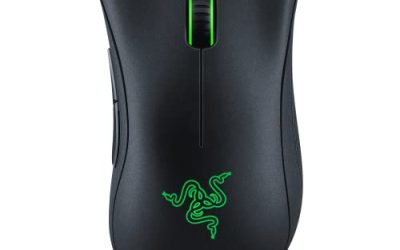
The DeathAdder Essential is the pick for a new player who wants a larger, right-handed ergonomic shape. The DeathAdder line has been around for years, and the Essential keeps the classic curved body that supports a full palm grip. At 96 grams, it has a little more presence under the hand than the lighter mice in this guide, which suits players who like to feel the mouse as they move it.
The optical sensor tracks up to 6,400 DPI, which is more than enough for the sensitivities most players use, and it holds a steady line with no drift. Five programmable buttons cover the essentials: left and right click, scroll wheel click, and two thumb buttons. The mechanical switches are rated for up to 10 million clicks, and the rubber side grips keep the mouse steady in the hand during long sessions. A green glow on the scroll wheel and logo gives the mouse a quiet Razer look without lighting up the whole desk.
The DeathAdder Essential is the simplest mouse in this guide, and that is its strength. There is nothing to learn beyond the shape and the sensitivity button. For a new player with a medium or large hand who wants a comfortable palm grip and a proven design, it is a safe and easy first gaming mouse.
SteelSeries Rival 3 Wired Gaming Mouse
SteelSeries Rival 3 Wired Gaming Mouse
The Rival 3 is the lightest mouse in this guide at 77 grams, and it is the pick for a new player who wants a light, fast-feeling wired mouse with bright lighting. Its symmetrical shell is shaped for right-handed use, with side buttons on the left only, and it suits claw and fingertip grips. The compact footprint measures 120.6 by 67 by 37.9 millimeters, which keeps it nimble on the pad.
The TrueMove Core optical sensor tracks from 100 to 8,500 CPI in 100-point steps, with true one-to-one tracking, up to 300 inches per second of tracking speed, and 35 G of acceleration. The polling rate runs at 1,000 Hz, so the mouse reports its position every millisecond. Six programmable buttons include split trigger buttons, where the main click buttons are separate from the shell for a more consistent click feel. The switches are rated for 60 million clicks.
Lighting is a strong point here. The Rival 3 has three independently controlled RGB zones with bright output, so you can set each zone to its own color through the SteelSeries Engine software. The mouse also stores up to five profiles on board, and its shell carries an IP54 splash resistance mark, which guards against the odd spill. For a first mouse that feels fast, looks bright, and weighs almost nothing, the Rival 3 is the one to beat.
Comparison Table
| Mouse | Connection | Sensor | Buttons | Weight | Lighting |
|---|---|---|---|---|---|
| Logitech G305 LIGHTSPEED | Wireless, 2.4 GHz | HERO optical, up to 12,000 DPI | 6 programmable | 99 g | None |
| Logitech G203 LIGHTSYNC | Wired USB | Optical, up to 8,000 DPI | 6 programmable | 85 g | LIGHTSYNC RGB |
| Razer DeathAdder Essential | Wired USB | Optical, up to 6,400 DPI | 5 programmable | 96 g | Green glow |
| SteelSeries Rival 3 | Wired USB | TrueMove Core, up to 8,500 CPI | 6 programmable | 77 g | Prism RGB, 3 zones |
Frequently Asked Questions
Is a wired or wireless mouse better for a first gaming mouse?
Either works well, and the choice comes down to how you like your desk. A wired mouse is always ready and never needs a battery, which keeps things simple. A wireless mouse removes the cable and lets the mouse move freely, and the G305 in this guide runs for up to 250 hours on a single AA battery, so battery changes are rare. Modern wireless links are fast enough that the delay is not something a hand can feel, so pick the one that fits your desk and your habits.
How much sensitivity do I need in a first gaming mouse?
Most new players settle between 800 and 1,600 DPI for general play, and all four mice in this guide cover that range with room to spare. The number on the box is a maximum, not a target. Set a value that lets you turn a full circle with a comfortable sweep of the arm, then adjust it in small steps over a week until it feels natural. A sensor that tracks cleanly at your chosen value matters far more than a bigger maximum number.
Do I need a lot of buttons on my first gaming mouse?
No. Six buttons is the sweet spot for a first gaming mouse, and five works just as well. Left click, right click, scroll wheel click, and two thumb buttons cover the actions most games need. Extra buttons help in games with many abilities, but they also take time to learn and can get in the way until your hand knows where they are. Begin with the simple layout, assign the thumb buttons to the actions you use most, and add complexity later if a game asks for it.
How to Choose
Pick the G305 if you want wireless freedom and the longest battery life in this group, with a compact shape that suits claw and fingertip grips. Pick the G203 if you want the same shape with a wire, lighting, and a lighter body. Pick the DeathAdder Essential if you have a medium or large hand and want a comfortable right-handed ergonomic shape with a proven design. Pick the Rival 3 if you want the lightest mouse here, with bright three-zone lighting and a fast, nimble feel.
Whatever you choose, give yourself a week to settle in. Set your sensitivity, assign the thumb buttons, and play your usual games before you change anything else. A first gaming mouse is a tool for building habits, and the best one is the one that feels so natural you forget it is there.
Disclosure: As an Amazon Associate, we may earn a commission from qualifying purchases made through links in this article, at no additional cost to you.