🛒 Best Price Today on Amazon
Prime members get fast, free shipping on everything above, plus member-only deals. New members get a 30-day free trial — cancel anytime.
A real-time strategy match is decided by how fast a hand can move between the minimap, the base, and the front line. In a long ladder session, a player may issue thousands of commands, jump between control groups, queue production, and drag-select armies while the clock keeps running. The mouse is the tool that carries all of that work, so its sensor, its buttons, and its shape matter more here than in almost any other genre.
The five mice below were chosen for the demands of this kind of play: a precise sensor that tracks cleanly during fast sweeps, extra programmable buttons for control groups and camera locations, and a shape that stays comfortable through a long evening of matches. No listing in this guide names the game directly, and none of the makers claims a mouse is built for one title. Fit is judged from the sensor, button count, and shape stated in each listing, not from a game endorsement that does not exist.
A note on what this guide does not do: it does not claim any mouse was tried in a match, and it does not repeat figures that the listings do not state. Where a listing leaves a detail out, the guide says so plainly and tells the reader to confirm it on the product page.
What to look for
Sensor precision comes first. A real-time strategy player spends a match making small, exact clicks: selecting a single worker from a mineral line, boxing a handful of units out of a crowd, or clicking a building icon on the edge of the screen. A sensor with a high maximum sensitivity and clean 1-to-1 tracking keeps those clicks landing where the cursor sits, even when the hand sweeps quickly from one corner of the screen to the other. Look for a stated maximum DPI or CPI figure and a high polling rate, which keeps cursor movement smooth during rapid flicks.
Button count comes second. The keyboard carries most of the hotkeys in this genre, but the mouse can take over the commands a player reaches for again and again: control group assignments, camera location jumps, rally points, and production queues. A mouse with two side buttons covers the basics. A mouse with five or more side controls, or a full thumb grid, lets a player bind a whole set of camera locations and group commands without moving the left hand off its home keys. The layout matters as much as the count. Buttons that sit too close together lead to misclicks in a tense moment, while a well-spaced grid or a five-button side panel stays readable under the thumb.
Shape and weight come third. A match can run twenty minutes or more, and a ladder session can run for hours, so a mouse that fights the hand will show up as fatigue long before the final engagement. A right-handed ergonomic shell with a thumb rest suits a palm grip and long sessions. A light shell suits a fingertip or claw grip and fast cursor sweeps across a large screen. There is no single correct weight: a heavier mouse feels planted and steady for precise boxing, while a lighter mouse feels quick for minimap jumps. The right answer is the one that matches the grip and the hand that uses it.
Connection is the fourth point. A wired mouse removes any worry about a wireless link dropping in the middle of a match and never needs charging. A wireless mouse removes the cable drag that can catch during a fast sweep, and modern 2.4 GHz links are built for low-latency play. Either one works for this genre; the choice depends on whether the player values a cable-free desk or a connection that never needs a battery check.
Software is the fifth point. Programmable buttons only earn their keep when they can be bound to the commands a player actually uses. Look for software that allows per-button binding, on-board memory for profiles, and a simple way to set sensitivity steps. A mouse that stores its profile on board keeps its binds when it moves between machines, which matters for players who practice on more than one computer.
Finally, a practical check: confirm the hand size and grip against the shape. A long shell suits a large hand in a palm grip; a compact shell suits a small hand or a fingertip grip. A thumb grid suits a player who wants many commands under one thumb; a five-button side panel suits a player who wants a few commands within easy reach. The guide below groups the picks by these differences so a reader can match a mouse to a play style rather than to a brand name.
Logitech G502 X Wired Gaming Mouse

Logitech G502 X Wired Gaming Mouse
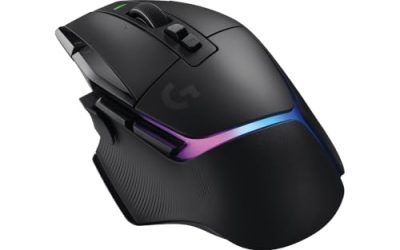
The G502 X is the balanced pick in this guide: a wired mouse with a precise sensor, a generous set of programmable controls, and a shape that has become a familiar sight on strategy desks. Its listing states a HERO 25K sensor with sensitivity up to 25,600 DPI, which covers the full range of cursor speeds a strategy player needs, from slow, exact worker selection to fast minimap sweeps. Thirteen programmable controls give a player room to bind control groups, camera locations, and rally commands without crowding the keyboard.
The listing states LIGHTFORCE hybrid optical-mechanical switches for the primary buttons, a redesigned hyperfast scroll wheel with a dual mode, and a removable and repositionable DPI-shift button. The DPI-shift button is a useful detail for this genre: a player can hold it to drop to a low sensitivity for a precise box-select, then release it to return to a fast sweep speed. The mouse weighs 89 grams and connects over a wired USB link, so there is no battery to watch and no wireless link to manage during a match.
The shape is a right-handed ergonomic shell with a thumb rest, which suits a palm or claw grip through long sessions. The side panel carries two main thumb buttons plus the DPI-shift control, and the scroll wheel tilts left and right for extra binds. Players who want a thumb grid will find the layout light on thumb commands compared with the Naga below, but players who want a solid all-round mouse with a strong sensor and a comfortable shape will find the G502 X hard to fault. The listing excerpts checked show the black variant in current circulation, with social posts from November 2026 linking the same listing on Amazon.
Razer Basilisk V3 35K Wired Gaming Mouse

Razer Basilisk V3 35K Wired Gaming Mouse
The Basilisk V3 35K is the ergonomic command pick: a wired mouse built around a thumb rest, a strong sensor, and a set of controls that rewards a player who binds camera jumps and group commands to the mouse. Its listing states a Razer Focus Pro 35K Optical Sensor Gen-2 with sensitivity up to 35,000 DPI and 1-DPI step adjustments, which allows a player to tune cursor speed in fine increments until it feels right for both micro and macro play. Thirteen customizable controls cover the primary buttons, the side buttons, and the scroll wheel inputs.
The listing states a configurable HyperScroll tilt wheel with tactile cycling, free-spin scrolling, and a smart-reel mode that switches between the two based on scroll speed, plus Optical Mouse Switches Gen-3 and 11-zone Chroma RGB lighting. The tilt wheel adds two more binds on top of the side buttons, which suits a player who wants camera locations or control groups on the wheel as well as under the thumb. The right-handed ergonomic shell with a thumb rest suits a palm grip, and the textured grip keeps the mouse steady during fast lateral sweeps.
A tracker page checked four days ago shows the listing in stock on Amazon US, which is the freshest corroboration in this guide. The listing excerpts checked do not state a weight figure, so the guide does not repeat one here; confirm it on the product page before buying. For a player who wants a high-ceiling sensor, a comfortable ergonomic shell, and a deep set of binds in a wired mouse, the Basilisk V3 35K is a strong fit.
Razer Naga V2 HyperSpeed Wireless MMO Gaming Mouse

Razer Naga V2 HyperSpeed Wireless MMO Gaming Mouse
The Naga V2 HyperSpeed is the maximum-command pick: a wireless mouse with a twelve-button thumb grid that turns the thumb into a second hotkey row. Its listing states nineteen programmable buttons in total, including the twelve-button side grid, a Focus Pro 30K optical sensor with sensitivity up to 30,000 DPI, and Mechanical Mouse Switches Gen-2. For a player who wants control groups, camera locations, and production commands all under one thumb, no other mouse in this guide comes close on button count.
The listing states HyperScroll technology with free-spin and tactile cycling modes, Razer HyperSpeed wireless and Bluetooth connectivity, and a battery life of up to 400 hours on Bluetooth and up to 250 hours on HyperSpeed wireless. The long wireless runtime matters for a player who practices for hours each day and does not want to think about charging mid-week. The listed dimensions are 4.71 inches long, 2.96 inches wide, and 1.71 inches tall, which marks it as a full-size shell suited to a palm grip and a medium to large hand.
The thumb grid takes practice. A player who has never used a twelve-button grid should expect a learning curve while the thumb maps the buttons, and the grid can feel crowded for a small hand. But for a player who already thinks in control groups and wants the deepest command set available, the grid is the point. A tracker page checked four days ago shows a current US listing for this ASIN, and a listing tracker checked in early November 2026 also lists it on Amazon. The listing excerpts checked do not state a weight figure, so the guide does not repeat one here.
SteelSeries Aerox 5 Wireless Gaming Mouse

SteelSeries Aerox 5 Wireless Gaming Mouse
The Aerox 5 Wireless is the lightweight multi-button pick: a wireless mouse that pairs a holey ultralight shell with a nine-button layout and a long wireless runtime. Its listing states a TrueMove Air optical sensor with 18,000 CPI and true 1-to-1 tracking, a 74-gram build, and Quantum 2.0 wireless with up to 180 hours of battery life. The light shell suits fast cursor sweeps across the minimap and the base, while the sensor keeps tracking clean at speed.
The listing states nine programmable buttons, including a five-button side panel with a distinctive up and down flick switch. The flick switch is a useful detail for this genre: it can carry a command a player repeats constantly, such as cycling through production buildings or jumping between camera locations, without the thumb leaving its resting spot. The listing also states AquaBarrier protection with an IP54 figure against dust and splashes, and PrismSync RGB lighting across three zones. Connectivity covers 2.4 GHz wireless and Bluetooth, with a USB-C cable for charging and wired play.
A listing tracker checked three days ago shows the listing in stock on Amazon, and a component tracker checked today also lists it as in stock on Amazon. The Amazon listing excerpt checked shows an Add to Cart control, which is consistent with a live listing. For a player who wants a light wireless mouse with more buttons than a typical five-button design and a battery that lasts for weeks of play, the Aerox 5 Wireless is the natural pick in this guide.
Logitech G Pro X Superlight 2 Wireless Gaming Mouse

Logitech G Pro X Superlight 2 Wireless Gaming Mouse
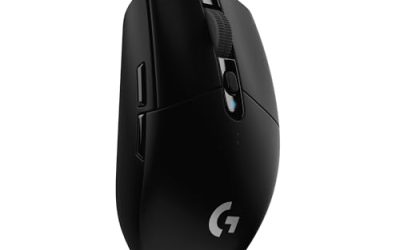
The Pro X Superlight 2 is the ultralight speed pick: a wireless mouse built for players who value fast, unencumbered cursor movement above all else. Its listing states a HERO 2 sensor with sensitivity up to 44,000 DPI, a 60-gram shell, five programmable buttons, an 8 kHz report rate, LIGHTFORCE hybrid switches, and USB-C charging. The 8 kHz report rate keeps cursor updates frequent during the fastest sweeps, and the 60-gram shell makes long minimap jumps feel effortless.
The shape is a symmetrical, low-profile shell that suits a fingertip or claw grip and a small to medium hand. With only five programmable buttons, it carries fewer binds than the other mice in this guide, so it suits a player who keeps most commands on the keyboard and wants the mouse to handle the core work: precise selection, fast camera movement, and a couple of binds on the side buttons. The listing excerpts checked do not state a battery life figure, so the guide does not repeat one here; confirm it on the product page before buying.
A listing tracker checked one day ago links this exact ASIN on Amazon, and another tracker from eighteen days ago does the same, which is recent corroboration that the listing is current. For a player who plays at a high actions-per-minute pace and wants the lightest, fastest-tracking mouse in this guide, the Superlight 2 is the pick that matches that style.
Comparison table
| Mouse | Sensor | Programmable controls | Weight | Connection |
|---|---|---|---|---|
| Logitech G502 X | HERO 25K, up to 25,600 DPI | 13 | 89 g | Wired USB |
| Razer Basilisk V3 35K | Focus Pro 35K Gen-2, up to 35,000 DPI | 13 | Not stated in listing excerpts checked | Wired USB |
| Razer Naga V2 HyperSpeed | Focus Pro 30K, up to 30,000 DPI | 19 | Not stated in listing excerpts checked | 2.4 GHz wireless, Bluetooth |
| SteelSeries Aerox 5 Wireless | TrueMove Air, 18,000 CPI | 9 | 74 g | 2.4 GHz wireless, Bluetooth, USB-C |
| Logitech G Pro X Superlight 2 | HERO 2, up to 44,000 DPI | 5 | 60 g | LIGHTSPEED wireless, USB-C |
Frequently asked questions
How many buttons does a strategy mouse need?
It depends on how much of the command load a player wants on the mouse. Two side buttons cover the basics, such as a camera jump and a control group. Five to nine buttons cover control groups, camera locations, and production cycling without moving the left hand. A twelve-button thumb grid covers a full set of groups and camera locations, but it takes practice to use well. The right count is the one a player can use without looking down or misclicking in a tense moment.
Does a wireless mouse add lag in a strategy match?
Modern 2.4 GHz wireless links are built for low-latency play, and the wireless mice in this guide state high polling rates and fast sensors. A wired mouse removes the question entirely and never needs charging, which some players prefer for long sessions. Either connection works for this genre; the choice comes down to whether a player values a cable-free desk or a link that never needs a battery check.
Is a light mouse better for fast play?
A light shell makes fast cursor sweeps easier, which helps when jumping between the minimap and the base, and it reduces hand fatigue over a long session. A heavier mouse feels more planted for precise box-selects and small clicks. Both styles have a place in this genre, and the guide includes both: the 60-gram Superlight 2 and the 74-gram Aerox 5 Wireless on the light side, and the 89-gram G502 X on the steadier side.
How to choose
Match the mouse to the way the game is played. A player who binds control groups and camera locations to the mouse should look at the Naga V2 HyperSpeed first, because its twelve-button grid carries the deepest command set in this guide. A player who wants a balanced mouse with a strong sensor, a comfortable ergonomic shell, and a solid set of binds should look at the G502 X or the Basilisk V3 35K, with the Basilisk giving the higher sensor ceiling and the G502 X giving the DPI-shift button for precise selection.
A player who values a light shell and long wireless runtime should look at the Aerox 5 Wireless, which pairs a 74-gram build with nine programmable buttons and a battery life of up to 180 hours. A player who plays at a high actions-per-minute pace and wants the fastest, lightest tracking in the guide should look at the Pro X Superlight 2, accepting its five-button layout in exchange for its 60-gram shell and 8 kHz report rate.
Before buying, confirm the hand fit against the shape and the current listing details on the product page. Check that the stated sensor, button count, and connection match the listing, and confirm the listing is in stock on Amazon US at the time of purchase. The right mouse is the one whose buttons, sensor, and shape match the way a player actually plays, not the one with the longest spec sheet.
Disclosure: As an Amazon Associate, we may earn a commission from qualifying purchases made through links in this article, at no additional cost to you.