🛒 Best Price Today on Amazon
Prime members get fast, free shipping on everything above, plus member-only deals. New members get a 30-day free trial — cancel anytime.
Most gaming monitor shopping starts with a refresh rate. With an ultrawide, the sharper question is how much width you want to pay for in frames. A 34 inch 21:9 screen at 3440×1440 asks a graphics card to draw roughly a third more pixels than a standard 2560×1440 display, so every extra hertz on the box comes with a hardware bill. That tension is the whole story behind picking the best 34 inch gaming monitor under 400 dollars.
This list is written for players who want the cinematic field of view in racing sims, flight games, and strategy titles, plus enough desktop width to keep two windows open side by side. It also suits creators who edit timelines on the same screen they game on. The ten monitors below cluster around 165Hz to 240Hz, and the more useful split in 2026 is not speed alone but panel quality, inputs, and how honest each listing is about its specs.
Quick Picks
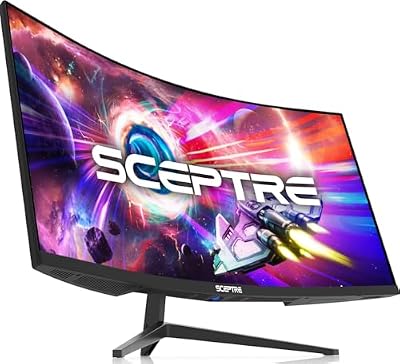
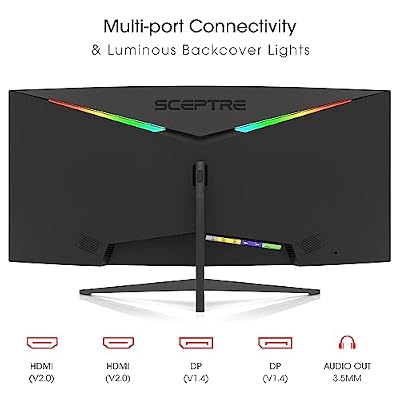
Sceptre 34-inch Curved ultrawide WQHD Monitor (3440 × 1440), R1500, up to 180Hz/165Hz, DisplayPort x2, 99% sRGB, 1ms, Built-in Speakers, Machine Black, 2025 (C345B-QUT168)




As an Amazon Associate we earn from qualifying purchases. Product prices and availability are accurate as of the date/time indicated.

New! Sceptre Curved 34-inch Prime Gaming Monitor 3440 x 1440 up to 240Hz 1500R 1ms 100% sRGB DisplayPort x2 HDMI x2 Build-in Speakers, Machine Black 2027 (C345B-QU240T Series)


As an Amazon Associate we earn from qualifying purchases. Product prices and availability are accurate as of the date/time indicated.

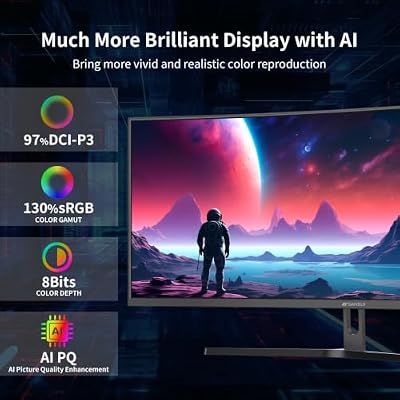
SANSUI 34-Inch Curved Gaming Monitor UWQHD 3440 x 1440P 200Hz Ultrawide | 34” Ultra Wide Gaming Computer Monitor-PBP, OD 1ms, HDR, 300nits, 130%sRGB, DCI-P3 97%,AI Crosshair,HDMI2.1x2,DP1.4




As an Amazon Associate we earn from qualifying purchases. Product prices and availability are accurate as of the date/time indicated.

Sceptre 34-Inch Curved Ultrawide WQHD Monitor, 3440 x 1440, R1500, Up to 180Hz/165Hz, DisplayPort x2, 100% sRGB, 1ms, Built-in Speakers, Black (C345B-QUT168 Series)


As an Amazon Associate we earn from qualifying purchases. Product prices and availability are accurate as of the date/time indicated.

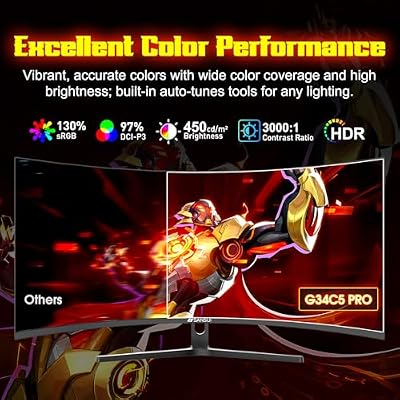
SANSUI 34 Inch Curved Monitor 240Hz UWQHD 3440×1440 Gaming Monitor | 21:9 2K Curved1500R,HDR400,Fast VA, PIP/PBP,AI Crosshair,AIPQ(Visual Enhance),MPRT 1ms,HDMI2.1*2,DP1.4*2(HDMI Cable Included)




As an Amazon Associate we earn from qualifying purchases. Product prices and availability are accurate as of the date/time indicated.

Gawfolk 34" Ultrawide Curved Gaming Monitor, UWQHD 3440x1440 165Hz 1500R | PIP/PBP 1ms(MPRT) 128% sRGB HDMI & DP Tilt Adjustable 21:9 PC Screen


As an Amazon Associate we earn from qualifying purchases. Product prices and availability are accurate as of the date/time indicated.

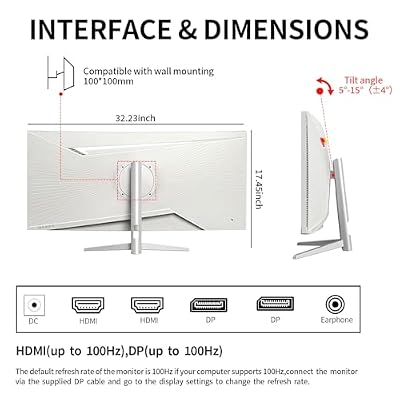
ZZA 34 Inch Ultrawide Curved Monitor Built in Speakers 4K Gaming Computer Monitor 100Hz, WQHD(3440x1440P) Curved 3800R 21:9 Ultra Wide PC Display, 130% sRGB, HDMI &DP, VESA Mount Compatible-White



As an Amazon Associate we earn from qualifying purchases. Product prices and availability are accurate as of the date/time indicated.
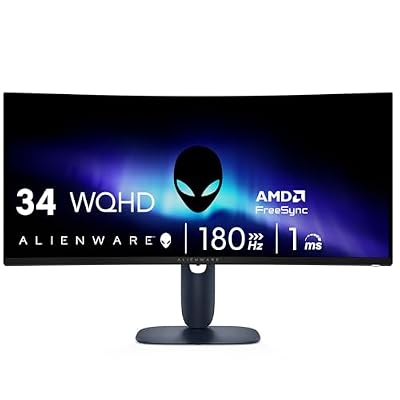
Alienware 34 Curved Gaming Monitor – AW3425DWM - 34-inch WQHD 180Hz 1ms Display, 1500R, AMD FreeSync Premium, VESA AdaptiveSync.


As an Amazon Associate we earn from qualifying purchases. Product prices and availability are accurate as of the date/time indicated.

LXZ 34 Inch Curved Ultrawide Gaming Monitor 165Hz, UWQHD 3440x1440, 1500R | VA, 1ms MPRT, FreeSync & G-Sync, PIP/PBP, 3500:1, 120% sRGB, HDMI & DP, VESA 100x100mm for Office, Business & Entertainment


As an Amazon Associate we earn from qualifying purchases. Product prices and availability are accurate as of the date/time indicated.

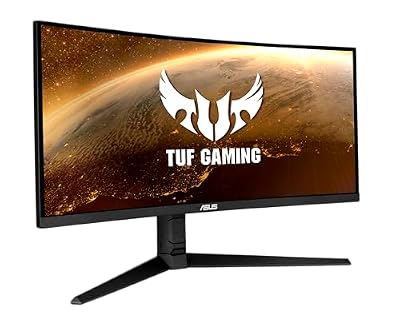
ASUS TUF Gaming VG34VQL1B 34 Inch 1440p 165Hz Ultrawide HDR Gaming Monitor | ELMB Sync, 1ms, FreeSync Premium, Height Adjustable, HDR, DisplayHDR 400, Eye Care, 1500R Curve, for PS5 and Xbox




As an Amazon Associate we earn from qualifying purchases. Product prices and availability are accurate as of the date/time indicated.
| Product | Best for | Key spec from the listing |
|---|---|---|
| Sceptre 34 inch WQHD (99% sRGB) | Simple, wide everyday screen | 3440×1440, up to 180Hz, 99% sRGB |
| Sceptre Prime 34 inch | Fastest refresh with plenty of ports | Up to 240Hz, 2 DP and 2 HDMI |
| SANSUI 34 inch 200Hz | Split-screen multitaskers | UWQHD, 200Hz, PBP, 130% sRGB |
| Sceptre C345B | Color-minded budget buyers | Up to 180Hz, 100% sRGB, speakers |
| SANSUI 34 inch 240Hz VA | Contrast and HDR400 fans | 240Hz, Fast VA, HDR400, PIP/PBP |
| Gawfolk 34 inch | Adjustable-stand shoppers | 165Hz, 1500R, 128% sRGB, tilt |
| ZZA 34 inch | Gentle-curve preference | 3440×1440, 100Hz, 3800R |
| Alienware AW3425DWM | Brand-name QHD ultrawide | 180Hz, 1ms, FreeSync Premium |
| LXZ 34 inch VA | Dual-sync flexibility | 165Hz, FreeSync and G-Sync, 3500:1 |
| ASUS TUF VG34VQL1B | Height-adjustable desk setups | 165Hz, ELMB Sync, DisplayHDR 400 |
How to Choose
Resolution: 3440×1440 is the target
Look for UWQHD or WQHD ultrawide at 3440×1440. Anything lower stretches pixels across the width and looks soft, and a 21:9 picture at 2560×1080 is a very different, coarser experience. Be wary of listings that print “4K” in the title but list 3440×1440 in the details; the resolution line is the one that counts.
Refresh rate versus frame budget
A 165Hz panel is already ambitious for many mid-range cards at this resolution. Pay for 200Hz or 240Hz only if your system holds well above 150 frames per second in the games you play. Otherwise, spend the difference on panel quality. A useful habit is to cap your frame rate a little below the monitor’s maximum, which keeps motion smooth and the graphics card quieter.
Curvature, panel type, and sync
Most ultrawides use a 1500R curve, which keeps the edges within view. A 3800R curve is much flatter. VA panels offer better contrast, and Fast VA improves motion handling. Check for FreeSync, and for G-Sync compatibility if you own an NVIDIA card.
Inputs, stand, and features to skip
Two DisplayPort connections and at least one HDMI are ideal. Height adjustment is rare at this tier, so tilt-only stands are normal. Skip “AI crosshair” and visual-enhancement modes as buying reasons; they are software extras. Budget models often trim stand flexibility and color accuracy.
The 10 Best Options
Sceptre 34 Inch WQHD (99% sRGB)
A no-frills ultrawide for players who want 3440×1440, a 1500R curve, and a refresh rate up to 180Hz. The listing mentions two DisplayPort inputs and built-in speakers, which covers the basics. It makes sense for someone replacing a pair of small screens who mostly wants one continuous desktop and a smooth picture in driving games, without paying for features they will never switch on.
- Up to 180Hz is a comfortable ceiling for mid-range cards.
- Two DisplayPort inputs allow a second source.
- Trade-off: 99% sRGB is the lowest color figure among the Sceptre options.
Skip it if color accuracy matters for photo or video editing.
Sceptre Prime 34 Inch Gaming
The most connection-rich listing in this group: two DisplayPort and two HDMI inputs, 1500R curve, 100% sRGB, and a refresh rate up to 240Hz. It suits a player who juggles a PC and a console. The tall refresh ceiling also leaves headroom if the graphics card is upgraded later, so the panel will not be the limiting part for years.
- Up to 240Hz is far above the 180Hz of the other Sceptre models.
- Four video inputs mean few cable swaps.
- Trade-off: most graphics cards will not fill 240 frames at 3440×1440.
Skip it if your graphics card struggles to reach 144 frames per second.
SANSUI 34 Inch 200Hz UWQHD
SANSUI’s 200Hz model lists PBP, 1ms overdrive, HDR, 300 nits, and 130% sRGB. The PBP feature lets two sources share the screen, handy for gaming beside a work laptop. That is a practical edge for remote workers who want chat or a document open next to a match.
- PBP lets two sources display at once.
- 130% sRGB coverage suggests vivid color.
- Trade-off: 300 nits is modest for HDR, so treat the HDR label cautiously.
Skip it if you want a bright, high-impact HDR picture.
Sceptre C345B
Another 3440×1440 option, this one with 100% sRGB, a 1500R curve, and up to 180Hz. It reads like a slightly better-specified twin of the first Sceptre, and the listing again names built-in speakers. For many buyers the choice between the two Sceptre models comes down to that extra point of color coverage and whichever one happens to be listed with better availability.
- Full sRGB coverage is a small step up in color.
- Two DisplayPort inputs are listed.
- Trade-off: no HDMI count is given in the title, so check before connecting a console.
Skip it if HDMI-heavy setups are your plan.
SANSUI 34 Inch 240Hz UWQHD VA
A Fast VA ultrawide with HDR400, PIP/PBP, and a 240Hz rate. VA tends to deliver deeper blacks, making this appealing for dark games and movies. Pairing that contrast with the highest refresh rate in this group makes it the enthusiast option for anyone whose graphics card can keep up.
- Fast VA offers strong contrast for its class.
- HDR400 is listed, a step above plain HDR badges.
- Trade-off: the AI crosshair and enhancement features are gimmicks that add little.
Skip it if viewing angles matter more than black depth.
Gawfolk 34 Inch Ultrawide
The Gawfolk offers UWQHD at 165Hz, a 1500R curve, PIP/PBP, and 128% sRGB. The listing stresses a tilt-adjustable stand, with HDMI and DisplayPort inputs. It reads as a value-focused pick for someone who wants the feature list of a pricier screen in a plain package.
- 128% sRGB claims wide color for the money.
- PIP/PBP supports multitasking.
- Trade-off: 165Hz trails the 240Hz options if frames are your priority.
Skip it if you want height adjustment or a widely known brand.
ZZA 34 Inch Curved Ultrawide
This listing is contradictory: it says “4K” yet lists WQHD at 3440×1440, plus 100Hz, a gentle 3800R curve, and built-in speakers. Buyers should confirm the real resolution before purchase. If the real panel matches the 3440×1440 detail, it is a calm, low-demand option for office use with occasional gaming on the side.
- The shallow 3800R curve is friendlier to office work.
- Built-in speakers are listed.
- Trade-off: 100Hz is the slowest panel here.
Skip it if gaming speed is the point.
Alienware AW3425DWM
A well-known gaming brand name, with a 34 inch WQHD curved panel, 180Hz, 1ms, 1500R, and AMD FreeSync Premium. The name carries gaming-brand recognition, which appeals to buyers who value a familiar logo and a clean design over a long feature list.
- FreeSync Premium and VESA AdaptiveSync support are listed.
- A 180Hz rate fits mid-range hardware well.
- Trade-off: the title lists fewer extras such as speakers or PBP.
Skip it if you want a feature-packed listing for the least outlay. Buyers who plan to keep a monitor for many years often accept a thinner feature list in exchange for a name they trust.
LXZ 34 Inch VA Ultrawide
The LXZ pairs 165Hz, a VA panel, 1500R, a 3500:1 contrast figure, and support for both FreeSync and G-Sync. That dual-sync note helps anyone who might switch GPU brands. It suits a builder who is still deciding on a graphics card and wants the monitor to work with whichever one wins.
- The 3500:1 contrast figure points to strong black levels.
- Both major sync standards are named.
- Trade-off: the brand is less established.
Skip it if long-term support matters to you. A more established maker is the safer route for warranty questions.
ASUS TUF Gaming VG34VQL1B
The ASUS offers 1440p ultrawide at 165Hz with ELMB Sync, DisplayHDR 400, FreeSync Premium, and a height-adjustable stand, rare in this group. For long sessions at one desk, being able to raise the screen to eye level matters more than a few extra hertz.
- Height adjustment improves ergonomics.
- ELMB Sync targets motion blur while keeping variable refresh.
- Trade-off: 165Hz is lower than the 240Hz rivals.
Skip it if you want the highest refresh figure.
Which One Fits Your Situation
You want maximum refresh and a powerful GPU
The Sceptre Prime 34 inch and the SANSUI 240Hz VA are the two models that list the highest rates. The Sceptre has more inputs; the SANSUI adds HDR400 and PIP/PBP.
You game and work from the same desk
The ASUS TUF VG34VQL1B has the adjustable stand, and the Gawfolk and SANSUI 200Hz offer PBP for two sources.
You care about dark scenes and contrast
Choose the LXZ VA or the SANSUI 240Hz VA. Both list VA panels designed for deeper blacks.
You want a recognizable gaming name
The Alienware AW3425DWM is the pick, with FreeSync Premium and 180Hz. The ASUS TUF is the other recognizable name, with a stand that adjusts in height.
Common Mistakes
- Trusting a “4K” label on an ultrawide without checking the actual resolution line.
- Buying 240Hz for a graphics card that tops out near 100 frames at this width.
- Ignoring the curve; 1500R and 3800R feel very different.
- Counting AI crosshairs and visual modes as performance features.
- Skipping a desk measurement; a 34 inch ultrawide is wider than it looks online, and the stand needs room behind the screen as well.
Related guides
- Logitech G Pro X 2 Vs Steelseries Arctis Nova Pro Wireless
- Travel Controller Case For 8Bitdo Ultimate Series
- Gaming Pc Under 600 For Roblox And Minecraft
Frequently Asked Questions
Is a 34 inch ultrawide better than a 32 inch 16:9 monitor?
It depends. Ultrawides add horizontal view and desktop room, but a 16:9 screen is taller and works better with standard video content.
Do all games support 21:9?
Most modern games do, but a few older or competitive titles stretch or add black bars. Check support for your favorite games first, and look at community fixes for any title that misbehaves at 21:9.
What graphics card do I need for 3440×1440?
A mid-range or better card is the realistic starting point. The higher the refresh rate you want to use, the stronger the card must be.
Is VA or IPS better on an ultrawide?
VA suits dark rooms and contrast; IPS suits wider viewing angles. For solo gaming at the desk, many buyers prefer VA’s depth. If the desk sits beside a bright window, IPS handles reflections and off-angle viewing with fewer compromises.