
- Top Pick: Samsung 27" Odyssey OLED G6 (G61SH) QD-OLED, QHD (1440P) Gaming Monitor
- Best Value: LG 27GX704A-B 27-inch Ultragear QHD (2650×1440) OLED Gaming Monitor 240Hz, 0.03ms, NVIDIA G-Sync Compatible, AMD FreeSync Premium Pro, VESA Display HDR TrueBlack400, HDMI 2.1, DisplayPort, Black
- Premium Choice: ASUS ROG Strix 26.5” 1440P QD-OLED Gaming Monitor (XG27ACDNG) -QHD (2560×1440), 360Hz, 0.03ms, Custom Heatsink, OLED Care+, G-SYNC Compatible, 99% DCI-P3, DisplayWidget, AI Gaming, 3yr Warranty
The gaming monitor question that mattered most in 2020 was refresh rate. In 2026, it’s panel technology. OLED has moved from a boutique curiosity into the mainstream 27-inch QHD bracket, while IPS has quietly gotten better, brighter, and cheaper. Both can now hit 240Hz or more at 1440p with sub-1ms response figures, which means the spec sheet no longer decides the argument for you. The real difference is in how each panel handles contrast, motion, brightness, and long-term reliability.
This comparison breaks down where each technology genuinely wins, where the marketing overstates the gap, and which type of player should spend the extra money. If you play story-driven single-player games in a dim room, the answer is probably obvious. If you’re a competitive FPS player who leaves a HUD on screen for eight hours a day, or you’re shopping on a tighter budget, the case for IPS is stronger than the enthusiast forums suggest.
As an Amazon Associate we earn from qualifying purchases at no extra cost to you.




⚡ Save on Your Next PC — Amazon Prime
Prime members get fast free shipping on the systems above, plus early access to Prime Day & Black Friday PC deals. New members get a 30-day free trial.
Watch: OLED vs IPS Gaming Monitor: 2026 Comparison — Video Review
Quick Verdict
Buy OLED if image quality is your priority: perfect blacks, near-instant pixel response, and unmatched HDR impact make panels like the Samsung Odyssey OLED G6 and the ASUS ROG Strix XG27ACDNG the best-looking gaming displays you can put on a desk. Buy IPS if you need maximum sustained brightness, all-day productivity use with static interfaces, or the lowest price per frame. IPS remains the safer, more versatile all-rounder; OLED is the enthusiast’s choice.
Key Differences
- Contrast: OLED pixels switch off completely for true black and effectively infinite contrast. IPS relies on a backlight, so dark scenes look grey and shadow detail washes out, even on mini-LED variants with local dimming.
- Response time: OLED panels quote 0.03ms grey-to-grey, roughly thirty times faster than a good IPS. In practice this means almost zero smearing behind moving objects, with no overdrive tuning required.
- Brightness: IPS wins on full-screen sustained brightness, comfortably holding 400-600 nits. OLED hits higher peaks in small highlights but dims noticeably when a bright scene fills the whole screen.
- Burn-in risk: OLED can retain static elements over years of use. Modern panels mitigate this with pixel shifting, heatsinks, and features like ASUS OLED Care+, plus 3-year burn-in warranties. IPS has no such risk.
- Colour volume: QD-OLED models cover around 99% DCI-P3 with far better saturation at low brightness. Standard IPS typically lands at 90-95% DCI-P3 and looks flatter in HDR.
- Price: A 240Hz 1440p IPS panel costs meaningfully less than an equivalent OLED, and the gap widens at ultrawide sizes.
OLED Gaming Monitors
OLED’s advantage is structural rather than incremental. Because each pixel emits its own light, there’s no backlight bleed, no halo around bright objects, and no compromise between contrast and viewing angle. In practice that means HDR games look genuinely different rather than slightly brighter. The LG 27GX704A UltraGear and AOC Q27GAZD both carry DisplayHDR TrueBlack 400 certification, a standard IPS panels cannot meet at any price.
Motion clarity is the second win. The near-instant pixel transitions on the ASUS ROG XG27AQDMGR and the 360Hz ROG Strix XG27ACDNG eliminate the dark trailing that even fast IPS panels show behind high-contrast edges. For ultrawide immersion, the Alienware AW3425DW extends the same QD-OLED benefits across a 34.2-inch 1800R curve. The trade-offs are real, though: text fringing on some subpixel layouts, aggressive brightness limiting in bright rooms, and the need for sensible habits around static taskbars.
IPS Gaming Monitors
IPS has not stood still. Current-generation fast IPS panels reach 1ms GtG, 240Hz to 360Hz refresh rates, and wide colour coverage, all while costing substantially less than OLED. For anyone with a bright, sunlit room, IPS is often the more usable display day to day, because it maintains consistent brightness across the entire screen regardless of scene content.
The bigger argument for IPS is durability and versatility. There is no burn-in risk, no automatic brightness limiter dimming your spreadsheet, and no ABL flicker when switching between dark and light windows. If your monitor doubles as a work display running the same IDE, browser tabs, and Discord window for eight hours a day, IPS removes an entire category of worry. The compromise is contrast: grey-ish blacks in dark games and unconvincing HDR remain IPS’s permanent weaknesses.
Which Should You Buy?
- For single-player and HDR gaming: Pick OLED. The Samsung Odyssey OLED G6 or LG UltraGear 27GX704A deliver the contrast that makes modern HDR titles worthwhile.
- For competitive FPS at the highest refresh: Pick the ASUS ROG Strix XG27ACDNG at 360Hz, or a high-refresh IPS if you want maximum brightness and zero burn-in concern.
- For mixed work and play: Pick IPS. Static UI elements and sustained brightness favour a backlit panel.
- For immersive sim racing and RPGs: Pick the Alienware AW3425DW ultrawide for the widest field of view with QD-OLED contrast.
- For value: Pick IPS, or the AOC Q27GAZD if you want the cheapest credible route into QD-OLED.
Frequently Asked Questions
Is OLED burn-in still a problem in 2026?
It’s a managed risk rather than an inevitability. Heatsinks, pixel refresh cycles, logo dimming, and taskbar auto-hide have made failures rare in normal use, and most manufacturers include a 3-year burn-in warranty. Heavy static-content users should still prefer IPS.
Does OLED actually feel faster than a 240Hz IPS?
Yes, though the difference is motion clarity rather than input lag. At matched refresh rates, OLED shows cleaner edges on moving objects because there’s no pixel transition smear to overdrive around.
Is QD-OLED better than standard OLED?
For gaming, generally yes. Quantum-dot layers boost colour volume and brightness, which is why the Samsung, ASUS Strix, AOC, and Alienware models all use QD-OLED panels.
Is 1440p still the sweet spot?
For 240Hz-plus gaming, yes. 27-inch QHD balances sharpness against GPU cost far better than 4K, which still demands upscaling to sustain high frame rates.
Final Verdict
If you can accommodate its quirks, OLED is the better gaming monitor in 2026 — the contrast and motion clarity are advantages IPS cannot engineer its way around. Choose the Samsung Odyssey OLED G6 or LG UltraGear for balanced value, the ASUS ROG Strix XG27ACDNG for competitive refresh rates, or the Alienware AW3425DW for ultrawide immersion. Stick with IPS if you need bright-room usability, all-day static content, or the lowest cost per frame.
Top picks from this guide
 SamsungSamsung 27" Odyssey OLED G6 (G61SH) QD-OLED, QHD (1440P) Gaming…$440 \xc2\xb7 99/100
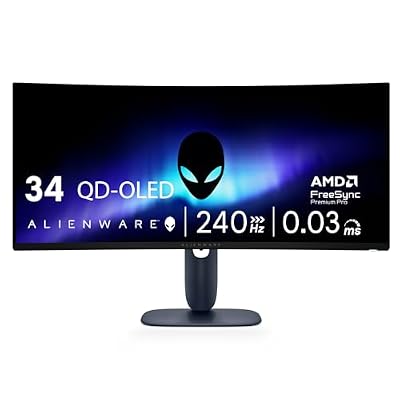 AlienwareAlienware 34 240Hz QD-OLED Curved Gaming Monitor - AW3425DW -…$700 \xc2\xb7 99/100
 LGLG 27GX704A-B 27-inch Ultragear QHD (2650x1440) OLED Gaming Monitor 240Hz,…$350 \xc2\xb7 98/100
 ASUSASUS ROG Strix 26.5” 1440P QD-OLED Gaming Monitor (XG27ACDNG) -QHD…$549 \xc2\xb7 98/100








