🛒 Best Price Today on Amazon
Prime members get fast, free shipping on everything above, plus member-only deals. New members get a 30-day free trial — cancel anytime.
Choosing a Razer mouse is really a decision about shape and workload, not about chasing the biggest sensor number on the box. Every model below tracks well enough for competitive play, so the choice that matters is whether your hand wants a flat symmetrical shell or a sculpted right-handed one, and whether your games need two side buttons or a full grid of them.

This guide is for shooter players weighing an ultralight wireless pick, MMO players who live on a hotbar, and mixed-genre players who want one mouse to cover work and play alike. It also suits anyone replacing an older Razer model and wondering which current line actually fits their grip. Each pick was selected from its Amazon listing name and stated specifications, and every model here is a Razer gaming mouse.
Quick Picks
As an Amazon Associate we earn from qualifying purchases
| Product | Best for | Key spec from title |
|---|---|---|
| Razer Viper V3 Pro | Competitive FPS with a symmetrical grip | 54g lightweight, 8K polling |
| Razer DeathAdder V3 Pro | Right-handed palm and claw players | 63g lightweight, 30K DPI optical sensor |
| Razer Basilisk V3 Pro | Mixed gaming and everyday scrolling | HyperScroll Tilt Wheel, 13 programmable controls |
| Razer Naga V2 Pro | MMO and MOBA hotbar players | 19+1 programmable buttons, swappable side plates |
| Razer Viper V3 HyperSpeed | Long sessions without recharging | Up to 280 hr battery, 30K DPI optical sensor |
How to Choose
Start with shape, then hand size and grip
Razer splits its range into two families of shape. The Viper models are symmetrical, with a low, flat profile that suits fingertip and claw grips and lets either hand position feel neutral. The DeathAdder, Basilisk, and Naga lines are right-handed ergonomic shells with a taller palm hump and a thumb rest, which fill the hand and support a relaxed palm grip. Measure your current mouse before ordering: a shell that is too long pushes your fingers past the main clicks, while one that is too short leaves your palm dragging on the pad and slows every flick.
Weight changes how a mouse feels in long sessions
The spread in this guide runs from 54 grams to a much heavier MMO shell, and that gap is noticeable within a single match. Lighter mice ask less of your wrist during repeated flicks and micro-corrections, which is why the esports models strip out lighting, extra wheels, and swappable parts. Heavier models trade that agility for stability and hardware: tilt wheels, side plates, and bigger batteries all add grams. Neither direction is automatically better. Players who lift the mouse often usually prefer the light end, while players who keep the mouse planted may never notice the extra weight.
Sensor and polling numbers need context
Every pick here uses a Razer optical sensor rated at 30,000 DPI or higher, and none of them will spin out in normal play, so treat sensor tier as a solved problem rather than the deciding factor. Polling rate deserves more attention. Most of these mice report at 1,000 Hz out of the box, and the Viper V3 Pro reaches a true 8,000 Hz wireless rate with its included HyperPolling dongle. Higher polling smooths cursor movement on high-refresh monitors, but it also shortens battery life, so check which rate each battery figure in a listing actually refers to before comparing runtimes.
Buttons, wheels, and how you charge
Count the inputs your games genuinely use. Shooter players rarely need more than two side buttons, and extra hardware only adds weight and accidental presses. MMO players are the opposite case: the Naga V2 Pro swaps between 2-, 6-, and 12-button side plates, so one mouse can match different games. Wheels matter too, since the Basilisk line offers a tilting wheel with free-spin and tactile modes. Finally, decide how you want to power the mouse. Most picks recharge over USB-C, while the Viper V3 HyperSpeed runs on a single AA battery that you swap in seconds.
The 5 Best Options
Razer Viper V3 Pro
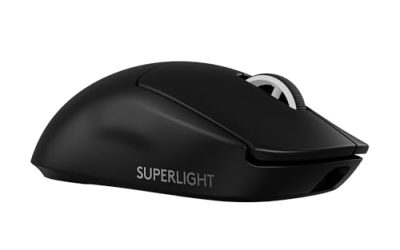
This is the pick for players who want the least mouse possible between their hand and the game. Its symmetrical shell weighs 54 grams in black, keeps the profile low for fingertip and claw grips, and pairs that shape with the strongest wireless specification in this guide, including a true 8,000 Hz polling rate through the dongle in the box. There is no lighting and no extra wheel hardware, and that restraint is the point: everything fitted serves fast, repeated aim movements.
Specs
- Sensor: Razer Focus Pro 35K Optical Sensor Gen-2
- Max sensitivity: 35,000 DPI
- Max speed and acceleration: 750 IPS, 70 G
- Weight: 54 g (Black)
- Switches: Razer Optical Mouse Switches Gen-3, 90-million click lifecycle
- Polling: up to 8,000 Hz wireless with the included Razer HyperPolling Wireless Dongle
- Battery life: up to 95 hours at 1,000 Hz
- Connection: Razer HyperSpeed Wireless (2.4 GHz) and wired
- Shape: symmetrical
Best for: Competitive FPS players who grip fingertip or claw and want the lightest Razer option.
Watch out for: Battery life drops sharply at the 8,000 Hz polling rate, and there is no Bluetooth mode for a second device.
ASIN: B0CW25XR5R
Razer DeathAdder V3 Pro
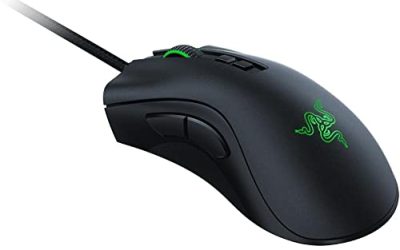
Where the Viper stays flat and neutral, the DeathAdder V3 Pro is built around a sculpted right-handed shape that fills the palm and gives the thumb a defined resting position. At 63 grams in black it stays light enough for shooters while feeling more anchored than a symmetrical shell, which suits palm and relaxed claw grips during longer sessions. It keeps the control layout simple, with five programmable buttons, and recharges over USB-C, so it works as a single-mouse setup for players who do not want swappable parts or a button grid.
Specs
- Sensor: Razer Focus Pro 30K Optical Sensor
- Max sensitivity: 30,000 DPI
- Max speed and acceleration: 750 IPS, 70 G
- Weight: 63 g (Black)
- Switches: Razer Optical Mouse Switches Gen-3, 90-million click lifecycle
- Battery life: up to 90 hours of continuous play, rechargeable via USB Type-C
- Connection: Razer HyperSpeed Wireless and wired
- Buttons: 5 programmable buttons
Best for: Right-handed palm and claw players who want an ergonomic shape that is still light enough for FPS.
Watch out for: The shape is right-handed only, and reaching 8,000 Hz polling requires a separately sold HyperPolling dongle.
ASIN: B0B6XZLNHQ
Razer Basilisk V3 Pro
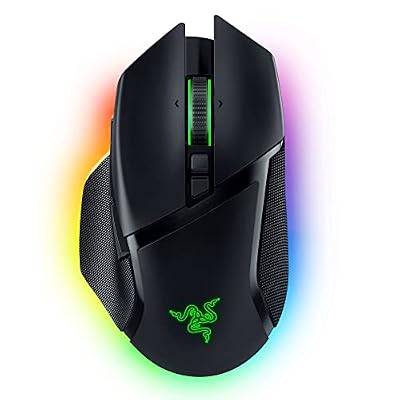
The Basilisk V3 Pro is the generalist of the range, aimed at players whose mouse also has to survive a workday. Its right-handed shell carries a tilting HyperScroll wheel that switches between tactile steps and free-spinning scrolls, thirteen programmable controls, and lighting across thirteen zones for players who run a Chroma setup. Three connection modes let it move between a gaming PC on the wireless dongle, a laptop over Bluetooth, and a wired fallback. It gives up the ultralight brief of the Viper and DeathAdder models in exchange for that flexibility.
Specs
- Sensor: 30K DPI optical sensor
- Switches: Razer Optical Mouse Switches Gen-3
- Controls: 13 programmable controls
- Wheel: Razer HyperScroll Tilt Wheel
- Lighting: 13-zone Chroma RGB
- Connection: 3 connection modes (HyperSpeed Wireless, Bluetooth, wired)
Best for: Players who split time between shooters, strategy games, and desktop work and want one feature-heavy mouse.
Watch out for: The extra wheel hardware and lighting make it far heavier than the esports picks, and the thumb clutch button is easy to press by accident at first.
ASIN: B0B6Y3XYFG
Razer Naga V2 Pro

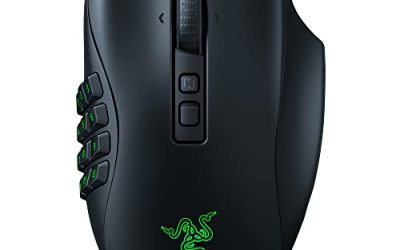
For MMO and MOBA players, the limiting factor is rarely the sensor; it is how many abilities sit under the thumb. The Naga V2 Pro answers that with three magnetic side plates covering 2-, 6-, and 12-button layouts, giving up to 19+1 programmable buttons on one mouse, so the same hardware can run a raid hotbar one evening and a lighter action-game layout the next. It also carries an adjustable HyperScroll Pro wheel and the longest stated battery figures in this guide, which suits players whose sessions run long and whose desk time is mostly game time.
Specs
- Sensor: Razer Focus Pro 30K Optical Sensor
- Switches: Razer Optical Mouse Switches Gen-3
- Buttons: 19+1 programmable buttons with 3 swappable side plates (2, 6, and 12-button layouts)
- Wheel: Razer HyperScroll Pro Wheel
- Battery life: up to 300 hours as stated in the listing title
- Connection: HyperSpeed Wireless, Bluetooth, and wired
Best for: MMO and MOBA players who bind abilities, items, and macros to the mouse.
Watch out for: It is the heaviest and widest mouse here, the shape is right-handed only, and wireless charging needs a separately sold dock or puck.
ASIN: B0BGJTLFN5
Razer Viper V3 HyperSpeed

This model keeps the symmetrical Viper shape but swaps the rechargeable cell for a single AA battery, and that one change reshapes the ownership experience. The listing states up to 280 hours of play from that battery, and when it finally runs down you swap the cell instead of tethering the mouse to a cable mid-session. At 82 grams including the battery it gives up some of the Pro model’s lightness, and its mechanical switches and 30K sensor sit a tier below, but the shape and wireless connection remain properly competitive.
Specs
- Sensor: Razer Focus Pro 30K Optical Sensor
- Max sensitivity: 30,000 DPI
- Max speed and acceleration: 750 IPS, 70 G
- Weight: 82 g including the AA battery
- Switches: Razer Mechanical Mouse Switches Gen-2, 60-million click lifecycle
- Battery life: up to 280 hours at 1,000 Hz from 1 AA battery (included)
- Buttons: 6 programmable buttons
- Connection: Razer HyperSpeed Wireless (2.4 GHz)
Best for: Symmetrical-shape players who would rather swap an AA battery a few times a year than manage recharging.
Watch out for: There is no wired mode, so the mouse depends entirely on its dongle connection, and it is noticeably heavier than the Viper V3 Pro.
ASIN: B0CF4DJM7F
Which One Fits Your Situation
You play ranked shooters most nights
Take the Viper V3 Pro if your grip is fingertip or claw, or the DeathAdder V3 Pro if you rest more of your palm on the shell. Both stay light and simple, and the choice between them is honestly about shape rather than specifications. Pick the Viper for the included 8,000 Hz dongle and the lowest weight; pick the DeathAdder when a taller, sculpted back feels better under your hand during long sessions.
Your main games are MMOs with full hotbars
The Naga V2 Pro is the only pick here designed around ability grids. Start with the 12-button plate for raid play, and swap to the 6- or 2-button plate for games where a crowded thumb panel causes mis-presses. Its long stated battery life also fits players who game in long blocks and dislike planning around a charging cable.
One mouse has to cover work and play
Choose the Basilisk V3 Pro. The free-spin wheel mode moves through long documents quickly, the tilt inputs help with horizontal scrolling, and Bluetooth lets the same mouse pair with a laptop while the dongle stays in your gaming PC. You accept extra weight in games, but you stop swapping hardware every time you sit down.
You hate thinking about battery levels
The Viper V3 HyperSpeed removes charging from the routine entirely. A single AA battery is stated to last up to 280 hours, a spare in a drawer covers the swap, and there is no cable to plug in before a match. It also suits a second setup, such as a living-room PC, where a charging cable would be one more thing to manage.
Common Mistakes
- Buying by DPI headline alone, when every mouse in this guide already tracks far beyond what in-game sensitivity settings use.
- Ordering an ergonomic right-handed model for a left-handed player, since the DeathAdder, Basilisk, and Naga shells cannot be mirrored.
- Comparing battery figures without checking the polling rate and connection mode each figure was measured at.
- Paying for a button grid you will never bind, or skipping the Naga when your MMO rotation genuinely needs one.
- Assuming a colour variant is a different model, when black and white versions of the same mouse share one specification.
Frequently Asked Questions
Is a symmetrical or ergonomic Razer mouse better for FPS?
Neither shape wins on its own. Symmetrical models like the Viper line suit fingertip and claw grips and feel neutral during fast horizontal flicks. Ergonomic models like the DeathAdder V3 Pro support the palm and suit players who rest their whole hand on the mouse. Match the shell to your grip first, then compare weight and buttons.
Does 8,000 Hz polling make a real difference?
It can smooth cursor movement on high-refresh monitors, and the Viper V3 Pro includes the dongle needed for its true 8,000 Hz wireless rate. The trade-off is battery life, which falls as polling rises, and some setups need the dongle placed close to the pad. Many players will notice shape and weight changes long before they notice polling above 1,000 Hz.
Which Razer mouse should an MMO player choose?
The Naga V2 Pro is the clear fit, because its three swappable side plates provide 2-, 6-, and 12-button layouts with up to 19+1 programmable buttons in total. That lets one mouse cover a full raid hotbar and still slim down for action games. The Basilisk V3 Pro offers more buttons than the esports models, but it does not match a dedicated button grid.
Can these mice work on a laptop without the dongle?
Only the models whose listings state Bluetooth can. The Basilisk V3 Pro and Naga V2 Pro list three connection modes including Bluetooth, so they can pair with a laptop directly. The Viper V3 Pro connects over its 2.4 GHz dongle or a cable, and the Viper V3 HyperSpeed is wireless-only through its dongle, so keep the receiver somewhere safe.