🛒 Best Price Today on Amazon
Prime members get fast, free shipping on everything above, plus member-only deals. New members get a 30-day free trial — cancel anytime.
There is no real shelf of true left-handed wireless gaming mice to browse. Most gaming mice are sculpted for the right hand, and left-handed editions are rare, so the genuine decision is which compromise to accept: a symmetrical shell whose side buttons land under your ring finger instead of your thumb, a genuinely ambidextrous mouse with swappable buttons you can move to the left side, or the one true mirrored left-hand wireless model in this roundup.
This guide serves four kinds of buyers: left-handed FPS players who need thumb buttons that actually work, left-handed MMO players weighing a wired true-left option against wireless ambidextrous ones, shared-desk households where both hands get used across the week, and budget first-timers trying left-hand mousing for the first time. Every pick below was chosen from the names and specifications on its Amazon product page, with each mouse’s handedness class stated plainly so nothing symmetrical is dressed up as a true left-hand design.
Quick Picks
As an Amazon Associate we earn from qualifying purchases
| Product | Best for | Key spec from title |
|---|---|---|
| Logitech G903 Lightspeed Wireless Gaming Mouse | Left-handed players who will configure buttons in G HUB | Ambidextrous shape with configurable buttons, HERO 25K sensor |
| Corsair M75 Wireless | Players who want side buttons that physically swap sides | Ambidextrous 89 g FPS mouse with swappable side buttons |
| Pulsar Gaming Gears X3 LHD Crazylight | Players who want a true mirrored left-hand shell | True left-hand design at 43 g, 32,000 DPI XS-1 sensor |
| Acer Dual-Mode 2.4GHz Wireless & Wired Mouse | A first left-hand mouse on a small budget | Symmetrical dual-mode mouse, 24,000 DPI, 8 programmable buttons |
| Logitech G PRO 2 LIGHTSPEED Wireless Mouse | Competitive players who place buttons on either side | HERO 2 sensor up to 44,000 DPI, LIGHTSPEED wireless, up to 95 hours |
How to Choose
Handedness class: true left, ambidextrous, or symmetrical only
Three different things hide behind the word ambidextrous. A true left-handed mouse is a mirrored shell sculpted for the left hand, like the Pulsar X3 LHD here. A true ambidextrous mouse adds working buttons on both sides or lets you swap them, so the left thumb gets real controls. A symmetrical-only mouse merely has a flat shape; its side buttons sit on the left flank, which puts them under a left-hander’s ring finger instead of the thumb. Check which class a listing describes before anything else, because shape alone does not make a mouse left-handed.
Side-button placement for the left thumb
For a left-handed player, the thumb rests on the mouse’s right flank, so that is where the buttons need to be. Magnetic systems, like the Corsair M75’s swappable sets or the G PRO 2’s place-anywhere buttons, solve this physically. Configurable designs like the G903 let you enable the right-flank pair and remove the rest. Fixed symmetrical layouts cannot move their buttons at all. Whichever system you choose, set the layout up in the software and play a few matches before judging it; an unconfigured ambidextrous mouse feels wrong for reasons that have nothing to do with its shape.
Shape and weight for the left hand’s grip
A mirrored contour supports the left palm the way right-handed ergonomic mice support the right, but the only true left-hand shell here is a 43 g ultralight built for fingertip and claw grips. Fuller symmetrical shells around 89 to 110 g give a palm more to rest on, at the cost of a flatter, less sculpted feel. Match the shell to how you actually hold a mouse: palm players should favour the heavier, taller bodies, while fingertip players gain the most from the ultralight mirrored option and lose the least support.
Wireless system and battery
Battery figures only make sense beside the connection mode that produced them. The Corsair M75 runs far longer on Bluetooth than on its 2.4 GHz SLIPSTREAM link, and Bluetooth is not the mode you would game on. Judge each mouse by its gaming-mode hours: the G903 stretches to 140 hours with lighting on, the G PRO 2 reaches 95 hours, and the Acer manages 40. Also check whether the mouse keeps working wired while it charges, because a dead battery mid-session is only a pause if a cable turns it into a wired mouse.
The 5 Best Options
Logitech G903 Lightspeed Wireless Gaming Mouse

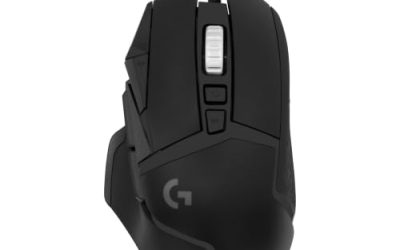
The G903 is the flexible veteran of this set: an ambidextrous, symmetrical mouse whose side buttons are configurable and removable, so a left-handed player can run buttons on the right flank where the left thumb rests. It suits FPS and mixed-genre players who want one wireless mouse they can reconfigure per game, backed by Logitech’s mature LIGHTSPEED connection and very long battery life. It is not a mirrored left-hand contour, and that distinction matters: the shell is flat and symmetrical, so support comes from your grip rather than from a sculpted palm curve.
Specs
- Handedness class: ambidextrous, with configurable and removable side buttons for a left-hand layout in G HUB
- HERO 25K sensor, 100 to 25,600 DPI, 400+ IPS
- LIGHTSPEED wireless with 1 ms report rate
- Up to 140 hours with LIGHTSYNC RGB on, up to 180 hours without
- 11 buttons
- About 110 g
- POWERPLAY charging supported, system sold separately
Best for: left-handed players who want one reconfigurable mouse for several genres.
Watch out for: the button layout needs setup in G HUB before it suits a left thumb, and POWERPLAY charging is a separate purchase; it is not a true left-hand contour, since the shape is symmetrical.
ASIN: B07NSVMT22
Corsair M75 Wireless

The Corsair M75 Wireless is a true ambidextrous mouse built around magnetic side buttons that swap between sides, with raised and flat sets in the box and an iCUE Left Hand Mode to match. For a left-handed FPS player, that means the thumb buttons physically sit where the left thumb lands instead of being mirrored in software only. At 89 g, with a high-end optical sensor and optical switches, it plays as a lightweight competitive mouse first and a left-hand solution second, which is exactly the order most left-handed players want.
Specs
- Handedness class: true ambidextrous, magnetic swappable side buttons on both sides, iCUE Left Hand Mode
- CORSAIR MARKSMAN optical sensor, 26,000 DPI, 650 IPS, up to 50G
- QUICKSTRIKE optical switches rated 100 million clicks
- 89 g
- Battery up to 210 hours on Bluetooth and over 80 hours on 2.4 GHz SLIPSTREAM
- SLIPSTREAM 2.4 GHz, Bluetooth, and USB wired connections
- 6 buttons
Best for: left-handed FPS players who want thumb buttons that physically move to the left-thumb side.
Watch out for: only 6 buttons, so there is no MMO grid; swapped buttons sit slightly flatter on one side than the default set.
ASIN: B0CTN2SRTH
Pulsar Gaming Gears X3 LHD Crazylight

The Pulsar X3 LHD Crazylight is the only true left-handed pick here: a mirrored left-hand shell, not a symmetrical body with buttons moved around. That makes it the natural choice for a left-handed player who has always adapted to right-hand or flat mice and wants a shape actually built for the left hand. At 43 g it is an ultralight built for quick flicks, and its XS-1 sensor reaches 32,000 DPI. The trade is support: this is a mouse for fingertip and claw grips, not for resting a full palm.
Specs
- Handedness class: true left-handed, mirrored left-hand shell
- 43 g ultralight build
- XS-1 sensor up to 32,000 DPI
- Wireless connection
Best for: left-handed fingertip and claw players who want a genuinely mirrored shell.
Watch out for: a 43 g ultralight shell gives little palm support, so it suits fingertip and claw left-hand play rather than a resting palm; as a niche left-hand model, confirm the exact LHD variant is the one selected on the product page, since the X3 line also sells right-hand versions.
ASIN: B0FQV4HTN2
Acer Dual-Mode 2.4GHz Wireless & Wired Mouse

The Acer dual-mode mouse is the budget entry: a genuinely ambidextrous, symmetrical shape with dedicated forward and back side buttons, so a left-handed user gets a workable layout without paying flagship money. Its 24,000 DPI sensor, 1,000 Hz polling and eight programmable buttons with macro editing cover everyday gaming and lighter MMO play, and it keeps working wired while it charges. It is not a sculpted left-hand shape and its battery is the shortest here, but as a first left-hand mouse it answers the basic question cheaply: does left-hand mousing suit you?
Specs
- Handedness class: genuinely ambidextrous symmetrical shape, with dedicated forward and back side buttons
- 24,000 DPI optical sensor
- 1,000 Hz polling, 35G acceleration, 6 DPI levels
- 8 programmable buttons with macro editing in the driver
- 650 mAh rechargeable battery, up to 40 hours
- Plays wired while charging
- No Bluetooth
Best for: first-time left-hand players who want programmable buttons on a small budget.
Watch out for: the 40-hour battery is the shortest in this set and there is no Bluetooth for a second device; it is a budget symmetrical mouse, not a sculpted left-hand shape.
ASIN: B0FMX627VP
Logitech G PRO 2 LIGHTSPEED Wireless Mouse

The Logitech G PRO 2 LIGHTSPEED is a genuinely ambidextrous competitive mouse with a symmetrical shell and up to four magnetic side buttons you place on either side, both sides, or leave off entirely. For a left-handed player that means a real two-button thumb cluster on the correct flank, paired with the HERO 2 sensor, LIGHTFORCE switches and up to 95 hours of battery. It suits serious FPS players who want a proven esports shape without giving up left-side buttons, and households can re-place the buttons when the mouse changes hands.
Specs
- Handedness class: genuinely ambidextrous, symmetrical shell with up to 4 magnetic side buttons placed on either or both sides
- HERO 2 sensor up to 44,000 DPI, above 888 IPS
- LIGHTFORCE hybrid optical-mechanical switches
- LIGHTSPEED 2.4 GHz wireless
- Up to 95 hours battery
- USB-C charging, POWERPLAY compatible
Best for: competitive left-handed players who want an esports shell with a proper left-thumb cluster.
Watch out for: 8K polling requires a receiver sold separately; decide the button layout before play, because magnetic buttons left off the mouse are buttons you do not have mid-game.
ASIN: B0CJ4TPLRM
Which One Fits Your Situation
You play FPS left-handed and need thumb buttons under your left thumb
Choose a mouse whose buttons physically reach the right flank. The Corsair M75’s magnetic sets swap sides outright, the G PRO 2 lets you mount its magnetic buttons on the left-thumb side, and the G903 can enable its right-flank pair in G HUB. All three give a left thumb real buttons instead of ring-finger compromises.
You play MMOs left-handed and are weighing wired true-left against wireless
No wireless mouse here carries an MMO button grid, so the wireless route means accepting fewer, well-placed buttons. The G903 offers 11 buttons once configured, and the Acer adds eight programmable buttons with macro editing for rotations and cooldowns. If a dense grid matters more than cutting the cable, the wired true-left option stays the honest pick; if mobility matters more, the G903 is the closest wireless compromise.
Your desk is shared and both hands get used across the week
Pick a mouse whose layout can change with the user. The G PRO 2’s magnetic buttons move between sides in seconds, the Corsair M75 swaps its button sets and flips to Left Hand Mode in iCUE, and the G903’s removable buttons reconfigure in G HUB. Each right-handed session and each left-handed session gets buttons on the correct side.
You have a small budget and are trying left-hand mousing for the first time
The Acer dual-mode mouse is the low-risk experiment: a symmetrical shape that works in the left hand, dedicated side buttons, eight programmable buttons and a wired fallback while it charges. It will not feel like a sculpted left-hand mouse, but it answers whether left-hand play suits you before you spend flagship money on the Pulsar X3 LHD or G PRO 2.
Common Mistakes
- Buying a symmetrical mouse and assuming its side buttons suit a left thumb, when they actually sit under the ring finger.
- Judging an ambidextrous mouse before configuring it, without swapping the magnetic buttons or enabling the left-hand layout in software.
- Comparing battery figures across connection modes, such as quoting a Bluetooth endurance number for a mouse you will game with over 2.4 GHz.
- Choosing a 43 g ultralight mirrored shell for a relaxed palm grip it was never shaped to support.
- Ordering the wrong variant of a line that sells both hands, such as a right-hand X3 instead of the X3 LHD.
Frequently Asked Questions
Is any mouse here truly left-handed?
Only one. The Pulsar X3 LHD Crazylight uses a mirrored shell sculpted for the left hand. The Corsair M75 and Logitech G PRO 2 are genuinely ambidextrous, with buttons that move to either side, and the G903 is ambidextrous with configurable buttons. The Acer is a symmetrical shape that works in the left hand without being sculpted for it.
Can I move the side buttons to the side my left thumb uses?
On three of these, yes. The Corsair M75’s magnetic button sets swap sides physically, the G PRO 2’s magnetic buttons mount on either or both sides, and the G903 lets you enable and remove side buttons through G HUB. The Acer’s forward and back buttons are fixed in place, though its symmetrical shape keeps them reachable for left-handed users.
Which of these connect by Bluetooth?
The Corsair M75 is the one pick here that lists Bluetooth alongside its 2.4 GHz SLIPSTREAM link and a wired mode, which also explains its much longer Bluetooth battery figure. The G903 and G PRO 2 use Logitech’s LIGHTSPEED 2.4 GHz receivers, and the Acer has no Bluetooth at all, so plan on its dongle or its cable.
Which pick suits a palm grip best?
The fuller shells are the safer palm-grip choices: the G903 at about 110 g and the Corsair M75 at 89 g give the left palm more body to rest on. The Pulsar X3 LHD, despite being the only true left-hand shape, is a 43 g ultralight aimed at fingertip and claw grips, so palm players should expect little support from it.