🛒 Best Price Today on Amazon
Prime members get fast, free shipping on everything above, plus member-only deals. New members get a 30-day free trial — cancel anytime.
A compact case is a decision about which parts you are willing to plan around, not just how small the box looks on a desk. Shrink the chassis and every other choice narrows with it: the motherboard format, the length of the graphics card, the height of the cooler, even the size of the power supply. Pick the case first and the rest of the parts list has to fit inside fixed clearances, so the smart move is to match the case to the hardware you already own or plan to buy.
This guide is for builders downsizing from a mid-tower, first-time small-form-factor builders, and anyone reusing an existing board or power supply in a smaller enclosure. The five cases below were chosen from the names, dimensions, and compatibility figures on their Amazon product pages, and they span the range of compact builds: mini-ITX boxes near ten liters, an 18-liter case with full-size cooling support, and a 33-liter micro-ATX option for builders who want compact without replacing every part.
Quick Picks
As an Amazon Associate we earn from qualifying purchases.
| Product | Best for | Key spec from title |
|---|---|---|
| Cooler Master MasterBox NR200P | A first small build that still fits long graphics cards | Tempered glass side panel, vertical GPU display |
| Fractal Design Terra (Jade) | A compact case that looks like furniture on the desk | Small form factor mini-ITX, PCIe 4.0 riser cable included |
| Lian Li A4-H2O (Silver) | The smallest footprint that still takes a 240 mm AIO | PCIe 4.0, supports SFX and SFX-L power supplies |
| ASUS Prime AP201 (Black) | Reusing a micro-ATX board and an ATX power supply | Graphics cards up to 338 mm, 360 mm cooler support |
| Thermaltake Core V1 (Black) | A simple compact cube for everyday and media PCs | Mini-ITX cube with interchangeable side panels |
How to Choose
Start With the Motherboard Format
Compact is not one size. The mini-ITX cases in this guide accept a single board format, so choosing one means committing to a mini-ITX motherboard with its single expansion slot and usually two memory slots. The micro-ATX option here also fits the larger micro-ATX boards that many builders already own, along with their extra slots and headers. Check the format printed on the Amazon listing against the board you own or plan to buy before anything else, because a mismatch here cannot be fixed with an adapter, a different cooler, or a shorter cable later in the build.
Measure the Graphics Card and Cooler Against the Printed Clearances
Every case here publishes a maximum graphics card length and a maximum cooler height, and both numbers are hard limits, not guidelines. Measure your card from the bracket to the end of the shroud, and include any protruding power connectors in the height. Sliding-spine designs complicate this further: on the Terra, moving the central wall gives the card more width but takes the same space away from the cooler. Compare your exact parts against the figures in each listing, and leave a few millimeters of margin for cables and panel flex instead of planning to the last millimeter.
Decide Between an SFX and an ATX Power Supply
Most true mini-ITX cases here are built around SFX or SFX-L power supplies, which are smaller than the ATX units found in mid-towers and carry a premium for their size. If your build budget already includes a good ATX unit, the two cases in this guide that accept standard ATX power supplies can save a forced purchase, but they give back some of the size advantage to make room for it. Check the power supply line in each listing, confirm the maximum unit length where one is stated, and price the whole build, not just the case.
Plan the Airflow Path and Check What Fans Are Included
Small cases have less internal air to buffer heat, so the path air takes matters more than the raw fan count. Look for mesh or vented panels on at least two sides, a layout that feeds the graphics card fresh air directly, and radiator mounts that do not fight the card for the same space. Then check what is actually in the box: some of these cases include a fan or two, while others include none and expect you to supply your own. An empty fan mount is a cost and a noise decision you are making at purchase time.
The 5 Best Options
Cooler Master MasterBox NR200P

The MasterBox NR200P is the pick for builders who want a small case without learning a whole new set of compromises. Its 18.25-liter frame is large by mini-ITX standards, and that extra room buys real hardware support: graphics cards up to 330 mm, tower coolers up to 155 mm under the glass panel, and a 280 mm radiator mount. Panels come off without tools for 360-degree access, which makes a first compact build far less fiddly, and the included riser cable lets the graphics card stand vertically behind the tempered glass. It suits gamers downsizing a full-size GPU into a desk-friendly box.
Specs
- Motherboard support: Mini-ITX
- Graphics card clearance: up to 330 mm
- CPU cooler height: up to 155 mm
- Radiator support: up to 280 mm; up to 7 fans
- Side panel: tempered glass
- Mounting: vertical GPU display option, tool-free 360-degree accessibility
Best for: first-time compact builders who are keeping a long graphics card
Watch out for: it needs an SFX or SFX-L power supply, so an ATX unit from a mid-tower will not fit
ASIN: B08BK6W7CS
Fractal Design Terra (Jade)
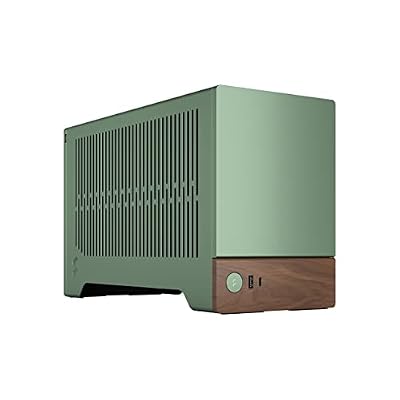
The Terra is built for desks where the case is part of the furniture. Fractal Design pairs an anodized aluminum shell and a solid walnut front panel with a 10.4-liter mini-ITX layout, so it reads more like a speaker or a small cabinet than a gaming tower. Inside, a central wall slides steplessly through 30 mm, trading graphics card width against cooler height so the same chassis can lean toward a thicker card or a taller low-profile cooler. A PCIe 4.0 riser cable is included. Choose it when appearance matters as much as footprint and the parts list is planned around its clearances.
Specs
- Volume: 10.4 L
- Motherboard support: Mini-ITX
- Graphics card length: up to 322 mm
- CPU cooler height: up to 77 mm, varies with central wall position
- Front panel: FSC-certified solid walnut; anodized aluminum exterior with 8 mm aluminum front
- Included: PCIe 4.0 riser cable
- Front I/O: USB Type-C 20Gbps and USB Type-A ports
Best for: a living-room or studio desk where the case stays on display
Watch out for: card width and cooler height trade against each other on the sliding spine, so check both figures for your exact parts
ASIN: B09DKPXSFJ
Lian Li A4-H2O (Silver)

The A4-H2O, a collaboration between Lian Li and DAN Cases, squeezes a credible gaming build into 11 liters using a sandwich layout: the motherboard sits on one side of a central spine and the graphics card on the other, connected by the included PCIe 4.0 riser. It still swallows a triple-slot card and a 240 mm all-in-one liquid cooler, a pairing most cases this small cannot offer. Aluminum outer panels over a steel frame keep it light, and every panel removes for access. It fits builders who measure success in liters saved and are comfortable planning cable runs in tight quarters.
Specs
- Volume: 11 L, sandwich design layout
- Motherboard support: Mini-ITX
- Graphics card support: triple-slot
- Radiator support: 240 mm AIO water cooling
- Power supply support: SFX and SFX-L
- Construction: aluminum exterior, SPCC steel interior; fully removable panels
- Model: A4-H2O A4 SILVER
Best for: the smallest footprint that still runs a 240 mm liquid cooler
Watch out for: plan on liquid cooling, because air-cooler clearance in the sandwich layout is very limited
ASIN: B09T74VNYS
ASUS Prime AP201 (Black)

The Prime AP201 is the compact option for people who do not want to replace parts they already own. At 33 liters it is the largest case here, but it accepts micro-ATX motherboards and standard ATX power supplies up to 180 mm, so a board and PSU from an existing mid-tower can move straight over. The quasi-filter mesh panels are perforated across almost every surface, and the layout supports radiators up to 360 mm and graphics cards up to 338 mm. Tool-free side panels and a 32 mm cable channel keep building straightforward. Pick it for a smaller, airflow-first home for full-power hardware.
Specs
- Volume: 33 L
- Motherboard support: Micro-ATX
- Graphics card length: up to 338 mm
- Radiator support: up to 360 mm; up to six fans
- Power supply support: ATX, up to 180 mm long
- Panels: quasi-filter mesh, tool-free side panels
- Cable management: 32 mm routing gap behind the motherboard tray
Best for: downsizing an existing micro-ATX build without replacing the power supply
Watch out for: at 33 liters it is compact rather than tiny, and the open mesh shows the internals instead of hiding them
ASIN: B0B99HTD3B
Thermaltake Core V1 (Black)

The Core V1 is a long-running budget cube that keeps compact building simple. Its steel mini-ITX chassis lays the motherboard flat, interchangeable side panels let you place the window where it suits the desk, and it takes a standard ATX power supply, which keeps the parts list familiar and easy to source. A 200 mm front fan is included, and the front panel carries the intake for the whole system. Clearances are modest next to the newer cases here, so it suits everyday, media, and light gaming builds rather than flagship graphics cards.
Specs
- Form factor: Mini-ITX cube chassis
- Construction: SPCC steel
- Side panels: interchangeable
- Power supply support: standard ATX (PS2)
- Included fan: one 200 mm front fan
- Model: CA-1B8-00S1WN-00
Best for: a straightforward compact cube for everyday and media PCs
Watch out for: this is an older design without front USB-C, and graphics card room is modest, so measure longer cards carefully
ASIN: B00M2UKGSM
Which One Fits Your Situation
You Already Own a Micro-ATX Board and an ATX Power Supply
If the goal is a smaller home for parts you already have, start with the ASUS Prime AP201. It is the only case here that pairs micro-ATX support with room for an ATX power supply up to 180 mm, and its 338 mm graphics card clearance covers most cards carried over from a mid-tower. The Thermaltake Core V1 also accepts an ATX unit, but only with a mini-ITX board, so it fits a planned board swap rather than a transplant.
You Want the Smallest Box That Still Games Hard
Choose between the Lian Li A4-H2O and the Fractal Design Terra. The A4-H2O is the performance pick: its 11-liter sandwich layout fits a triple-slot card and a 240 mm liquid cooler. The Terra is a touch smaller at 10.4 liters and looks better on a desk, but it balances card width against cooler height on its sliding spine and leaves liquid cooling off the table. Either way, budget for an SFX power supply and a deliberate, slow build.
This Is Your First Small-Form-Factor Build
Start with the Cooler Master MasterBox NR200P. It is the roomiest mini-ITX case here, its panels lift off without tools for access from every side, and its 330 mm card and 155 mm cooler clearances forgive the measurement mistakes that tighter cases punish. You still need an SFX power supply and a mini-ITX board, but the build itself feels closer to a small mid-tower than to the puzzle-box end of the hobby.
You Are Building a Modest Media or Everyday PC
The Thermaltake Core V1 covers this job without overspending on the enclosure. Its cube layout is easy to build in, the included 200 mm front fan handles cooling for modest hardware, and support for a standard ATX power supply keeps the parts list simple. Save the tighter, pricier mini-ITX cases for builds that actually need their clearances or their footprint; a living-room or family PC gains little from shaving off the last few liters.
Common Mistakes
- Buying the graphics card first and checking its length against the case afterward, instead of comparing all three dimensions with the printed clearances.
- Assuming the ATX power supply from an old build will fit a mini-ITX case, when most require the smaller SFX format.
- Forgetting that sliding-spine cases trade cooler height for card width, so a combination that fits in one spine position may not fit in another.
- Mixing a riser cable of one PCIe generation with parts set to a different generation in the BIOS, which can leave a new build with no display output.
- Choosing a tempered glass side panel for a build that needs the airflow of a vented panel instead.
Frequently Asked Questions
Do compact cases need a special power supply?
Most mini-ITX cases do. The NR200P, Terra, and A4-H2O are designed around SFX or SFX-L units, which are smaller than the ATX power supplies used in mid-towers. The AP201 and Core V1 are the exceptions here and accept standard ATX units within their stated length limits. Always confirm the format and maximum length in the listing before ordering, because an ATX unit physically will not fit an SFX-only case.
Can a compact case fit a full-length graphics card?
Often, yes. The cases here publish clearances from 322 mm in the Terra to 338 mm in the AP201, which covers many dual-fan and some triple-fan cards. What usually rules a card out is thickness or height rather than length, especially in sandwich-layout cases with slot limits. Measure your exact card, including the shroud and power connector clearance, and compare all three dimensions with the figures in the listing.
Are compact cases louder than mid-towers?
They do not have to be, but they are less forgiving. There is less air volume and less room for slow-spinning fans, so a compact build rewards careful choices: mesh panels, sensible fan curves, and a cooling layout planned around the small chassis. Several cases support 240 mm or larger radiators, which can move heat out of a compact case better than a small air cooler working at its limit.
What is a riser cable, and which of these cases need one?
A riser cable is a flexible extension that lets a graphics card mount behind the motherboard instead of plugging straight into it. Sandwich-layout cases like the Terra and A4-H2O include a PCIe 4.0 riser, and the NR200P includes one for its vertical mount. Conventional layouts like the AP201 and Core V1 need no riser at all. With a riser, match the PCIe generation setting in the BIOS to the cable.