🛒 Best Price Today on Amazon
Prime members get fast, free shipping on everything above, plus member-only deals. New members get a 30-day free trial — cancel anytime.
- Cooler Master MM720 Overview
- Cooler Master MM720 Specifications
- Design and Build Quality
- Comfort and Ergonomics
- Sensor Performance and Tracking Accuracy
- Gaming Performance and Practical Use
- Optical Switches and Button Quality
- Cable, Mouse Feet, and Movement
- RGB Lighting and Customization
- Cooler Master MasterPlus+ Software
- Cooler Master MM720 Pros and Cons
- Cooler Master MM720 vs Other Gaming Mice
- Who Should Buy the Cooler Master MM720?
- Frequently Asked Questions
- Conclusion
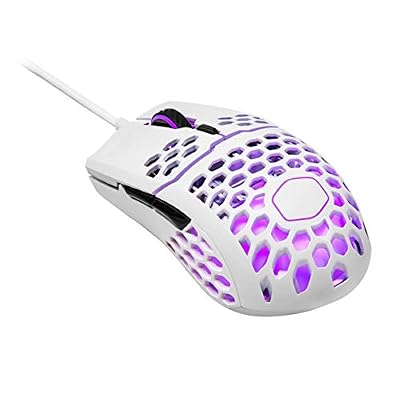
Cooler Master MM711 60G Glossy White Gaming Mouse with Lightweight Honeycomb Shell, Ultraweave Cable, 16000 DPI Optical Sensor and RGB Accents
Included for 'Cooler Master MM720 Review: Is This 49g Mouse Worth It?' because the listing specifies Ultraweave Cable and 16000 DPI Optical Sensor and RGB Accents, details this guide uses to compare options.
View on Amazon
Cooler Master MM710 Glossy Black Gaming Mouse with Lightweight Honeycomb Shell, Ultraweave Cable, 16000 DPI Optical Sensor
Included for 'Cooler Master MM720 Review: Is This 49g Mouse Worth It?' because the listing specifies Ultraweave Cable and 16000 DPI Optical Sensor, details this guide uses to compare options.
View on Amazon
Cooler Master MM712 Wireless Gaming Mouse White with Adjustable 19,000 DPI, 2.4GHz and Bluetooth, Ultraweave Cable, PTFE Feet, RGB Lighting and MasterPlus+ Software
Included for 'Cooler Master MM720 Review: Is This 49g Mouse Worth It?' because the listing specifies 000 DPI and 2.4GHz and Bluetooth, details this guide uses to compare options.
View on Amazon
Cooler Master MM310 Wire Gaming Mouse White, Adjustable 12,000 DPI, Palm|Claw Grip, PixArt Optical Sensor, Ultraweave Cable, PTFE Feet, RGB Lighting (MM-310-WWOL1)
Included for 'Cooler Master MM720 Review: Is This 49g Mouse Worth It?' because the listing specifies Adjustable 12 and 000 DPI, details this guide uses to compare options.
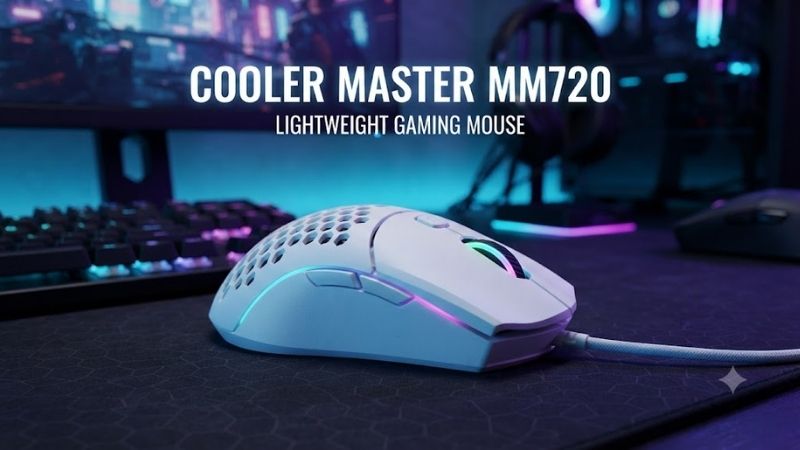
View on AmazonThe Cooler Master MM720 is a lightweight wired gaming mouse designed for players who prefer a short, wide shape and precise cursor control. Weighing just 49 grams, it combines a PixArt PMW3389 sensor, optical switches, and a distinctive finger rest. This review examines its specifications, comfort, gaming capabilities, and limitations.
Cooler Master MM720 Overview
The Cooler Master MM720 takes inspiration from the company’s earlier Spawn and Xornet gaming mice. Instead of following the narrow, symmetrical design used by many modern esports mice, it features an unusually wide body with dedicated support for the ring finger, creating a distinctive grip.
Its combination of a lightweight honeycomb shell, flexible cable, and high-end optical sensor makes the MM720 particularly interesting for competitive gaming. However, the unconventional shape means it will not suit every hand size or grip style, regardless of how impressive its technical specifications appear.
The MM720 also represents an older generation of lightweight gaming peripherals. It remains capable for many competitive games, but buyers should compare its comfort, condition, and price against newer wired and wireless gaming mice before deciding whether its specialized design offers meaningful advantages.
Cooler Master MM720 Specifications
| Specification | Cooler Master MM720 |
|---|---|
| Mouse Type | Wired gaming mouse |
| Sensor | PixArt PMW3389 optical |
| Maximum Native DPI | 16,000 |
| Maximum Tracking Speed | 400 IPS |
| Maximum Acceleration | 50G |
| Polling Rate | Up to 1,000Hz |
| Weight | 49g |
| Dimensions | 105.42 × 76.52 × 37.35 mm |
| Primary Switches | LK Optical Micro Switches |
| Rated Switch Durability | 70 million clicks |
| Programmable Buttons | 6 |
| Connectivity | Wired USB Type-A |
| Cable | 1.8m Ultraweave |
| Mouse Feet | PTFE |
| RGB Lighting | Two zones |
| Onboard Memory | 512KB |
| Software | Cooler Master MasterPlus+ |
| Grip Compatibility | Claw and palm |
| Available Colors | Black and white |
| Surface Finishes | Matte and glossy |
| Manufacturer-Listed Warranty | 2 years |
The specifications reveal a mouse focused on low weight, reliable optical tracking, and responsive input rather than wireless convenience or numerous programmable controls. Its PixArt PMW3389 sensor remains technically capable, while the unusual dimensions are likely to influence the ownership experience more than its maximum DPI rating.
Design and Build Quality
Distinctive Wide-Bodied Shape
The MM720 measures approximately 105mm long and 76.5mm wide, making it noticeably shorter and wider than many mainstream gaming mice. This unconventional footprint is intentional, providing additional support for the fingers while allowing the hand to control movements through a compact, low-profile body.
Its most recognizable feature is the extended ring-finger rest along the right side. This creates a dedicated surface for a finger that might otherwise drag against the mouse pad. For suitable grips, the additional support can improve comfort and make the mouse feel more stable during directional movements.
However, mouse shape is highly personal. Players accustomed to long, narrow mice may initially find the MM720 unfamiliar, particularly when repositioning their fingers for rapid movements. The wider chassis can also affect how users lift the mouse, making practical fit more important than conventional ergonomic labels.
Ultra-Lightweight Honeycomb Construction
At just 49 grams, the Cooler Master MM720 is substantially lighter than many traditional wired gaming mice. Its perforated shell reduces material without requiring an extremely small body, making the mouse attractive to players who want lightweight movement while maintaining a broad gripping surface.
The honeycomb structure also creates a distinctive appearance and changes how the shell feels against the hand. Some users appreciate the textured surface, while others prefer solid plastic. The openings can collect dust and debris, so maintaining cleanliness may require slightly more attention than with an enclosed design.
The reduced mass makes quick repositioning easier, particularly for users who lift their mouse frequently. However, low weight does not automatically improve accuracy. Grip stability, mouse-pad friction, sensor behavior, and individual muscle memory all contribute to whether a lightweight mouse actually feels comfortable.
Matte and Glossy Finishes
Cooler Master offers the MM720 in black and white, with matte and glossy surface options. Matte finishes generally provide a more subdued appearance, while glossy versions have a reflective texture that may feel different depending on hand moisture and individual preferences during extended use.
Finish selection can be surprisingly important for gaming comfort. Users with dry hands may prefer a different texture from those whose palms become sweaty during long sessions. Since the MM720 has an unusual shape, both its coating and finger placement can influence grip confidence and overall control.
Build Quality and Moisture Protection
The MM720 uses an ABS plastic shell and optical primary switches. Cooler Master also promotes dust and water resistance associated with its protective coating and IP58-rated design. This is useful for a perforated mouse, although it should not be interpreted as protection against every possible liquid exposure.
Optical switches avoid the same mechanical contact mechanism used by conventional electrical switches, potentially reducing certain wear-related problems. Nevertheless, the durability of the mouse also depends on its cable, scroll wheel, housing, and connectors, all of which should be inspected when buying older stock.
Comfort and Ergonomics
Claw Grip Performance
The Cooler Master MM720 is particularly interesting for claw-grip players who curl their fingers over the primary buttons while controlling the mouse with their fingertips and portions of their palm. Its compact length and broad body can provide a stable contact area without requiring the hand to stretch forward.
The ring-finger support distinguishes it from conventional claw-grip mice. Users who normally experience their ring finger rubbing against the mouse pad may appreciate the dedicated resting area. However, the shape can feel restrictive to players who prefer to move their fingers independently along the side.
Palm Grip Compatibility
Although Cooler Master lists palm grip compatibility, comfort will depend heavily on hand dimensions. The MM720’s relatively short body may feel supportive to smaller hands, but users with larger hands may find that its shape does not provide the extended palm contact available from longer ergonomic mice.
The wide rear and dedicated finger support can still make the MM720 comfortable for certain relaxed grip positions. Buyers should focus on where their palm naturally rests and whether the mouse allows their wrist to remain comfortable, rather than assuming that an ergonomic shape guarantees universal comfort.
Fingertip Grip Considerations
Fingertip-grip players generally control their mouse through minimal contact with the fingers, often keeping the palm away from the housing. The MM720’s short length and low weight can support this approach, but its wide body and finger rest may interfere with some users’ preferred positioning.
For players who rely on frequent vertical adjustments, the shell’s unusual shape may influence lifting technique. A lightweight mouse is easier to raise, but comfort depends on having secure contact points. Fingertip users who prefer narrow, symmetrical designs may find conventional alternatives more natural.
Sensor Performance and Tracking Accuracy
PixArt PMW3389 Optical Sensor
The Cooler Master MM720 uses the PixArt PMW3389 optical sensor, which supports native sensitivity settings up to 16,000 DPI. It also carries specified tracking capabilities of 400 inches per second and acceleration tolerance of 50G, providing considerable headroom for normal gaming movements.
These specifications indicate that the sensor is designed to accommodate rapid mouse movement without easily exceeding its tracking limits. Actual gaming performance still depends on the mouse surface, firmware, system settings, and user technique. High sensor specifications alone do not guarantee superior aiming accuracy.
DPI Adjustment and Practical Sensitivity
The MM720 includes predefined DPI settings of 400, 800, 1,200, 1,600, 3,200, 6,400, and 16,000, with 1,200 DPI listed as the default. Cooler Master’s software provides additional configuration options, allowing users to tailor sensitivity more closely to their preferred games and desktop environments.
For competitive shooters, extreme DPI settings are rarely necessary. Players often choose moderate sensitivity levels and adjust in-game sensitivity to achieve comfortable aiming movement. Consistency is generally more useful than repeatedly changing DPI, especially when developing muscle memory for precision tasks.
Polling Rate and Responsiveness
The MM720 supports a maximum polling rate of 1,000Hz, meaning it can report mouse data to the computer up to 1,000 times each second. This is a conventional gaming mouse polling rate that provides sufficiently frequent updates for many competitive and everyday gaming applications.
Newer gaming mice may advertise much higher polling rates, but those figures should not be confused with guaranteed improvements in player performance. Display refresh rate, processing latency, game engine behavior, and hardware configuration also influence responsiveness. A stable 1,000Hz connection remains useful.
Lift-Off Distance
Cooler Master specifies a lift-off distance below approximately 2mm for the MM720. This characteristic matters when players reposition the mouse by lifting it from the pad, since continued tracking during a lift can introduce unwanted cursor movement after the intended aiming adjustment.
Lower lift-off distance can be advantageous for low-sensitivity FPS players who regularly reach the edge of their mouse pad. However, actual behavior can vary with surface texture and configuration. Users should evaluate how the mouse behaves on their specific gaming surface before adjusting their technique.
Gaming Performance and Practical Use
First-Person Shooter Games
The MM720’s combination of low weight, flexible cable, and PMW3389 sensor makes it suitable for games such as Counter-Strike 2, Valorant, and Apex Legends. Its relatively low mass can make fast directional changes less physically demanding, especially for users accustomed to repeated mouse lifts.
Its wide shell may provide additional grip stability during rapid aiming movements, but that benefit depends on the player’s natural hand position. The mouse does not guarantee improved accuracy, and users transitioning from conventional symmetrical mice may need time to become comfortable with its shorter dimensions.
MOBA and Strategy Games
For games such as Dota 2 and League of Legends, the MM720 provides accurate cursor movement and a small collection of programmable buttons. Its responsive optical switches can accommodate frequent clicking, while the lightweight housing supports repeated repositioning across large sections of the screen.
However, users who depend on extensive mouse-based shortcuts may prefer a model with more side buttons. The MM720 prioritizes a compact, specialized layout rather than the numerous controls commonly found on dedicated MMO mice. Its suitability therefore depends on each player’s preferred keyboard and mouse assignments.
Everyday Productivity and Creative Work
Outside gaming, the MM720 can handle browsing, document editing, and general desktop navigation without difficulty. Its programmable controls may help with frequently repeated commands, while adjustable sensitivity allows users to adapt cursor movement to different monitor resolutions and workspace arrangements.
The unusual shape may be less appealing for shared workstations where multiple people use the same mouse. Users performing detailed design or editing tasks should also consider their preferred grip and sensitivity. Comfortable pointer control matters more than gaming-oriented specifications during extended professional work.
Optical Switches and Button Quality
LK Optical Micro Switches
The MM720 uses LK optical micro switches for its primary left and right buttons. Cooler Master rates these switches for 70 million clicks, although this figure represents a manufacturer’s durability rating rather than a guarantee of the number of clicks every individual mouse will achieve.
Optical switches detect actuation through light-based mechanisms rather than relying exclusively on traditional metal contacts. This design can help reduce certain contact-related issues and support responsive clicking. However, click feel, spring tension, and travel characteristics remain important subjective considerations.
Side Buttons and Button Placement
The MM720 provides six programmable buttons, including its primary controls and additional inputs. Two thumb-side buttons offer convenient access to actions such as communication commands, equipment selection, or navigation shortcuts without requiring users to move their hands from the mouse.
Because the mouse has an unusually short chassis, side-button accessibility depends on grip placement. Players with larger thumbs or unconventional hand positioning should evaluate whether the buttons are easy to reach without accidentally pressing them. Button convenience can matter more than the total programmable count.
Scroll Wheel Behavior
The scroll wheel uses an optical encoder and includes RGB illumination. It supports ordinary scrolling and can serve as an additional input for gaming or desktop commands. The physical wheel mechanism still requires consideration because scrolling precision and tactile feedback can vary between products.
For players who assign weapon selection, jumping, or frequently repeated actions to the wheel, consistent operation is particularly important. When buying a used MM720, verify that scrolling registers correctly in both directions and that pressing the wheel does not produce unexpected movement or missed input.
Cable, Mouse Feet, and Movement
Ultraweave Cable
Cooler Master equips the MM720 with a fixed 1.8-meter Ultraweave cable designed to provide flexibility during mouse movement. Compared with a stiff traditional cable, a flexible braided design can reduce the sensation of resistance or pulling when making broad movements across a gaming mouse pad.
However, the MM720 is still a wired mouse. Players seeking a completely cable-free desk or frequently transporting their equipment may prefer wireless alternatives. A mouse bungee can help manage excess cable and prevent it from contacting nearby accessories or creating additional friction during gameplay.
PTFE Mouse Feet
The MM720 features PTFE mouse feet, a material commonly used to reduce friction between a mouse and its pad. These feet complement the lightweight housing by allowing smoother movement across suitable surfaces, particularly when performing repeated horizontal adjustments or large aiming motions.
Actual glide depends on the mouse pad’s texture, cleanliness, and condition. Soft cloth surfaces may feel different from hard pads, even with the same mouse. Since the MM720 is an older product, replacement feet may also be worth considering when evaluating heavily used or refurbished units.
RGB Lighting and Customization
The Cooler Master MM720 includes two-zone RGB illumination, providing visual customization through its wheel and illuminated logo area. The lighting adds character to the mouse without fundamentally changing its gaming capabilities, making it primarily an aesthetic feature for coordinated desktop setups.
Users who prefer minimal distractions can configure the lighting through the supported software. RGB preferences are secondary to ergonomics and sensor reliability, but convenient lighting controls can still improve the ownership experience for gamers who maintain consistent colors across their keyboards, desktops, and peripherals.
Cooler Master MasterPlus+ Software
Cooler Master’s MasterPlus+ application supports mouse configuration, including sensitivity adjustments, button assignments, and lighting customization. These capabilities make the MM720 more versatile than a basic fixed-function USB mouse, particularly for gamers who switch between applications with different control requirements.
The software also provides options for creating macros and customizing performance-related settings. Buyers should confirm compatibility with their operating system and available software version, especially when purchasing an older peripheral that may not receive the same development attention as newer models.
The MM720 includes onboard memory, allowing supported configuration information to be stored on the device. This can be convenient when moving between computers, although available functionality depends on the profile settings and firmware. Users should verify that essential settings remain active after disconnecting the mouse.
Cooler Master MM720 Pros and Cons
Pros
-
Extremely lightweight 49g construction
-
Reliable PixArt PMW3389 optical sensor
-
Distinctive ring-finger support
-
Optical primary switches
-
Flexible Ultraweave cable
-
PTFE feet for smooth movement
-
Customizable RGB lighting and button assignments
-
Particularly interesting for claw-grip players
Cons
-
Unusual shape does not suit every grip
-
Wired connectivity only
-
Limited programmable buttons for MMO gaming
-
Honeycomb openings require occasional cleaning
-
Short body may be uncomfortable for larger hands
-
Older hardware with limited newer-generation features
-
Availability and condition vary by seller
Cooler Master MM720 vs Other Gaming Mice
Cooler Master MM720 vs Razer Viper Mini
The Razer Viper Mini and MM720 target players who appreciate lightweight mice, but their shapes are substantially different. The Viper Mini uses a narrower symmetrical design, while the MM720 emphasizes width and finger support. Grip preference should therefore determine which model deserves consideration.
The MM720’s distinctive shape may appeal to claw-grip users who find narrow mice uncomfortable. By contrast, the Viper Mini offers a more conventional compact profile for players who prefer less side support. Neither shape is inherently superior, making hand dimensions and movement habits the deciding factors.
Cooler Master MM720 vs Logitech G Pro X Superlight
The Logitech G Pro X Superlight emphasizes wireless connectivity and a comparatively conventional symmetrical shape. The MM720 is lighter in its listed configuration and provides a dedicated ring-finger rest, making the comparison more about design philosophy than a simple difference in sensor specifications.
Players who prioritize freedom from cables and broader grip familiarity may prefer the Logitech approach. Those who specifically enjoy short, wide mice might find the MM720 more comfortable. Evaluate the price difference carefully, particularly when comparing an older wired product with wireless gaming hardware.
Cooler Master MM720 vs Cooler Master MM711
The Cooler Master MM711 is another lightweight gaming mouse with a perforated housing, but it follows a more familiar symmetrical design. The MM720 instead uses a shorter, wider ergonomic layout, offering a fundamentally different gripping experience despite their shared manufacturer and lightweight construction.
Choosing between them requires more than comparing weight and sensor specifications. Players who prefer ambidextrous-style shapes may gravitate toward the MM711, while those seeking additional ring-finger support may appreciate the MM720. The shape difference has a greater practical impact than minor specification variations.
Who Should Buy the Cooler Master MM720?
The Cooler Master MM720 is particularly suitable for claw-grip players who want a short, wide gaming mouse with minimal weight. Its dedicated finger rest provides a distinctive ergonomic feature, while the PMW3389 sensor and optical switches offer the technical capabilities required for many competitive games.
It also makes sense for users who prefer wired connectivity and want to avoid charging batteries. The mouse is especially interesting when available at a reasonable price, although buyers should inspect older inventory and compare the total value against contemporary alternatives with different shapes and connectivity options.
Players with larger hands, strict fingertip preferences, or extensive shortcut requirements may be better served by other designs. Wireless-focused buyers should also look elsewhere. The MM720’s value lies primarily in its specialized ergonomics, not in being a universally suitable gaming mouse.
Frequently Asked Questions
Is the Cooler Master MM720 Good for FPS Gaming?
Yes, the Cooler Master MM720 offers features well suited to FPS gaming, including a 49g body, PixArt PMW3389 sensor, and 1,000Hz polling rate. Its short, wide shape may appeal to claw-grip players who frequently reposition their mouse. Actual aiming comfort depends on hand size, grip style, and personal preferences.
Is the Cooler Master MM720 Wireless?
No, the Cooler Master MM720 is a wired gaming mouse using a fixed 1.8-meter Ultraweave USB cable. The flexible construction is intended to reduce cable interference during movement, but it cannot provide the unrestricted convenience of wireless connectivity. A mouse bungee may help manage the cable on crowded desks.
Does the Cooler Master MM720 Have Optical Switches?
Yes, the MM720 uses LK optical micro switches for its primary mouse buttons. Cooler Master rates these switches for 70 million clicks, and their optical actuation mechanism avoids certain traditional electrical contact issues. However, durability ratings do not guarantee identical longevity across individual units.
Is the Cooler Master MM720 Comfortable for Large Hands?
Comfort depends on grip style and individual hand proportions. The MM720 is relatively short but unusually wide, which may suit some users with larger hands who prefer claw gripping. However, its limited length can provide insufficient palm support for others. Trying a similarly shaped mouse is advisable when possible.
Does the Cooler Master MM720 Support DPI Customization?
Yes, the MM720 includes multiple predefined DPI settings and supports additional customization through Cooler Master MasterPlus+ software. Users can adjust sensitivity to match gaming preferences and desktop requirements. Consistent, comfortable sensitivity settings are generally more beneficial than simply choosing the highest available DPI.
Is the Cooler Master MM720 Worth Buying Today?
The MM720 remains worth considering for gamers who specifically want its lightweight, short, and wide ergonomic design. Its sensor and optical switches remain capable for many games, but newer alternatives may offer wireless connectivity and additional features. The best decision depends on price, physical condition, and grip comfort.
Conclusion
The Cooler Master MM720 remains a distinctive lightweight gaming mouse thanks to its 49g construction, PMW3389 sensor, optical switches, and dedicated finger rest. It is particularly appealing for claw-grip FPS players who value precise movement and wired reliability. Its unusual shape makes personal comfort the deciding factor.