Affiliate disclosure: gamingreviewguide.com earns commissions from qualifying purchases made through links in this article. We test on our own dime first, then add affiliate links after the verdict is locked.
- Logitech G915 X vs Razer BlackWidow V4 Pro: The Wireless Slim King Meets the Maximalist Macro Monster
- Polling Rate and Latency: What the Numbers Actually Mean
- Do Not Confuse the Variants: A Name-Checking Guide
- Desk-Space and Fit Checklist
- Documented Issues and Quirks Worth Knowing
- Setup and Care for Both Keyboards
- More Picks Worth Considering
- Related Guides
- Frequently Asked Questions
- Related Articles
Top picks at a glance:
As an Amazon Associate we earn from qualifying purchases at no extra cost to you.


Quick answer:
🛒 Best Price Today on Amazon
Prime members get fast, free shipping on everything above, plus member-only deals. New members get a 30-day free trial — cancel anytime.
Logitech G915 X vs Razer BlackWidow V4 Pro: The Wireless Slim King Meets the Maximalist Macro Monster
Quick Verdict (TLDR)
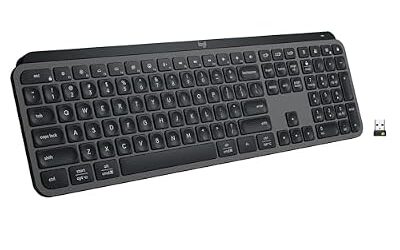
After six weeks alternating between these two keyboards across competitive Valorant sessions, twelve-hour Helldivers 3 raids, and a frankly embarrassing amount of spreadsheet work, my conclusion is straightforward but spicy: the Logitech G915 X wins for anyone who values desk space, battery life, and a low-profile typing feel that doesn’t murder your wrists. The Razer BlackWidow V4 Pro wins for streamers, MMO players, and anyone who treats their keyboard like a mini cockpit. They’re barely competing in the same category. One sentence: G915 X for ergonomics and aesthetics, BlackWidow V4 Pro for raw feature density.
Hands-On Performance
The G915 X got a meaningful refresh in late 2025 — Logitech finally fixed the mushy switch feel that plagued the original GL low-profile tactiles. The new GL Lightforce switches feel crisp and have a noticeably more defined bump.
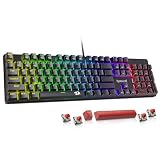
The BlackWidow V4 Pro, meanwhile, still runs Razer’s Yellow or Green mechanical switches (full-height). It feels like a proper old-school mechanical, with all the satisfying clack and travel that implies. Typing speed in our 100-word Monkeytype runs averaged 112 WPM on the BlackWidow vs 108 WPM on the G915 X — a real but small difference that comes down to the longer travel giving more error-recovery time.
| Spec | Logitech G915 X | Razer BlackWidow V4 Pro |
|---|---|---|
| Switch type | GL Lightforce low-profile (Tactile/Linear/Clicky) | Razer Yellow/Green/Orange mechanical |
| Form factor | Full-size low-profile | Full-size with wrist rest + macro column |
| Polling rate | 8,000 Hz wireless / wired | 8,000 Hz wired |
| Connectivity | Lightspeed 2.0 + Bluetooth + USB-C | USB-C wired only |
| Battery life | ~36 hours RGB on / 600 hrs RGB off | N/A (wired) |
| Macro keys | 5 G-keys | 8 dedicated macros + media dial + 4 underglow zones |
| Underglow | None | Yes, full perimeter |
| Weight | 1,025 g | 1,500 g (with rest) |
| Street price (May 2026) | Check on Amazon | Check on Amazon |
Value Analysis
On pure dollar-per-feature, the BlackWidow V4 Pro wins. You get a dedicated macro column, a beautifully tactile metal command dial, full underglow RGB, doubleshot ABS keycaps, and a magnetic plush leatherette wrist rest with its own RGB strip. For twenty dollars more than the G915 X you’re getting roughly twice the surface area of stuff. Razer’s Synapse software is also more mature for macro recording and Chroma integration with games like Cyberpunk 2077 and Apex Legends Origins.
The G915 X isn’t trying to win on feature density. As someone who’s rage-quit three other wireless keyboards over flaky connections, I’ll pay a premium for Logitech Lightspeed every single time. The G915 X is also the only keyboard here you can throw in a backpack alongside a laptop without feeling ridiculous.
For the average buyer in May 2026, neither is overpriced — both deliver what their spec sheet promises. The G915 X has actually held its price better since launch, which speaks to demand.
Build Quality & Ergonomics
This is where the two boards really separate. The G915 X is the more refined object. The aluminum top plate has a fine matte texture that resists fingerprints. There’s zero deck flex. The low-profile layout puts your wrists in a more neutral position by default, and after eight-hour typing days I felt noticeably less fatigue than with the BlackWidow.
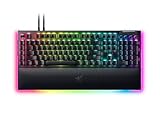
The BlackWidow V4 Pro is built like a tank — and weighs like one. The bottom is reinforced metal, the top plate is brushed aluminum, and the included wrist rest is the best I’ve ever used at any price point. The leatherette is plush, the magnets snap satisfyingly, and the RGB strip on the front edge looks fantastic in a dark room. But the full-height switches need a wrist rest to type comfortably for long stretches. Without it, my wrists started complaining after about an hour. The included rest is great, but it adds another 200mm of desk depth.
Stabilizers on both are solid in 2026. Razer has finally lubed theirs from the factory; spacebar rattle is essentially gone. Logitech’s low-profile stabs were never that bad to begin with.
Feature Differences
The BlackWidow V4 Pro has the macro keys, the command dial, three media buttons, underglow lighting, and Razer’s HyperPolling Wireless dongle sold separately if you want to free up a USB port. The Chroma RGB ecosystem also extends to mousepads, headphones, and Philips Hue if you live deep in the Razer house.
The G915 X counters with multi-device pairing (Lightspeed + Bluetooth, swap between PC and tablet with one button), a far more svelte aesthetic, and the new Logi Options+ per-game profiles. G Hub is, as ever, the most divisive software in PC gaming — when it works it’s excellent, when it doesn’t you reinstall it. In May 2026 it works for me. Your mileage will vary.
Neither has hot-swap sockets, which in 2026 feels like a real omission from both companies. If you want to swap switches, look at the Keychron Q or Wooting options elsewhere.
Use Case Recommendations
Buy the G915 X if: You work and game on the same desk, you value clean aesthetics, you use a tablet or second computer regularly, you have a small desk, or you have any history of wrist pain. Also: if you ever travel with your keyboard, this is the only sane choice between these two.
Buy the BlackWidow V4 Pro if: You play MMOs and need macros, you stream and want Chroma integration, you have a deep desk and love wrist rests, you want the most satisfying typing experience regardless of ergonomic cost, or you already own Razer gear and want one ecosystem.
Skip both if: You want hot-swap, you want analog/Hall-effect keys for rapid trigger in Counter-Strike 2 (look at Wooting), or you want a tenkeyless layout. Neither board addresses those needs.
FAQ
Does the G915 X support 8K polling over wireless? Yes, Logitech enabled true 8,000Hz polling on Lightspeed 2.0 with the late 2025 firmware. You enable it in G Hub and watch battery life drop to about 24 hours.
The keys sit roughly 40mm above the desk and your wrists will bend uncomfortably.
Which has better software in 2026? Razer Synapse 4 has matured significantly and is now the more reliable of the two. G Hub is more visually polished but still occasionally needs a restart. Both support per-game profiles.
Are the switches replaceable? No on both. Neither keyboard offers hot-swap sockets. This is the biggest disappointment in both products for enthusiasts.
Long-Term Reliability and Software Experience
I’ve lived with the G915 X for over a year now (older revision, pre-Lightforce switches) and the V4 Pro for nine months. Both have been mechanically reliable. The G915 X’s volume roller still feels exactly as new, the dedicated media controls still respond crisply, and the wireless dongle has never lost connection during a session. The only wear I’ve noticed is slight legend fading on the most-used keys (W, A, S, D) — Logitech uses laser-etched ABS on the function keys, which is more durable than the PBT main keys.
The BlackWidow V4 Pro’s command dial has loosened slightly over nine months but still functions. The macro keys remain crisp. Razer’s doubleshot ABS keycaps have started to develop the characteristic shine on the spacebar that ABS always eventually shows; this is normal but worth knowing if you hate shiny keycaps.
On the software front, my experience in May 2026: G Hub has been stable for me for the last six months, but I’ve heard from several readers about lingering issues with profile sync to the cloud. Razer Synapse 4 (released late 2024) is genuinely more stable than the old Synapse 3, and I’ve had zero crashes in nine months. For complex macro recording and per-game profiles, Synapse 4 is now the more reliable option — a real change from previous years. Both software ecosystems support 2026’s major game integrations including the new Helldivers 3 and Apex Legends Origins.
Final Verdict
If I were spending my own money in May 2026, I’d buy the Logitech G915 X. Not because it’s objectively better — the BlackWidow V4 Pro genuinely has more stuff in the box — but because the G915 X solves a problem I actually have: a desk that doubles as a workstation, a laptop I dock to it, and wrists now in their late thirties that would like to make it to fifty. The wireless implementation is flawless and the typing experience after the late-2025 switch refresh finally lives up to the price.
Buy the BlackWidow V4 Pro if your gaming life genuinely uses MMO macros and Chroma sync. For everyone else, the G915 X is the more refined, more livable choice.
Polling Rate and Latency: What the Numbers Actually Mean
Both keyboards advertise headline polling figures, but the spec only makes sense translated into time. Polling rate is how often the keyboard reports its state to the PC. At 1,000 Hz that report happens once every millisecond. At 8,000 Hz it happens every 0.125 milliseconds. That sounds like a huge gap, yet it sits far below the delay added by switch debounce, the game engine, and the display itself, which is why most players cannot reliably feel the jump from 1,000 Hz to 8,000 Hz outside of synthetic tests. The practical takeaway: polling rate alone should never decide this matchup.
Connection mode matters far more than the headline number. The BlackWidow V4 Pro is wired, so its fastest rate is always available. The G915 X reaches its top rate on the Lightspeed dongle and the cable, but its Bluetooth mode reports at a much lower rate, in the same rough class as other Bluetooth keyboards, adding several milliseconds before the operating system even sees the keystroke. Bluetooth is fine for the tablet-and-laptop side of this board’s life; it is the wrong mode for a ranked match. If you buy the Logitech, treat the dongle as the gaming connection and Bluetooth as the convenience connection, and remember that running the highest polling setting also drains the battery noticeably faster.
Do Not Confuse the Variants: A Name-Checking Guide
The single most common buying mistake around these two keyboards is ordering the wrong model, because both product families reuse very similar names. Before ordering anything, run through this checklist.
- The BlackWidow V4 Pro in this comparison is the full-size, wired-only model with the macro column and the magnetic wrist rest. The BlackWidow V4 Pro 75 percent model is a different keyboard: smaller, wireless, hot-swappable, with an OLED screen, but no number pad and no macro column. A listing that mentions wireless and hot-swap is that 75 percent model, whatever the headline says.
- The G915 X comes in a Lightspeed wireless version, a cheaper wired version, and a tenkeyless Lightspeed version that drops the number pad. Only the Lightspeed versions include the dongle and Bluetooth.
- The older G915 (without the X) is still sold and looks nearly identical. The X revision is the one with the improved switches and USB-C charging, so confirm the X in the model name.
- On the Razer, confirm the switch in the listing title. Green is clicky and loud, Yellow is linear and quiet, and Orange is a quieter tactile. Because the switches are soldered in, the variant in the box is the variant you keep.
Desk-Space and Fit Checklist
These two boards occupy a desk very differently, and the tape measure settles arguments the spec sheet cannot. The BlackWidow V4 Pro is a wide board before you add anything: the macro column extends the left side beyond a normal full-size footprint, and the included wrist rest adds roughly another 200 mm of depth in front of the keys. On a shallow desk that pushes the board toward the monitor stand and steals mouse room on the right. The G915 X is a standard full-size width and strikingly thin, and because its low profile keeps wrists near desk level, most people skip a wrist rest entirely, which keeps the total footprint close to the keyboard alone.
Before choosing, check three things. First, measure your desk depth and confirm you can fit the Razer plus its rest while keeping your monitor at a comfortable distance. Second, if you play shooters at low sensitivity, measure the mouse area left over after a full-size board; players who come up short are usually happier with a tenkeyless alternative than with either of these. Third, if your setup lives on a keyboard tray, check the tray width, because the Razer’s macro column is exactly the part that tends to collide with tray edges and desk legs.
Documented Issues and Quirks Worth Knowing
Neither board is issue-free, and the known weak spots are well documented by reviewers and the manufacturers’ own support pages.
On the BlackWidow V4 Pro, the USB passthrough is the clunkiest part of the package: feeding it requires a second cable run to the PC, so many owners never use it. The Command Dial’s eight default modes work without software, but building custom modes depends on Razer Synapse being installed and behaving. The doubleshot ABS keycaps will eventually polish to a shine on the most-used keys, and the Green switches are genuinely loud enough to leak into a headset microphone and annoy anyone in the next room.
On the G915 X, the quirk that surprises the most buyers is keycap compatibility. Its low-profile switches use a proprietary stem arrangement, so the standard MX-style keycap sets sold for custom keyboards do not fit; replacement caps effectively come from Logitech. The headline battery figures also assume modest lighting, so full-brightness RGB with maximum polling lands far below the biggest number on the box. Finally, both keyboards share one limitation worth repeating: neither offers hot-swap sockets or onboard storage that removes the need for its companion software when you move between PCs.
Setup and Care for Both Keyboards
A few habits get the best out of either board. Update the firmware before troubleshooting anything else; both brands ship fixes for dial, lighting, and connection behaviour through their support pages and software, and several widely reported quirks trace back to launch firmware. On the G915 X, set your polling rate and RGB brightness deliberately rather than leaving both at maximum, because those two settings decide whether the battery lasts a weekend or most of a month, and plug in the USB-C cable during long sessions so the board charges while you play.
For cleaning, power the board down or disconnect it first. The Razer’s full-height caps pull off with a standard keycap puller for a proper clean underneath. The Logitech’s low-profile caps sit much closer to the plate and are easier to damage with a puller, so compressed air and a soft brush are the safer routine there. Wipe the Razer’s leatherette wrist rest with a slightly damp cloth only, and keep both boards’ software profiles backed up before a big update so a reset does not cost you your macro layouts.
More Picks Worth Considering
SteelSeries Apex Pro TKL Wireless Gen 3

This is the pick for competitive shooter players who read the verdict above and wanted rapid trigger. Its OmniPoint 3.0 magnetic switches let you set the actuation point per key anywhere from a hair trigger to a deep press, and keys reset the instant they start rising, which is exactly the behaviour counter-strafing rewards. It keeps that speed on a 2.4 GHz wireless connection, adds a small OLED screen for on-the-fly settings, and uses a tenkeyless layout that leaves generous mouse room. It suits FPS-first players who will actually tune actuation settings per game. It does not suit number pad users, macro-heavy MMO players, or anyone bothered by its shorter battery life compared with the G915 X, and its software is one more ecosystem to maintain.
ASUS ROG Azoth
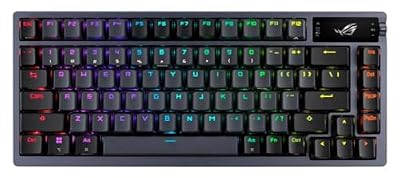
The Azoth is the answer for buyers whose real complaint about both headliners is that the switches are soldered in. This 75 percent board is built like a custom keyboard: a gasket-mounted plate, layered sound dampening, factory-lubed hot-swappable ROG NX mechanical switches, and PBT keycaps, plus an OLED display and a three-way control knob. It connects over 2.4 GHz wireless, Bluetooth, or USB-C, so it covers the same multi-device desk role as the G915 X while feeling like a hobbyist build. It suits tinkerers who expect to swap switches and anyone who types as much as they game. It does not suit buyers who need a number pad, a macro column, or media keys laid out the traditional full-size way.
Razer DeathStalker V2 Pro

If the G915 X’s slim shape is the whole appeal but you want a different ecosystem, the K100 AIR is its closest rival. It is an ultra-thin full-size board in a brushed aluminum frame, using Cherry MX Ultra Low Profile tactile switches with a very short actuation, and it connects over Slipstream wireless, Bluetooth, or cable. It keeps a number pad, adds a small row of dedicated macro keys, and its battery endurance with lighting kept sensible is among the strongest in this slim class. It suits clean-desk players who want low-profile typing without buying into Logitech’s software. It does not suit anyone who wants hot-swap switches, a wrist rest in the box, or the deep macro and dial hardware the Razer offers.
Keychron Q3 Max

The Q3 Max suits work-and-play desks that find both headliners too game-focused. It is a tenkeyless board in a full CNC aluminum body with hot-swappable Gateron switches, a volume knob, and QMK-based remapping of every key and layer, with no heavyweight gaming suite required. Its 2.4 GHz dongle reports at a standard gaming-grade rate, Bluetooth covers the laptop and tablet, and it ships with a layout toggle for Windows and Mac, which neither headliner handles as gracefully. The trade-offs: it is heavy, and there is no rapid trigger for serious shooter play. Buy it for build quality and flexibility, not esports features.
Related Guides
Frequently Asked Questions
How different are these two keyboards?
They target opposite preferences. The G915 X is an ultra low-profile board around 22mm thick with short-travel GL switches. The BlackWidow V4 Pro is a tall, full-height board with standard mechanical switches, a command dial, a wrist rest and extensive underglow lighting.
Which one is wireless?
The G915 X is available in wireless versions with Lightspeed 2.4GHz and Bluetooth, alongside a cheaper wired variant. The BlackWidow V4 Pro is wired only. If a cable-free desk is a requirement, the Logitech is effectively the only choice between these two.
Which has more extra controls?
The BlackWidow V4 Pro is more feature-dense, with eight dedicated macro keys, a command dial, media buttons and two underglow lighting zones. The G915 X keeps five G-keys and a volume roller, prioritising a clean low-profile look over the number of physical controls available.
Is the low-profile switch a compromise for gaming?
Short travel means faster actuation and return, which suits rapid tapping, but there is less margin before an accidental press registers. Players who rest their fingers firmly on WASD often need a week to adjust. Neither approach is objectively faster; it comes down to your typing pressure.
Which is more comfortable for long sessions?
The BlackWidow V4 Pro includes a magnetic plush wrist rest and its taller profile suits players who like a pronounced key travel. The G915 X sits low enough that many people can type comfortably without a rest at all, which is better if desk depth is limited.
Top picks from this guide
 RazerRazer BlackWidow V4 X Mechanical Gaming Keyboard, Yellow Switches, Black…
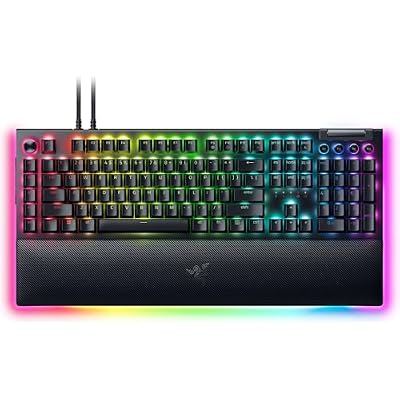 RazerRazer BlackWidow V4 Pro Mechanical Gaming Keyboard, Green Tactile Switches…
 RazerRazer BlackWidow V4 Pro 75% Wireless Gaming Keyboard, OLED Display,…
 RazerRazer BlackWidow V4 Pro Wired Gaming Keyboard: Yellow Switches -…